Overview
The JavaScript Signals standard proposal (at stage 1 as of May 2024) aims to provide a standard way to manage state in JavaScript applications that is reactive. This is useful in both user interface and server-side code.
The design is the result of collaboration between the teams from Angular, Ember, MobX, Preact, Qwik, RxJS, Solid, Svelte, Vue, and more. Noticably absent from this list is the React team. The goal is for signals to be usable in multiple frameworks.
The proposal defines a new JavaScript namespace named “Signal”. The Signal namespace:
- provides a method to define state with an initial value
- provides a method to define state that is computed from other state
- performs lazy evaluation of state so it is not computed until needed
- memoizes the last computated value of each piece of state to avoid repeating computations that will result in the same value
From the “How Signals work” section of the proposal:
A Signal represents a cell of data which may change over time. Signals may be either “state” (just a value which is set manually) or “computed” (a formula based on other Signals).
Computed Signals work by automatically tracking which other Signals are read during their evaluation. When a computed is read, it checks whether any of its previously recorded dependencies have changed, and re-evaluates itself if so. When multiple computed Signals are nested, all of the attribution of the tracking goes to the innermost one.
Computed Signals are lazy, i.e., pull-based: they are only re-evaluated when they are accessed, even if one of their dependencies changed earlier.
Computed Signals track their dependencies dynamically—each time they are run, they may end up depending on different things, and that precise dependency set is kept fresh in the Signal graph. This means that if you have a dependency needed on only one branch, and the previous calculation took the other branch, then a change to that temporarily unused value will not cause the computed Signal to be recalculated, even when pulled.
A Signal Polyfill is available for use now.
Perhaps when this proposal is approved and becomes part of JavaScript, browser vendors will implement new DevTools that track and display the state maintained by signals.
Define State
The following code defines a piece of state with an initial value:
const counter = new Signal.State(0);
Define Computed State
The following code defines two pieces of state that are computed from other state:
const isEven = new Signal.Computed(() => (counter.get() & 1) == 0);
const parity = new Signal.Computed(() => (isEven.get() ? 'even' : 'odd'));
Retrieve State
The following code gets the value of a piece of state:
const value = counter.get();
Modify State
The following code modifies a piece of state:
counter.set(10);
effect Function
From the “Understanding the Signal class” section of the proposal:
The Signal API does not include any built-in function like
effect. This is because effect scheduling is subtle and often ties into framework rendering cycles and other high-level framework-specific state or strategies which JS does not have access to.
However, a suggested implementation is provided at
Creating a simple effect which is
similar to the following code that I placed in the file effect.ts.
The Signal.subtle namespace defines “APIs which are necessary for
more advanced usage like implementing a framework or
building dev tools versus more everyday application development usage
like instantiating signals for use with a framework.”
import {Signal} from 'signal-polyfill';

let needsEnqueue = true;

function processPending() {
  needsEnqueue = true;
  for (const s of watcher.getPending()) {
    s.get();
  }
  watcher.watch();
}

const watcher = new Signal.subtle.Watcher(() => {
  if (needsEnqueue) {
    needsEnqueue = false;
    queueMicrotask(processPending);
  }
});

type Cleanup = () => void;
type Callback = () => Cleanup | void;
export function effect(callback: Callback) {
  // The callback function passed to the effect function
  // can optionally return a "cleanup" function.
  // If it does then the cleanup function is called every time
  // a piece of state used in the callback function changes,
  // and again if the function returned by this one is called.
  let cleanup: Cleanup | undefined;

  const computed = new Signal.Computed(() => {
    if (typeof cleanup === 'function') cleanup();
    cleanup = callback() || undefined;
  });

  watcher.watch(computed);
  computed.get();

  // The caller of "effect" can call this returned function
  // to stop watching for state changes.
  return () => {
    watcher.unwatch(computed);
    if (typeof cleanup === 'function') cleanup();
  };
}
Execute Code When State Changes
The following code executes a function every time the value of any state it uses changes:
// This prints the value of the parity state in the DevTools console
// initially, and again every time it changes.
effect(() => console.log(parity.get()));

effect(() => {
  // The setInnerText function is defined below.
  // n1 and n2 are Signal.State objects that hold numbers.
  // Assume that there is a span element with an id of "sum".
  // The first argument to setInnerText is a CSS selector.
  setInnerText('#sum', n1.get() + n2.get());
});
Utility Functions
The following are examples of utility functions
that make working with signals easier.
I placed this code in the file utilities.ts:
import {effect} from './effect';
import {Signal} from 'signal-polyfill';

/** Creates a two-way binding between an input element and a state. */
export function bindNumberInput(selector: string, state: Signal.State<any>) {
  const element = getElement(selector) as HTMLInputElement;
  element.onchange = () => state.set(Number(element.value));
  effect(() => (element.value = state.get()));
}

export function getElement(selector: string): HTMLElement {
  const element = document.querySelector(selector) as HTMLElement;
  if (!element) throw new Error(`No element found for selector: ${selector}`);
  return element;
}

export function setInnerText(selector: string, value: string | number) {
  const element = getElement(selector) as HTMLElement;
  element.innerText = String(value);
}
Demo App
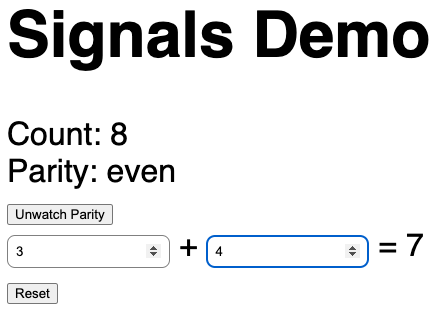
For a web app that uses the Signals API, see js-signals-demo.
- The root directory contains the file
index.html. - The
publicdirectory contains the filestyles.css. - The
srcdirectory contains the filesindex.ts,effect.ts, andutilities.ts.
FAQ
The proposal contains an extensive FAQ section.
One particularly interesting question asks “Is the Signal API meant to be used directly by application developers, or wrapped by frameworks” The answer given is:
“While this API could be used directly by application developers, it is not designed to be especially ergonomic. Instead, the needs of library/framework authors are priorities. Most frameworks are expected to wrap even the basic Signal.State and Signal.Computed APIs with something expressing their ergonomic slant. In practice, it’s typically best to use Signals via a framework, which manages trickier features, as well as managing ownership and disposal, and scheduling rendering to DOM—this proposal doesn’t attempt to solve those problems.”