Overview
nearley is a parsing toolkit with many features.
- It handles all Backus-Naur Form (BNF) grammars, including those with left recursion.
- It can produce abstract syntax trees, text output, or simply validate input.
- It provides a testing tool (
nearley-test). - It provides a railroad diagram generator that creates HTML files
which include SVG-based diagrams (
nearley-railroad). - It works with many lexers including its default lexer Moo. The lexer converts the input string into tokens that are matched by the parser rules.
The nearley library:
- can be used in both server-side and browser JavaScript code
- uses the Earley algorithm
- implements right recursion optimizations
- can produce random strings that match a given grammar
- has editor plug-ins that provide syntax highlighting for VS Code (from Pouya Kary), Sublime Text, and Vim
- has been maintained by volunteers since 2014
Installing
To install nearley globally so its tools can be used from the command line,
enter npm install -g nearley.
To install nearley in a Node project, enter npm install nearley.
Installing nearley also installs the Moo lexer library.
Grammar Terminology
- terminal: a single, constant string (ex. ”+” or “if”)
- nonterminal: a set of possible strings (ex. number or name)
- rule: definition of a nonterminal that can include a set of alternatives
Builtins
Nearley provides files that define commonly used grammar rules and functions. These are found at builtin.
number.ne defines the grammar rules:
unsigned_intmatches zero or positive integersintmatches any integerunsigned_decimalmatches zero or positive floating point numbersdecimalmatches any floating point numberpercentagematches a decimal followed by %jsonfloatmatches same as decimal, but adds scientific notation matching
postprocessors.ne defines the following functions that are used inside
the postprocessor code associated with grammar rules (more on this later):
nthreturns the nth element from a data array$???delimited???
string.ne defines the grammar rules:
dqstringmatches strings delimited by double quotessqstringmatches strings delimited by single quotesbtquotematches strings delimited by backticks
whitespace.ne defines the grammar rules:
_matches zero or more whitespace characters.__matches one or more whitespace characters.
To include these files in .ne grammar file, use the @builtin directive.
For example:
@builtin "whitespace.ne"
Grammars
A grammar is a set of rules that define sequences of matching tokens. Each rule can optionally specify a result to produced.
Creating a Grammar
Grammars are defined in text files with a .ne file extension.
The first grammar rule defines the starting point.
The remaining rules can appear in any order, including alphabetical.
Grammars can contain single-line comments that begin with
the # character and extend to the end of the line.
The following is a fairly simple grammar defined in the file arithmetic.ne.
It defines rules for arithmetic expressions
that use the following operators:
+addition-subtraction*multiplication- ’/’ division
This grammar supports standard operator precedence and using parentheses to override that.
@builtin "number.ne" # using decimal rule
@builtin "whitespace.ne" # using _ rule

start -> additive

# Note the recursive references.
additive
  -> multiplicative _ "+" _ additive
   | multiplicative _ "-" _ additive
   | multiplicative

multiplicative
  -> term _ "*" _ multiplicative
   | term _ "/" _ multiplicative
   | term

term
  -> decimal
   | "(" additive ")"
A grammar rule cannot be named “null” because that is a nearley keyword (called the “epsilon rule”) that represents the absence of a match.
A grammar file can include the contents of other grammar files
using the @include "file-path" directive.
This allows sharing common elements between top-level grammars
including lexer configurations, function definitions, and grammar rules.
Compiling a Grammar
To compile a grammar to JavaScript code, use the nearleyc command.
For example:
nearleyc arithmetic.ne -o arithmetic.js
Testing a Grammar
To test a grammar with specific input,
use the nearley-test command.
For example:
nearley-test arithmetic.js -i '2 * 3 + (5 + 1) / 2 - 4',
This outputs the following nested array which represents the parse tree.
In this example, each occurrence of null
represents whitespace which is not being captured.
[
  [
    [
      [
        [ 2 ], null, "*", null, [
          [ 3 ]
        ]
      ], null, "+", null, [
        [
          [ "(", [
              [
                [ 5 ]
              ], null, "+", null, [
                [
                  [ 1 ]
                ]
              ]
            ], ")" ], null, "/", null, [
            [ 2 ]
          ]
        ], null, "-", null, [
          [
            [ 4 ]
          ]
        ]
      ]
    ]
  ]
]
This output is not particularly helpful. It does demonstrate that our grammar is correct.
Here is an example of supplying input that does not match the grammar.
nearley-test arithmetic-default.js -i '1 + two'
And here is the output with some parts elided because it is quite long.
/usr/local/lib/node_modules/nearley/lib/nearley.js:346
                throw err;
                ^
Error: Syntax error at line 1 col 5:

1 1 + two
      ^
Unexpected "t". Instead, I was expecting to see one of the following:

A character matching /[ \t\n\v\f]/ based on:
    ...
A "(" based on:
    ...
A "-" based on:
    ...
A character matching /[0-9]/ based on:
    ...
  offset: 4,
  token: { value: 't' }
A grammar like this, with no processors (discussed next), can be used to validate input. When evaluated from JavaScript code, an exception will be thrown if the input does not match the grammar.
Postprocessors
Each rule alternative can be followed by JavaScript code
that is executed when the rule is matched.
The code must be delimited by {% and %}.
It must contain the name of a predefined function or a function definition (typically written as an arrow function).
The function is passed three values:
data- array containing the parsed result for each matching tokenlocation- zero-based index into the input string where the match beganreject- object that can be returned to indicate that the rule should not match
From the nearley docs, “Warning: Grammars using reject are not context-free, and are often much slower to parse.”
Typically only the first argument, data is used
and often the name is shortened to just d.
The return value of the function determines the value that represents the match that just occurred.
Postprocessor Rules for Evaluating
Let’s add postprocessing the previous grammar so that it evaluates each rule to a number.
The value of the starting rule will be the value reported for the entire input expression.
@builtin "number.ne" # using decimal rule
@builtin "whitespace.ne" # using _ rule

start -> additive {% id %}

additive
  -> multiplicative _ "+" _ additive {% d => d[0] + d[4] %}
   | multiplicative _ "-" _ additive {% d => d[0] - d[4] %}
   | multiplicative {% id %}

multiplicative
  -> term _ "*" _ multiplicative {% d => d[0] * d[4] %}
   | term _ "/" _ multiplicative {% d => d[0] / d[4] %}
   | term {% id %}

term
  -> decimal {% id %}
   | "(" additive ")" {% d => Number(d[1]) %}
Running the following command:
nearley-test arithmetic.js -i '2 * 3 + (5 + 1) / 2 - 4'",
outputs the expected value in an array which is [ 5 ].
Postprocessor Rules for AST Building
Let’s modify the postprocessing so the result is an abstract syntax tree (AST).
ASTs are trees of objects describe the results of parsing input text. These objects are not standardized. You can choose the set of properties that make sense for your use case.
ASTs are useful for compiling one syntax into another. For example, we could parse code written in Smalltalk and output corresponding JavaScript code.
Arbitrary JavaScript code can be included in a grammar
by delimiting it with @{% and %}.
Often this is used to define functions that are used in postprocessing rules.
It can also be used to customize the lexer.
Any number of these blocks can appear and
they can be placed anywhere within the grammar file.
There definitions will be hoisted to the top of the generated parser code
regardless of where they appear in the grammar file.
The provided id function returns the first element from the data array.
It is equivalent to d => d[0].
@{%
// This function creates and returns an AST node.
// In this example only one type of AST node is created,
// but typical there are many types in the AST tree.
function binaryOperation(data) {
  return {
    type: "binary operation",
    operator: data[2],
    left: data[0],
    right: data[4],
  };
}
%}

@builtin "number.ne" # using decimal rule
@builtin "whitespace.ne" # using _ rule

start -> additive {% id %}

additive
  -> multiplicative _ [+-] _ additive {% binaryOperation %}
   | multiplicative {% id %}

multiplicative
  -> term _ [*/] _ multiplicative {% binaryOperation %}
   | term {% id %}

term
  -> decimal {% id %}
   | "(" additive ")" {% data => data[1] %}
Running the following command:
nearley-test arithmetic.js -i '2 * 3 + (5 + 1) / 2 - 4'",
outputs the following AST:
[
  {
    type: "binary operation",
    operator: "+",
    left: {
      type: "binary operation",
      operator: "*",
      left: 2,
      right: 3,
    },
    right: {
      type: "binary operation",
      operator: "-",
      left: {
        type: "binary operation",
        operator: "/",
        left: {
          type: "binary operation",
          operator: "+",
          left: 5,
          right: 1
        },
        right: 2
      }
      right: 4,
    },
  }
]
The following JavaScript function takes
a node from this AST and computes its result.
If it is passed the root node above, it returns the expected result of 5.
function evaluateAST(node) {
  switch (node.type) {
    case 'binary operation':
      return evaluateBinaryOperation(node);
    default:
      throw new Error(`unsupported AST node type "${node.type}"`);
  }
}

function evaluateBinaryOperation(node) {
  let {left, operator, right} = node;
  if (typeof left !== 'number') left = evaluateAST(left);
  if (typeof right !== 'number') right = evaluateAST(right);
  switch (operator) {
    case '+':
      return left + right;
    case '-':
      return left - right;
    case '*':
      return left * right;
    case '/':
      return left / right;
  }
}
EBNF modifiers
One way implement a rule that matches a repeated sequence of tokens is to use a recursive approach. Another way is to use Extended Backus-Naur Form (EBNF) modifiers which include:
:?optional (zero or one):*zero or more:+one or more
The grammar below shows both approaches with the recursive approach commented out and the corresponding EBNF approach uncommented. It matches a sequence of words separated by any amount of whitespace.
@builtin "whitespace.ne"

# Recursive technique
#words
#  -> word {% id %}
#   | word __ words {% d => {
#       return d.flat(2).filter(word => word !== null);
#     } %}

# EBNF technique applied to a capture group
words -> word (__ word):* {% d => {
  return d.flat(2).filter(word => word !== null);
} %}

# Recursive technique
#word
#  -> letter {% id %}
#   | letter word {% d => d.join('') %}

# EBNF technique applied to s single non-terminal
word -> letter:+ {% d => d[0].join('') %}

# The id function is equivalent to d => d[0].
letter -> [A-Za-z] {% id %}
To test this, enter something like the following:
nearley-test ./ebnf-demo.js -i 'apple banana cherry'
This outputs [ [ 'apple', 'banana', 'cherry' ] ]
indicating that there was one result that is an array of the three words.
Using a Grammar from JavaScript Code
The compiled parser code can be used from a JavaScript program. This works in both server-side code and browser code.
The following example uses the previous grammar to produce an AST.
It then uses the evaluateAstNode function above to compute the result.
import nearley from 'nearley';
import grammar from './arithmetic.js'; // compiled grammar

const parser = new nearley.Parser(nearley.Grammar.fromCompiled(grammar));

const input = '2 * 3 + (5 + 1) / 2 - 4'; // expect 5

try {
  parser.feed(input);

  // parser.results is an array because there
  // can be more than one way to parse given input.
  // There is more than one element,
  // the grammar is considered to be ambiguous.
  // Often only the first element is of interest.
  console.log(parser.results);

  console.log(evaluateAstNode(parser.results[0]));
} catch (e) {
  console.error(e.message);
}
Railroad Diagrams
To generate a railroad diagram from a grammar,
use the nearley-railroad command.
For example:
nearley-railroad my-grammar.ne -o my-grammar.html
To view the diagram, open the generated .html in any web browser.
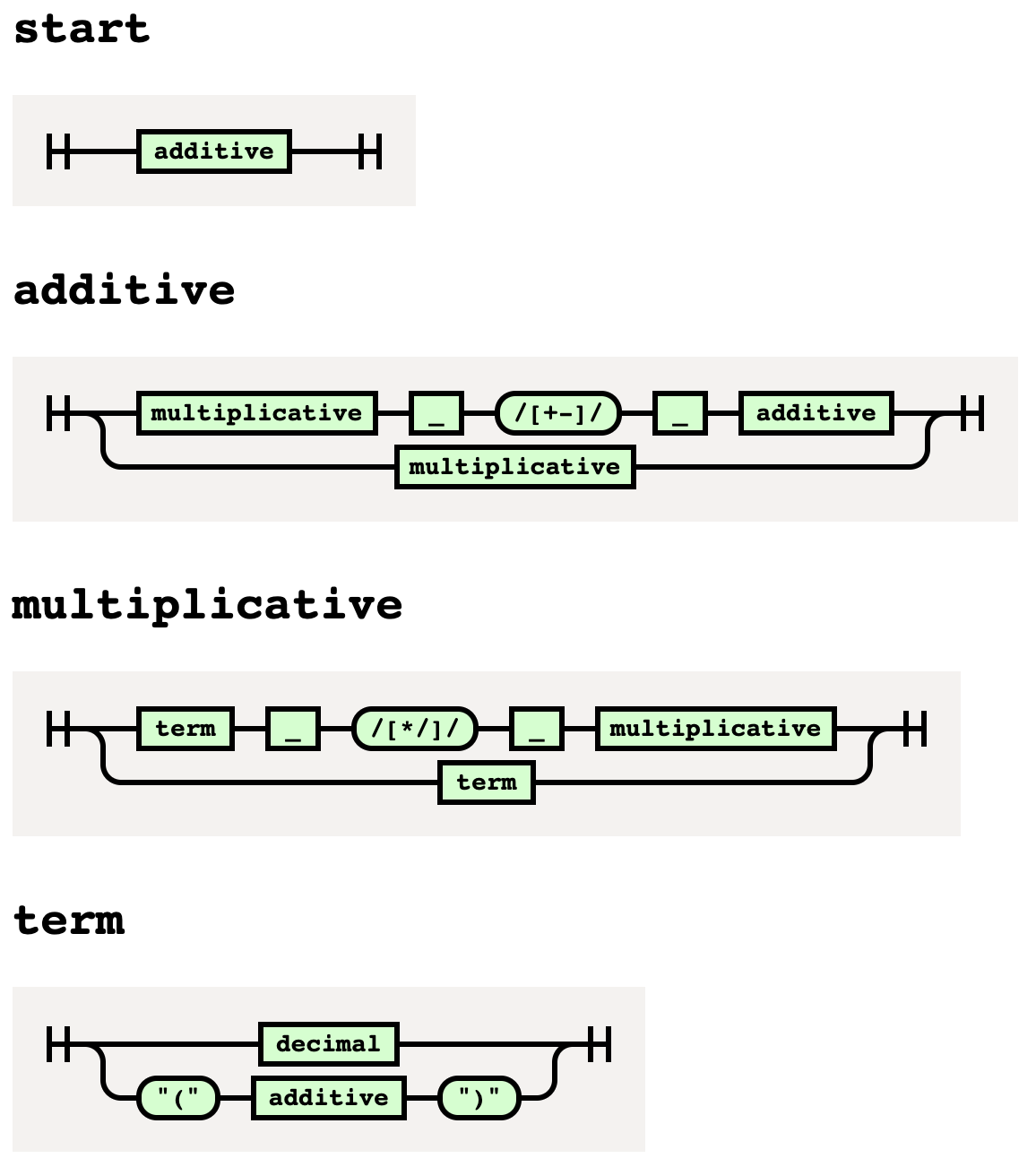
Here is the railroad diagram for our arithmetic grammar:
Unparsing
The nearley-unparse command takes a compiled grammar (.js file)
and generates an input string that matches the grammar.
Running it multiple times will produce different results.
By default it begins at the first rule,
but any rule can be specified with the -s flag.
By default there is no limit to how deeply it will search through the rules
to generate matching input. This can be quite slow.
To limit the search, specify the -d option with a value like 500.
For example, the following command generates matching input for our arithmetic grammar:
nearley-unparse -d 200 arithmetic-ast.js
This produces results like the following:
-48.6
((20802.1530))
(((-3)))
I could not get this to generate any matching input that contained an arithmetic operator. Color me unimpressed.
Customizing the Lexer
Let’s modify our arithmetic grammar to support single-line comments
that begin with the # character and extend to the end of the line.
This requires modifying the lexer because by default
the lexer discards all newline characters.
We need to consider newline characters to know when a comment ends.
Here is an example of input that includes single-line comments.
Like before, evaluating this should produce the result 5.
# first term
2 * 3 +
# middle term
(5 + 1) / 2 -
# last term
4
The following grammar customizes the lexer. This grammar differs from previous ones we have seen in that:
- We don’t need the builtins
number.neandwhitespace.nebecause the lexer takes care of those concerns. - We don’t have to account for whitespace or comments in the grammar rules because the lexer removes all tokens that represent them.
- The tokens defined in the lexer are
referred to in the grammar with a
%prefix.
@{%
  const moo = require('moo');

  const lexer = moo.compile({
    add: '+',
    comment: /#[^\n]*\n/,
    divide: '/',
    lparen: '(',
    multiply: '*',
    number: /0|[1-9][0-9]*(?:.[0-9]+)?/,
    rparen: ')',
    subtract: '-',
    ws: { match: /[ \n\t]+/, lineBreaks: true },
  });

  // Redefine the lexer next function to skip certain tokens.
  const originalNext = lexer.next;
  lexer.next = function () {
    while (true) {
      const token = originalNext.call(this);
      if (!token) return null; // end of tokens
      if (token.type !== 'ws' && token.type !== 'comment') {
        //console.log('token =', token);
        return token;
      }
    }
  };
%}

@lexer lexer

start -> additive {% id %}

additive
  -> multiplicative %add additive {% d => d[0] + d[2] %}
   | multiplicative %subtract additive {% d => d[0] - d[2] %}
   | multiplicative {% id %}

multiplicative
  -> term %multiply multiplicative {% d => d[0] * d[2] %}
   | term %divide multiplicative {% d => d[0] / d[2] %}
   | term {% id %}

term
  -> %number {% d => Number(d[0]) %}
   | %lparen additive %rparen {% d => Number(d[1]) %}
Unit Tests
It’s a good idea to create a suite of unit tests for each grammar
that verifies that it correctly parses a collection of input strings.
Here’s an example that uses the vitest testing library.
import nearley from 'nearley';
import {describe, expect, it} from 'vitest';
import compiledGrammar from './arithmetic-eval.js';

describe('parser', () => {
  const grammar = nearley.Grammar.fromCompiled(compiledGrammar);

  it('evaluates expression 1', () => {
    // Each test requires a new Parser instance.
    const parser = new nearley.Parser(grammar);
    parser.feed('123');
    expect(parser.results[0]).toBe(123);
  });

  it('evaluates expression 2', () => {
    const parser = new nearley.Parser(compiledGrammar);
    parser.feed('2 * 3');
    expect(parser.results[0]).toBe(6);
  });

  it('evaluates expression 3', () => {
    const parser = new nearley.Parser(compiledGrammar);
    parser.feed('2 * 3 + (5 + 1) / 2 - 4');
    expect(parser.results[0]).toBe(5);
  });
});
The file above is named arithmetic-eval.test.js.
The npm script "test": "vitest", will run all the tests
fond in files whose extension is .test.js or .test.ts.
Compiling to TypeScript
By default the nearley compiler generates JavaScript code for the parser. To change this to TypeScript:
- Add the
@preprocessor typescriptdirective in the grammar file. - Change references to the generated parser file
to use the
.tsfile extension instead of.js.
Example Grammars
All of the example code shown above can be found in the GitHub repository nearley-demos.
Many example grammars can be found in the nearley GitHub repository. See examples.