The only mechanism for communicating with an object is to send it a message. A message is a combination of a selector (or message name) and arguments. Messages are always sent to a explicit receiver.
Method lookup begins by searching for the selector
in the methodDict of the receiver.
If a match is not found there, the search
continues upward in each of the superclasses.
If a match is found, it is added to a method lookup cache.
This removes the need to search the inheritance hierarchy for every message send
and significantly improves performance.
When inside an instance method, to send a message to the current object,
use the pseudo-variable self as the receiver.
To send a message to the superclass of the current object,
use the pseudo-variable super as the receiver.
The difference between self and super is where method lookup begins.
With self it begins in the class of the current object and
with super it begins in the superclass of that.
If Smalltalk were to add the ability to specify the parameter and return types of methods, it would just be specifying the set of messages to which compatible objects can respond. This is not done, so compatibility is determined at run-time.
Arguments in messages are always passed by reference, not by value.
In Smalltalk documentation, selectors are preceded by #
to indicate that they are symbols.
But the # is not included when actually sending a message.
A method is code found in a class that responds to a message.
Smalltalk supports three types of messages:
-
unary
These message do not take any arguments. Their names are alphanumeric and begin lowercase. For example, in
5 factorial,#factorialis a unary message. -
binary
These message take a single argument and have names that use a restricted set of characters that make them look like operators in other programming languages. Binary message names can only contain one or more of the following characters:
+ - * / \ ~ < > = @ % | & ? ,For example, in
a * b,#*is a binary message. This sends the message#*to the objecta, passing it the argumentb.The binary message
=tests whether two objects are equal, meaning one can be used in place of the other. Each class can define this method to decide how their objects should be compared. If they do not define=, an implementation will be found in the inheritance hierarchy. TheObjectclass defines=to be the same as==.The
ProtoObjectclass defines the binary instance methods==and~~.==tests whether two objects are the same objects in memory (identity).~~tests whether two objects are different objects in memory. -
keyword
These messages take one or more arguments that are each preceded by a keyword. Each keyword is alphanumeric, begins lowercase, and ends in a colon. For example,
#at:putis a keyword message in theOrderedCollectionclass which is the superclass of theArrayclass.The following code creates an array of colors and then changes the second element from
'green'to'yellow':colors := #('red' 'green' 'blue'). colors at: 2 put: 'yellow'.The parts of a keyword message must be specified in the order in which they appear in the corresponding method definition. It’s possible define additional methods that support other orders, but that is not typically done.
When multiple messages of these types are combined in a single expression, the order of evaluation is:
- all unary messages from left to right
- all binary messages from left to right
- all keyword messages from left to right
For example, in 2 raisedTo: 1 + 3 factorial,
the order is #factorial, #+, and #raisedTo.
The evaluation order can be changed by adding parentheses. For example:
a := 2.
b := 3.
c := 4.
x := a + b * c. "20"
y := a + (b * c). "24"
Parentheses are never needed around unary messages since those are always evaluated before binary and keyword messages.
If a message is sent to an object and no compatible method is found, the following popup will appear:
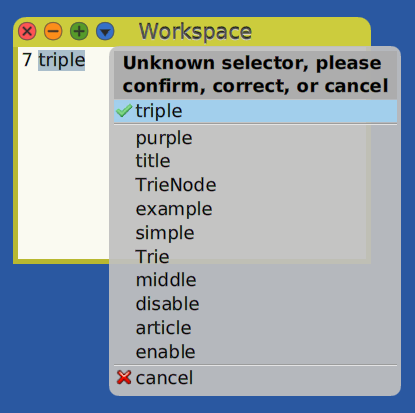
If the selector was incorrectly typed, any implemented selector can be selected from this popup.
If the selector is confirmed or if such a message is sent from running code, the following Debugger window will appear:
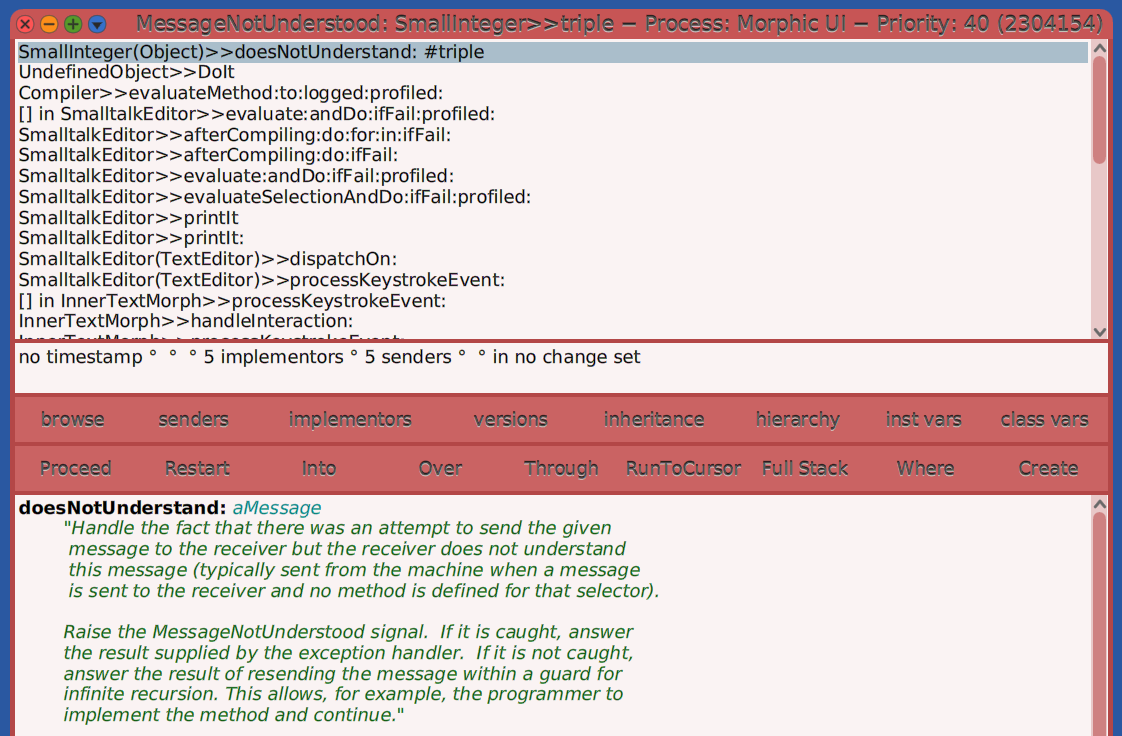
One option is to implement the missing method. To do this:
- Click the “Create” button.
- In the popup that appears, select the class within the inheritance hierarchy where the method will be added.
- In the next popup that appears, select a method category for the new method.
- Initially the method implementation will only contain
self shouldBeImplemented. - Modify the implementation as desired.
- Press cmd-s to save it.
- Optionally click the “Proceed” button to resume execution with calling the new method.
Message Cascades
To send multiple messages to the same object, add a semicolon after all but the last message.
The following code sends multiple messages to the Transcript class:
Transcript show: 'first line'; newLine; show: 'second line'
The following code sends the #add: message
to an OrderedCollection object three times.
Each cascade can be written on a separate line for readability.
| fruits |
fruits := OrderedCollection new.
fruits
    add: 'apple';
    add: 'banana';
    add: 'cherry'.
The value of a message cascade is the object returned by the last message.
If the method invoked by the last message
does not return the initial receiver object and
you want the cascade to return that,
end the cascade with ; yourself.
For example, the last expression above uses a message cascade
to send the message #add: three times. The result is 'cherry'.
Adding ; yourself to the end of that expression
changes it to the value of the variable fruits.
Tab Completions
When entering code to send a message, completion hints are provided
if at least the first letter in the message name is typed
and the tab key is pressed.
For example, entering 7 s and pressing the tab key
shows possible completions of shallowCopy, sqrt, and more.
Use the up and down arrow keys to select a completion
and press the return key to accept it.
To enable completions without typing any characters in the name,
enter Preferences at: #spaceTabOpensAutoCompletion put: true
in a Workspace and “Do it”.
For example, with this preference set, you can enter 'test'
followed by a space and press the tab key to get completion hints.
Matching messages found anywhere in the inheritance hierarchy appear in black.
If there are no matching messages,
it will show all known selectors that match in any class in blue.
The reason is that you can send any message to any object.
Even if the object has no matching method anywhere in its inheritance hierarchy,
it could still respond by handling it in a doesNotUnderstand: method.
Personally I do not find this helpful and wish it did not show those messages.
Dynamic Messages
The #perform: message and its variations can be sent to any class or object
to send a message specified by the symbol that follows perform:.
This is useful in situations where the message to send
must be determined at run-time.
Another alternative it to use the MessageSend class.
The class methods :receiver:selector, :receiver:selector:argument:, and
:receiver:selector:arguments: return an object that describes a message send.
The object can be passed around and the actual send can be triggered later.
For example, the following sets of expressions are equivalent:
"These demonstrate sending a unary message. Each gives the result 2."
4 sqrt.
4 perform: #sqrt.
(MessageSend receiver: 4 selector: #sqrt) value.

"These demonstrate sending a binary message. Each gives the result 6."
2 * 3.
2 perform: #* with: 3.
(MessageSend receiver: 2 selector: #* argument: 3) value.

"These demonstrate sending a keyword message. Each gives the result 4."
'foobarbaz' findString: 'BAR' startingAt: 1 caseSensitive: false.
'foobarbaz'
    perform: #findString:startingAt:caseSensitive:
    with: 'BAR' with: 1 with: false.
(MessageSend
    receiver: 'foobarbaz'
    selector: #findString:startingAt:caseSensitive:
    arguments: #('BAR' 1 false)
) value.
To provide more than three keyword arguments with perform,
send the #perform:withArguments message.