Code and data are both represented by objects. Code can be described by a method or block, both of which are kinds of objects.
Objects are created by sending a message to a class. In addition, some kinds of objects, such as numbers, strings, and arrays, can be created from a literal syntax.
Every class supports the class method new,
which creates and returns a new instance of the class.
If the class defines the instance method initialize,
the new method will call it.
If the class is a subclass of any class other that Object,
its initialize method typically begins with super initialize
which calls the initialize method in the superclass.
The initialize method also typically initializes
each of the instance variables of the object.
Let’s look at an example class named Rect
with instance variables height and width.
We chose the name Rect because the name Rectangle is used
by a provided class in the “Graphics-Primitives” class category.
We can define the class method height:width:
that provides an alternate way to create objects as follows:
height: aHeight width: aWidth
    ^self new setHeight: aHeight width: aWidth
We can then define the following instance methods:
initialize
    super initialize.
    height := 1.
    width := 1

setHeight: aHeight width: aWidth
    height := aHeight.
    width := aWidth

area
    ^ height * width
It is recommended for initialize methods to
begin by sending the #initialize message to super
so the superclass will initialize its instance variables.
Omitting this can produce unexpected results.
The setHeight:width: method should be in the “private” method category
to indicate that it is not meant to invoked from outside this class.
We can use the Rect class as follows:
r1 := Rect new.
Transcript show: r1 area. "1"

r2 := Rect height: 2 width: 3.
Transcript show: r2 area. "6"
To determine the class of an object, send it the unary message #class.
For example, 19 class returns SmallInteger.
Object and ProtoObject
The Object is a superclass of nearly every other class.
It defines methods that are available on all objects.
It is a subclass of the ProtoObject class.
There are a small number of other classes that are
subclasses of ProtoObject and not subclasses of Object.
These include BreakingMethodWrapper, MessageCatcher, and ProtoCatcher.
To get a String representation of any object that is
meaningful to a Smalltalk developer (not necessarily to a user),
send it the #printString message.
The default implementation in the Object class
returns “a” or “an” followed by a space and the class name.
For example, sending #printString to a Dog class
will return the string 'a Dog' by default.
Classes can override the printOn: method
to customize the String that is returned.
The printOn: method is invoked by both the print and printString methods.
The following code prints a Set(3 2 1),
which is String representation of a Set of numbers,
to the Transcript:
| set |
set := #(1 2 3 1) asSet.
set print
Here is a simple Dog class that overrides the printOn: method:
Object subclass: #Dog
    instanceVariableNames: 'breed name'
    classVariableNames: ''
    poolDictionaries: ''
    category: 'Demo'

name: nameString breed: breedString
    | dog |

    dog := Dog new.
    dog name: nameString.
    dog breed: breedString.
    ^ dog.

breed
    ^ breed

breed: aString
    breed := aString

name
    ^ name

name: aString
    name := aString

printOn: aStream
    aStream
        nextPutAll: self class name withArticle; "adds a or an at beginning"
        nextPutAll: ': ';
        nextPutAll: name;
        nextPutAll: ' is a ';
        nextPutAll: breed;
        nextPut: $.
The following code creates an instance of the Dog class
and prints it to the Transcript:
dog := Dog name: 'Comet' breed: 'Whippet'.
dog print. "outputs a Dog: Comet is a Whippet."
The following table describes some of the instance methods
defined in the ProtoObject class.
| Method | Description |
|---|---|
ifNil: | never evaluates the argument block |
ifNil:ifNotNil: | always evaluates the ifNotNil: block |
ifNotNil: | always evalutes the argument block |
ifNotNil:ifNil: | always evaluates the ifNotNil: block and never the ifNil: block |
isNil | always answers false |
notNil | always answers true |
The following table describes some of the instance methods
defined in the Object class.
| Method | Description |
|---|---|
addDependent: | adds an object to be notified when this object is changed |
asJsonString | answsers String JSON representation from `jsonWriteOn: method |
asString | answsers String representation from printString method |
assert: | signals AssertionFailure if block argument evaluates to false |
assert:description: | same as assert:, but with a custom message |
breakDependents | removes all objects to be notified when this object is changed |
changed | informs all dependents that an unspecified aspect of the object has changed |
changed: | informs all dependents that a specified aspect of the object has changed |
class | answers the class of this object |
className | answers the class name of this object as a String |
confirm: | renders dialog that asks specified question with options “Yes” and “No”; returns Boolean |
confirm:orCancel: | similar to confirm:, but adds “Cancel” option and evalutes orCancel: block if selected |
removeDependent: | removes an object to be notified when this object is changed |
| “ |
TODO: Add more methods to the table above?
TODO: Show examples of using confirm: and confirm:orCancel:.
Counting Objects
To determine the number of objects that currently exist
from a given class, not counting its subclasses,
send the message #allInstances to the class.
This answers an Array containing all the objects.
For example:
Workspace allInstances size
To determine the number of objects that currently exist
from all the subclasses of a given class,
send the message #allSubclasses to the class to get the subclasses
and sum the instance counts from each of those.
For example:
Morph allSubclasses sum: [:class | class allInstances size]
To determine the number of objects that currently exist from all classes,
use the approach above with the class ProtoObject
which is a superclass of all classes.
ProtoObject allSubclasses sum: [:class | class allInstances size]
Deleting Objects
Variables defined in a Workspace hold references to their object values. Closing a Workspace removes those references, which makes it possible for them to be garbage collected.
Some classes such as Morph implement a delete method.
To delete all instances of such classes,
enter the following in Workspace and “Do it”:
SomeClass allInstancesDo: [:obj | obj delete]
Object Creation Detail
New objects can be created by
sending the message #new or #basicNew to a class.
The diagram below shows the classes involved
when sending the message #new to a class.
Circle is a subclass of Shape
which is a subclass of Object
which is a subclass of ProtoObject.
The superclass of ProtoObject is nil.
The asterisks in the diagram are placeholders
for the class associated with an arrow.
For example, sending the message #superclass to Circle gives Shape
and sending the message #class to Circle gives Circle class.
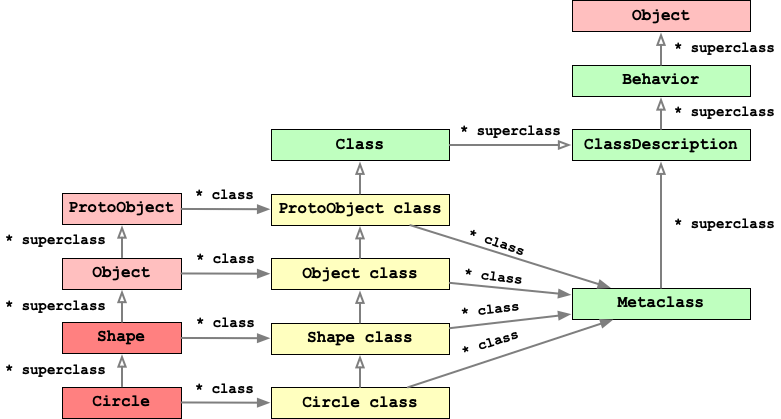
Here are some important facts about the diagram above:
- Every class is represented by a pair of objects. One represents the class and the other represents its metaclass.
- The instance methods of a metaclass are the class methods of the corresponding class.
- When a class is selected in a System Browser, clicking the “class” button causes it to display its metaclass.
- The name of each metaclass is the name of its corresponding class
followed by ” class”. For example, the name of the
metaclass of the
Circleclass isCircle class. - There is only one instance of each metaclass.
- The superclass of all metaclasses it
Metaclass. Metaclassis subclass ofClassDescriptionwhich is a subclass ofBehaviorwhich is a subclass ofObject.- The
Behaviorclass defines thenewmethod and many others includingallInstances,allSubclasses,allSuperclasses,instVarNames, andmethodDict. - The
Behaviornewmethod returnsself basicNew initialize. - The
Objectmetaclass implements the instance methodinitializewhich does nothing, leaving all the instance variables initialized tonil. - Any class can implement the instance method
initializeto set its instance variables to values other thannil.
Let’s walk through the steps to find the new method
when evaluating circle := Circle new.
The #new message is sent to the Circle class,
not to an instance of the class.
- Look in
Circle class. - Look in
Shape class. - Look in
Object class. - Look in
ProtoObject class. - Look in
Class class. - Look in
ClassDescription class. - Look in
Behavior classwhere it is found.
Another way to discover where the new method is implemented
is to enter the following in a Workspace and press cmd-p (Print it):
Circle class lookupSelector: #new
The output is (Behavior>>#new "a CompiledMethod:48(357226)").
The Behavior class defines the instance method >>
which takes a Symbol selector and
returns the CompiledMethod instance that handles the selector.
The basicNew method does not call the instance method initialize.
The basicNew method should not be overridden in subclasses
to do something different, but the new method can be overridden.
Method Dictionaries
Method dictionaries are used to process message sends.
Their keys are symbols that are message selectors
and their values are CompiledMethod objects.
The processing for finding a matching method
searches the methodDict instance variables
found in the inheritance hierarchy of the receiver object.
The instance methods of a class are stored in
the provided instance variable methodDict of the class.
This can be viewed by sending the message #methodDict to a class or
by selecting the class name and pressing cmd-shift-i (Explore it).
The value of methodDict is an instance of MethodDictionary
which is a subclass of Dictionary.
The class methods of a class are stored in
the provided instance variable methodDict of the metaclass of the class.
This can be viewed by sending the message #methodDict to a metaclass or
by selecting the class name followed by ” class”
and pressing cmd-shift-i (Explore it).
It is also an instance of MethodDictionary.
One way to find a metaclass name so it can be selected
is to select the class in a System Browser and click the “class” button.
Immutability
A class can enforce the immutability of its object by simply not implementing any methods that change its instance variable.
Another option is to use the “Immutability” package. It causes attempts to change any instance variable of a given object to result in a “ModificationForbidden” error. This opens a Debugger window that contains a stack trace which indicates where the modification attempt was made.
To install the “Immutability” package,
enter Feature require: #Immutability and “Do it”.
Among other things, this package adds
the instance method beImmutable to the Object class.
To enforce a specific object to be immutable,
send it the #beImmutable message.
For example the Rect class described above
could have the following class method for creating new instances:
height: aHeight width: aWidth
    ^self new setHeight: aHeight width: aWidth; beImmutable; yourself
Note the use of yourself to return the current object
rather than the return value of the beImmutable method.
Become
The become method defined in the ProtoObject class
changes all references to the receiver object
to refer to the argument object AND
changes all references to the argument object
to refer to the receiver object.
Copies are not created, only the references change.
The becomeForward method defined in the Object class
is similar, but does less.
It changes all the references to the receiver object
to refer to the argument object, but not vice-versa.
For example, this can be used to model a physical address change.
These methods have the potential to introduce bugs that are difficult to trace. Despite that, they can be useful.
The following code demonstrates using the become: method
to create a proxy for another object.
It tracks the selectors of all messages sent to a given object.
The object being proxied below is referenced in three places,
in the date variable, in the dates OrderedCollection,
and in the occasions Dictionary.
date := Date today.
dates := OrderedCollection newFrom: { date }.
occasions := Dictionary newFrom: { 'today' -> date }.
HistoryProxy on: date.
date monthName print. "#January"
dates first dayOfWeekName print. "#Sunday"
occasions at: 'today' :: value year print. "a Year (2025)"
history := HistoryProxy restoreAndProvideHistory: date.
history print. "an OrderedCollection(monthName dayOfWeekName year)"
Define the HistoryProxy class as follows:
Object subclass: #HistoryProxy
    instanceVariableNames: 'history object'
    classVariableNames: ''
    poolDictionaries: ''
    category: 'Demo'
Implement the following class methods in the HistoryProxy class.
on: anObject
    | proxy |

    proxy := self new on: anObject.
    anObject become: proxy.
    ^ proxy

restoreAndProvideHistory: aProxy
    | result |

    result := aProxy history.
    aProxy become: aProxy object.
    ^ result.
Implement the following instance methods in the HistoryProxy class.
on: anObject
    history := OrderedCollection new.
    object := anObject shallowCopy.

doesNotUnderstand: aMessage
    "Record the message and reroute it to the object."

    history add: aMessage.
    ^ aMessage sendTo: object.

history
    ^ history

object
    ^ object