Methods are associated with a specific class. Class methods handle messages sent to the class. Instance methods handle messages sent to objects instantiated from the class.
Method definitions take the following form:
messageSelectorAndArgumentNames
    "comment stating purpose of message"

    | temporary variable names |
    statements
The convention for indentation it to use tab characters, but spaces can also be used, as can no indentation at all. Unlike Python, indentation in Smalltalk is not significant.
Other programming languages use a keyword
like function, func, fun, or fn
to identify the start of a function or method definition.
Smalltalk does not require a keyword because it is always clear from context
when a method is being defined.
For example, System Browser windows provide a separate text editing area
for viewing and editing each method definition.
In binary and keyword methods, parameter variable names typically
indicate the expected object type and begin with “a” or “an”.
For example, aNumber, aString, or anArray.
This works well because the keyword that
precedes the parameter variable indicates its meaning.
For example, name: aString score: aNumber.
When multiple parameters have the same data type, a good way to
name them is to include their meaning and type in the name.
For example, latitude: latNumber longitude: lngNumber.
Methods always “answer” (return) an object,
either explicitly with the ^ return operator
or implicitly returning the receiver (self).
For example, the instance method asUppercase in the String class
contains the comment “Answer a String made up from
the receiver whose characters are all uppercase.”
Returning the receiver enables message chaining
in which multiple messages are sent to the same object.
All methods are public. By convention, methods that should only be used by other methods in the same class are placed in the “private” message category.
To find a method when its class is not known:
-
Open the World menu and select Open … Message Names. This opens a “Message Names” window.
-
Enter any part of a message name and press the return key. For example, entering “nj” will find several methods including the “inject:into:” message that is implemented by the
Collectionclass.A list of matching message names will be displayed in the top left pane with the first one selected. A list of classes that implement the selected method will be displayed in the top right pane with the first one selected. The implementation of the selected method will be displayed in the bottom pane.
-
Click another message name to see the classes that implement it.
-
Click another class name to see its implementation of the method.
-
Click the “Browse” button to open a System Browser focused on that method.
The buttons in the “Message Names” window are the same as the buttons “System Browser” windows.
Squeak Smalltalk supports finding methods by part of their name OR by providing example input and output. To find a method in Squeak Smalltalk:
- Click the “Tools” menu and select “Method Finder”. This opens a “Selector Browser”.
- Enter part of the method name OR an example input, followed by a period, and the expected output.
- Press the return key.
- A list of all matching methods will be displayed.
- Click one of the methods to open a System Browser that shows the method implementation.
See The amazing Squeak Method Finder.
To add a method to a class:
- Open a System Browser.
- Select the class category of the class to which the method will be added in the top, first pane.
- Select the class in the top, second pane.
- Select the method category in which the method will be added. If no suitable category appears in the list, press cmd-n (new category…) to create a new one. Alternatively, select ”— all —” and assign the method to a category later. In that case the method will be assigned to the “as yet unclassified” category.
- A starting template for a new method definition will appear in the bottom pane.
- Change “messageSelectorAndArgumentNames” to the name of the new method, including any parameter names it uses.
- Modify the comment describing the method.
- Update the list of temporary (local) variable names or delete that line.
- Replace “statements” with the method implementation.
- To associate the method with a different method category, drag its name from the top, fourth pane to the desired method category in the top, third pane.
For example, try adding the following methods to the Integer class
which is in the class category “Kernel-Numbers”.
predecessor
    "Answer the predecessor of this integer."
    ^self - 1

successor
    "Answer the successor of this integer."
    ^self + 1
Superclasses can define methods that subclasses must implement
and each subclass can implement them differently.
For example, a class named VShape can define the following method:
area
    "Answer the area of the shape."
    self subclassResponsibility
This does not prevent instances of the class from being created, but calling such methods will result in an Error window with the title “My subclass should have overridden {method-name}” will appear.
The classes VCircle and VRectangle can be defined as subclasses of VShape.
If they do not define the area method
and that message is sent to an instance, an Error window
with the title “My subclass should have overridden #area” will appear.
To add the missing method from the Error window:
- Click the “Create” button.
- Select a message category for the method.
- Enter its implementation.
- Press cmd-s to save.
- Press the “Proceed” button to continue running the code at the point of the failed message send.
The example classes above adds the prefix “V” (first letter of my last name) to their names because the class name `Rectangle is already defined.
The VCircle class can add the following class method for creating instances:
radius: aNumber
    ^self new setRadius: aNumber
The VCircle class can add the following instance methods:
setRadius: aNumber
    radius := aNumber

area
    ^Float pi * radius * radius
A common way to provide a constant value is
to define a class method that returns it.
For example, pi is a class method in the Float class.
The VRectangle class can add the following class method for creating instances:
height: aHeight width: aWidth
    ^self new setHeight: aHeight width: aWidth
The VRectangle class can add the following instance methods.
In method bodies that contain more than one expression,
the expressions are separated by the period character (.).
setHeight: aHeight width: aWidth
    height := aHeight.
    width := aWidth

area
    ^height * width
To view the bytecode for a method, select it in a System Browser, click the “show…” button, and select “byteCodes”.
To delete a method, select its name in the top, fourth pane and press cmd-x (remove method).
To delete a method category and all the methods in it, select its name in the top, third pane and press cmd-x (remove).
Both class and instance methods can call themselves recursively.
Here is an example of a class method from a class I created named Math
that calls itself recursively:
factorial: n
    "Answer the factorial of a given integer."
    ^(n = 1
        ifTrue: 1
        ifFalse: [n * (Math factorial: n - 1)])
Here is an example of an instance method I added to the Integer class
that calls itself recursively.
The method factorial already exists in that class
and is more efficient than the version below.
factorial2
    "Answer the factorial of this integer."
    ^(self = 1
        ifTrue: 1
        ifFalse: [self * (self - 1) factorial2])
Here is another example that recursively computes a Fibonacci number.
fibonacci

    self = 0 ifTrue: [ ^0 ].
    self = 1 ifTrue: [ ^1 ].
    ^ (self - 1) fibonacci + (self - 2) fibonacci.
If you edit the name of a method in code editing pane of a System Browser, it will create a copy of the method with the new name. The method with the previous name will still exist and can be deleted. An alternative is to right-click the method in the 4th pane and select “refactorings…rename…”.
While it is not commonly done, a method can check the types of its arguments
and alter its functionality based on those.
For example, this class method returns a number
that is double what is passed to it.
If it is given a String instead of a Number,
it converts it to a Number and doubles it.
If it is given any other kind of object, it just returns 0.
double: obj
    "Answer double the value of the argument."
    (obj isKindOf: Number) ifTrue: [^ obj * 2].
    (obj isKindOf: String) ifTrue: [
        [^ obj asNumber * 2]
            on: Error "error converting string to number"
            do: [^ 0]].
    ^ 0.
Instance and class methods can dynamically added to a class
by sending the message #compile: to a class or its metaclass.
The argument is a string of Smalltalk code.
For example, the following code adds the class method legs
and the instance method speak to the Dog class.
Dog class compile: 'legs ^4'.
Dog compile: 'speak ''Woof!'' print'
The expression Dog class returns the metaclass of the Dog class
and adding a method there makes it a class method.
The single quotes inside the speak method string are doubled to escape them.
The new methods will appear in System Browsers.
Unknown Variables
When a method is saved, if it assigns a value to an unknown variable then the following dialog will appear:
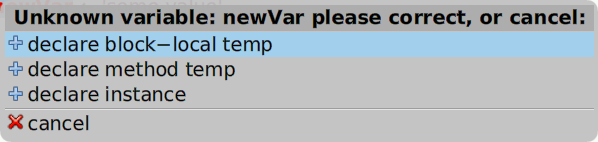
Choose “declare instance” to add the variable to the
instanceVariableNames: list where the class is defined.
Choose “declare method temp” to add a declaration at the top of the current method.
Choose “declare block-local temp” to add a declaration inside the block where it is used. This will be at the top of the current method if not inside a block.
Choose “cancel” to skip adding a variable declaration.
Accessor Methods
“Getter methods” allow instance or class variable values to be accessed from outside the class that defines them.
“Setter methods” allow instance or class variables to be modified from outside the class the defines them.
Suppose a class Dog has the instance variable breed.
The following accessor methods can be implemented:
breed
    ^breed

breed: aString
    breed := aString
Accessor methods for all instance variables in a class can be generated by right-clicking the class name in a System Browser and selecting “more…create inst var accessors”.
Overriding Methods
A class can override methods defined in a superclass.
In some cases this is required because the superclass method
sends the message #subclassResponsibility to self.
For example, the Number class defines the instance method + as follows:
+ aNumber
    "Answer the sum of the receiver and aNumber."
    self subclassResponsibility
The subclasses BoxedFloat64, SmallFloat64, Fraction, Integer, and others
all override this method to add specific number types in a unique way.
The need for this is especially evident when
considering how to add two Fraction values.
In some cases it is desirable for an overriding method in a subclass
to call the corresponding method its superclass.
This is done by sending the same message to the super keyword.
This is always done in the initialize method because otherwise
instance variables in the superclass will not be properly initialized.
Primitive Methods
Primitive methods are implemented in the VM, often in a way that is more efficient than what could be achieved in Smalltalk code.
From the book “Smalltalk-80: The Language and its Implementation”, referred to as the “Blue Book”:
All behavior in the system is invoked by messages, however, all messages are not responded to by executing Smalltalk-80 methods. There are about one hundred primitive methods that the Smalltalk-80 virtual machine knows how to perform. Examples of messages that invoke primitives are the
+message to small integers, theat:message to objects with indexed instance variables, and thenewandnew:messages to classes. When3gets the message+ 4, it does not execute a Smalltalk-80 method. A primitive method returns7as the value of the message. The complete set of primitive methods is included in the fourth part of this book, which describes the virtual machine. Methods that are implemented as primitive methods begin with an expression of the form<primitive #>where#is an integer indicating which primitive method will be followed. If the primitive fails to perform correctly, execution continues in the Smalltalk-80 method. The expression<primitive #>is followed by Smalltalk-80 expressions that handle failure situations.
In Cuis Smalltalk, the comment at the beginning of
the class method whatIsAPrimitive in the Object class
contains the following:
When the Smalltalk interpreter begins to execute a method which specifies a primitive response, it tries to perform the primitive action and to return a result. If the routine in the interpreter for this primitive is successful, it will return a value and the expressions in the method will not be evaluated. If the primitive routine is not successful, the primitive ‘fails’, and the Smalltalk expressions in the method are executed instead. These expressions are evaluated as though the primitive routine had not been called.
Historically the Squeak VM could support a maximum of 256 primitive operations. Newer versions of the Squeak VM do not have that limitation.
From Vanessa Freudenberg, “The VM is mostly written in a subset of Smalltalk called Slang, transpiled to C, then compiled and linked with platform-specific code to create the VM executable.”
The functionality of specific numbered primitives can differ between VM implementations. To get a sense of typical mappings, see the ones used by SqueakJS in the file vm.primitives.js. For the OpenSmalltalk version, see the file cointerp.c.