Overview



Zig is a free, open source (under the MIT license), high performance, systems programming language. It is a modern alternative to C with similar syntax such as statements terminated with semicolons and conditions in parentheses.
Zig provides a complete, LLVM-based toolchain for creating, developing, building, and testing apps written in Zig, C, and C++. There are advantages to building apps with the Zig compiler even if they have no Zig code and only use C and/or C++ code.
Zig is suitable for applications that care deeply about performance, memory usage, and/or binary size. Often these concerns justify the tedium of manual memory management that is required due to lack of automated garbage collection.
A major appeal of Zig is that it is simpler than C++ and Rust and safer than C. However, Zig does not provide the same level of memory safety as Rust.
Zig emphasizes:
-
No hidden control flow
Examples of hidden control flow in other languages include exception handling, operator overloading, destructors, and decorators.
-
No hidden memory allocations
All memory allocation is performed by allocators that the developer selects. Each kind of allocator implements a different allocation strategy. Zig does not support closures, so allocations do not outlive their scope.
-
No preprocessors or macros
In place of these, Zig uses code that runs at compile-time, indicated by the
comptimekeyword. -
Having only one way to accomplish each task.
Zig includes:
- a package manager
- a build system that is simpler that the combinations of build tools typically used with C and C++
- a build system API (used in
build.zigfiles) - cross-compilation support
- a test runner
- ability to target all platforms supported by LLVM, including WebAssembly
Zig is not an object-oriented (OO) programming language. There is no support for defining classes, using inheritance, or using polymorphism. However, Zig does support defining structs with methods and for many applications that is close enough to OO.
Andrew Kelly began work on Zig in August, 2015 (first commit). The first public release was in February, 2016.
Despite still being in beta, it has been adopted by many projects. The current version of Zig is 0.11.0. Zig is expected to reach 1.0 in 2025, after 10 years of work. Rust took nine years to reach 1.0, so the time frames are similar.
Development of Zig is managed by the Zig Software Foundation (ZSF) which is a non-profit organization. “The mission of the Zig Software Foundation is to promote, protect, and advance the Zig programming language, to support and facilitate the growth of a diverse and international community of Zig programmers, and to provide education and guidance to students, teaching the next generation of programmers to be competent, ethical, and to hold each other to high standards.”
The Zig core team is composed of around a dozen developers, many of which are paid by the foundation to work on Zig full-time.
Originally the Zig compiler was implemented in C++. The 0.10.0 version of Zig changed to a self-hosted compiler which means it is implemented in Zig.
Pros and Cons
Pros of Zig include:
- run-time speed
- integrated build system
- fast compiler compared to C++ and Rust
- manual memory management offers great control over memory utilization
- integration with C and C++
- nice null handling
- simple, integrated test framework
- SIMD support with vectors
Cons of Zig include:
- not yet 1.0 (expected in 2025)
- manual memory management is somewhat tedious
- tedious string handling
- labeled
breaksyntax is odd - no checking for use of variables with
undefinedvalue - some stack traces do not include the offending line
(use the
-freference-tracecommand-line option)
Used By
-
Bun - a JavaScript/TypeScript run-time and toolchain, is primarily written in Zig. Bun has many advantages over Node.js and Deno including much better performance.
-
TigerBeetle is “the world’s fastest financial accounting database”.
-
Roc - “a fast, friendly, functional language” “Roc’s compiler has always been written in Rust. Roc’s standard library was briefly written in Rust, but was soon rewritten in Zig.”
-
Mach - a game engine and graphics toolkit, is implemented in Zig.
-
Uber uses Zig to build its C++ applications for x86_64 and arm64.
-
Ghosty terminal emulator
Run-time Checks
Zig provides the following run-time checks:
- bounds checking of array and slice indexing
at compile-time when index is known at compile-time and at run-time otherwise
(unless built with the optimization mode
ReleaseFastorReleaseSmallwhich do not include run-time safety checks) - pointers cannot be null unless declared to be optional
- optional pointers must be checked for null before they are dereferenced
- tagged unions cannot be accessed without verifying the tag
- detects arithmetic underflow and overflow when casting between numeric types
- checks for correct alignment when casting between pointer types
Resources
- Zig home page
- Zig Standard Library
- Mark Volkmann
- Zig GitHub repository
- Zig Showtime YouTube videos
- Getting started with the Zig programming language
- Ziglings - “A series of tiny broken programs … By fixing them, you’ll learn how to read and write Zig code.”
- ziglearn.org
- Zig Discord server
- Wikipedia
- Zig News
- awesome-zig collection of open-source Zig libraries
Installing
To install, download a platform-specific zip or tar file from the
Getting Started
page, expand it, move the directory this creates to a desired location,
set the environment variable ZIG_PATH to point to this directory, and
add ZIG_PATH to the list of directories in the PATH environment variable.
To see the version installed, enter zig version.
Stable versions have a version number such as 0.11.0. Consider downloading a nightly build labeled “master” to use the very latest version.
In macOS and easier option is to install Zig
with Homebrew by entering brew install zig.
However, currently this may only work on Macs with Intel-based processors.
For more detail on installation options, see Installing Zig.
Getting Started
Zig source files use the file extension .zig.
The built-in function @import returns a struct instance
whose field values are namespaces, types, functions, and constants.
In the code below, debug is a namespace nested in the std namespace
and print is a function inside the debug namespace.
Zig programs require a public main function.
Zig libraries do not.
The function return type void means no value will be returned.
The following code, in the file hello.zig is a basic hello world program.
const std = @import("std");
const print = std.debug.print;

pub fn main() void {
    // s for string, d for decimal
    print("Hello {s}! {d}\n", .{"Zig", 2023});
}
The first argument to print is a format string
that can contain {} placeholders where values are to be inserted.
The second argument to print is a literal array that holds
values to be inserted in place of the format string placeholders.
The syntax .{} is the literal syntax for
both arrays and structs (more on these later).
This can contain a comma-separated list of either
array items or struct field assignments.
The zig executable handles everything that can be done with a Zig program.
For help on what it can do, enter zig --help.
For help on a specific command that follows zig, enter zig {command} --help.
To build and run the program above, enter zig run hello.zig.
The executable is not saved.
To create an executable and save it,
enter zig build-exe --name hello hello.zig.
To run the executable, enter ./hello.
To format a .zig source file, enter zig fmt {file-name}.zig.
There is no linter for Zig, but the Zig compiler provides more guidance than most compilers.
To see a list of Zig guiding principles, enter zig zen.
Later we will discuss Zig packages that
typically contain multiple .zig source files.
Tools
For VS Code, see the extension Zig Language. This provides code formatting and intellisense.
Add a trailing comma after the last field in a struct causes each field to placed on a separate line. Without the trailing comma, if all the fields fit on a single line then they will be placed on a single line.
Editor extensions typically handle unused variables
by adding a line that uses them.
For example, if the variable foo is unused,
the line _ = foo; will be added immediately after its declaration.
If running a Zig program results in a stack trace
that doesn’t contain any lines in the code that you wrote,
try running it again with the -freference-trace command-line option.
Style
Zig has an official Style Guide that is not enforced by the compiler. At a high level it specifies the following:
- 4-space indentation
- open braces on the same line or the last of wrapped lines
- maximum line length is 100
- function names should be camelCase
- but functions that return a type should be TitleCase
- type names should be TitleCase
- variable names should be snake_case
- names of files that define a struct should have the same name as the struct which uses TitleCase
- all other file names should be snake_case
- directory names should be snake_case
Projects
To create a new Zig project, create a directory for it, cd to the directory,
and enter zig init-exe.
This creates the file build.zig and
a src directory containing the file main.zig.
To create a new Zig library, create a directory for it, cd to the directory,
and enter zig init-lib.
This creates the same files and directories as zig init-exe,
but the contents of main.zig are different.
Zig Build
The file build.zig is a build script implemented in Zig
that uses the compiler API.
Modify this file to change the characteristics of executable that is produced
and to modify the “steps”.
For help on build options, enter zig build --help or -h.
The zig build command is typically followed by the name of a build step.
Build steps are similar to npm package.json scripts.
To see the available steps, enter zig build --list-steps or -l.
The steps provided by default are:
install: copies build artifacts to the default install pathuninstall: removes build artifacts from the default install pathrun: runs the apptest: runs all the unit tests
To run a step, enter zig build {step-name}.
If no step name is provided, it defaults to install.
The file main.zig is the starting point of the project.
Like many .zig files, this begins by importing the standard library
with const std = @import("std");
It also defines the main function with pub fn main() !void { ... }.
The ! means the function can return an error value.
If an error is returned from the main function,
it panics and prints a stack trace.
To build an executable, cd to a project directory that contains
a build.zig file and enter zig build.
This runs the build function defined in the build.zig file.
It creates an executable file with same name as the project
in the zig-out/bin directory.
To customize the optimizations to be performed, add the -Doptimize=value
where value is one of the following:
-Doptimize value | Run-time safety checks | Optimizations |
|---|---|---|
Debug | Yes | No |
ReleaseSafe | Yes | Yes (speed) |
ReleaseFast | No | Yes (speed) |
ReleaseSmall | No | Yes (size) |
By default, executables are created for the current CPU architecture and OS
and the Debug optimizations are applied.
To build an executable for a different target, add the -Dtarget option
with a value that describes a CPU architecture
followed by a dash and an operating system.
For example, to build a Windows executable add -Dtarget=x86_64-windows.
This creates a file with a .exe extension in the zig-out/bin directory.
To see a list of supported targets, enter zig targets.
This outputs a large amount of JSON. See the values of
the keys “arch” and “os” which are JSON arrays of string values.
To build and run the app, enter zig build run.
To build and run all the tests, enter zig build test.
This runs all tests found in main.zig and all .zig files
that are directly or indirectly imported from main.zig.
Tests in unused .zig files are not run.
The object files produced by the compiler
are stored in the zig-cache directory.
This allows subsequent builds to avoid recompiling source files
that have not changed since the last build.
The executable file produced by a build
is stored in zig-out/bin/{project-name}.
Custom Build Steps
The build.zig file in a project can define additional steps.
To do this, define what each step should do in functions like the following:
// The first parameter is "self" and second is "progress",
// but use "_" if unused.
// The fields in a std.build.Step struct instance include
// name, dependencies, dependents, state, and more.
// The std.Progress.Node struct instance doesn't seem very useful.
fn myStep1(step: *std.build.Step, _: *std.Progress.Node) !void {
    print("in {s}\n", .{step.name});

    // To pass command-line arguments,
    // enter "zig build step1 -- arg1 arg2 etc`.
    // To access the command-line arguments ...
    if (step.owner.args) |args| {
        for (args) |arg| {
            print("arg = {s}\n", .{arg});
        }
    }

    // Print the name of each step field.
    // const fieldNames = std.meta.fieldNames(std.build.Step);
    // for (fieldNames) |fieldName| {
    //     print("step field = {s}\n", .{fieldName});
    // }

    // Print the name of each progress field.
    // const fieldNames = std.meta.fieldNames(std.Progress.Node);
    // for (fieldNames) |fieldName| {
    //     print("progress field = {s}\n", .{fieldName});
    // }
}

fn myStep2(step: *std.build.Step, _: *std.Progress.Node) !void {
    print("in {s}\n", .{step.name});
}

fn myStep3(step: *std.build.Step, _: *std.Progress.Node) !void {
    print("in {s}\n", .{step.name});
}
Next, register the functions inside the provided build function as follows:
    // The first argument is the step name and the second is the
    // description that appears when `zig build --list-steps` is entered.
    const step1 = b.step("step1", "first step");
    step1.makeFn = myStep1;

    const step2 = b.step("step2", "second step");
    step2.makeFn = myStep2;
    // Can optionally depend on any number of other steps.
    step2.dependOn(step1);
    // Entering "zig build step2" will run step1 and then step2.

    const step3 = b.step("step3", "third step");
    step3.makeFn = myStep3;
    step3.dependOn(step1);
    step3.dependOn(step2);
    // Entering "zig build step3" will run step1, step2, and step3.
To run a custom step, enter zig build {step-name}.
To pass command-line arguments to the step,
append -- followed by a space-separated list of arguments.
Package Manager
Zig has a built-in package manager. To use it in a project:
- Create the top-level file
build.zig.zonwhich uses Zig Object Notation (zon) to describe dependencies. - Modify the top-level file
build.zigto use the dependencies. - Import dependencies in
.zigfiles that need to use them.
TODO: Add an example of all these steps.
Tests
Zig has a built-in testing framework that allows unit tests to be included in source files in order to test the functions they define. Tests can also exercise functions implemented in other source files.
The test code is only used by the zig test command
and is not included in builds.
Each test is described by the test keyword followed by
a test description string (or a function name) and a block of code.
Tests are similar to functions that have a return type of anyerror!void.
Tests can appear before or after the defintions of the functions they test.
The block of code uses functions whose
names begin with expect to make assertions.
Calls to these functions must be preceded by the try keyword.
If the function call after a try returns an error, the test fails.
The expect function takes a single argument
that must be an expression that evaluates to a bool value.
The expectEqual function takes two arguments
which are expressions representing an expected and actual value.
Using expectedEqual provided better failure messages than equal.
Other testing functions include:
expectApproxEqAbs- tests that two numbers are within a given toleranceexpectApproxEqRel- similar toexpectApproxEqAbs, but the tolerance is multiplied by the larger of the absolute values of the two numbers being comparedexpectEqualDeep- tests deep equality of arrays, slices, structs, unions, vectors, and moreexpectEqualSentinel- compares sequences that are terminated by a sentinel valueexpectEqualSlices- compares slicesexpectEqualStrings- compares stringsexpectError- compares a value to an expected errorexpectFmt- tests the string produced by inserting arguments into a format stringexpectStringEndsWith- tests whether a ends begins with anotherexpectStringStartsWith- tests whether a string begins with another
The functions expectApproxEqAbs, expectApproxEqRel,
expectEqual, and expectEqualDeep all have the parameters
expected: anytype, actual: @TypeOf(expected).
This causes the second argument to be cast to the type of the first.
If the expected value is a literal value,
it must be cast with “@as” if it is the first argument,
but not if it is the second.
So it is typically easier to pass the actual value as the first argument
and the expected value as the second argument.
For more information about the expect functions, see the std.testing documentation.
All tests in a source file are executed by running zig test {file-name}.zig.
To run specific tests, add the --test-filter {text} option
which causes it to only run tests whose description contains the given text.
To temporarily skip a test, comment out all the code inside it
and add the line return error.SkipZigTest;.
If the code is not commented out, the compiler will
give an “unreachable code” error.
Here is a basic example:
const std = @import("std");
const expectEqual = std.testing.expectEqual;

pub fn add(a: i32, b: i32) i32 {
    return a + b;
}

test add { // uses a function name
    try expectEqual(add(1, 2), 3); // passes
}

test "add works" { // uses a description string
    try expectEqual(add(1, 2), 3); // passes
    try expectEqual(add(2, 3), 50); // fails
}
If an expect call fails, its test stops, but other tests are still run.
Messages output by failed tests are written to stderr. The output includes the following:
- a message of the form “Test [{m}/{n}] test.{test-description}… FAIL (TestUnexpectedResult)” for each failed test
- a stack trace is output that shows the failing
expect(only one of them) - a summary of the form “{n1} passed; {n2} skipped; {n3} failed”
To test for memory leaks, use the std.testing.allocator
for all memory allocation.
This allocation can only be used in test blocks.
To run tests found in all source files referenced and used,
create a file with a name like main.zig
containing something like the following:
const std = @import("std");
const m1 = @import("module1.zig");

pub fn main() !void {
    m1.first();
}

test {
    std.testing.refAllDecls(@This());
}
Then enter zig build test.
This will run all tests in main.zig and tests in any file referenced from it
which includes module.zig and everything it references recursively.
If there are no test failures then there will be no output.
Andrew Kelley said “refAllDecls is a hack that will almost certainly be removed from the standard library.”
To determine whether code is running in a test,
use the is_test constant in the built-in module (not std.built-in).
For example:
const is_test = @import("built-in").is_test;
The built-in module is autogenerated code based on the build target.
To see the generated code, enter zig build-exe {name}.zig --show-built-in.
This can be used to avoid running certain code in a test
or only run certain code in a test.
It can also be used only use std.testing.allocator when running in a test.
Enter zig test --help to see options that affect tests.
Modules and Packages
A module is defined by a single .zig file that
defines a collection of variables and functions.
A package is a directory that contains a build.zig file
and an src directory that includes any number of modules.
To define a module, create a source file whose file name is the module name.
Prefix all variables and functions to be exposed with the pub keyword.
The file can also define non-public variables and functions
that are only used by other functions defined in the file.
For example, the file my_module.zig could contains the following:
pub const gretzky = 99;

pub fn double(n: i32) i32 {
    return n * 2;
}
To import a module, use the built-in function @import.
The file path passed to this function can be absolute, relative,
or the name of a built-in module such as “std”.
The @import function returns a struct instance whose
fields are the public values defined in the imported file.
For example, to import and use the module defined in my_module.zig above
within the file main.zig, write the following:
const std = @import("std");
const print = std.debug.print;
const mod = @import("my_module.zig");

pub fn main() !void {
    print("gretzky = {}\n", .{mod.gretzky}); // 99

    const value = 3;
    const result = mod.double(value);
    print("result = {}\n", .{result}); // 6
}
The Zig standard library uses the same mechanism described above, but in a nested fashion. Here is a portion of the files in the Zig GitHub repository that define the standard library:
-
lib-
std-
std.zigpub const array_hash_map = @import("array_hash_map.zig"); pub const ArrayHashMap = array_hash_map.ArrayHashMap; pub const ArrayHashMapUnmanaged = array_hash_map.ArrayHashMapUnmanaged; pub const ArrayList = @import("array_list.zig").ArrayList; // more top-level types pub const atomic = @import("atomic.zig"); // more top-level namespaces from other source files // more stuff -
array_hash_map.zig: imported bystd.zig -
array_list.zig: imported bystd.zig -
atomic.zig: imported bystd.zig -
atomicAtomic.zig: imported byatomic.zigqueue.zig: imported byatomic.zigstack.zig: imported byatomic.zig
-
math.zig: imported bystd.zig -
mathacos.zig: imported bymath.zigacosh.zig: imported bymath.zig- … more
.zigfiles imported bymath.zig
-
-
Comments
Single-line comments begin with //.
Zig does not support multi-line comments. It relies on code editors to make it easy to comment and uncomment ranges of lines.
Top-level comments begin with //!.
These are used to document the current module (source file).
Doc comments begin with ///.
These are used to document variables, functions,
and types represented by enums, structs, and unions.
TODO: Determine how to generate documentation.
Printing
Zig provides several functions that write to stderr.
Perhaps the most commonly used is std.debug.print.
Others include std.log.info, std.log.debug, std.log.warn,
and std.log.err, in order from least to most severe.
The print function takes a format string
and a possibly empty tuple of values
to be inserted in place of the format string placeholders.
The format string can contain placeholders with the syntax {specifier}
that indicate where values in the second argument are to be inserted.
The following format specifiers are supported:
| Specifier | Prints |
|---|---|
any | value of any type using its default format |
b | integer value in binary notation |
c | integer as ASCII character (maximum of 8 bits) |
d | numeric value in decimal notation |
e | floating point value in scientific notation |
o | integer value in octal notation |
s | slices of u8 |
s | pointer-to-many and C pointers of u8 |
u | integer as UTF-8 sequence (maximum of 21 bits) |
X | numeric value in uppercase hexadecimal notation |
x | numeric value in lowercase hexadecimal notation |
? | optional value as either the unwrapped value or null;may be followed by a format specifier for the underlying value |
! | error union value as either the unwrapped value or the formatted error value; may be followed by a format specifier for the underlying value |
* | address of the value |
Often placeholders do not need to specify a format
because the correct formatting is used by default.
In these cases, placeholders can be written as {}.
The format string must be known at compile-time. This allows errors in format strings to be flagged at compile-time. The errors include having more placeholders than values (“too few arguments”), having more values than placeholders (“unused argument”), and using specifiers that are incompatible with the corresponding value (“invalid format string … for type”).
A common error is to pass a single value as the second argument instead of a literal array. The compiler will output the error “expected tuple or struct argument, found {type-passed}”.
Typically the second argument is specified inline
as a literal tuple with the syntax .{ value1, value2, ... }.
But a variable whose value is a tuple can also be passed.
The std.log.* functions take the same arguments as std.debug.print,
but produce output the begins with their level followed by a colon and a space.
For example, std.log.warn("{} is too large!", .{score});
prints a message like “warning: 19 is too large!”.
These log functions add their own newline at the end of each output.
To set the logging level, define the public constant std_options.
For example, the following suppresses output
from std.log.info and std-log-debug.
pub const std_options = struct {
    // This sets the default logging level.
    // Set to .info, .debug, .warn, or .err.
    pub const log_level = .warn;

    // This sets scope-specific logging levels.
    pub const log_scope_levels = &[_]std.log.ScopeLevel{
        // Can have one line like this for each scope.
        .{ .scope = .my_library, .level = .info },
    };
};
Log messages can be scoped to a particular part of an project. This is useful for better identifying log messages and for filtering log output from specific parts of a project.
Use the following instead of std.log to scope the log messages.
const log = std.log.scoped(.my_library);
log.info("testing", .{}); // output is "info(my_library): testing"
TODO: How can you specify scope-specific logging levels?
For more detail, see A simple overview of Zig.
To write to stdout instead of stderr, do the following:
const stdout = std.io.getStdOut();
const sow = stdout.writer();
// The print method of writers can fail,
// so possible errors must be handled.
try sow.print("Hello, {s}!\n", .{"world"});
Structs can specify how they should be formatted for printing
by implementing the format function.
For example:
const std = @import("std");
const print = std.debug.print;

const Dog = struct {
    name: []const u8,
    breed: []const u8,
    age: u8,

    const Self = @This(); // reference to containing struct
    pub fn format(
        value: Self,
        comptime _: []const u8,
        _: std.fmt.FormatOptions,
        writer: anytype,
    ) std.os.WriteError!void {
        return writer.print(
            "{s} is a {d} year old {s}.",
            .{ value.name, value.age, value.breed },
        );
    }
};

pub fn main() !void {
    const dog = Dog{ .name = "Comet", .breed = "whippet", .age = 3 };
    print("{}\n", .{dog}); // Comet is a 3 year old whippet.
}
Types
Types in Zig, such as built-in types like i32 and custom struct types,
are first-class values.
This means they can be assigned to variables, assigned to struct fields,
passed to functions, and returned from functions.
Types must be known at compile-time.
This means that function parameters whose type is type
must be preceded by the comptime keyword.
Primitive Types
Zig supports a large number of primitive types.
-
signed integers:
i{any-number-of-bits}Commonly used numbers of bits are 8, 16, 32, 64, and 128, but any number from 1 to 65535 is allowed.
-
unsigned integers:
u{any-number-of-bits}Commonly used numbers of bits are 8, 16, 32, 64, and 128, but any number from 1 to 65535 is allowed.
The
u8type can be used to hold a single character. Single character literals are enclosed in single quotes. -
floating point:
f16,f32,f64,f80,f128 -
isize,usizeThese are signed and unsigned integers whose size is the pointer size of the current CPU.
-
C types:
c_char,c_short,c_ushort,c_int,c_uint,c_long,c_ulong,c_longlong,c_ulonglong,c_longdouble -
anyerrorThis matches any kind of error.
-
anyopaqueThis used when interfacing with C to describe a type-erased pointer.
-
anytypeThis matches any type and is typically used for function parameters in functions that support duck typing.
-
bool- booleanAs expected, the literal values are
trueandfalse. -
comptime_intandcomptime_floatThese are the types of compile-time known, literal integer and floating point values that can be any size. Their values are inlined in the generated assembly instructions, so they don’t occupy memory. This makes their byte size irrelevant.
-
noreturnThis is the type of functions that never finish. It is also the type of
break,continue,return,unreachable, and the constructwhile (true) { … }. -
type- describes a type -
void- no value
Arbitrary bit-width integers can be declared by following
i or u with any positive integer value.
For example, the identifier u3 refers to an unsigned 3-bit integer.
“The maximum allowed bit-width of an integer type is 65535.”
Literal integers and floating point numbers
can contain underscores for readability.
For example, 1_234_567 and 1_234.567_89.
Float literals coerce to any float type and integer literals coerce to any integer type.
The standard library defines many functions in std.math
that return or test for “not a number” (nan) and
infinity (positive and negative) values for specific number types.
Floating point operations are performed in strict mode by default.
This means the generated code checks for overflows and underflows
and triggers an error if they occur.
Code can opt into optimized mode to turn off these checks
with @setFloatMode(.Optimized);.
Non-primitive Types
The following is summary of Zig types from the Ziglings exercise #058. These will be discussed in more detail in subsequent sections.
| Type | Meaning |
|---|---|
u8 | single item (primitive) |
*u8 | single-item pointer |
[]u8 | slice (size known at run-time) |
[5]u8 | array of 5 u8s |
[*]u8 | many-item pointer (zero or more) |
enum | {a, b} set of unique values a and b |
error | {e, f} set of unique error values e and f |
struct | {y: u8, z: i32} group of values y and z |
union(enum) | {a: u8, b: i32} single value either u8 or i32 |
Variables
The syntax for declaring a variable is:
{const|var} {name}[: type] = {value};
Variables can be declared at file scope (referred to as “container-level”),
function scopes, and block scopes within functions.
Variables declared inside a struct, union, enum, or opaque
are also consider container-level.
(An opaque is similar to a struct and is used for
interacting with C code that doesn’t expose field details.)
Variable declared with const are immutable and
variable declared with var are mutable.
Using const is preferred when the value will not be modified.
const variables whose initialization value is known at compile-time
are implicitly comptime.
Variable names must begin with a letter and are composed of letters, numbers, and underscores. Variable names cannot match a keyword (listed in the “Keywords” section). The convention for variable names is to use snake_case. The name should begin lowercase unless the value is a type.
Variables cannot have the same name as a keyword. They also cannot shadow (have the same name as) another variable in an outer scope.
Non-conforming names can be used with the syntax @"some name".
Use of this seems like a bad idea.
The type can be omitted if it can be inferred from the value.
However, the inferred type for numeric values is comptime_int
or comptime_float and is almost never the desired type.
It is better to supply explicit types for numeric variables.
All variables must be initialized, but they can be set to undefined
which is a way of stating that a real value will be assigned later.
Using a variable whose value is undefined does not trigger an error
and results in unexpected results.
The parts inside curly braces are required and the parts inside square brackets are optional.
An initial value is required, but can be set to undefined
as way of stating that a value will be assigned later.
The compiler does not currently check that
the variable is set to another value before it is used.
Accessing a variable that is still set to undefined
produces unexpected results.
Run-time checks for this may be added in the future.
There are four kinds of values a variable or expression can have that indicate that it doesn’t have a real value, each with a different meaning.
undefined: no value yet and should not be used until one is assignednull: currently has no value, but may have before and may have latervoid: there will never be a value- any kind of error: no value because an error occurred
The keyword undefined cannot be used to
test whether a variable value is currently undefined,
but a variable can be reset to undefined.
Zig does not allow unused variables.
Editor extensions/plugins such as vscode-zig
can add lines like _ = my_variable for each unused variable on save
so they appear to be used.
This feature may be enabled by default, can be disabled.
In vscode-zig, the “Zls: Enable Autofix” option controls this.
Type Coercions and Casting
Type coercions are performed automatically when
a value is assigned to a variable or passed to a function
that expects another compatible type.
For example, a numeric literal whose type is comptime_int
can be assigned to any integer type that will hold the value.
The built-in function @as performs an explicit type coercion.
This can be used to ensure that the initial value is treated as a specific type.
For example:
const limit = @as(i8, 5);
print("{d} is {s}\n", .{ limit, @typeName(@TypeOf(limit)) }); // 5 is i8
Explicit casts may or may not be safe. These are performed with the built-in functions listed in the “Cast and Conversion” subsection of the “Builtin Functions” section.
From Zigling exercise #61:
- Types can always be made more restrictive.
- Numeric types can coerce to larger types.
- Single-item pointers to arrays coerce to slices and many-item pointers.
- Single-item mutable pointers can coerce to single-item pointers pointing to an array of length 1.
- Payload types and null coerce to optionals.
- Payload types and errors coerce to error unions.
- ‘undefined’ coerces to any type.
- Compile-time numbers coerce to compatible types.
- Tagged unions coerce to the current tagged enum.
- Enums coerce to a tagged union when that tagged field is a zero-length type that has only one value (like void).
- Zero-bit types (like void) can be coerced into single-item pointers.
For more detail, see the Casting section in the official docs.
Optionals (aka Nullables)
The types of variables, struct fields, and function parameters
can be made optional by preceding the type with ?.
This allows them to have the value null.
For example, const maybeNumber: ?i32 = null;
The orelse operator unwraps an optional value.
If the value is null, the value that follows orelse is used.
The orelse operator can be followed by
a labeled block that computes the value to use.
It can also be followed by a return statement to exit the current function.
The following code demonstrates several usages of orelse.
const std = @import("std");
const expectEqual = std.testing.expectEqual;

fn double(n: ?i32) i32 {
    const value = n orelse return 0;
    return value * 2;
}

test "orelse" {
    var maybeNumber: ?i32 = null;
    var number = maybeNumber orelse 0;
    try expectEqual(number, 0);

    maybeNumber = 42;
    number = maybeNumber orelse 0;
    try expectEqual(number, 42);

    try expectEqual(double(2), 4);
    try expectEqual(double(null), 0);
}
Zig prevents null pointer references by using optional pointers whose usages are checked by the compiler.
The following code demonstrates many features of working with optionals:
const std = @import("std");
const print = std.debug.print;
const expectEqual = std.testing.expectEqual;
const String = []const u8;

test "optional" {
    var a: i8 = 0; // not optional
    // Placing "" before a type makes it optional.
    // Only optional variables can be set to "null".
    var b: ?i8 = null;

    try expectEqual(a, 0);
    try expectEqual(b, null);

    a = 1;
    b = 2;
    try expectEqual(a, 1);
    try expectEqual(b, 2);

    // This form of "if" statement can only be used with optional values.
    // If non-null, the unwrapped value is placed in value.
    if (b) |value| {
        try expectEqual(value, 2);
    } else {
        unreachable; // verifies that b is non-null
    }

    try expectEqual(b orelse 0, 2);

    // "b." is equivalent to "b orelse unreachable".
    // It unwraps the value which is why the cast here is to i8 instead of ?i8.
    try expectEqual(b.?, 2);

    b = null;
    try expectEqual(b, null);
    try expectEqual(b orelse 0, 0);
    // _ = b.?; // results in "panic: attempt to use null value"

    if (b) |_| { // not using the unwrapped value
        unreachable; // verifies that b is null
    } else {
        try expectEqual(b, null);
    }
}

// This is a struct with optional fields.
const Dog = struct {
    name: ?String = null,
    breed: ?String = null,
};

// This demonstrates using the orelse operator
// which unwraps the value if non-null
// and uses the value that follows if null.
fn present(dog: Dog) String {
    return dog.name orelse dog.breed orelse "unknown";
}

test "struct with optional fields" {
    const dog1 = Dog{ .name = "Comet", .breed = "Whippet" };
    const dog2 = Dog{ .name = "Oscar" };
    const dog3 = Dog{ .breed = "Beagle" };
    const dog4 = Dog{};
    const dogs = [_]Dog{ dog1, dog2, dog3, dog4 };

    try expectEqual(dog1.name, "Comet");
    try expectEqual(dog1.breed, "Whippet");

    try expectEqual(dog2.name, "Oscar");
    try expectEqual(dog2.breed, null);

    try expectEqual(dog3.name, null);
    try expectEqual(dog3.breed, "Beagle");

    try expectEqual(dog4.name, null);
    try expectEqual(dog4.breed, null);

    try expectEqual(present(dog1), "Comet");
    try expectEqual(present(dog2), "Oscar");
    try expectEqual(present(dog3), "Beagle");
    try expectEqual(present(dog4), "unknown");

    // The output from this loop should be:
    // name = Comet
    // breed = Whippet
    // present = Comet
    // name = Oscar
    // present = Oscar
    // breed = Beagle
    // present = Beagle
    // present = unknown
    for (dogs) |dog| {
        if (dog.name) |name| print("name = {s}\n", .{name});
        if (dog.breed) |breed| print("breed = {s}\n", .{breed});
        print("present = {s}\n", .{present(dog)});
    }
}
Keywords
Zig supports the following keywords which cannot be used as the names of variables, function parameters, or struct fields:
addrspace, align, allowzero, and, anyframe, anytype, asm,
async, await, break, callconv, catch, comptime, const, continue,
defer, else, enum, errdefer, error, export, extern, fn, for,
if, inline, linksection, noalias, noinline, nosuspend, opaque,
or, orelse, packed, pub, resume, return, struct, suspend,
switch, test, threadlocal, try, union, unreachable,
usingnamespace, var, volatile, and while.
Operators
Zig supports the following operators:
-
arithmetic:
+,-,*,/,% -
operator assignment:
+=,-=,\*=,/=,%/ -
relational:
==,!=,>,>=,<,<= -
logical:
and(not&&),or(not||),!(notnot)The first two provide short-circuiting and therefore can affect control flow. Operators that merely produce a value, like
!, are symbols instead of words. -
bitwise:
<<,>>,&,|,^,~ -
bitwise assignment:
<<=,>>=,&=,|=,^= -
unwrapped value or other value:
orelse -
array concatenation:
++ -
array multiplication:
** -
pointer dereference:
.* -
address of:
& -
merge error sets:
|| -
many wrapping operators where overflows wrap around These have a
%suffix. For example,*%multiplies with wrapping and*%=is an assignment version. -
many saturating operators where the result is clamped to a fixed range from a minimum to a maximum value. These have a
|suffix. For example,*|multiplies with saturating and*|=is an assignment version. -
does not support the
++and-—operators found in C
The precedence of Zig operators is described in the official docs.
Pointers
To get a pointer to the data of a variable, use &variable_name.
To dereference a pointer, use variable_name.*.
When the value is a struct instance, this syntax
can be used with chaining to access a struct field.
For example, dog_ptr.*.name.
This can be thought of as a request to get
the whole struct instance and then a specific field from it.
But the compiler treats dog_ptr.name as the same.
A pointer can optionally be const to ensure that
it cannot be changed to point to a different value.
A pointer to a non-const value can be used to modify the value
regardless of whether the pointer itself is const.
A pointer to const value cannot be used to modify the value.
The .* syntax can be used on the left or right sign of an assignment.
For example:
const std = @import("std");
const expectEqual = std.testing.expectEqual;

fn touchdown(score_ptr: *u8, extraPoint: bool) !void {
    const current = score_ptr.*;
    score_ptr.* += 6;
    try expectEqual(score_ptr.*, current + 6);
    if (extraPoint) score_ptr.* += 1;
}

test "primitive pointers" {
    var score: u8 = 3;
    // Only need try here because touchdown uses expectEqual.
    try touchdown(&score, true);
    try expectEqual(score, 10);
}
Pointer variables cannot be set to null
unless they are declared to be optional with ?.
Zig supports two kinds of pointers, single-item and many-item. The following table describes several types that involve pointers. The first three are a single-item pointer and the rest (ones with square brackets) are many-item pointers.
| Type | Meaning |
|---|---|
*T | pointer to a T value |
?*T | optional pointer to a T value |
*?T | pointer to an optional T value |
[*]T | pointer to an unknown number of T values |
?[*]T | optional pointer to an unknown number of T values |
[*]?T | pointer to an unknown number of optional T values |
?[*]?T | optional pointer to an unknown number of optional T values |
The type [*]T is a slice of pointers to values of type T.
Here are examples of obtaining and using pointers.
const std = @import("std");
const expectEqual = std.testing.expectEqual;

const Dog = struct { name: []const u8, breed: []const u8, age: u8 };

test "struct pointers" {
    var dog = Dog{ .name = "Comet", .breed = "whippet", .age = 3 };
    const dog_ptr = &dog; // single-item pointer
    try expectEqual(dog.name, "Comet");
    try expectEqual(dog_ptr.*.name, "Comet");
    try expectEqual(dog_ptr.name, "Comet"); // automatic dereferencing

    // Pointers can only be used to modify a struct property
    // if the struct instance is not const.
    dog_ptr.*.name = "Oscar";
    try expectEqual(dog.name, "Oscar");

    // Create an array of Dog instances.
    var dogs = [_]Dog{
        .{ .name = "Comet", .breed = "whippet", .age = 3 },
        .{ .name = "Oscar", .breed = "whippet", .age = 7 },
    };
    // Iterate over the dogs and increment their age.
    // &dogs gives a many-item pointer.
    for (&dogs) |*d| {
        // d.*.age += 1; // This works.
        d.age += 1; // But this also works and is shorter.
        // In C we could use "d->age++;",
        // but Zig only uses ++ to concatenate arrays.
    }
    try expectEqual(dogs[0].age, 4);
    try expectEqual(dogs[1].age, 8);
}
Ranges
Ranges of numbers have an inclusive lower bound
and an upper bound that is either exclusive or inclusive.
For example, the range 5..7 with two dots includes the values 5 and 6
and the range 5...7 with three dots includes the values 5, 6 and 7.
Exclusive ranges can be used to create a slice from an array, but not inclusive.
Inclusive ranges can be used in switch branches, but not exclusive.
I was unable to find rationale for these limitations.
Enumerations
The enum keyword is used to define an enumeration.
For example, const Color = enum { red, yellow, blue };.
Enum instances like Color.yellow have a unique ordinal value.
These values start from zero by default and increment by one.
Enum instances cannot have associated data.
To get the ordinal value of an enum instance,
use the built-in function @intFromEnum(enum_instance).
For example, @intFromEnum(Color.yellow) returns 1.
To get an enum instance from an ordinal value,
use the built-in function @enumFromInt(enum_value).
For example, const color: Color = @enumFromInt(1); returns Color.yellow.
To get the string name of an enum instance,
use the built-in function @tagName(enum_instance).
For example, const name: []const u8 = @tagName(Color.yellow); returns "yellow".
Enums are typically defined at the global scope rather than inside a function.
Enum values can override their default ordinal value if an integer type
is specified in parentheses after the enum keyword.
Subsequent enum values that do not also override their default value
increment from the ordinal value of the previous enum value.
Enums can define methods that can be called on instances. These methods can be called on an instance or an instance can be passed to them.
The following code demonstrates all of these features.
const std = @import("std");
const print = std.debug.print;
const expect = std.testing.expect;
const expectEqual = std.testing.expectEqual;

// Enums must be defined with const or comptime, not var.
// A numeric type for ordinal values must be specified
// in order to access and override ordinal values.
const Color = enum(u8) {
    red, // defaults to 0
    yellow, // assigned 1
    blue = 7, // overrides default of 2
    green, // assigned 8

    const favorite = Color.yellow;
    // const favorite: Color = .yellow; // alternatively

    // The type name "Color" is available here when define outside a function,
    // but not when defined inside a function (container-scope).
    // pub fn isPrimary(self: Color) bool {
    //     return self == Color.red or self == Color.yellow or self == Color.blue;
    // }

    // Using "Self" like this works regardless of whether the enum
    // is defined inside or outside of a function.
    const Self = @This();
    pub fn isPrimary(self: Self) bool {
        return self == Self.red or self == Self.yellow or self == Self.blue;
    }
};

test "enum" {
    const c = Color.green;
    print("c = {}\n", .{c}); // enum_demo.main.Color.green
    try expectEqual(@intFromEnum(c), 8);
    try expect(!c.isPrimary());
    try expect(!Color.isPrimary(c));
    try expect(Color.yellow.isPrimary());
}
Arrays
Arrays are contiguous memory with compile-time known, fixed length and zero-based indexes.
Slices are similar to arrays, but their length is not known until run-time. A slice is created by referencing (not copying) a subset of an array or other slice using range syntax.
Arrays own their data, whereas slices are pointers to data they do not own.
Both arrays and slices have a len field of type usize
that holds their length.
The length cannot be changed.
For a dynamically-sized array, consider using the standard library type
ArrayList.
Array types have the syntax [length]type.
For example, [5]i32 is an array of five integers.
The length can be replaced by an underscore when it can be inferred from an initial value. For example:
// Using const makes this an immutable array.
const dice_rolls = [_]u8{ 4, 2, 5, 1, 2 };
To initialize all elements to same value, use the ** operator.
For example:
// Using var makes this a mutable array.
var dice_rolls = [_]u8{0} ** 5; // array of 5 zero elements
To access a single element of an array,
follow it with square brackets containing an index.
For example, dice_rolls[2] = 6;.
Bounds checking is performed on array element accesses at compile-time for known indexes and at run-time for run-time indexes.
To get a subset of an array as a slice, reference a range of its items.
For example, dice_rolls[2..4] gives a “slice” of the items at index 2 and 3.
Note that the .. operator creates a range where the upper bound is exclusive.
The ... operator, which creates a range where the upper bound is inclusive,
cannot be used to create a slice.
The upper index of the range can be omitted
to get all the items from a given index to the end.
For example, dice_rolls[2..].
It is idiomatic to use the type usize for variables that hold array indexes.
To concatenate arrays, use the ++ operator which returns a new array.
Recall that strings are arrays of characters.
For example:
var name = "Ma" ++ "rk"; // "Mark"
To repeat an array, use the ** operator which returns a new array.
For example:
const santa = "Ho " ** 3; // "Ho Ho Ho "
The following code demonstrates several operations on arrays.
const std = @import("std");
const print = std.debug.print;
const expect = std.testing.expect;
const expectEqual = std.testing.expectEqual;
const expectEqualSlices = std.testing.expectEqualSlices;
test "arrays" {
// Create a mutable array so it can be modified later.
var dice_rolls = [_]u8{ 4, 2, 6, 1, 2 };
try expectEqual(dice_rolls.len, 5);
try expectEqual(@TypeOf(dice_rolls.len), usize);
// Use a for loop to iterate over the items in an array or slice.
// A for loop can iterate over multiple arrays at the same time.
// This is being used to iterate over
// the array elements AND their indices.
for (dice_rolls, 0..) |roll, index| {
try expectEqual(roll, dice_rolls[index]);
}
// Copy an array.
const copy: [5]u8 = dice_rolls;
try expectEqual(copy[0], dice_rolls[0]);
try expect(© != &dice_rolls);
// Get a slice of an array.
const subset = dice_rolls[2..4];
var expected_subset = [_]u8{ 6, 1 };
try expectEqualSlices(u8, &expected_subset, subset);
// std.mem.eql compares arrays and slices
// containing elements of any given type.
assert(std.mem.eql(u8, &expected_subset, subset));
// Modify array items in-place.
for (&dice_rolls) |*roll| {
roll.* += 1;
if (roll.* > 6) roll.* = 1;
}
// print("{any}\n", .{dice_rolls});
const expected_modifications = [_]u8{ 5, 3, 1, 2, 3 };
try expectEqualSlices(u8, &expected_modifications, &dice_rolls);
// Concatenate two arrays.
const more_rolls = [_]u8{ 1, 2, 3 };
const combined_rolls = dice_rolls ++ more_rolls;
const expected_combined = [_]u8{ 5, 3, 1, 2, 3, 1, 2, 3 };
try expectEqualSlices(u8, &expected_combined, &combined_rolls);
}
Multidimensional arrays are created by nesting single-dimension arrays. For example:
test "multi-dimensional array" {
    var matrix = [3][3]f64{
        [_]f64{ 1.0, 2.0, 3.0 },
        [_]f64{ 4.0, 5.0, 6.0 },
        [_]f64{ 7.0, 8.0, 9.0 },
    };

    const row_index = 1;
    const column_index = 2;
    try expectEqual(matrix[row_index][column_index], 6.0);

    for (matrix) |row| {
        print("\n", .{});
        for (row) |value| {
            print("{} ", .{value});
        }
    }

    // Initialize a two-dimensional array to all zeroes.
    var m2 = std.mem.zeroes([3][3]u8);
    try expectEqual(m2[0][0], 0);
    m2[1][2] = 19;
    try expectEqual(m2[1][2], 19);
}
The following code demonstrates passing an array by value (copy) and reference (pointer);
const std = @import("std");
const expectEqual = std.testing.expectEqual;

fn double(slice: []u8) void {
    for (slice) |*element| {
        element.* *= 2;
    }
}

test "pass by reference" {
    var arr = [_]u8{ 1, 2, 3 };
    double(&arr); // must use &
    const expected = [_]u8{ 2, 4, 6 };
    try expectEqual(arr, expected);
}

test "pass by value" {
    // var arr = [_]u8{ 1, 2, 3 };
    // double(arr); // doesn't compile
}
Slices
A slice is an array-like collection of values whose length is not known until run-time. Recall that the length of an array is part of its type and is known at compile-time. A slice references (doesn’t copy) a range of indexes from an array or another slice. The range must be specified with indexes separated by two dots which means the start index is inclusive and the end index is exclusive.
Slices are represented by a pointer and a length.
Slice types have the syntax []type
with no length specified in the square brackets.
For example, []u8 is a slice of u8 values.
Slice elements are accessed with square brackets that include an index, just like array elements. Modifying an element of a slice actually modifies the corresponding array element. Both see the same values.
Like with arrays, bounds checking is performed on slice element accesses at compile-time for known indexes and at run-time for run-time indexes.
The following code demonstrates creating, accessing, and modifying slices:
const std = @import("std");
const expectEqual = std.testing.expectEqual;

test "slice" {
    var array = [_]u8{ 1, 2, 3, 4, 5 };
    try expectEqual(array.len, 5);

    // This slice is immutable.
    const slice = array[2..4];
    try expectEqual(slice.len, 2);
    try expectEqual(slice[0], array[2]);
    try expectEqual(slice[1], array[3]);

    // This slice is mutable.
    var slice2 = array[2..4];
    // The slice and array share memory,
    // so modifying one also modifies the other.
    slice2[0] = 30;
    try expectEqual(array[2], 30);
    array[3] = 40;
    try expectEqual(slice2[1], 40);

    // array[7] = 0; // error: index 7 outside array of length 5
    // slice[8] = 0; // error: index 8 outside array of length 2
}
Vectors
The built-in function @Vector creates an array-like, fixed length collection of elements.
The elements must all be of the same type which can be
bool, any integer type, any float type or any pointer.
The advantage vectors have over arrays is that certain operations
can be performed on the elements in parallel using standard operators.
This includes many built-in functions such as @exp and @sin.
If available in the current processor, SIMD
instructions are used.
A new vector containing the results is returned.
The benefit of using vectors is most apparent when the length is large and SIMD operations are performed on it.
Vectors are compatible with fixed-length arrays with the same length or slices of arrays with the same length. These can be assigned to each other.
The following code demonstrates several operations on vectors.
const std = @import("std");
const expectEqual = std.testing.expectEqual;

test "vectors" {
    // The length of a new vector cannot be inferred using _.
    const MyVec = @Vector(3, f32);
    const v1 = MyVec{ 1.2, 2.3, 3.4 };

    // Elements can be accessed just like with arrays and slices.
    try expectEqual(v1[0], 1.2);
    try expectEqual(v1[1], 2.3);
    try expectEqual(v1[2], 3.4);

    // Can create a vector from an array or slice with assignment.
    const arr1 = [_]f32{ 1.2, 2.3, 3.4 };
    const vFromArr: @Vector(3, f32) = arr1;

    // Can create an array from a vector with assignment.
    const arr2: [3]f32 = vFromArr;
    try expectEqual(arr1, arr2);

    // To iterate over vector elements,
    // create an array from it and iterate over the array.

    // Can add two vectors.
    const v2 = MyVec{ 9.8, 8.7, 7.6 };
    const v3 = v1 + v2;
    try expectEqual(v3[0], 1.2 + 9.8);
    try expectEqual(v3[1], 2.3 + 8.7);
    try expectEqual(v3[2], 3.4 + 7.6);

    // The @splat function creates a vector
    // where all elements have the same value.
    // The result must be assigned to a vector type
    // from which its length and element type are inferred.
    const n = 2;
    const twos: MyVec = @splat(n);
    const doubled = v1 * twos;
    try expectEqual(doubled[0], 1.2 * n);
    try expectEqual(doubled[1], 2.3 * n);
    try expectEqual(doubled[2], 3.4 * n);

    // The @reduce function performs a given operation on
    // all the elements of a vector and returns a single value.
    try expectEqual(@reduce(.Add, v1), 1.2 + 2.3 + 3.4);
    try expectEqual(@reduce(.Mul, v1), 1.2 * 2.3 * 3.4);
    try expectEqual(@reduce(.Min, v1), 1.2);
    try expectEqual(@reduce(.Max, v1), 3.4);
    // .And, .Or, and .Xor operations can be applied to bool vectors.
}
For more SIMD operations, see the standard library namespace std.simd.
It is not easy to test in a platform independent way whether the current processor supports SIMD instructions. Fortunately code logic typically doesn’t depend on CPU-specific features. The following example shows how to determine this for a specific processor family.
const target = try std.zig.system.NativeTargetInfo.detect(.{});
// This assumes that the target is an ARM processor
// such as Apple's M processors.
// Apple calls their SIMD feature Neon.
const supports_simd = std.Target.arm.featureSetHas(
    target.target.cpu.features,
    .neon
);
For a more robust approach that does not assume a particular processor,
see the source for the std.simd.suggestVectorSizeForCpu function.
defer and errdefer
The defer keyword specifies an expression to evaluate
when the containing block exits.
This is often used to deallocate memory allocated on the preceding line
or perform some other kind of cleanup.
For example:
var allocator = std.heap.page_allocator;
var myList = std.ArrayList(10).init(allocator);
defer myList.deinit();
Keeping code that allocates and frees memory together is less error-prone than allocating memory, writing a bunch of code that uses it, and having to remember to free it after all that code. It is also useful in functions that have multiple ways they can exit.
Many structs define init and deinit methods.
Those methods are always called explicitly, never implicitly.
So they could be given any names, but
those names are used by convention.
Defer expressions cannot use the “return” keyword.
The errdefer keyword specifies an expression to evaluate
if an error is returned from the current scope.
See the example in the “Error Handling” section.
Strings
Zig does not provide a dedicated string type.
Instead, strings are represented by arrays of type
[]u8 (mutable) or []const u8 (immutable).
This treats strings like a collection of bytes rather than Unicode characters.
It is convenient to define an alias for this type with the following:
const String = []const u8;
Literal strings are delimited by double quotes.
They are represented by null-terminated byte arrays, like in C,
that use UTF-8 encoding.
For example, var name = "Mark";
The fact that strings are null-terminated is an implementation detail that typically does not factor into writing string-handling code. From Ziglings exercise #77, “Why do we bother using a zero/null sentinel to terminate strings in Zig when we already have a known length? Versatility! Zig strings are compatible with C strings (which are null-terminated) AND can be coerced to a variety of other Zig types.”
Single character literals are enclosed in single quotes.
Multi-line strings precede each line with double backslashes. A newline character is added at the end of each line except the last. For example:
const multiline =
    \\Out of memory.
    \\We wish to hold the whole sky,
    \\But we never will.
;
To embed Unicode characters in a string library, use the syntax \u{code}.
Zig only provides the ability to operate on strings as byte arrays.
There are Zig libraries that provide additional capabilities
such as operating on Unicode characters.
A good place to start is the standard library functions in std.unicode.
The following string operations are supported using byte arrays.
| Operation | Example |
|---|---|
| assign to variable | var name: []u8 = "Mark"; |
| get a byte | const letter2 = name[1]; // a |
| modify a byte | name[1] = 'o'; // now "Mork" |
| iterate over bytes | for (name) |byte| { ... } |
One way to create an array of strings is to use an array initializer as follows:
const colors = [_]String{ "red", "green", "blue" };
To compare two strings, use the std.mem.eql function.
For example:
const s = "hello";
if (std.mem.eql(u8, s, "hello")) { ... }
The standard library provides many more functions that operate on strings
in the std.mem namespace.
See the “Standard Library” section for details.
To write to a string, use std.fmt.bufPrint or std.io.fixedBufferStream.
Using bufPrint is good when all the content can be specified in one call.
Using fixedBufferStream allows content to be collected over multiple calls.
The following code demonstrates many operations on strings.
const std = @import("std");
const expectEqualStrings = std.testing.expectEqualStrings;

test "basic" {
    // s is a pointer to the string.
    const s = "Hello, world!";
    const T = @TypeOf(s);
    // 13 is the length and 0 is the sentinel (terminator) value.
    try expectEqualStrings(@typeName(T), "*const [13:0]u8");
}

test "chars" {
    const name = [_]u8{ 'M', 'a', 'r', 'k' };
    // Note the use of & to pass a pointer to the string.
    // Literal strings are automatically passed by pointer.
    try expectEqualStrings(&name, "Mark");
}

test "multiline" {
    const singleLine = "Out of memory.\nWe wish to hold the whole sky,\nBut we never will.";
    const multiline =
        \\Out of memory.
        \\We wish to hold the whole sky,
        \\But we never will.
    ;
    try expectEqualStrings(singleLine, multiline);
}

test "starts and ends with" {
    const s = "abcde";
    try expect(std.mem.startsWith(u8, s, "ab"));
    try expectStringStartsWith(s, "ab");
    try expect(std.mem.endsWith(u8, s, "de"));
    try expectStringEndsWith(s, "de");
}

test "bufPrint" {
    var buffer: [20]u8 = undefined;
    const result = try std.fmt.bufPrint(
        &buffer,
        "{c} {s} {d}",
        .{ 'A', "Hello", 19 },
    );
    try expectEqualStrings("A Hello 19", result);
}

test "fixedBufferStream" {
    var buffer: [20]u8 = undefined;
    var fbs = std.io.fixedBufferStream(&buffer);
    var writer = fbs.writer();
    _ = try writer.write("one"); // returns # of bytes written
    try writer.print("-{s}", .{"two"});
    try writer.print("-{s}", .{"three"});
    try expectEqualStrings("one-two-three", fbs.getWritten());
}
The std.io namespace provides several functions that
split/tokenize strings based on specified delimiters.
Split returns a slice from each delimiter
whereas tokenize treats consecutive delimiters as one.
For example, splitting "red,green,,,blue" on the comma delimiter
gives "red", "green", "", "", and "blue" and
tokenizing the same string gives "red", "green", and "blue".
The following code demonstrates each of these.
const std = @import("std");
const expectEqualStrings = std.testing.expectEqualStrings;
const String = []const u8;

test "split" {
    const expected = [_]String{ "red", "green", "", "", "blue" };

    const colors1 = "red,green,,,blue";
    // This returns an iterator that provides values obtained by
    // splitting on a single delimiter that is a single value.
    var iter1 = std.mem.splitScalar(u8, colors1, ',');
    var index: u8 = 0;
    while (iter1.next()) |color| {
        try expectEqualStrings(expected[index], color);
        index += 1;
    }

    const colors2 = "red;-)green;-);-);-)blue";
    // This returns an iterator that provides values obtained by
    // splitting on a single delimiter that is a sequence of values.
    var iter2 = std.mem.splitSequence(u8, colors2, ";-)");
    index = 0;
    while (iter2.next()) |color| {
        try expectEqualStrings(expected[index], color);
        index += 1;
    }

    var colors3 = "red,green,; blue";
    // This returns an iterator that provides values obtained by
    // splitting on any one of the given delimiters.
    var iter3 = std.mem.splitAny(u8, colors3, ",; ");
    index = 0;
    while (iter3.next()) |color| {
        try expectEqualStrings(expected[index], color);
        index += 1;
    }
}

test "tokenize" {
    const expected = [_]String{ "red", "green", "blue" };

    const colors1 = "red,green,,,blue";
    // This returns an iterator that provides values obtained by
    // splitting on a single delimiter that is a single value.
    var iter1 = std.mem.tokenizeScalar(u8, colors1, ',');
    var index: u8 = 0;
    while (iter1.next()) |color| {
        try expectEqualStrings(expected[index], color);
        index += 1;
    }

    const colors2 = "red;-)green;-);-);-)blue";
    // This returns an iterator that provides values obtained by
    // splitting on a single delimiter that is a sequence of values.
    var iter2 = std.mem.tokenizeSequence(u8, colors2, ";-)");
    index = 0;
    while (iter2.next()) |color| {
        try expectEqualStrings(expected[index], color);
        index += 1;
    }

    var colors3 = "red,green,; ,; blue";
    // This returns an iterator that provides values obtained by
    // splitting on any one of the given delimiters.
    var iter3 = std.mem.tokenizeAny(u8, colors3, ",; ");
    index = 0;
    while (iter3.next()) |color| {
        try expectEqualStrings(expected[index], color);
        index += 1;
    }
}
TODO: Finish from https://www.huy.rocks/everyday/01-04-2022-zig-strings-in-5-minutes
zig-string Library
The following code demonstrates using the zig-string library.
For more functionality, including Unicode support, use a string library such as zig-string or zigstr.
// This demonstrates using the zig-string library
// at https://github.com/JakubSzark/zig-string.
// You can just copy the file zig-string.zig.
const std = @import("std");
const assert = std.debug.assert;
const print = std.debug.print;
const String = @import("./zig-string.zig").String;

test "strings" {
    const allocator = std.testing.allocator;

    var myString = String.init(allocator);
    defer myString.deinit();

    // Use functions provided
    try myString.concat("abc");
    _ = myString.pop();
    assert(myString.cmp("ab"));
    try myString.concat("cde");

    assert(myString.cmp("abcde"));
    assert(myString.len() == 5);

    // TODO: This is not working!
    // const mySubstr = myString.substr(1, 3);
    // print("mySubstr = {any}\n", .{mySubstr});

    myString.toUppercase(); // modifies in place
    assert(myString.cmp("ABCDE"));

    myString.toLowercase(); // modifies in place
    assert(myString.cmp("abcde"));

    var copy = try myString.clone();
    defer copy.deinit();
    copy.reverse(); // modifies in place
    assert(copy.cmp("edcba"));

    assert(!myString.isEmpty());
    myString.clear();
    assert(myString.isEmpty());

    var santa = try String.init_with_contents(allocator, "Ho");
    defer santa.deinit();
    assert(santa.cmp("Ho"));
    try santa.repeat(2); // will have 3 occurrences after this
    assert(santa.cmp("HoHoHo"));

    // TODO: Why must this be var and not const?  Probably because deinit modifies it.
    var colors = try String.init_with_contents(allocator, "red,green,blue");
    defer colors.deinit();
    // Splits into []u8 slices.  This works.
    if (colors.split(",", 0)) |c1| {
        assert(std.mem.eql(u8, c1, "red"));
        if (colors.split(",", 4)) |c2| {
            assert(std.mem.eql(u8, c2, "green"));
        }
    }

    var padded = try String.init_with_contents(allocator, "  foo ");
    padded.trim(); // trims in place
    // Also see trimStart and trimEnd.
    assert(padded.cmp("foo"));

    // Splits into String slices.  This does not work!
    // var color1 = try colors.splitToString(",", 0);
    // if (color1) |c1| {
    //     defer c1.deinit();
    //     assert(c1.cmp("red"));
    //     const color2 = try colors.splitToString(",", 4);
    //     if (color2) |c2| {
    //         defer c2.deinit();
    //         assert(c2.cmp("green"));
    //     }
    // }

    // This demonstrates splitting a []u8 instead of a zig-string String.
    const colorsArray = "red,green,blue";
    var splits = std.mem.split(u8, colorsArray, ",");
    while (splits.next()) |chunk| {
        print("chunk = {s}\n", .{chunk});
    }
}
Structs
A struct is a custom type that holds a collection of
fields, methods, namespaced constants, and namespaced functions.
If a struct does not contain any fields, it just acts as a namespace.
The C programming language also supports structs, but they can only contain fields, not methods.
Struct fields and methods cannot be made private.
They are always visible outside the struct definition.
The following code demonstrates defining and using a struct:
const std = @import("std");
const sqrt = std.math.sqrt;
const expectEqual = std.testing.expectEqual;

fn square(n: f32) f32 {
    return std.math.pow(f32, n, 2);
}

// Structs must be defined with const or comptime, not var.
const Point = struct {
    // This is a constant because it is "pub const".
    pub const dimensions = 2;

    x: f32 = 1, // default value
    y: f32 = 2, // default value

    // Defining an init function is optional.
    pub fn init(x: f32, y: f32) @This() {
        return Point{ .x = x, .y = y };
    }

    // This is a method because it is "pub" and
    // takes an instance of the struct as its first argument.
    pub fn distanceToOrigin(self: Point) f32 {
        return sqrt(square(self.x) + square(self.y));
    }

    pub fn distanceTo(self: Point, other: Point) f32 {
        const dx = self.x - other.x;
        const dy = self.y - other.y;
        return sqrt(square(dx) + square(dy));
    }

    // This function is called on the struct name instead of an instance
    // because its first parameter is not an instance.
    // Invoke this with Point.identify("I am a");
    // to print "I am a Point."
    pub fn identify(prefix: []const u8) void {
        std.debug.print("{s} Point.\n", .{prefix});
    }
};

// Typically this would be a method on the Point struct,
// but we want to demonstrate passing a pointer to a struct
// to enable modifying fields.
fn translate(pt: *Point, dx: f32, dy: f32) void {
    pt.x += dx;
    pt.y += dy;
}

test "Point struct" {
    try expectEqual(Point.dimensions, 2); // constant value

    var p1 = Point{}; // uses default values for x and y
    try expectEqual(p1.x, 1);
    try expectEqual(p1.y, 2);

    const p2 = Point{ .y = 3 }; // uses default value for x
    try expectEqual(p2.x, 1);
    try expectEqual(p2.y, 3);

    const p3 = Point{ .x = 3, .y = 4 };
    // Two ways to call a method.
    try expectEqual(p3.distanceToOrigin(), 5);
    try expectEqual(Point.distanceToOrigin(p3), 5);

    const p4 = Point.init(6, 8);
    try expectEqual(p3.distanceTo(p4), 5);
    try expectEqual(Point.distanceTo(p3, p4), 5);

    // This iterates over all the fields of the Point struct,
    // prints the name, the type, and the value in the p1 instance.
    print("\n", .{});

    // "for" loops require each captured value to
    // have the same type that is known at compile-time.
    // That is not guaranteed for tuples.
    // The std.meta.fields function returns a tuple.
    // Making it inline removes the "for" loop
    // by repeating the body for each item in the tuple.
    // Typically this does not result in a large increase in generated code
    // because tuples usually do not contain a large number of items.
    inline for (std.meta.fields(@TypeOf(p1))) |field| {
        print("found field {s} with type {s}\n", .{ field.name, @typeName(field.type) });
        print("value in p1 is {}\n", .{@as(field.type, @field(p1, field.name))});
    }

    // Passing a pointer so the struct instance can be modified.
    translate(&p1, 2, 3);
    try expectEqual(p1.x, 3);
    try expectEqual(p1.y, 5);
}
The fields of a struct can be given default values that are used
when instances are created without specifying a value for each field.
For example, the declaration of the field x in the Point struct above
can be replaced with x: f32 = 1.
We can then create a Point instances without specifying a value for x.
For example, const my_point = Point{.y = 2} creates
an instance where the x field has the value 1.
The fields of a struct can be given a default value of undefined.
The std.debug.print function does a reasonable job
of printing struct instances without any format specifier.
For example, after setting the p1 variable in the code above,
we could add print("p1 = {}\n", .{p1}); to produce the following output:
p1 = struct_demo.Point{ .x = 3.0e+00, .y = 4.0e+00 }
The syntax for a literal struct is the same as the syntax for a literal array.
.{} can contain a comma-separated list of either
array items or struct field assignments.
This syntax can be used to assign a struct instance to a variable
or pass one to a function.
A literal struct is not required to be associated with a specific struct type.
In this case it is an anonymous struct and
is similar to creating objects in JavaScript.
The following example creates an anonymous struct instance with four properties.
    const instance = .{
        .key1 = true, // type is bool
        .key2 = 19, // type is comptime_int
        .key3 = 'x', // type is comptime_int (value is 120)
        .key4 = "text", // type is *const [4:0]u8; 0 is the alignment
    };

    try expectEqual(@TypeOf(instance.key1), bool);
    try expectEqual(instance.key1, true);

    try expectEqual(@TypeOf(instance.key2), comptime_int);
    try expectEqual(instance.key2, 19);

    try expectEqual(@TypeOf(instance.key3), comptime_int);
    try expectEqual(instance.key3, 'x');

    try expectEqual(@TypeOf(instance.key4), *const [4:0]u8);
    try expectEqual(instance.key4, "text");
To get information about all the fields in a struct, use std.meta.fields.
For example, the following code can be added to the test above.
For each field it prints the name, the type, and its value in the p1 instance.
    print("\n", .{});
    inline for (std.meta.fields(@TypeOf(p1))) |field| {
        print("found field {s} with type {s}\n", .{ field.name, @typeName(field.type) });
        print("value in p1 is {}\n", .{@as(field.type, @field(p1, field.name))});
    }
}
When a struct instance in one variable is assigned to another, a copy is created. To avoid making a copy, get a pointer instead.
The following code demonstrates passing a struct by value (copy) and reference (pointer);
const std = @import("std");
const expectEqual = std.testing.expectEqual;
const String = []const u8;

const Dog = struct {
    name: String,
    age: u8,
};

fn haveBirthday1(dog: *Dog) void {
    dog.age += 1;
}

fn haveBirthday2(dog: Dog) !void {
    // Cannot modify dog because it is a const copy.
    // dog.age += 1; // gives error: cannot assign to constant
    try expectEqual(dog.age, 3);
}

test "pass by reference" {
    var dog = Dog{ .name = "Comet", .age = 3 };
    haveBirthday1(&dog); // passes a pointer
    try expectEqual(dog.age, 4); // modified
}

test "pass by value" {
    var dog = Dog{ .name = "Comet", .age = 3 };
    try haveBirthday2(dog); // passes a const copy
    try expectEqual(dog.age, 3); // not modified
}
A struct can be responsible for managing its own memory.
pub const PathManager = struct {
    paths: std.ArrayList([]const u8),
    allocator: std.mem.Allocator,

    // ...

    fn appendFilePaths(self: *PathManager, path: []const u8) !void {
        const dir = std.fs.cwd();
        const file = try dir.openFile(path, .{ .mode = .read _only });
        defer file.close();

        const metadata = try file.metadata();

        switch (metadata.kind()) {
            std.fs.File.Kind.file => {
                const abs_path = try dir.realpathAlloc(self.allocator, path);
                errdefer self.allocator.free(abs_path);
                try self.paths.append (abs_path);
            },
            std.fs.File.Kind.directory => {
                var next_dir = try dir.openIterableDir(path, .{});
                defer next_dir.close();
                var iter = next_dir.iterate();
                while (try iter.next()) |entry| {
                    const next_path = try std.fs.path.join(self.allocator, &[_][]const u8{ path, entry. name });
                    defer self.allocator.free(next_path);
                    try self.appendFilePaths(next_path);
                }
            },
            else => return,
        }
    }
};
The following code demonstrates using the custom struct defined above.
pub fn main() !void {
    const allocator = std.heap.page_allocator;
    var manager = try PathManager.init(allocator, &[_][]const u8{ "src", "test" });
    defer manager.deinit();
}
A generic type can be defined by a function that returns a struct.
See the “comptime” section for an example.
Zig does not support defining an interface to which structs must conform.
Add the packed keyword before the struct keyword to guarantee that
the fields are stored in the order defined
and that there is no padding between them.
This is useful when the data in instances will be accessed with bit offsets.
Tuples
Tuples are anonymous structs without specified field names.
The field names default to indexes starting from zero.
The field values can all be of different types.
Field values are accessed with the syntax some_tuple[index].
The following code demonstrates using a tuple:
const std = @import("std");
const print = std.debug.print;
const expectEqual = std.testing.expectEqual;

test "tuple" {
    // Casting the integer and float literal values
    // to specific types is optional.
    // The compiler will know the element types in this tuple
    // and can use them in the "inline for" loop below.
    const tuple = .{ true, @as(u8, 19), @as(f32, 3.14), 'A', "hello" };

    try expectEqual(tuple.len, 5);
    try expectEqual(tuple[0], true);
    try expectEqual(tuple[1], 19);
    try expectEqual(tuple[2], 3.14);
    try expectEqual(tuple[3], 'A');
    try expectEqual(tuple[4], "hello");
    try expectEqual(tuple.@"4", "hello"); // alternate way to index

    // "for" loops require each captured value to
    // have the same type that is known at compile-time.
    // That is not guaranteed for tuples.
    // Making it inline removes the "for" loop
    // by repeating the body for each item in the tuple.
    // Typically this does not result in a large increase in generated code
    // because tuples usually do not contain a large number of items.
    inline for (tuple) |value| {
        const T = @TypeOf(value);
        print("type of {any} is {}\n", .{ value, T });
        print("value is {any}\n", .{value});
    }

    // Destructuring can be used to get the elements of a tuple,
    // but all the elements must be matched.
    // Zig only supports destructuring of tuples.
    const e1, const e2, const e3, const e4, const e5 = tuple;
    _ = e3;
    _ = e4;
    _ = e5;
    try expectEqual(e1, true);
    try expectEqual(e2, 19);
}
Unions
A bare union defines a set of fields that a value can have
where only one is active at a time.
Each field can have a different type.
A tagged union adds the use of an enum that
lists the possible field names in a union.
This allows the union to be used in a switch statement.
To get the enum value for a given tagged union instance,
use the std.meta.Tag(union_instance) function.
An “inferred enum” union is a simpler alternative to a tagged union
that is useful when a separate enum is not needed for other purposes.
The following code demonstrates using all three kinds of unions:
const std = @import("std");
const print = std.debug.print;
const expectEqual = std.testing.expectEqual;

test "union" {
    // Unions must be defined with const or comptime, not var.
    const Identifier = union {
        name: []const u8,
        number: i32,
    };
    const id1 = Identifier{ .name = "top secret" };
    const id2 = Identifier{ .number = 1234 };
    try expectEqual(id1.name, "top secret");
    try expectEqual(id2.number, 1234);
}

test "tagged union" {
    const IdentifierTag = enum { name, number };
    const Identifier = union(IdentifierTag) {
        name: []const u8,
        number: i32,
    };

    const ids = [_]Identifier{
        .{ .number = 1234 },
        .{ .name = "top secret" },
    };

    for (ids) |id| {
        switch (id) {
            .name => |name| {
                try expectEqual(name, "top secret");
            },
            .number => |number| try expectEqual(number, 1234),
        }
    }

    try expectEqual(std.meta.activeTag(ids[0]), IdentifierTag.number);
    try expectEqual(std.meta.activeTag(ids[1]), IdentifierTag.name);
}

test "inferred enum union" {
    const Identifier = union(enum) {
        name: []const u8,
        number: i32,
    };

    const ids = [_]Identifier{
        Identifier{ .number = 1234 },
        Identifier{ .name = "top secret" },
    };

    for (ids) |id| {
        switch (id) {
            .name => |name| {
                try expectEqual(name, "top secret");
            },
            .number => |number| try expectEqual(number, 1234),
        }
    }
}
A union can define methods that delegate to
methods in the types of its members.
This simulates the concept of “interfaces” in other programming languages.
The following code demonstrates this.
const std = @import("std");
const expectEqual = std.testing.expectEqual;

const Circle = struct {
    radius: f32 = 0,
    pub fn area(self: @This()) f32 {
        return std.math.pi * self.radius * self.radius;
    }
};

const Rectangle = struct {
    width: f32 = 0,
    height: f32 = 0,
    pub fn area(self: @This()) f32 {
        return self.width * self.height;
    }
};

const Square = struct {
    size: f32 = 0,
    pub fn area(self: @This()) f32 {
        return self.size * self.size;
    }
};

const Shape = union(enum) {
    circle: Circle,
    rectangle: Rectangle,
    square: Square,

    // Think of this as an interface method.
    // We can call this method on any member of
    // the containing union that has an "area" method.
    pub fn area(self: Shape) f32 {
        switch (self) {
            // "inline" is needed here because the actual types
            // passed as self differ (Circle, Rectangle, and Square).
            // We only have an "else" branch because
            // we want to handle call values in the same way.
            inline else => |case| return case.area(),
        }
    }
};

test "union interface" {
    const shapes = [_]Shape{
        Shape{ .circle = Circle{ .radius = 2 } },
        Shape{ .rectangle = Rectangle{ .width = 2, .height = 3 } },
        Shape{ .square = Square{ .size = 2 } },
    };

    const expected = [_]f32{ 12.5663709, 6, 4 };
    for (shapes, 0..) |shape, index| {
        try expectEqual(shape.area(), expected[index]);
    }
}
Add the packed keyword before the union keyword
when the data in instances will be accessed with bit offsets.
Blocks
Blocks are lines of code surrounded by curly braces that define a variable scope.
Labelled blocks are expressions that return a value. For example:
const value = myLabel: {
    // Add code to compute a value here.
    break :myLabel some_value;
}
Control Structures
Zig supports four control structures, if, switch, while, and for.
All of these can be used as expressions that result in a value.
if Expressions
The syntax for if expressions is nearly
identical to that of C if statements.
The most basic form follows:
if (cond1) {
    // code goes here
} else if (cond2) {
    // code goes here
} else {
    // code goes here
}
The conditions must evaluate to a bool or optional value.
Other types of values are not interpreted as truthy or falsely.
Here is an example that includes random number generation and
simplifies output of strings type is typically []const u8.
const std = @import("std");
const print = std.debug.print;

// The value of the first argument to print must be known at compile-time.
fn log(comptime text: []const u8) void {
    print(text ++ "\n", .{});
}

pub fn main() !void {
    // prng is short for pseudo random number generator.
    var prng = std.rand.DefaultPrng.init(blk: {
        var seed: u64 = undefined;
        // try can only be used inside a function.
        try std.os.getrandom(std.mem.asBytes(&seed));
        break :blk seed;
    });

    // Generate a random integer from 1 to 3.
    const value = prng.random().intRangeAtMost(u8, 1, 3);
    print("value = {}\n", .{value});

    if (value == 1) {
        log("one");
    } else if (value == 2) {
        log("two");
    } else {
        log("other");
    }
}
Zig does not support the ternary operator from C.
An if expression can be used instead.
The following example sets the variable value to either 19 or 21.
const value = if (condition) 19 else 21;
An if expression can test whether a variable with an optional type
is currently set to null.
If not, the value is unwrapped and made available in the body.
For example:
if (variable) |value| {
    // use value here
} else { // optional part
    // value was null
}
Here is an example that demonstrates using an optional integer.
const std = @import("std");
const print = std.debug.print;

fn report(wrapper: ?i8) void {
    if (wrapper) |value| {
        print("value = {}\n", .{value});
    } else {
        print("value is null\n", .{});
    }
}

pub fn main() void {
    var wrapper: ?i8 = null;
    report(wrapper);
    wrapper = 19;
    report(wrapper);
}
The following code demonstrates testing whether a variable with an optional type is currently set to null without unwrapping the value.
if (variable == null) {
    // code goes here
}
An if expression can test whether a value is an error or a non-error value.
For example:
if (canReturnError(args)) |value| {
    // handle success
} else |err| switch (err) {
    MyErrorSet.FirstCase => // handle this error
    ...
}
switch Expressions
The syntax for switch expressions is a bit different
than in C switch statements.
The expression that follows switch must
evaluate to an integer, enum value, or bool.
Other types, including strings, are not supported.
Cases are referred to as “branches”.
Branches can match a single value, a list of values, or a range of values.
These are followed by the => operator which is followed by
an expression, a statement, or a block of code.
It must be possible to coerce all branch values to a common type.
Here is an example that demonstrates all the branch options:
const std = @import("std");
const print = std.debug.print;
const String = []const u8;

// The value of the first argument to print must be known at compile-time.
fn log(comptime text: String) void {
    print(text ++ "\n", .{});
}

pub fn main() !void {
    // prng is short for pseudo random number generator.
    var prng = std.rand.DefaultPrng.init(blk: {
        var seed: u64 = undefined;
        // try can only be used inside a function.
        try std.os.getrandom(std.mem.asBytes(&seed));
        break :blk seed;
    });

    // Generate a random integer from 1 to 3.
    const value = prng.random().intRangeAtMost(u8, 1, 10);
    print("value = {}\n", .{value});

    switch (value) {
        1 => log("one"),

        // Double-dot ranges have an exclusive upper bound.
        // Triple-dot ranges have an inclusive upper bound.
        // Only triple-dot ranges are allowed here.
        2...5 => { // braces are only required for multiple statements
            log("two to five");
        },

        6, 8, 10 => {
            log("six, eight, or ten");
        },

        // The else branch must be specified
        // unless the other branches are exhaustive.
        else => log("other")
    }
}
All switch branches must be distinct.
If more than one branch matches the same value,
a “duplicate switch value” error will be reported at run-time.
Here is an example of a switch expression used to obtain a value:
    const result = switch (value) {
        1 => "single",
        2 => "couple",
        3 => "few",
        else => "many",
    };
    print("result = {s}\n", .{result});
Here is an example of switching on an enum value.
The else branch is not needed because the branches are exhaustive.
    const Color = enum { red, green, blue };
    var favorite = Color.blue;
    // var favorite: Color = .blue; // alternate syntax
    switch (favorite) {
        .red => log("hot"),
        .green => log("warm"),
        .blue => log("cold"),
    }
A switch branch can capture the expression value.
This is useful when the expression is not just a variable.
For example:
    switch (getItemCount()) {
        0 => log("You have no items.\n"),
        1...7 => |count| print(
            "You have {} items and can use the express lane.\n",
            .{count},
        ),
        else => |count| print(
            "You have {} items and cannot use the express lane.\n",
            .{count},
        ),
    }
The left-side value of switch branch can come from a function call. For example:
fn highestScore(game: String) u32 {
    if (std.mem.eql(u8, game, "bowling")) return 300;
    if (std.mem.eql(u8, game, "blackjack")) return 21;
    return 0; // unknown
}
...
    const game = "blackjack";
    const score = 21;
    switch (score) {
        highestScore(game) => log("You have the highest score."),
        else => print("Your score is {}.\n", .{score}),
    }
}
while Expressions
The syntax for while expressions is nearly identical
to that of C while statements.
Here are examples of while expressions
that demonstrate using the break and continue statements
which can optionally be followed by a label to jump to an outer loop.
const std = @import("std");
const print = std.debug.print;

pub fn main() !void {
    var value: u8 = 0;

    // This loop outputs 1, 2, 3.
    while (true) {
        value += 1;
        print("{}\n", .{value});
        if (value == 3) break;
    }

    value = 0;
    // This loop outputs 1, 2, 4, 5.
    while (value < 5) {
        value += 1;
        if (value == 3) continue;

        print("{}\n", .{value});
    }
}
A while expression can be used like a C for loop
where a single update is specified in a
second pair of parentheses (referred to as a “continue expression”)
that is separated from the first pair with a colon.
Here is an example.
    value = 1;
    // This loop outputs 1, 2, 3.
    while (value <= 3) : (value += 1) {
        print("{}\n", .{value});
    }
If the condition passed to a while expression evaluates to null,
the loop exits.
This can be used to iterate over the return values
of a function that has a optional return type.
Here is an example:
const std = @import("std");
const print = std.debug.print;

var counter: u8 = 0;
fn nextCounter() ?u8 {
    counter += 2;
    if (counter > 6) return null;
    return counter;
}

pub fn main() !void {
    // This loop terminates when the nextCounter function returns null.
    // It outputs 2, 4, 6.
    // If a "continue expression" is included,
    // the colon and that come after the capture in pipes.
    while (nextCounter()) |c| {
        print("{}\n", .{c});
    }
}
A while expression can be used to obtain a value.
The value is specified by a break statement with a value.
If it is possible for the loop to exit without hitting a break statement,
add an else clause to specify the value.
The else clause is only evaluated if the loop does not break.
Here is an example:
    value = 0;
    // result is "triple" if value starts at 1
    // and "not found" if value starts at 0.
    const result = while (value < 10) {
        if (value == 3) break "triple";
        value += 2;
    } else "not found";
    print("result = {s}\n", .{result});
A while expression can catch errors when its expression evaluates to an error.
The else clause is only evaluated if an error occurs.
Here is an example:
const std = @import("std");
const print = std.debug.print;

const FetchError = error{TooBig};
var count: u8 = 0;
fn fetchCount() FetchError!u8 {
    count += 2;
    return if (count > 6) FetchError.TooBig else count;
}

pub fn main() !void {
    // This loop terminates when the fetchCount function returns an error.
    // It outputs 2, 4, 6 followed by "error.TooBig".
    while (fetchCount()) |c| {
        print("{}\n", .{c});
    } else |err| {
        print("err = {}\n", .{err});
    }
}
for Expressions
The syntax for for expressions is very different from C for statements.
They can be used in several ways.
A for expression can iterate over the items in an array or slice.
Here is an example:
const std = @import("std");
const print = std.debug.print;

pub fn main() !void {
    // Create an array of numbers.
    const numbers = [_]u8{ 10, 20, 30, 40, 50 };

    // This loop outputs all the numbers.
    for (numbers) |number| {
        print("{}\n", .{number});
    }

    // Create a slice from an inclusive index to an exclusive index.
    const slice = numbers[1..4];

    // This loop outputs 20, 30, 40
    // which are the numbers at index 1, 2, and 3.
    for (slice) |number| {
        print("{}\n", .{number});
    }
}
A for expression can iterate over a range of integers.
Here is an example:
    // Iterate over a range of numbers where
    // the first is included and the last is not.
    // This loop outputs 10, 11, 12, 13, 14, but not 15.
    for (10..15) |number| {
        print("{}\n", .{number});
    }
A for expression can iterate over any number of arrays and slices
at the same time. Each must have the same length.
If they do not, the compiler error message
“non-matching for loop lengths” is output.
Here is an example:
    const letters = "ABCDE";
    // This loop outputs the ASCII code of each letter
    // followed by the number at the same index.
    // The letters and numbers arrays must have the same length.
    for (letters, numbers) |letter, number| {
        print("{} - {}\n", .{ letter, number });
    }
An open-ended range starting from zero can be iterated over at the same time as other arrays or slices. Here is an example that outputs the index of each value in the `numbers“ array along with the corresponding number:
    for (0.., numbers) |index, number| {
        print("{} - {}\n", .{ index, number });
    }
To mutate array or slice items in a loop, iterate over pointers to the items. Here is an example:
    var mutable = [_]u8{ 1, 2, 3 };
    for (&mutable) |*item| {
        item.* *= 2; // doubles
    }
    const expected = [_]u8{ 2, 4, 6 };
    // If this fails, the output is "error: TestExpectedEqual"
    // followed by a stack trace.
    // It does not indicate which items are not equal.
    try std.testing.expectEqualSlices(u8, &mutable, &expected);
A for expression can be used to obtain a value.
The value is specified by a break statement with a value.
If it is possible for the loop to exit without hitting a break statement,
add an else clause to specify the value.
The else clause is only evaluated if the loop does not break.
Here is an example:
    // result is "triple" if the range starts a 1
    // and "not found" if the range starts at 0.
    // It seems "for" expressions can use double-dot ranges,
    // but not triple-dot ranges. Why?
    const result = for (1..10) {
        if (value == 3) break "triple";
        value += 2;
    } else "not found";
    print("result = {s}\n", .{result});
Like while expressions, for expressions
can use break and continue statements
which can optionally be followed by a label to jump to an outer loop.
Labeled Blocks
Labeled blocks turn a block into an expression with a value. They can be used to compute the value of a variable or a switch branch.
The syntax for labeled blocks was borrowed from Rust.
The value of a labeled block is specified using a break statement
that includes the block label.
If no such break statement is encountered,
the value of the block is the value of the type void.
By convention, must block labels in Zig are “blk”.
For example:
const std = @import("std");
const expectEqual = std.testing.expectEqual;

test "labeled block" {
    const s1 = blk: {
        const ms = std.time.milliTimestamp();
        const s = @divFloor(ms + 500, 1000);
        break :blk s;
    };

    // Often labeled blocks can be replaced by a single expression.
    const s2 = @divFloor(std.time.milliTimestamp() + 500, 1000);

    try expectEqual(s1, s2);
}
Error Handling
When calling a function that can return an error, that possibility cannot be ignored. Calls must do one of the following:
- Precede the call with the
trykeyword to specify that errors should be returned to the function that called the current function. For example,try number = parseU64(str, 10); - Follow the call with the
catchkeyword to supply a value if the call returns an error, regardless of the kind of error that is returned. For example,const number = parseU64(str, 10) catch 0;
Typically either try or catch is applied to a function call,
not both.
Note that try someFn(); is equivalent to someFn() catch |e| return e;.
The catch keyword can be followed by a capture in vertical bars
and a block of code that can use the captured variable.
For example:
some_function() catch |err| {
    // Use err here.
    // Compute the value to be used or return an error.
};
The catch keyword can be followed by a labeled block
that computes the value to be used.
For example:
some_function() catch blk: {
    // Compute some_value.
    break :blk some_value;
};
Errors that can be returned by functions are represented by special enum-like values that cannot carry additional data. For example, the following defines an “error set” with two possible values:
const EvalError = error { Negative, TooHigh };
An error can be returned from a function in the same way as returning a value. For example:
return EvalError.TooHigh;
Functions that can return errors must indicate this
by preceding their return type with !.
They can optionally specify an error set before the !
that describes the possible errors that can be returned.
If no error set is specified, the compiler infers
the possible errors from the function body.
The following code demonstrates defining a function that specifies an error set:
const EvalError = error{ Negative, TooHigh };

fn double(n: i8) EvalError!i8 {
    if (n < 0) return EvalError.Negative;
    if (n > 100) return EvalError.TooHigh;
    return n * 2;
}

pub fn main() !void {
    var result = try double(4); // 8
    print("result = {d}\n", .{result});
    result = try double(-1); // panics with error: .Negative
    print("result = {d}\n", .{result});
}
Omitting the error set from a function return type
is not the same as specifying the error set anyerror.
Using anyerror means that absolutely any kind of error can be returned,
whereas omitting the error set means
the compiler will determine the possible errors.
Error sets can be combined with the || operator.
For example:
const EvalError = error{ Negative, TooHigh };
const TemperatureError = error { TooCold, TooHot };
const CombinedError = EvalError || TemperatureError;
When the error set is omitted from the function return type, the function can return single error values that are no part of a predefined error set.
The following code demonstrates defining a function that does not specify an error set:
fn double(n: i32) !i32 {
    if (n < 0) return error.Negative; // note use of error keyword
    if (n > 100) return error.TooHigh;
    return n * 2;
}

pub fn main() !void {
    var result = try double(4); // 8
    print("result = {d}\n", .{result});
    result = try double(-1); // panics with error: Negative
    print("result = {d}\n", .{result});
}
The following code demonstrates many features of Zig error handling:
const std = @import("std");
const print = std.debug.print;

// The "expectEqual" function has the following signature:
// fn expectEqual(expected: anytype, actual: @TypeOf(expected)) !void
// So the second argument is cast to the type of the first.
// If the expected value is a literal value,
// it must be cast with "@as" if it is the first argument,
// but not if it is the second.
const expectEqual = std.testing.expectEqual;

const expectError = std.testing.expectError;

const EvalError = error{ Negative, TooHigh };

fn double(n: i8) EvalError!i8 {
    if (n < 0) return EvalError.Negative;
    if (n > 100) return EvalError.TooHigh;
    return n * 2;
}

test "error handling" {
    // try expectEqual(@as(i8, 4), try double(2)); // requires cast
    try expectEqual(try double(2), 4); // does not require cast

    try expectError(EvalError.Negative, double(-1));

    try expectError(EvalError.TooHigh, double(101));

    // "catch" provides a value to use if *any* error is returned.
    var result = double(-1) catch @as(i8, 0);
    try expectEqual(result, 0);

    result = double(101) catch @as(i8, 100);
    try expectEqual(result, 100);

    // We can test for specific errors.
    try expectEqual(double(-1), EvalError.Negative);
    try expectEqual(double(101), EvalError.TooHigh);
}

fn safeDouble(n: i8) i8 {
    // This captures the specific error and
    // makes it available in the catch block.
    return double(n) catch |err| {
        print("safeDouble caught {}\n", .{err});
        if (err == EvalError.Negative) return 0;
        if (err == EvalError.TooHigh) return 100;
        return 0;
    };
}

test "catch" {
    try expectEqual(safeDouble(2), 4);
    try expectEqual(safeDouble(-1), 0);
    try expectEqual(safeDouble(101), 100);
}

// This function differs from "double" in that in uses "errdefer".
fn doubleErrdefer(n: i8) EvalError!i8 {
    errdefer print("double returned an error for {d}\n", .{n});
    return double(n);
}

test "errdefer" {
    try expectEqual(doubleErrdefer(2), 4);

    // This prints "double returned an error for -1".
    try expectEqual(doubleErrdefer(-1), EvalError.Negative);

    // This prints "double returned an error for 101".
    try expectEqual(doubleErrdefer(101), EvalError.TooHigh);
}
While error sets cannot hold additional data, functions include an out parameter that can hold data describing an error. The following code demonstrates this.
const std = @import("std");
const print = std.debug.print;
const String = []const u8;

const expectEqual = std.testing.expectEqual;
const expectEqualStrings = std.testing.expectEqualStrings;

const EvalError = error{ Negative, TooHigh };

const ErrorData = struct {
    value: i32,
    message: String,
};

fn process(number: i32, error_out: *ErrorData) EvalError!i32 {
    if (number < 0) {
        error_out.value = number;
        error_out.message = "negative";
        return EvalError.Negative;
    }
    if (number > 100) {
        error_out.value = number;
        error_out.message = "too high";
        return EvalError.TooHigh;
    }
    return number * 2;
}

test "negative error" {
    var error_data: ErrorData = undefined;
    _ = process(-1, &error_data) catch {
        try expectEqual(error_data.value, -1);
        try expectEqualStrings(error_data.message, "negative");
        return;
    };
    unreachable;
}

test "too high error" {
    var error_data: ErrorData = undefined;
    _ = process(101, &error_data) catch {
        try expectEqual(error_data.value, 101);
        try expectEqualStrings(error_data.message, "too high");
        return;
    };
    unreachable;
}

test "success" {
    var error_data: ErrorData = undefined;
    const result = process(2, &error_data) catch {
        unreachable;
    };
    try expectEqual(result, 4);
}
Unreachable Code Paths
The unreachable statement asserts that a code path should never be reached.
This calls the built-in panic function
with the message “reached unreachable code”
which terminates the application and outputs a stack trace.
Functions
The syntax for defining a function is:
[pub] fn {name}([parameter-list]) {return-type} {
    {body}
}
To make a function available outside from current its source file,
precede it with the pub keyword.
To also make it callable from C,
precede it with the export keyword instead of pub.
The convention for function names is to use camelCase. If the function returns a type, the name should begin with an uppercase letter.
Parameters
The parameter list is a comma-separated list of parameter declarations.
The syntax for each parameter declaration is {name}: {type}.
Function parameters are immutable, meaning that function bodies cannot modify them.
Primitive values are passed by value.
The compiler will decide whether to pass non-primitive types
(structs, unions, and arrays) by value or reference
based on which it determines is faster.
To force a non-primitive type to be passed by reference,
pass a pointer by preceding with &.
To accept a parameter as a pointer, precede its type with *.
Functions cannot take a variable number of arguments, so functions that would have a variable number of arguments in other languages take a tuple instead.
Return Types
The return type syntax is [error-type][!][return-type].
If a function does not return a value,
the return type must be specified as void.
If a function can return an error,
its return type must be preceded by !.
The following are examples of function return types:
i32: an integer is returned and no errors can be returned!i32: an integer or one of the errors inferred from the function body is returnedanyerror!i32: an integer or any kind of error is returnedMyErrorSet!i32: an integer or one of the errors inMyErrorSetis returned
When an error occurs in a function, an error enum value is returned.
Zig does not support throwing exceptions.
The return type of a function can be inferred from the type of one of its arguments. The following code demonstrates this with a function that squares any kind of number, returning the same type.
const std = @import("std");
const expectEqual = std.testing.expectEqual;
const expectApproxEqAbs = std.testing.expectApproxEqAbs;

// Calls with a non-number do not compile
// because the "*" cannot be applied to them.
fn square(x: anytype) @TypeOf(x) {
    return x * x;
}

test "function return type inference" {
    const n: i8 = 2;
    try expectEqual(square(n), 4);

    const x: f32 = 3.1;
    try expectApproxEqAbs(square(x), 9.61, 0.001);
}
The return type of a function can be determined with a switch expression
For examples of this, see this Sourcegraph search.
Calling Functions
To call a function that returns a value and not use it, assign it to _.
For example, _ = someFn();
When a function returns, all stack memory allocations made in the function are freed. A common way to allow a function to modify data that is not freed when the function returns is to pass a pointer to data owned by the caller and modify that inside the function.
Literal Strings
Literal strings are known at compile-time and stored in memory that is not part of the stack or the heap. A function can create a literal string and return it since it will not be freed when the function exits.
Variable Parameter Types
To allow any type of value to be passed as an argument,
use anytype for the parameter type.
Inside the function, use the built-in function @TypeOf(variableName)
to obtain the actual type.
Use the built-in function @typeInfo(variableName)
to get information about the actual type.
This returns a std.built-in.Type which is a typed union.
TODO: Add an example of using this.
Anonymous Functions
Anonymous functions (lambdas) are not supported. For the rationale, see issue 1717.
A work-around for this is to wrap a function in a struct
and then extract it. This makes them tedious to use.
It’s probably best to make it a named function outside the struct
and just use that.
A struct containing only functions and no fields is just a namespace and doesn’t consume any extra memory.
The following code demonstrates this approach.
The function is passed to the map function.
const std = @import("std");
const tAlloc = std.testing.allocator;
const expectEqualSlices = std.testing.expectEqualSlices;

fn map(
    comptime InT: type,
    comptime OutT: type,
    allocator: std.mem.Allocator,
    data: []const InT,
    function: fn (InT) OutT,
) ![]OutT {
    var list = try std.ArrayList(OutT).initCapacity(allocator, data.len);
    defer list.deinit();
    for (data) |item| {
        try list.append(function(item));
    }
    return try list.toOwnedSlice();
}

test "anonymous function" {
    const T = u32;
    const numbers = [_]T{ 1, 2, 3 };

    const result = try map(T, T, tAlloc, &numbers, struct {
        fn double(n: T) T {
            return n * 2;
        }
    }.double);
    defer tAlloc.free(result);
    const expected = [_]T{ 2, 4, 6 };
    try expectEqualSlices(T, result, &expected);
}
Duck Typing with anytype
Functions can have parameters with the type anytype.
As the name implies, this allows any kind of value to be passed.
However, the compiler will verify that the value
can be used correctly by the function body.
This supports “duck typing”.
The following code demonstrates using anytype for duck typing.
const std = @import("std");
const expectApproxEqAbs = std.testing.expectApproxEqAbs;

const String = []const u8;

const Animal = struct {
    name: String,
    top_speed: u32, // miles per hour
};

const Car = struct {
    make: String,
    model: String,
    year: u16,
    top_speed: u32, // miles per hour
};

const Wrong = struct {
    top_speed: f32, // not expected type of u32
};

// The first argument must be a struct with
// a top_speed field that is an integer.
fn travelTime(thing: anytype, distance: u32) !f32 {
    // The compiler will verify that "thing" has a "top_speed" field
    // that is an integer because it is used that way here.
    const s: f32 = @floatFromInt(thing.top_speed);

    // We can't eliminate the local variable d because
    // @floatFromInt requires that we specify the result type.
    const d: f32 = @floatFromInt(distance);

    return d / s;
}

test "anytype" {
    const cheetah = Animal{
        .name = "cheetah",
        .top_speed = 75,
    };
    const distance = 20; // miles
    const tolerance = 0.001;
    try expectApproxEqAbs(
        try travelTime(cheetah, distance),
        0.2667,
        tolerance,
    );

    const ferrari = Car{
        .make = "Ferrari",
        .model = "F40",
        .year = 1992,
        .top_speed = 201,
    };
    try expectApproxEqAbs(
        try travelTime(ferrari, distance),
        0.0995,
        tolerance,
    );

    // This results in a compile error which is good because
    // the first argument is struct whose top_speed field is not an integer.
    // const wrong = Wrong{ .top_speed = 1.0 };
    // _ = try travelTime(wrong, distance);

    // This results in a compile error which is good because
    // the first argument is not a struct with a "top_speed" field.
    // _ = try travelTime("wrong", distance);
}
Pointers to Functions
To define a type that is a pointer to a function and can be used as a argument type, do something like the following:
const myFnType = \*const fn (p1: type1, p2: type2) return type;
TODO: Add more detail and a full example.
Function Reflection
The built-in function @typeInfo can be used to obtain an object
that describes the parameters and return type of a function.
The params field of this object is an array of objects
with type and name fields.
The return_type field of this object gives type returned.
The following code demonstrates this:
TODO: Provide example code including @typeInfo(@TypeOf(someFunction)).Fn.
comptime Keyword
The comptime keyword marks items that must be known at compile-time.
It can be applied to:
- function parameters whose values are known at compile-time
- variables declared inside functions that are initialized at compile-time
- expressions such as function calls that are evaluated at compile-time
- blocks of code that will be run at compile-time
This takes the place of preprocessor directives and macros in C and C++.
The initial values of variables declared at the container level (outside any function) are automatically evaluated at compile-time. Also, type declarations of any of these are evaluated at compile-time: variables, functions (parameter and return types), enums, structs, and unions.
Code executed at compile-time has several limitations.
- It cannot have side-effects such as performing I/O operations or sending network requests.
- It cannot perform more that a fixed number of branching operations
such as loop iterations or recursive calls.
This limit can be set by calling
@setEvalBranchQuota(quota). The limit defaults to 1000 and cannot be set lower than this.
Compile-time calls to the assert function that fail
result in compile errors.
The comptime keyword has many uses,
one of which is implementing generic types.
For example, the following code defines the function makeNode
that takes a comptime parameter and creates a struct type
for a tree node whose value has a specific type.
const std = @import("std");
const print = std.debug.print;
const stdout = std.io.getStdOut();
const sow = stdout.writer();

// This is an example of defining a generic type with a function that
// has "type" parameters and returns a struct that uses the provided types.
// The Zig compiler generates a different version of this function
// for every type actually passed to it.
fn makeNode(comptime T: type) type {
    return struct {
        const Self = @This(); // reference to containing struct

        // left and right are optional pointers to
        // another instance of this struct type.
        left: ?*Self,
        right: ?*Self,
        value: T,

        fn init(value: T) Self {
            return Self{
                .left = null,
                .right = null,
                .value = value,
            };
        }

        pub fn depthFirstPrint(self: *Self, indent: u8) void {
            // Ignoring errors for simplicity.
            sow.writeByteNTimes(' ', indent * 2) catch {};

            // The value of specifier will be known at compile-time.
            const specifier = if (T == []const u8) "s" else "";
            // The format argument to the print function
            // must be known at compile-time.
            const format = "- {" ++ specifier ++ "}\n";
            // Ignoring errors for simplicity.
            sow.print(format, .{self.value}) catch {};

            // Recursively print the left and right nodes.
            if (self.left) |left| left.depthFirstPrint(indent + 1);
            if (self.right) |right| right.depthFirstPrint(indent + 1);
        }
    };
}

fn treeOfIntegers() void {
    const Node = makeNode(u8);
    var node1 = Node.init(1);
    var node2 = Node.init(2);
    node1.left = &node2;
    var node3 = Node.init(3);
    node1.right = &node3;
    var node4 = Node.init(4);
    node2.left = &node4;
    node1.depthFirstPrint(0);
}

fn treeOfStrings() void {
    const Node = makeNode([]const u8);
    var node1 = Node.init("one");
    var node2 = Node.init("two");
    node1.left = &node2;
    var node3 = Node.init("three");
    node1.right = &node3;
    var node4 = Node.init("four");
    node2.left = &node4;
    node1.depthFirstPrint(0);
}

const Dog = struct {
    name: []const u8,
    breed: []const u8,
    age: u8,

    const Self = @This();
    pub fn format(
        value: Self,
        comptime _: []const u8,
        _: std.fmt.FormatOptions,
        writer: anytype,
    ) std.os.WriteError!void {
        return writer.print(
            "{s} is a {d} year old {s}.",
            .{ value.name, value.age, value.breed },
        );
    }
};

fn treeOfDogs() void {
    const Node = makeNode(Dog);
    var node1 = Node.init(Dog{
        .name = "Maisey",
        .breed = "Treeing Walker Coonhound",
        .age = 3,
    });
    var node2 = Node.init(Dog{
        .name = "Ramsay",
        .breed = "Native American Indian Dog",
        .age = 3,
    });
    node1.left = &node2;
    var node3 = Node.init(Dog{
        .name = "Oscar",
        .breed = "German Short-haired Pointer",
        .age = 3,
    });
    node1.right = &node3;
    var node4 = Node.init(Dog{
        .name = "Comet",
        .breed = "Whippet",
        .age = 3,
    });
    node2.left = &node4;
    node1.depthFirstPrint(0);
}

pub fn main() !void {
    treeOfIntegers();
    // Output is
    // - 1
    //   - 2
    //     - 4
    //   - 3

    treeOfStrings();
    // Output is
    // - one
    //   - two
    //     - four
    //   - three

    treeOfDogs();
    // Output is
    // - Maisey is a 3 year old Treeing Walker Coonhound.
    //   - Ramsay is a 3 year old Native American Indian Dog.
    //     - Comet is a 3 year old Whippet.
    //   - Oscar is a 3 year old German Short-haired Pointer.
}
The following code computes the value of a container-level variable,
total, at compile-time.
const std = @import("std");
const print = std.debug.print;

// []u32 is a slice which is a pointer type already.
fn sum(numbers: []const u32) u32 {
    // When this function is called at the container level, the
    // next line gives the error "comptime call of extern function".
    // print("in sum\n", .{});
    var _sum: u32 = 0;
    for (numbers) |number| {
        _sum += number;
    }
    return _sum;
}

const scores = [_]u32{ 10, 20, 30, 40, 50 };

// This passes a pointer to the scores array to the
// `sum` function which is executed at compile-time.
const total = sum(&scores);

pub fn main() !void {
    // Since total is computed at compile-time, the generated
    // binary doesn't compute it and only has to print 150.
    print("total = {d}\n", .{total});
}
The Compiler Explorer website
provides an online code editor and compiler for many languages.
The screenshot below demonstrates the effect of evaluating code at compile-time
on the generated assembly language instructions.
Note that the generated code for the demo function just returns 150
and doesn’t need to compute it because that is already done at compile-time.
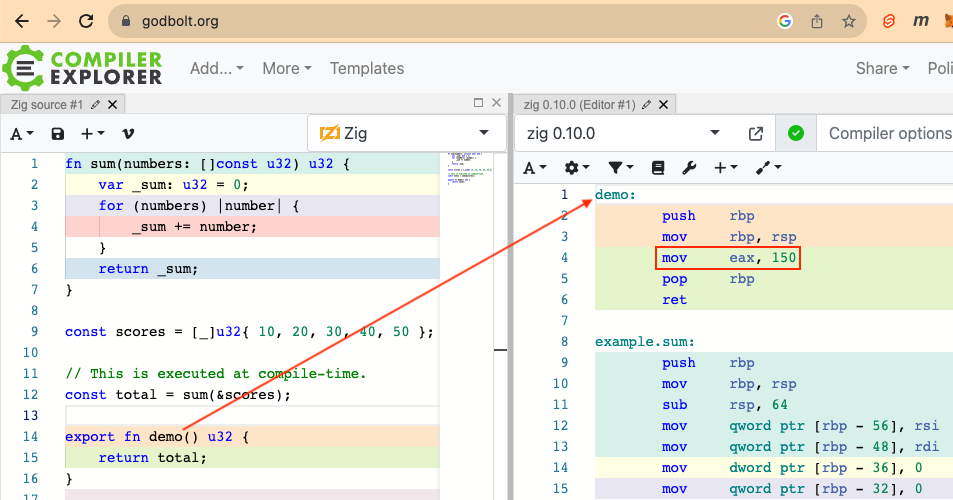
The built-in types comptime_int and comptime_float represent
integer and floating point values that are known at compile-time
and whose size is not specified.
TODO: Is the size of a comptime_int always the CPU word size?
TODO: Is the size of a comptime_float always 128 bits?
Variables of these types must be either const or comptime.
For example:
const std = @import("std");
const print = std.debug.print;

const my_int = 19;
const my_float = 3.14;

pub fn main() !void {
    print("my_int type is {}\n", .{@TypeOf(my_int)}); // comptime_int
    print("my_float type is {}\n", .{@TypeOf(my_float)}); // comptime_float
}
inline Keyword
The inline keyword can be applied to functions, for loops, and while loops.
This screenshot shows the assembly code generated for a non-inline function.
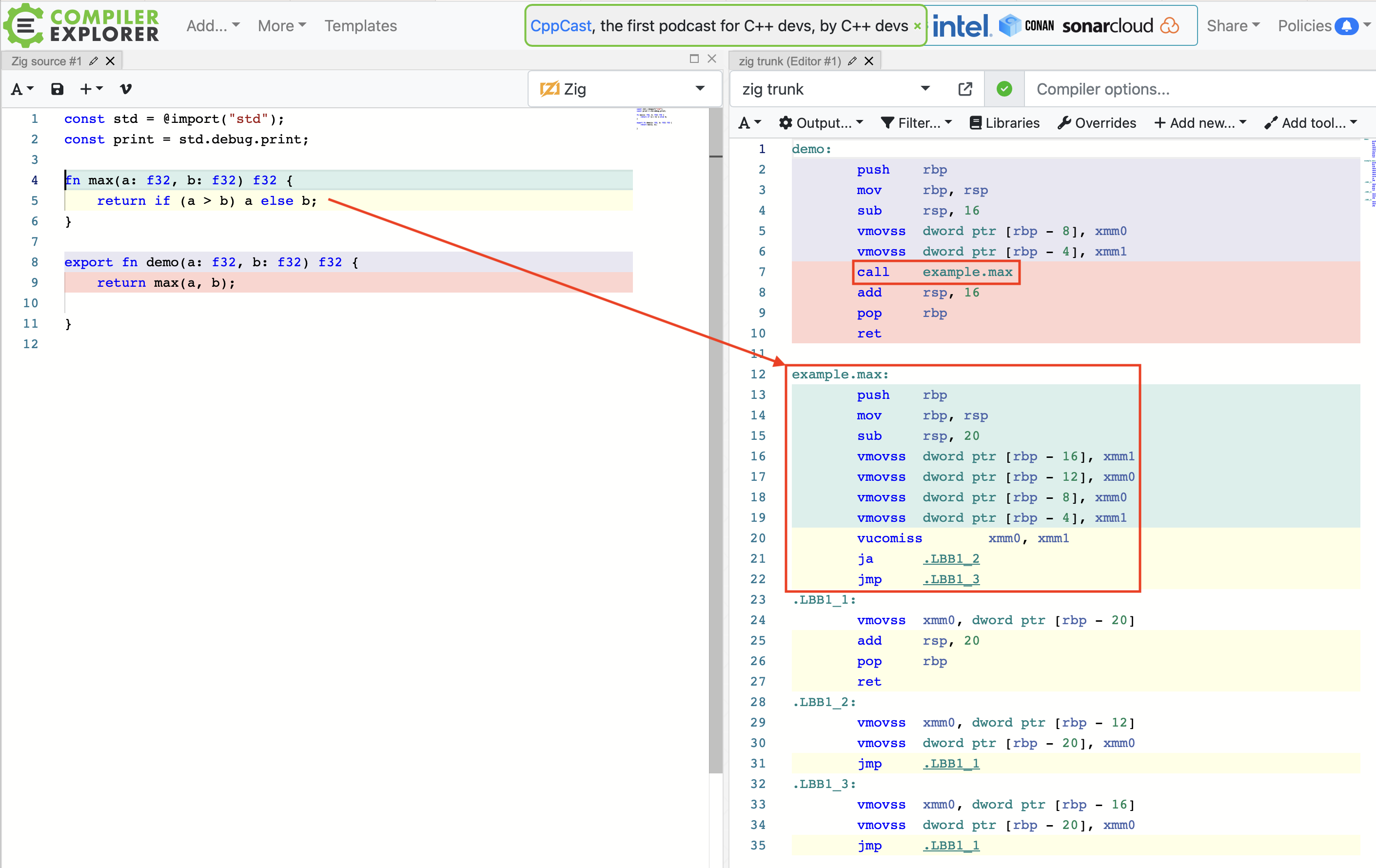
This screenshot shows the assembly code generated for the same function
when changed to be inline.
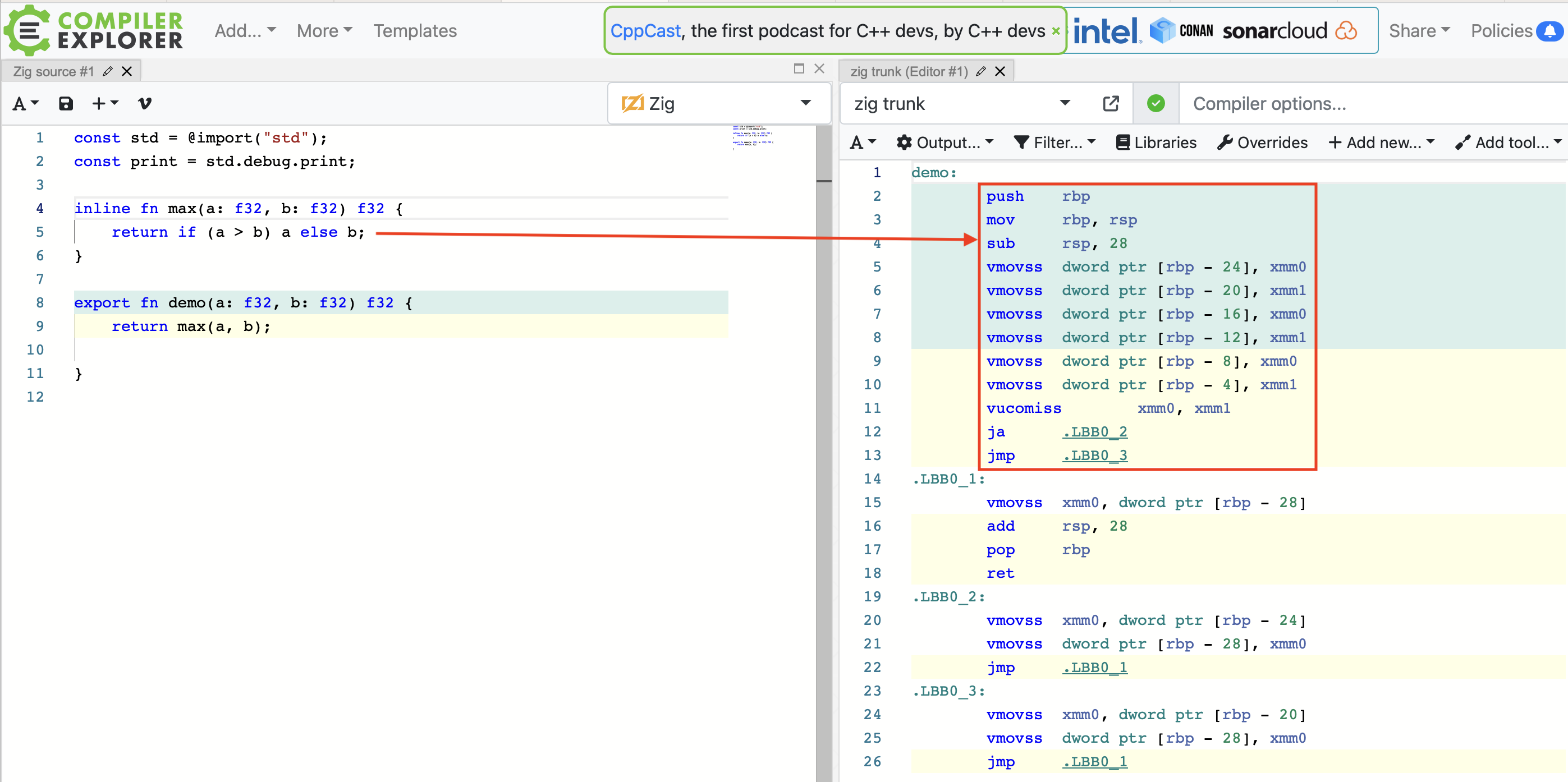
Polymorphism
Generic functions can be implemented using parameters with the type anytype
or by using unions. This achieves a form of polymorphism.
The following code demonstrates both approaches.
const std = @import("std");
const print = std.debug.print;
const expectEqual = std.testing.expectEqual;

const Circle = struct {
    radius: f32 = 0,
    pub fn area(self: @This()) f32 {
        return std.math.pi * self.radius * self.radius;
    }
};

const Rectangle = struct {
    width: f32 = 0,
    height: f32 = 0,
    pub fn area(self: @This()) f32 {
        return self.width * self.height;
    }
};

const Square = struct {
    size: f32 = 0,
    pub fn area(self: @This()) f32 {
        return self.size * self.size;
    }
};

fn anyArea(shape: anytype) f32 {
    return shape.area();
}

test "polymorphism with anytype" {
    const r = Rectangle{ .width = 2, .height = 3 };
    try expectEqual(r.area(), 6.0);
    try expectEqual(anyArea(&r), 6.0);

    const shapes = .{
        Circle{ .radius = 2 },
        Rectangle{ .width = 2, .height = 3 },
        Square{ .size = 2 },
    };

    const expected = [_]f32{ 12.5663706, 6.0, 4.0 };

    // "inline" is required here because
    // the elements in shapes do not all have the same type.
    inline for (shapes, 0..) |shape, index| {
        try expectEqual(anyArea(&shape), expected[index]);
    }

    // This demonstrates the error "shape must be a pointer to a struct".
    // const area = anyArea(Square{ .size = 2 });
    // try expectEqual(area, 4);
}

const Shape = union(enum) {
    circle: Circle,
    rectangle: Rectangle,
    square: Square,
};

fn shapeArea(shape: *const Shape) f32 {
    return switch (shape.*) {
        .circle => |c| c.area(),
        .rectangle => |r| r.area(),
        .square => |s| s.area(),
    };
}

test "polymorphism with union" {
    const shapes = [_]Shape{
        .{ .circle = Circle{ .radius = 2 } },
        .{ .rectangle = Rectangle{ .width = 2, .height = 3 } },
        .{ .square = Square{ .size = 2 } },
    };

    const expected = [_]f32{ 12.5663706, 6.0, 4.0 };

    for (shapes, 0..) |shape, index| {
        try expectEqual(shapeArea(&shape), expected[index]);
    }
}
Reflection
The following built-in functions support reflection:
@hasDecldetermines if a struct contains a declaration with a given name.@hasFielddetermines if a struct contains a field with a given name.@Thiswhen inside astructdefinition, returns its type.@TypeOfreturns the type of a given value or the common type of a list of values.@typeInforeturns a tagged union that describes a type.@typeNamereturns the name of a given type as a string.std.meta.fieldsreturns information about the fields in a struct.std.meta.hasFndetermines if a struct contains a function with a given name.
For more, see the library zigtrait.
const std = @import("std");
const print = std.debug.print;

const Dog = struct { name: []const u8, breed: []const u8, age: u8 };

fn nextInteger(n: i32, bigger: bool) i32 {
    return if (bigger) n + 1 else n - 1;
}

pub fn main() void {
    const d = Dog{ .name = "Comet", .breed = "whippet", .age = 3 };

    // Struct reflection
    inline for (std.meta.fields(Dog)) |field| {
        const T = field.type;
        print(
            "Dog struct has field \"{s}\" with type {s}\n",
            .{ field.name, @typeName(T) }
        );

        const value = @field(d, field.name);
        print("value is {any}\n", .{value});
    }

    // Function reflection
    const T = @TypeOf(nextInteger);
    print("nextInteger type is {}\n", .{T}); // fn(i32, bool) i32
    const info = @typeInfo(T);
    if (info == .Fn) { // if T is a function type ...
        inline for (1.., info.Fn.params) |number, param| {
            // Can't get parameter name, only type.
            print("parameter {d} type is {any}\n", .{ number, param.type });
        }
        print("return type is {any}\n", .{info.Fn.return_type});
    }
}
In the code above, info is a std.built-in.Type instance.
It is compared to .Fn to test whether T is a function type.
A Type instance can be compared to any of these:
.AnyFrame, .Array, .Bool, .ComptimeFloat, .ComptimeInt, .Enum,
.EnumLiteral, .ErrorSet, .ErrorUnion, .Float, .Fn, .Frame, .Int,
.NoReturn, .Null, .Opaque, .Optional, .Pointer, .Struct,
.Undefined, .Union, .Vector, and .Void
Allocators
All memory allocation in Zig is done through allocators. There are many provided allocators that each use a different memory management strategy. New allocators can be defined to implement custom memory management strategies.
A program can use any number of allocators for different groups of memory allocations. This provides much more flexibility than in languages that only have one memory allocation strategy or only support selecting one for an entire program.
For guidelines on selecting an allocator, see Choosing an Allocator.
The defer keyword is followed by a statement or block of code
to be executed when the containing block terminates.
This is often used to free memory that was allocated by an allocator.
Keeping code that allocates and frees memory together
is less error-prone than allocating memory,
writing a bunch of code that uses it, and
having to remember to free it after all that code.
This is also better for functions that can exit in multiple ways.
Allocators typically do not free the memory they have allocated when an application is terminating because doing so is a waste of time. This gives Zig an advantage over C++ in time required to terminate because C++ destructors (which play a similar role) do run on application termination.
Many structs implemented in the Zig standard library, such as ArrayList,
define a deinit method that can be called to free its memory.
For example, defer my_array_list.deinit();
Some deinit methods modify the struct instance in some way.
An example is HashMap, but not ArrayList.
Instances that are modified by its deinit method cannot be const.
In cases where it is desirable to have a const instance,
a defer block can create a mutable, shallow copy of the struct
and then call deinit on that. For example:
defer {
    var mutable_instance = immutable_instance;
    mutable_instance.deinit();
}
To allocate a single struct instance on the heap,
use const struct_ptr = try allocator.create(SomeStructType);.
To free this, use allocator.destroy(struct_ptr);, possibly with defer..
To allocate an array of values on the heap,
use var array = try allocator.alloc(SomeType);.
To free this, use allocator.free(array);, possibly with defer..
For example, the function std.mem.join returns a string
that can be freed with defer allocator.free(my_string).
The ArrayList method toOwnedSlice
also returns a string that can be freed in the same way
where allocator is the one passed to the ArrayList when it is created.
Functions that allocate memory on the heap
typically take an allocator as their first argument.
This is preferable over using a globally accessible allocator
because it allows the function be to used with multiple allocators.
For example, such functions can be called with std.testing.allocator
in tests and a more efficient allocator when running outside of tests.
Generic data structures such as ArrayList hold a reference to an allocator.
Functions that take an argument that is such a data structure
can forego requiring another argument to specify an allocator if
it is acceptable to use the allocator associated with the data structure.
The Zig standard library provides the following allocators:
-
std.heap.ArenaAllocatorThis allocator uses an “arena” to handle the task of freeing the memory of everything allocated by it when it goes out of scope. This allows allocating memory for many things that don’t need to be individually freed. All that is required is to use
defer arena.deinit();one time right after theArenaAllocatoris created.The following code demonstrates using this allocator.
const std = @import("std"); const base_allocator = std.testing.allocator; const expectEqual = std.testing.expectEqual; test "ArenaAllocator" { var arena = std.heap.ArenaAllocator.init(base_allocator); defer arena.deinit(); const allocator = arena.allocator(); var list1 = std.ArrayList([]const u8).init(allocator); // no need to deinit try list1.append("one"); try list1.append("two"); try list1.append("three"); try expectEqual(list1.items.len, 3); var list2 = std.ArrayList(u8).init(allocator); // no need to deinit try list2.append(7); try list2.append(13); try expectEqual(list2.items.len, 2); // No memory is leaked even though we didn't deinit the lists. } -
std.heap.c_allocatorWhen C code is linked, this allocator allows using
malloc. -
std.heap.FixedBufferAllocatorThis allocates memory from a fixed size buffer which avoids allocating memory at run-time. It requires determining the maximum amount of memory needed at compile-time. If more than that amount is requested, an
OutOfMemoryerror occurs.The following code demonstrates using this kind of allocator.
const std = @import("std"); pub fn main() !void { // This gives OutOfMemory error when the buffer is less than 130 bytes. var buffer: [130]u8 = undefined; var fba = std.heap.FixedBufferAllocator.init(&buffer); const allocator = fba.allocator(); var list = std.ArrayList([]const u8).init(allocator); try list.append("one"); try list.append("two"); try list.append("three"); } -
std.heap.GeneralPurposeAllocatorThis is a configurable allocator that can detect certain errors while using heap memory.
The tuple passed to
GeneralPurposeAllocatoris for configuration. The following fields are supported:-
stack_trace_frames: usizeThis is the number of stack frames to capture. It defaults to 10 in test mode and 6 otherwise.
-
enable_memory_limit: boolThis defaults to
false. When `true“, the allocator has the following additional fields:total_requested_bytes: tracks the total allocated bytes of memory requestedrequested_memory_limit: causes allocations to returnerror.OutOfMemorywhentotal_requested_bytesexceeds this limit
-
safety: boolThis determines whether safety checks are enabled. It defaults to the value ofstd.debug.runtime_safety. -
thread_safe: boolThis determines whether the allocator may be used simultaneously from multiple threads. It defaults to
!built-in.single_threaded. -
MutexType: ?type = nullThis determines the type of mutex to use for thread safety. When it is null (the default), it defaults to using
std.Thread.Mutexwhen thread_safe is enabled orDummyMutexotherwise. -
verbose_log: boolWhen true, this enables emitting info messages with the size and address of every allocation. It defaults tofalse.
The following code demonstrates creating this kind of allocator.
const std = @import("std");
const print = std.debug.print;
const String = []const u8;

pub fn main() !void {
    var config = .{ .safety = true, .verbose_log = true };
    var gpa = std.heap.GeneralPurposeAllocator(config){};
    defer {
        // The defer method must be called on the gpa instance
        // in order for memory leaks to be detected.
        // check is a enum with the values "ok" and "leak"
        const check = gpa.deinit();
        print("leak? {}\n", .{check == .leak});
    }
    // This is a shorter way to call deinit which ignores the return value.
    // defer _ = gpa.deinit();

    var allocator = gpa.allocator();
    var list = std.ArrayList(String).init(allocator);
    // defer list.deinit(); // purposely leaking memory
    try list.append("red");
    print("len = {}\n", .{list.items.len});
}
Here is another example that demonstrates implementing a memory limit.
const std = @import("std"); const print = std.debug.print; const String = []const u8; pub fn main() !void { var config = .{ .enable_memory_limit = true, }; var gpa = std.heap.GeneralPurposeAllocator(config){}; gpa.requested_memory_limit = 1600; // get error: OutOfMemory with 1500 print("requested_memory_limit = {}\n", .{gpa.requested_memory_limit}); var allocator = gpa.allocator(); const result = try std.ChildProcess.run(.{ .allocator = allocator, .argv = &[_]String{"date"}, }); print("{s}\n", .{result.stdout}); } -
-
std.heap.LoggingAllocatorThis wraps another allocator and logs all the allocations and frees for debugging purposes. The following code demonstrates this.
const std = @import("std"); const String = []const u8; const print = std.debug.print; fn log(text: String) void { print("{s}\n", .{text}); } pub fn main() !void { var gpa = std.heap.GeneralPurposeAllocator(.{}){}; // can't be const var la = std.heap.loggingAllocator(gpa.allocator()); // can't be const const allocator = la.allocator(); var list = std.ArrayList(String).init(allocator); defer list.deinit(); log("appending red"); try list.append("red"); // allocates 128 bytes log("appending orange"); try list.append("orange"); log("appending yellow"); try list.append("yellow"); log("appending green"); try list.append("green"); log("appending blue"); try list.append("blue"); log("appending purple"); try list.append("purple"); log("appending white"); try list.append("white"); log("appending gray"); try list.append("gray"); log("appending black"); try list.append("black"); // allocs 320 bytes & deallocs previous 128 bytes log("appending brown"); try list.append("brown"); for (list.items) |color| { log(color); } log("end of main"); // frees 320 bytes } -
std.heap.LogToWriterAllocatorThis allocator is similar to
std.heap.LoggingAllocator, but allows specifying where the log messages should be written (such as a file). -
std.heap.MemoryPoolThis allocator allocates memory for only one type and is very fast. Use this in code that needs to allocate a large number of instances of one type.
For examples of using this, see the tests at memory_pool.zig.
-
std.heap.page_allocatorThis allocator allocates memory in chunks of the OS page size.
An instance of this allocator is available as a value in the
std.heapnamespace. For example:const allocator = std.heap.page_allocator; -
std.heap.raw_c_allocatorThis allocator asserts that allocations are within
@alignOf(std.c.max_align_t)and directly callsmalloc/free. It can be used withArenaAllocatorand is more optimal in that case than `std.heap.c_allocator“. -
std.heap.SbrkAllocatorThis is a low-level allocator. See sbrk.
-
std.heap.ScopedLoggingAllocatorThis is the same as
SbrkAllocator, but it goes directly to thestd.logfunction. -
std.heap.StackFallbackAllocator“Some stack, some heap: IF the stack is not enough, go to the heap”
-
std.heap.ThreadSafeAllocator“Covers an allocator in a way that calling it between threads is safe (not exactly fast tho)”
-
std.heap.WasmAllocator“Wasm is your friend, use this to allocate. Generally used as a backing allocator for GeneralPurpose or Arena”
-
std.heap.WasmPageAllocator“Dumber WasmAllocator, useful for when you actually wanna do your own memory management via pages”
-
std.testing.allocatorThis can only be used inside a
testblock. Most tests should use this for all allocations because it detects memory leaks. Other allocators must be used in programs and libraries.An instance of this allocator is available as a value in the
std.testingnamespace. For example:const allocator = std.testing.allocator; -
std.testing.FailingAllocatorThis fails after a given number of allocations. It is useful for testing how a program handles out of memory conditions. It must be passed another allocator such as
std.testing.allocator. For example:const testing = std.testing; var allocator = testing.FailingAllocator.init(testing.allocator, 5);
Stack vs. Heap
Memory allocated on the stack is automatically freed when the scope in which it is allocated exits.
Memory allocated on the heap can outlive the scope in which it was allocated. It must be freed to avoid leaking memory.
The following code demonstrates allocating objects on both the stack and heap.
const std = @import("std");
const String = []const u8;
const expectEqual = std.testing.expectEqual;
const expectEqualStrings = std.testing.expectEqualStrings;

const Dog = struct {
    const Self = @This();

    name: String,
    age: u8,

    // This allocates memory for a Dog object in the stack.
    // Defining this method is optional.
    pub fn init(name: String, age: u8) Self {
        return Self{ .name = name, .age = age };
    }

    // This allocates memory for a Dog object in the heap.
    // Defining this method is optional.
    pub fn initHeap(
        allocator: std.mem.Allocator,
        name: String,
        age: u8,
    ) !*Self {
        const dog_ptr = try allocator.create(Self);
        dog_ptr.* = .{ .name = name, .age = age };
        return dog_ptr;
    }
};

test "stack allocation" {
    const dog1 = Dog{ .name = "Comet", .age = 3 };
    const dog2 = Dog.init("Comet", 3);
    try expectEqualStrings(dog1.name, dog2.name);
    try expectEqual(dog1.age, dog2.age);
}

test "heap allocation" {
    const allocator = std.testing.allocator;

    // To allocate an array of objects instead of just one, use alloc method.
    const dog1 = try allocator.create(Dog);
    // To free an array of objects instead of just one, use free method.
    defer allocator.destroy(dog1);

    // dog1.name = "Comet";
    // dog1.age = 3;
    dog1.* = .{ .name = "Comet", .age = 3 };

    const dog2 = try Dog.initHeap(allocator, "Comet", 3);
    defer allocator.destroy(dog2);

    try expectEqualStrings(dog1.name, dog2.name);
    try expectEqual(dog1.age, dog2.age);
}
Standard Library
The Zig standard library provides many “commonly used algorithms, data structures, and definitions”.
Documentation on the standard library is somewhat sparse as of 2023.
Fortunately the source code typically provides useful information.
Click “src” links in the documentation to view the source code.
Look for doc comments on public (pub) declarations
and test blocks that demonstrate usage.
To use the standard library in a source file, add the following line near the top of the file which makes the entire library available:
const std = @import("std");
It is common to declare additional constants to make it easier to access standard library functions. For example:
const print = std.debug.print;
Standard Library Namespaces
The standard library defines many namespaces that provide types, functions, values, and error sets. Some of these define additional child namespaces.
The top-level namespaces in the standard library include the following:
-
array_hash_map- defines several kinds of hash maps that preserve insertion order -
ascii- ASCII text processing -
atomic- memory ordering, atomic data structures, and operations -
base64- Base64 encoding/decoding -
bit_set- bit manipulation data structures -
built-in- comptime-available information about the build environment, such as the target and optimization mode -
c- provides access to many standard C functions such asbind,connect,fork,free,malloc, andsend -
coff- Common Object File Format (COFF) -
compress- compression algorithms such as zlib, zstd, and more -
comptime_string_map- defines compile-time known has maps with string keys -
crypto- cryptography -
cstr- defines values used when working with C strings -
debug- debug printing, allocation and other debug helpers -
dwarf- Debugging With Arbitrary Record Formats (DWARF) debugging data format -
elf- Executable and Linking Format (ELF) -
enums- enum-related metaprogramming helpers -
event- evented I/O data structures -
fifo- first in, first out data structures -
fmt- string formatting and parsing (e.g. parsing numbers out of strings) -
fs- file system-related functionality -
hash- fast hashing functions (i.e. not cryptographically secure) -
hash_map- defines several kinds of hash maps that do not preserve insertion order -
heap- allocator implementations -
http- HTTP client and server -
io- I/O streams, reader/writer interfaces and common helpers -
json- JSON parsing and serialization -
leb- Little Endian Base (LEB128) encoding -
log- standardized interface for logging -
macho- Mach Object (Mach-O) file format -
math- mathematical constants and operations -
mem- functions for comparing, searching, and manipulating memoryThis namespace defines many functions for performing operations on memory. Many of these are applicable to strings. The following code demonstrates commonly used functions from this namespace in alphabetical order.
const std = @import("std"); const print = std.debug.print; const allocator = std.testing.allocator; const expect = std.testing.expect; const expectEqual = std.testing.expectEqual; const expectEqualStrings = std.testing.expectEqualStrings; const String = []const u8; const Dog = struct { name: String, breed: String, }; test "std.mem" { const s = "foo^bar^baz"; // Using var instead of const so it can be sorted. var numbers = [_]u32{ 21, 19, 42, 7, 13 }; try expectEqual(std.mem.count(u8, s, "^"), 2); try expect(std.mem.endsWith(u8, s, "baz")); try expect(std.mem.eql(u8, s, "foo^bar^baz")); try expectEqual(std.mem.indexOf(u8, s, "^"), 3); try expectEqual(std.mem.indexOfMax(u32, &numbers), 2); try expectEqual(std.mem.indexOfMin(u32, &numbers), 3); try expectEqual(std.mem.indexOfMinMax(u32, &numbers), .{ .index_min = 3, .index_max = 2 }); try expectEqual(std.mem.indexOfScalar(u32, &numbers, 19), 1); const strings = [_]String{ "foo", "bar", "baz" }; const joined = try std.mem.join(allocator, "^", &strings); defer allocator.free(joined); try expectEqualStrings(joined, "foo^bar^baz"); try expectEqual(std.mem.lastIndexOf(u8, s, "^"), 7); try expectEqual(std.mem.lastIndexOfScalar(u32, &numbers, 7), 3); try expect(std.mem.lessThan(u8, "bar", "foo")); try expect(!std.mem.lessThan(u8, "foo", "bar")); // There is no greaterThan function. try expectEqual(std.mem.max(u32, &numbers), 42); try expectEqual(std.mem.min(u32, &numbers), 7); try expectEqual(std.mem.minMax(u32, &numbers), .{ .min = 7, .max = 42 }); // Will get "out of bounds for array" if not long enough. var buffer: [30]u8 = undefined; const times = std.mem.replace(u8, s, "^", "-", &buffer); try expectEqual(times, 2); const expectedReplacement = "foo-bar-baz"; try expectEqualStrings(buffer[0..expectedReplacement.len], expectedReplacement); std.mem.replaceScalar(u32, &numbers, 42, 0); const expectedNumbers = [_]u32{ 21, 19, 0, 7, 13 }; try expectEqual(numbers, expectedNumbers); std.mem.sort(u32, &numbers, {}, lessThanU32); try expectEqual(numbers, .{ 0, 7, 13, 19, 21 }); var dogs = [_]Dog{ .{ .name = "Oscar", .breed = "German Shorthaired Pointer" }, .{ .name = "Comet", .breed = "Whippet" }, .{ .name = "Ramsay", .breed = "Native American Indian Dog" }, }; std.mem.sort(Dog, &dogs, {}, stringField(Dog, "name").lessThan); try expectEqualStrings(dogs[0].name, "Comet"); try expectEqualStrings(dogs[1].name, "Oscar"); try expectEqualStrings(dogs[2].name, "Ramsay"); const expectedPieces = [_]String{ "foo", "bar", "baz" }; var iter = std.mem.splitScalar(u8, s, '^'); var index: u8 = 0; while (iter.next()) |color| { try expectEqualStrings(expectedPieces[index], color); index += 1; } try expect(std.mem.startsWith(u8, s, "foo")); var words = [_]String{ "foo", "bar", "baz" }; std.mem.swap(String, &words[0], &words[2]); try expectEqualStrings(words[0], "baz"); try expectEqualStrings(words[2], "foo"); const padded = " foo bar "; try expectEqualStrings(std.mem.trim(u8, padded, " "), "foo bar"); try expectEqualStrings(std.mem.trimLeft(u8, padded, " "), "foo bar "); try expectEqualStrings(std.mem.trimRight(u8, padded, " "), " foo bar"); } fn lessThanU32(_: void, lhs: u32, rhs: u32) bool { return lhs < rhs; } // This can be used to sort Struct instances on a given string field. fn stringField(comptime T: type, comptime field: String) type { return struct { fn lessThan( _: void, lhs: T, rhs: T, ) bool { const left = @field(lhs, field); const right = @field(rhs, field); return std.mem.lessThan(u8, left, right); } }; } -
meta- metaprogramming helpers -
net- networking -
options- standard library options -
os- wrappers around OS-specific APIs -
packed_int_array- a set of array and slice types that bit-pack integer elements -
pdb- Program Database (PDB) file format -
process- accessors for process-related info (e.g. command line arguments) and spawning of child processes -
rand- fast pseudo-random number generators (i.e. not cryptographically secure) -
simd- single Instruction Multiple Data (SIMD) helpers -
sort- sorting -
start- defines a couple of undocumented functions -
tar- Tape Archive (tar) archive format compression/decompression -
testing- testing allocator, testing assertions, and other helpers for testing code -
time- sleep, obtaining the current time, conversion constants, and more -
tz- time zones -
unicode- UTF-8 and UTF-16LE encoding/decoding -
valgrind- helpers for integrating with Valgrind -
wasm- constants and types representing the WebAssembly (Wasm) binary format -
zig- tokenizing and parsing of Zig code and other Zig-specific language tooling
Some of the most commonly used parts are described in the subsections below.
ArrayList type
The ArrayList data structure is “a contiguous, growable list of items in memory.”
Instances of ArrayList have the fields items, capacity, and allocator.
Instances have the methods append, appendSlice, clearAndFree, clone, deinit,
getLast, getLastOrNull, init, insert, insertSlice, orderedRemove,
pop, popOrNull, replaceRange, writer, and many more.
The following code demonstrates common operations on ArrayLists.
const std = @import("std");
const print = std.debug.print;
const allocator = std.testing.allocator;
const expectEqual = std.testing.expectEqual;
const expectEqualStrings = std.testing.expectEqualStrings;

const String = []const u8;

test "ArrayList" {
    // Beginning with no capacity cannot return an error.
    var list = std.ArrayList(String).init(allocator);
    // Beginning with a specified capacity can return an error.
    // var list = try std.ArrayList(String).initCapacity(allocator, 500);
    defer list.deinit();

    try list.append("red");
    try list.appendSlice(&[_]String{ "green", "blue" });
    try expectEqual(list.items.len, 3);

    // Iterate over the list entries.
    print("\n", .{});
    for (list.items) |value| {
        print("{s}\n", .{value});
    }

    // There is no method to test if an ArrayList` contains a given value.
    // It's more efficient to use a `BufSet` when that is needed.

    try expectEqual(@as(?String, "blue"), list.getLastOrNull());

    try expectEqual(@as(?String, "blue"), list.popOrNull());
    try expectEqual(list.items.len, 2);

    try list.insert(1, "pink");
    try expectEqual(list.items.len, 3);
    // Also see the replaceRange method.

    const removed = list.orderedRemove(1);
    try expectEqual(@as(String, "pink"), removed);
    try expectEqual(list.items.len, 2);

    try list.appendNTimes("black", 2);
    try expectEqual(list.items.len, 4); // length was 2
    try expectEqual(@as(String, "black"), list.getLast());

    list.clearAndFree();
    try expectEqual(list.items.len, 0);
}
MultiArrayList type
A MultiArrayList is similar to an ArrayList
in that it to stores a sequence of elements.
However, the elements must be instances of a struct or union type.
Each field is stored in a separate array (not a vector) which makes it easy
to obtain a slice containing all the values for a given field.
Such a slice can used to create a Vector which supports SIMD
operations.
The following code demonstrates several common operations
on MultiArrayList instances:
const std = @import("std");
const allocator = std.testing.allocator;
const expectEqual = std.testing.expectEqual;

const Range = struct {
    min: f32,
    max: f32,
    current: f32,
};

test "MultiArrayList" {
    // Unlike "ArrayList" instances, "MultiArrayList" instances
    // do not store an allocator in order to optimize memory used.
    // This is why an allocator must be passed
    // to methods like "append" and "insert".
    var list = std.MultiArrayList(Range){};
    defer list.deinit(allocator);

    // Optionally set the total capacity before appending elements
    // to avoid having to allocate memory multiple times.
    try list.ensureTotalCapacity(allocator, 10);

    const r1 = Range{ .min = 0, .max = 100, .current = 50 };
    try list.append(allocator, r1);

    try list.append(allocator, Range{ .min = 10, .max = 50, .current = 25 });

    // Insert an element at a specific index, zero in this case.
    try list.insert(allocator, 0, Range{ .min = 1000, .max = 9999, .current = 1234 });

    // Set an element at a specific index, zero in this case.
    list.set(0, Range{ .min = 1000, .max = 2000, .current = 1234 });

    try expectEqual(list.len, 3);

    // After the insert, r1 was moved to index 1.
    try expectEqual(list.get(1), r1);

    // The "items" method gets a slice of the values for a given field.
    const currents: []f32 = list.items(.current);

    const vector: @Vector(3, f32) = currents[0..3].*;
    const sum = @reduce(.Add, vector);
    try expectEqual(sum, 1309.0);
}
HashMap type
A hash map is a collection of key/value pairs.
std.HashMap is a low-level implementation that
requires supplying a hashing function.
std.AutoHashMap
provides a good hashing function for most key types.
The first argument is the key type and the second is the value type.
When the key type is []const u8, the following error is triggered:
“std.auto_hash.autoHash does not allow slices here ([]const u8)
because the intent is unclear. Consider using std.StringHashMap
for hashing the contents of []const u8.”
The following code creates an AutoHashMap where
the keys are strings and the values are unsigned integers.
var map = std.AutoHashMap([]const u8, u8).init(allocator);
std.AutoArrayHashMap is similar to std.AutoHashMap.
It differs in the following ways described in the docs:
- “Insertion order is preserved.”
- “Deletions perform a swap removal on the entries list.”
- “Modifying the hash map while iterating is allowed, however, one must understand the well-defined behavior when mixing insertions and deletions with iteration.
- The
valuesmethod “returns the backing array of values”.
std.BufMap is used for maps where both keys and values are strings.
std.StringArrayHashMap provides a good hashing function for string keys. The argument is the value type.
std.StringHashMap
is similar to StringArrayHashMap.
TODO: How do they differ?
The following code demonstrates common operations on HashMaps.
const std = @import("std");
const print = std.debug.print;
const allocator = std.testing.allocator;
const expect = std.testing.expect;
const expectEqual = std.testing.expectEqual;
const expectEqualStrings = std.testing.expectEqualStrings;
const String = []const u8;

const Dog = struct {
    name: String,
    breed: String,
};

test "AutoArrayHashMap" {
    var map = std.AutoArrayHashMap(u8, String).init(allocator);
    defer map.deinit();

    try map.put(99, "Gretzky");
    try map.put(4, "Orr");
    try map.put(19, "Ratelle");
    try expectEqual(map.count(), 3);

    // Iterate over the map entries.
    print("\n", .{});
    var iter = map.iterator();
    while (iter.next()) |entry| {
        print("{s} number is {d}.\n", .{ entry.value_ptr.*, entry.key_ptr.* });
    }

    try expect(map.contains(99));

    // The `get` method returns an optional value.
    var name = map.get(99) orelse "";
    try expectEqualStrings("Gretzky", name);

    const removed = map.orderedRemove(99);
    try expect(removed);
    try expectEqual(@as(?String, null), map.get(99));
}

test "AutoHashMap" {
    var map = std.AutoHashMap(u8, String).init(allocator);
    defer map.deinit();

    try map.put(99, "Gretzky");
    try map.put(4, "Orr");
    try map.put(19, "Ratelle");
    try expectEqual(map.count(), 3);

    // Iterate over the map entries.
    print("\n", .{});
    var iter = map.iterator();
    while (iter.next()) |entry| {
        print("{s} number is {d}.\n", .{ entry.value_ptr.*, entry.key_ptr.* });
    }

    // Iterate over the map keys.
    var iter2 = map.keyIterator();
    while (iter2.next()) |key| {
        const number = key.*;
        if (map.get(number)) |name| {
            print("{s} number is {d}.\n", .{ name, number });
        }
    }

    try expect(map.contains(99));

    // The `get` method returns an optional value.
    var name = map.get(99) orelse "";
    try expectEqualStrings("Gretzky", name);

    const removed = map.remove(99);
    try expect(removed);
    try expectEqual(@as(?String, null), map.get(99));
}

test "BufMap" {
    var map = std.BufMap.init(allocator);
    defer map.deinit();

    try map.put("Comet", "whippet");
    try map.put("Oscar", "german shorthaired pointer");
    try expectEqual(map.count(), 2);
    try expectEqualStrings(map.get("Comet").?, "whippet");
    try expectEqualStrings(map.get("Oscar").?, "german shorthaired pointer");
}

test "ComptimeStringMap" {
    // Create an array of tuples.
    const list = .{
        .{ "Gretzky", 99 },
        .{ "Orr", 4 },
        .{ "Ratelle", 19 },
    };
    try expectEqual(list.len, 3);

    // Create a compile-time map of string keys to u8 values.
    // Since an immutable map with a fixed size is being created,
    // there is no need to deinit it.
    const map = std.ComptimeStringMap(u8, list);

    for (map.kvs) |kv| {
        print("{s} number is {d}.\n", .{ kv.key, kv.value });
    }

    try expect(map.has("Gretzky"));
    try expect(map.has("Orr"));
    try expect(map.has("Ratelle"));

    try expectEqual(@as(u8, 99), map.get("Gretzky").);
    try expectEqual(@as(u8, 4), map.get("Orr").);
    try expectEqual(@as(u8, 19), map.get("Ratelle").);
}

test "StringArrayHashMap" {
    const dogs = [_]Dog{
        .{ .name = "Comet", .breed = "whippet" },
        .{ .name = "Oscar", .breed = "german shorthaired pointer" },
    };

    // The keys are strings and the values are Dogs.
    var map = std.StringArrayHashMap(Dog).init(allocator);
    defer map.deinit();

    for (dogs) |dog| {
        try map.put(dog.name, dog);
    }

    try expectEqualStrings(map.get("Comet").?.breed, "whippet");
    try expectEqualStrings(map.get("Oscar").?.breed, "german shorthaired pointer");
}

test "StringHashMap" {
    // The keys are strings and the values are unsigned integers.
    var map = std.StringHashMap(u8).init(allocator);
    defer map.deinit();

    try map.put("Gretzky", 99);
    try map.put("Orr", 4);
    try map.put("Ratelle", 19);
    try expectEqual(map.count(), 3);

    // Iterate over the map entries.
    print("\n", .{});
    var iter = map.iterator();
    while (iter.next()) |entry| {
        print("{s} number is {d}.\n", .{ entry.key_ptr.*, entry.value_ptr.* });
    }

    // Iterate over the map keys.
    var iter2 = map.keyIterator();
    while (iter2.next()) |key| {
        print("{s} number is {any}.\n", .{ key.*, map.get(key.*) });
    }

    try expect(map.contains("Gretzky"));

    // The `get` method returns an optional value.
    try expectEqual(@as(?u8, 99), map.get("Gretzky"));

    const removed = map.remove("Gretzky");
    try expect(removed);
    try expectEqual(@as(?u8, null), map.get("Gretzky"));
}
std.ComptimeStringMap
provides an alternative to StringHashMap for immutable hash maps
with string keys whose entries are fixed at compile-time.
It has a much simpler API that the hash maps described above
and does not require memory cleanup by calling a deinit method.
The ComptimeStringMap function takes two arguments.
The first is the value type and the second is an array of key/value tuples.
The following code demonstrates common operations on a ComptimeStringMap.
const std = @import("std");
const print = std.debug.print;
const expect = std.testing.expect;
const expectEqual = std.testing.expectEqual;

test "ComptimeStringMap" {
    // Create an array of tuples.
    const list = .{
        .{ "Gretzky", 99 },
        .{ "Orr", 4 },
        .{ "Ratelle", 19 },
    };
    try expectEqual(list.len, 3);

    // Create a compile-time map of string keys to u8 values.
    const map = std.ComptimeStringMap(u8, list);

    for (map.kvs) |kv| {
        print("{s} number is {d}.\n", .{ kv.key, kv.value });
    }

    try expect(map.has("Gretzky"));
    try expect(map.has("Orr"));
    try expect(map.has("Ratelle"));

    try expectEqual(@as(u8, 99), map.get("Gretzky").);
    try expectEqual(@as(u8, 4), map.get("Orr").);
    try expectEqual(@as(u8, 19), map.get("Ratelle").);
}
Set types
A BufSet is a set of string values.
An EnumSet is a set of enum values.
A DynamicBitSet is a set of bit values.
For sets of other kinds of values, consider using a HashMap
where the values have the type void.
The following code demonstrates common operations on both of these kinds of sets.
const std = @import("std");
const print = std.debug.print;
const expect = std.testing.expect;
const expectEqual = std.testing.expectEqual;

test "BufSet" {
    const allocator = std.testing.allocator;
    var set = std.BufSet.init(allocator);
    defer set.deinit();

    try set.insert("Gretzky");
    try set.insert("Orr");
    try set.insert("Ratelle");
    try expectEqual(set.count(), 3);

    // Iterate over the set keys.
    print("\n", .{});
    var iter = set.iterator();
    while (iter.next()) |key| {
        print("{s}\n", .{key.*});
    }

    try expect(set.contains("Gretzky"));

    set.remove("Gretzky");
    try expect(!set.contains("Gretzky"));
}

test "EnumSet" {
    const Color = enum { red, orange, yellow, green, blue, purple, white, black };

    // This does not use an allocator and does not have a `deinit` method.
    var set = std.EnumSet(Color).initEmpty();

    // To begin with all enum values in the set ...
    // var set = std.EnumSet(Color).initFull();

    // To begin with a subset of the enum values in the set ...
    // var set = std.EnumSet(Color).initMany(&[_]Color{ .orange, .yellow });

    // To begin with one of the enum values in the set ...
    // var set = std.EnumSet(Color).initOne(.orange);

    set.insert(.orange);
    set.insert(.yellow);
    set.insert(.black);
    try expectEqual(set.count(), 3);

    // Iterate over the set keys.
    print("\n", .{});
    var iter = set.iterator();
    while (iter.next()) |key| {
        print("{}\n", .{key});
    }

    try expect(set.contains(.yellow));

    set.remove(.yellow);
    try expect(!set.contains(.yellow));

    // There are many more methods on `EnumSet` instances.
}
SinglyLinkedList
The SinglyLinkedList data structure has a pointer to the head list. List elements have a pointer to the next element in the sequence.
Instances of SinglyLinkedList have the field first
which is an optional pointer to a SinglyLinkedList.Node.
Instances have the methods len(), popFirst(), prepend(node), and remove(node).
Instances of SinglyLinkedList.Node have the fields data and next.
Instances have the methods countChildren(), findLast(node),
insertAfter(node), removeNext(), and reverse().
The following code demonstrates common operations on SinglyLinkedLists.
const std = @import("std");
const expectEqual = std.testing.expectEqual;

const DataType = u32;
const NumberList = std.SinglyLinkedList(DataType);
const Node = NumberList.Node;

test "SinglyLinkedList basic" {
    var list = NumberList{};

    // node1 holds a struct on the stack.
    var node1 = Node{ .data = 1 };
    list.prepend(&node1);

    // If we were to reuse node1 here,
    // it would replace the struct on the stack,
    // destroying the previous value.
    var node2 = Node{ .data = 2 };
    list.prepend(&node2);

    try expectEqual(list.len(), 2);

    var node = list.first orelse unreachable;
    try expectEqual(node.data, 2);

    node = node.next orelse unreachable;
    try expectEqual(node.data, 1);

    try expectEqual(node.next, null);
}

test "SinglyLinkedList advanced" {
    var arena = std.heap.ArenaAllocator.init(std.testing.allocator);
    defer arena.deinit();
    const allocator = arena.allocator();

    // Create a linked list from values in an array.
    var list = NumberList{};
    const numbers = [_]DataType{ 10, 20, 30 };
    for (numbers) |number| {
        var node_ptr = try allocator.create(Node);
        node_ptr.data = number;
        list.prepend(node_ptr);
    }

    try expectEqual(list.len(), numbers.len);

    // Verify the linked list contents.
    var iter = list.first;
    var i: usize = numbers.len;
    while (iter) |node_ptr| {
        i -= 1;
        try expectEqual(node_ptr.data, numbers[i]);
        iter = node_ptr.next;
    }
}
DoublyLinkedList
The DoublyLinkedList data structure “has a pair of pointers to both the head and tail of the list. List elements have pointers to both the previous and next elements in the sequence.”
Instances of DoublyLinkedList have the fields first, last, and len.
The fields first and last are optional pointers to a DoublyLinkedList.Node.
Instances have the methods append(node), concatByMoving(other_list),
insertAfter(node1, node2), insertBefore(node1, node2),
pop(), popFirst(), prepend(node), and remove(node).
Instances of DoublyLinkedList.Node have the fields data, prev, and next.
Instances have no methods.
The following code demonstrates common operations on DoubllyLinkedLists.
const std = @import("std");
const expectEqual = std.testing.expectEqual;

const DataType = u32;
const NumberList = std.DoublyLinkedList(DataType);
const Node = NumberList.Node;

test "DoublyLinkedList basic" {
    var list = NumberList{};

    // node1 holds a struct on the stack.
    var node1 = Node{ .data = 1 };
    list.append(&node1);

    // If we were to reuse node1 here,
    // it would replace the struct on the stack,
    // destroying the previous value.
    var node2 = Node{ .data = 2 };
    list.append(&node2);

    try expectEqual(list.len, 2);
    try expectEqual(list.first.?.data, 1);
    try expectEqual(list.last.?.data, 2);

    var node = list.first orelse unreachable;
    try expectEqual(node.data, 1);

    node = node.next orelse unreachable;
    try expectEqual(node.data, 2);

    try expectEqual(node.next, null);
}

test "DoublyLinkedList advanced" {
    var arena = std.heap.ArenaAllocator.init(std.testing.allocator);
    defer arena.deinit();
    const allocator = arena.allocator();

    // Create a linked list from values in an array.
    var list = NumberList{};
    const numbers = [_]DataType{ 10, 20, 30 };
    for (numbers) |number| {
        var node_ptr = try allocator.create(Node);
        node_ptr.data = number;
        list.append(node_ptr);
    }

    try expectEqual(list.len, numbers.len);

    // Verify the linked list contents from the beginning.
    var iter = list.first;
    var i: usize = 0;
    while (iter) |node_ptr| {
        try expectEqual(node_ptr.data, numbers[i]);
        iter = node_ptr.next;
        i += 1;
    }

    // Verify the linked list contents from the end.
    iter = list.last;
    i = numbers.len;
    while (iter) |node_ptr| {
        i -= 1;
        try expectEqual(node_ptr.data, numbers[i]);
        iter = node_ptr.prev;
    }
}
Builtin Functions
Zig provides over 100 (118 as of 10/23) built-in functions. These are known to the compiler and do not require importing in order to use them.
The name of every built-in function begins with ”@”.
If @ is followed by an uppercase letter then the function returns a type.
While the built-in functions are invoked like normal functions, some have behavior that normal functions cannot replicate.
The official documentation at the link above does not categorize the built-in functions. The YouTube video A Look at Zig from Loris Cro uses the categories below:
Math (25)
The math built-in functions can take advantage of CPU-specific capabilities
to achieve better performance than
functions in the standard library found in std.math.
However, this is partially achieved by providing less error checking.
Most of the math built-in functions can
operator on a single float or a Vector of floats.
When passed a Vector of floats, they return a new Vector of floats.
-
@addWithOverflow- takes numbersaandband returns a tuple containinga + band a bit indicating whether there was an overflow -
@abs- returns the absolute value of a number (was@fabs) -
@ceil- returns the ceiling of number -
@cos- returns the cosine of a number -
@divExact- returns the quotient of two numbers -
@divFloor- returns the quotient of two numbers, rounded toward negative infinity -
@divTrunc- returns the quotient of two numbers, rounded toward zero -
@exp- returns the constant e raised to a given number -
@exp2- returns 2 raised to a given number -
@floor- returns the floor of a number -
@log- returns the natural log of a number -
@log10- returns the log base 10 of a number -
@log2- returns the log base 2 of a number -
@max- returns the maximum of two numbers -
@min- returns the minimum of two numbers -
@mod- returns the modulo of a numerator and denominator@mod(-5, 3) == 1 (@divFloor(a, b) * b) + @mod(a, b) == a -
@mulAdd- takes numbersa,b, andcand returns(a * b) + conly rounding once for better accuracy -
@mulWithOverflow- takes numbersaandband returns a tuple containinga * band a bit indicating whether there was an overflow -
@rem- returns the remainder of a numerator and denominator@rem(-5, 3) == -2 (@divTrunc(a, b) * b) + @rem(a, b) == a -
@round- returns a number rounded away from zero (compare to@trunc) -
@sin- returns the sine of a number -
@sqrt-returns the square root of a number -
@subWithOverflow- takes numbersaandband returns a tuple containinga - band a bit indicating whether there was an overflow -
@tan- returns the tangent of a number -
@trunc- returns a number truncated towards zero (compare to@round)
Bitwise (8)
-
@bitReverse- takes any integer type and returns the same type with bits reversed -
@byteSwap- converts between big and little endian -
@clz- “count leading zeros”; takes any integer type and returns the number of most significant zero bits -
@ctz- “count trailing zeros” takes any integer type and returns the number of least significant zero bits -
@popCount- “population count”; takes any integer type and returns the number of one bitsconst std = @import("std"); const expectEqual = std.testing.expectEqual; test "clz" { const i: u8 = 16; // bits are 00010000 try expectEqual(3, @clz(i)); } test "ctz" { const i: u8 = 16; try expectEqual(4, @ctz(i)); } test "popcount" { const i: u8 = 16; try expectEqual(1, @popCount(i)); } -
@shlExact- “shift left”; takes any integer type and returns the value with bits shifted left by a given amount -
@shlWithOverflow- takes a numberaand shift amountband returns a tuple containinga << band a bit indicating whether there was an overflow -
@shrExact- “shift right”; takes any integer type and returns the value with bits shifted right by a given amount
Atomic and Memory (12)
@atomicLoad- atomically dereferences a pointer and returns the value@atomicRmw- atomically modifies memory and returns the previous value@atomicStore- atomically stores a value@cmpxchgStrong- performs a strong atomic compare exchange operation@cmpxchgWeak- performs a weak atomic compare exchange operation@fence- introduces “happens before edge” between operations TODO: What does this mean?@memcpy- copies data from a source to a mutable destination@memset- sets all elements of a mutable destination to the same value@wasmMemoryGrow- increases the size of WASM memory at an index@wasmMemorySize- returns the size of WASM memory at an index
Cast and Conversion (20)
In general, using @as is preferred over other casting functions.
Casts can be combined with introspection functions
to achieve better error handling.
-
@alignCast- changes the alignment of a pointer -
@addrSpaceCast- -
@as- casts a given value to a given type when guaranteed to succeedThis does not compile if the destination type cannot represent all possible values of the source type. For example, this cannot be used to cast a u32 value to a u8 value.
-
@bitCast- converts a value of one numeric type to another; the sizes of the source and destination values must match -
@constCast- takes a const pointer and returns a non-const pointer -
@enumFromInt- converts an integer to an enum value -
@errorCast- -
@errorFromInt- -
@floatCast- -
@floatFromInt- -
@intCast- casts a given integer value to another integer typeThis panics if any bits will be truncated.
-
@intFromBool- -
@intFromEnum- converts an enum value to an integer -
@intFromError- -
@intFromFloat- -
@intFromPtr- -
@ptrCast- -
@ptrFromInt- -
@truncate- -
@volatileCast-
Programming (18)
-
@cDefine- -
@cImport- imports C libraries for use in Zig codeFor example:
const c = @cImport({
    @cInclude("stdio.h");
    @cInclude("some_other.h");
});

c.puts("Hello, World!");
To include the required C when building the Zig program, include the
-lcoption. For example,zig run -lc main.zig. -
@cInclude- includes a specific C library inside a@cImportSee the example in
@cImportabove. -
@cUndef- -
@cVaArg -
@cVaCopy -
@cVaEnd -
@cVaStart -
@compileError- -
@compileLog- -
@embedFileThis reads a file at compile-time and embeds the text in the compiled code as if it were a literal string. The file path can be absolute or relative.
const std = @import("std"); const expectEqualStrings = std.testing.expectEqualStrings; test "embedFile" { const data = @embedFile("./file_io/data.txt"); try expectEqualStrings(data, "Hello, World!"); } -
@export- creates a symbole in the output object file -
@import- imports a module -
@setAlignStack- -
@setCold- -
@setEvalBranchQuota- -
@setFloatMode- -
@setRuntimeSafety-
Run-time and Async (3)
@breakpoint-@frameAddress-@panic- terminates the program and outputs a given message and stack trace
Introspection (11)
-
@alignOf- returns the number of bytes to which a given type must be aligned -
@bitOffsetOf- -
@bitSizeOf- -
@errorName- -
@errorReturnTrace- -
@fieldParentPtr- -
@frameAddress- -
@returnAddress- -
@sizeOf- -
@src- returns astd.built-in.SourceLocationstruct containing the fieldsfile,fn_name,line, andcolumn.const std = @import("std"); const expectEqual = std.testing.expectEqual; const expectEqualStrings = std.testing.expectEqualStrings; fn demo() !std.built-in.SourceLocation { // @src must be called inside a function. return @src(); } test "@src" { const src = try demo(); try expectEqualStrings(src.file, "src_test.zig"); try expectEqualStrings(src.fn_name, "demo"); try expectEqual(@as(u32, 7), src.line); try expectEqual(@as(u32, 12), src.column); // start of @src } -
@tagName- gets the string name of an enum instance
Metaprogramming (10)
-
@This- returns the type of the containingenum,struct, orunion -
@Type- returns the type that corresponds to an instance of thestd.built-in.Typestruct -
@TypeOf- returns the type of a given value or the type that is common to multiple values -
@call- calls a given function with arguments in a tupleThe @call function takes a CallModifier enum value, a function, and arguments in a tuple. The CallModifier enum values are
auto(most common),always_inline,always_tail,async_kw,compile_time,never_inline,never_tail, andno_async.The following code demonstrates using
@call.const std = @import("std"); const expectEqual = std.testing.expectEqual; fn add(a: i32, b: i32) i32 { return a + b; } test "@call" { const args = .{ 2, 3 }; const result = @call(.auto, add, args); try expectEqual(result, 5); } -
@field- returns the value of a given field in a struct instanceconst value = @field(struct_instance, "field_name"); -
@hasDecl- returns aboolindicating if a given type is astructcontaining a field or method with a given nameHere is an example from the Ziglings exercise #70:
const MyType = @TypeOf(possible_duck); const walks_like_duck = @hasDecl(MyType, "waddle"); -
@hasField- similar to@hasDecl, but only looks for fields, not functions or constants -
@typeInfo- returns an instance of thestd.built-in.Typestruct that describes a given type -
@typeName- returns the string name of a given type -
@unionInit-
Other (11)
TODO: Find the proper category for these!
-
@Vector- -
@shuffle- creates a new vector by selecting elements from two vectors based on a bit mask -
@splat-See the “Vector” section.
-
@extern- creates a reference to an external symbol in the output object file -
@inComptime- -
@offsetOf- -
@prefetch- -
@reduce- -
@select- -
@trap- -
@workGroupId- -
@workGroupSize- -
@workItemId-
HashMap
A hash map is a collection of key/value pairs.
std.HashMap is a low-level implementation that
requires supplying a hashing function.
std.AutoHashMap
provides a good hashing function for most key types.
The first argument is the key type and the second is the value type.
When the key type is []const u8, the following error is triggered:
“std.auto_hash.autoHash does not allow slices here ([]const u8)
because the intent is unclear. Consider using std.StringHashMap
for hashing the contents of []const u8.”
The following code creates an AutoHashMap where
the keys are strings and the values are unsigned integers.
var map = std.AutoHashMap([]const u8, u8).init(allocator);
std.AutoArrayHashMap is similar to std.AutoHashMap.
It differs in the following was described in the docs:
- “Insertion order is preserved.”
- “Deletions perform a swap removal on the entries list.”
- “Modifying the hash map while iterating is allowed, however, one must understand the well-defined behavior when mixing insertions and deletions with iteration.
- The
valuesmethod “returns the backing array of values”.
std.StringHashMap provides a good hashing function for string keys. The argument is the value type.
A HashMap can be used as a set where the values are {}.
The following code demonstrates common operations on HashMaps.
const std = @import("std");
const print = std.debug.print;
const allocator = std.testing.allocator;
const expect = std.testing.expect;
const expectEqual = std.testing.expectEqual;
const expectEqualStrings = std.testing.expectEqualStrings;
const String = []const u8;

test "AutoArrayHashMap" {
    var map = std.AutoArrayHashMap(u8, String).init(allocator);
    defer map.deinit();

    try map.put(99, "Gretzky");
    try map.put(4, "Orr");
    try map.put(19, "Ratelle");
    try expectEqual(map.count(), 3);

    // Iterate over the map entries.
    print("\n", .{});
    var iter = map.iterator();
    while (iter.next()) |entry| {
        print("{s} number is {d}.\n", .{ entry.value_ptr.*, entry.key_ptr.* });
    }

    try expect(map.contains(99));

    // The `get` method returns an optional value.
    var name = map.get(99) orelse "";
    try expectEqualStrings("Gretzky", name);

    const removed = map.orderedRemove(99);
    try expect(removed);
    try expectEqual(@as(?[]const u8, null), map.get(99));
}

test "AutoHashMap" {
    var map = std.AutoHashMap(u8, String).init(allocator);
    defer map.deinit();

    try map.put(99, "Gretzky");
    try map.put(4, "Orr");
    try map.put(19, "Ratelle");
    try expectEqual(map.count(), 3);

    // Iterate over the map entries.
    print("\n", .{});
    var iter = map.iterator();
    while (iter.next()) |entry| {
        print("{s} number is {d}.\n", .{ entry.value_ptr.*, entry.key_ptr.* });
    }

    // Iterate over the map keys.
    var iter2 = map.keyIterator();
    while (iter2.next()) |key| {
        const number = key.*;
        if (map.get(number)) |name| {
            print("{s} number is {d}.\n", .{ name, number });
        }
    }

    try expect(map.contains(99));

    // The `get` method returns an optional value.
    var name = map.get(99) orelse "";
    try expectEqualStrings("Gretzky", name);

    const removed = map.remove(99);
    try expect(removed);
    // try expectEqual(map.get(99), null);
    try expectEqual(@as(?[]const u8, null), map.get(99));
}

test "ComptimeStringMap" {
    // Create an array of tuples.
    const list = .{
        .{ "Gretzky", 99 },
        .{ "Orr", 4 },
        .{ "Ratelle", 19 },
    };
    try expectEqual(list.len, 3);

    // Create a compile-time map of string keys to u8 values.
    // Since an immutable map with a fixed size is being created,
    // there is no need to deinit it.
    const map = std.ComptimeStringMap(u8, list);

    for (map.kvs) |kv| {
        print("{s} number is {d}.\n", .{ kv.key, kv.value });
    }

    try expect(map.has("Gretzky"));
    try expect(map.has("Orr"));
    try expect(map.has("Ratelle"));

    try expectEqual(@as(u8, 99), map.get("Gretzky").);
    try expectEqual(@as(u8, 4), map.get("Orr").);
    try expectEqual(@as(u8, 19), map.get("Ratelle").);
}

test "StringHashMap" {
    // The keys are strings and the values are unsigned integers.
    var map = std.StringHashMap(u8).init(allocator);
    defer map.deinit();

    try map.put("Gretzky", 99);
    try map.put("Orr", 4);
    try map.put("Ratelle", 19);
    try expectEqual(map.count(), 3);

    // Iterate over the map entries.
    print("\n", .{});
    var iter = map.iterator();
    while (iter.next()) |entry| {
        print("{s} number is {d}.\n", .{ entry.key_ptr.*, entry.value_ptr.* });
    }

    // Iterate over the map keys.
    var iter2 = map.keyIterator();
    while (iter2.next()) |key| {
        print("{s} number is {any}.\n", .{ key.*, map.get(key.*) });
    }

    try expect(map.contains("Gretzky"));

    // The `get` method returns an optional value.
    try expectEqual(@as(?u8, 99), map.get("Gretzky"));

    const removed = map.remove("Gretzky");
    try expect(removed);
    try expectEqual(@as(?u8, null), map.get("Gretzky"));
}
std.ComptimeStringMap
provides an alternative to StringHashMap for immutable hash maps
with string keys whose entries are fixed at compile-time.
It has a much simpler API that the hash maps described above
and does not require memory cleanup by calling a deinit method.
The ComptimeStringMap function takes two arguments.
The first is the value type and the second is an array of key/value tuples.
The following code demonstrates common operations on a ComptimeStringMap.
const std = @import("std");
const print = std.debug.print;
const expect = std.testing.expect;
const expectEqual = std.testing.expectEqual;

test "ComptimeStringMap" {
    // Create an array of tuples.
    const list = .{
        .{ "Gretzky", 99 },
        .{ "Orr", 4 },
        .{ "Ratelle", 19 },
    };
    try expectEqual(list.len, 3);

    // Create a compile-time map of string keys to u8 values.
    const map = std.ComptimeStringMap(u8, list);

    for (map.kvs) |kv| {
        print("{s} number is {d}.\n", .{ kv.key, kv.value });
    }

    try expect(map.has("Gretzky"));
    try expect(map.has("Orr"));
    try expect(map.has("Ratelle"));

    try expectEqual(@as(u8, 99), map.get("Gretzky").);
    try expectEqual(@as(u8, 4), map.get("Orr").);
    try expectEqual(@as(u8, 19), map.get("Ratelle").);
}
Sets
A BufSet is a set of string values.
An EnumSet is a set of enum values.
The following code demonstrates common operations on both of these kinds of sets.
const std = @import("std");
const print = std.debug.print;
const expect = std.testing.expect;
const expectEqual = std.testing.expectEqual;

test "BufSet" {
    const allocator = std.testing.allocator;
    var set = std.BufSet.init(allocator);
    defer set.deinit();

    try set.insert("Gretzky");
    try set.insert("Orr");
    try set.insert("Ratelle");
    try expectEqual(set.count(), 3);

    // Iterate over the set keys.
    print("\n", .{});
    var iter = set.iterator();
    while (iter.next()) |key| {
        print("{s}\n", .{key.*});
    }

    try expect(set.contains("Gretzky"));

    set.remove("Gretzky");
    try expect(!set.contains("Gretzky"));
}

test "EnumSet" {
    const Color = enum { red, orange, yellow, green, blue, purple, white, black };

    // This does not use an allocator and does not have a `deinit` method.
    var set = std.EnumSet(Color).initEmpty();

    // To begin with all enum values in the set ...
    // var set = std.EnumSet(Color).initFull();

    // To begin with a subset of the enum values in the set ...
    // var set = std.EnumSet(Color).initMany(&[_]Color{ .orange, .yellow });

    // To begin with one of the enum values in the set ...
    // var set = std.EnumSet(Color).initOne(.orange);

    set.insert(.orange);
    set.insert(.yellow);
    set.insert(.black);
    try expectEqual(set.count(), 3);

    // Iterate over the set keys.
    print("\n", .{});
    var iter = set.iterator();
    while (iter.next()) |key| {
        print("{}\n", .{key});
    }

    try expect(set.contains(.yellow));

    set.remove(.yellow);
    try expect(!set.contains(.yellow));

    // There are many more methods on `EnumSet` instances.
}
MultiArrayList
The MultiArrayList data structure “stores a list of a struct or tagged union type”. “Instead of storing a single list of items, MultiArrayList stores separate lists for each field of the struct or lists of tags and bare unions.”
TODO: Add an example.
HashMap
A hash map is a collection of key/value pairs.
std.HashMap is a low-level implementation that
requires supplying a hashing function.
std.AutoHashMap
provides a good hashing function for most key types.
The first argument is the key type and the second is the value type.
When the key type is []const u8, the following error is triggered:
“std.auto_hash.autoHash does not allow slices here ([]const u8)
because the intent is unclear. Consider using std.StringHashMap
for hashing the contents of []const u8.”
The following code creates an AutoHashMap where
the keys are strings and the values are unsigned integers.
var map = std.AutoHashMap([]const u8, u8).init(allocator);
std.AutoArrayHashMap is similar to std.AutoHashMap.
It differs in the following was described in the docs:
- “Insertion order is preserved.”
- “Deletions perform a swap removal on the entries list.”
- “Modifying the hash map while iterating is allowed, however, one must understand the well-defined behavior when mixing insertions and deletions with iteration.
- The
valuesmethod “returns the backing array of values”.
std.StringHashMap provides a good hashing function for string keys. The argument is the value type.
A HashMap can be used as a set where the values are {}.
The following code demonstrates common operations on HashMaps.
const std = @import("std");
const print = std.debug.print;
const allocator = std.testing.allocator;
const expect = std.testing.expect;
const expectEqual = std.testing.expectEqual;
const expectEqualStrings = std.testing.expectEqualStrings;
const String = []const u8;

test "AutoArrayHashMap" {
    var map = std.AutoArrayHashMap(u8, String).init(allocator);
    defer map.deinit();

    try map.put(99, "Gretzky");
    try map.put(4, "Orr");
    try map.put(19, "Ratelle");
    try expectEqual(map.count(), 3);

    // Iterate over the map entries.
    print("\n", .{});
    var iter = map.iterator();
    while (iter.next()) |entry| {
        print("{s} number is {d}.\n", .{ entry.value_ptr.*, entry.key_ptr.* });
    }

    try expect(map.contains(99));

    // The `get` method returns an optional value.
    var name = map.get(99) orelse "";
    try expectEqualStrings("Gretzky", name);

    const removed = map.orderedRemove(99);
    try expect(removed);
    try expectEqual(@as(?[]const u8, null), map.get(99));
}

test "AutoHashMap" {
    var map = std.AutoHashMap(u8, String).init(allocator);
    defer map.deinit();

    try map.put(99, "Gretzky");
    try map.put(4, "Orr");
    try map.put(19, "Ratelle");
    try expectEqual(map.count(), 3);

    // Iterate over the map entries.
    print("\n", .{});
    var iter = map.iterator();
    while (iter.next()) |entry| {
        print("{s} number is {d}.\n", .{ entry.value_ptr.*, entry.key_ptr.* });
    }

    // Iterate over the map keys.
    var iter2 = map.keyIterator();
    while (iter2.next()) |key| {
        const number = key.*;
        if (map.get(number)) |name| {
            print("{s} number is {d}.\n", .{ name, number });
        }
    }

    try expect(map.contains(99));

    // The `get` method returns an optional value.
    var name = map.get(99) orelse "";
    try expectEqualStrings("Gretzky", name);

    const removed = map.remove(99);
    try expect(removed);
    // try expectEqual(map.get(99), null);
    try expectEqual(@as(?[]const u8, null), map.get(99));
}

test "ComptimeStringMap" {
    // Create an array of tuples.
    const list = .{
        .{ "Gretzky", 99 },
        .{ "Orr", 4 },
        .{ "Ratelle", 19 },
    };
    try expectEqual(list.len, 3);

    // Create a compile-time map of string keys to u8 values.
    // Since an immutable map with a fixed size is being created,
    // there is no need to deinit it.
    const map = std.ComptimeStringMap(u8, list);

    for (map.kvs) |kv| {
        print("{s} number is {d}.\n", .{ kv.key, kv.value });
    }

    try expect(map.has("Gretzky"));
    try expect(map.has("Orr"));
    try expect(map.has("Ratelle"));

    try expectEqual(@as(u8, 99), map.get("Gretzky").);
    try expectEqual(@as(u8, 4), map.get("Orr").);
    try expectEqual(@as(u8, 19), map.get("Ratelle").);
}

test "StringHashMap" {
    // The keys are strings and the values are unsigned integers.
    var map = std.StringHashMap(u8).init(allocator);
    defer map.deinit();

    try map.put("Gretzky", 99);
    try map.put("Orr", 4);
    try map.put("Ratelle", 19);
    try expectEqual(map.count(), 3);

    // Iterate over the map entries.
    print("\n", .{});
    var iter = map.iterator();
    while (iter.next()) |entry| {
        print("{s} number is {d}.\n", .{ entry.key_ptr.*, entry.value_ptr.* });
    }

    // Iterate over the map keys.
    var iter2 = map.keyIterator();
    while (iter2.next()) |key| {
        print("{s} number is {any}.\n", .{ key.*, map.get(key.*) });
    }

    try expect(map.contains("Gretzky"));

    // The `get` method returns an optional value.
    try expectEqual(@as(?u8, 99), map.get("Gretzky"));

    const removed = map.remove("Gretzky");
    try expect(removed);
    try expectEqual(@as(?u8, null), map.get("Gretzky"));
}
std.ComptimeStringMap
provides an alternative to StringHashMap for immutable hash maps
with string keys whose entries are fixed at compile-time.
It has a much simpler API that the hash maps described above
and does not require memory cleanup by calling a deinit method.
The ComptimeStringMap function takes two arguments.
The first is the value type and the second is an array of key/value tuples.
The following code demonstrates common operations on a ComptimeStringMap.
const std = @import("std");
const print = std.debug.print;
const expect = std.testing.expect;
const expectEqual = std.testing.expectEqual;

test "ComptimeStringMap" {
    // Create an array of tuples.
    const list = .{
        .{ "Gretzky", 99 },
        .{ "Orr", 4 },
        .{ "Ratelle", 19 },
    };
    try expectEqual(list.len, 3);

    // Create a compile-time map of string keys to u8 values.
    const map = std.ComptimeStringMap(u8, list);

    for (map.kvs) |kv| {
        print("{s} number is {d}.\n", .{ kv.key, kv.value });
    }

    try expect(map.has("Gretzky"));
    try expect(map.has("Orr"));
    try expect(map.has("Ratelle"));

    try expectEqual(@as(u8, 99), map.get("Gretzky").);
    try expectEqual(@as(u8, 4), map.get("Orr").);
    try expectEqual(@as(u8, 19), map.get("Ratelle").);
}
Sets
A BufSet is a set of string values.
An EnumSet is a set of enum values.
The following code demonstrates common operations on both of these kinds of sets.
const std = @import("std");
const print = std.debug.print;
const expect = std.testing.expect;
const expectEqual = std.testing.expectEqual;

test "BufSet" {
    const allocator = std.testing.allocator;
    var set = std.BufSet.init(allocator);
    defer set.deinit();

    try set.insert("Gretzky");
    try set.insert("Orr");
    try set.insert("Ratelle");
    try expectEqual(set.count(), 3);

    // Iterate over the set keys.
    print("\n", .{});
    var iter = set.iterator();
    while (iter.next()) |key| {
        print("{s}\n", .{key.*});
    }

    try expect(set.contains("Gretzky"));

    set.remove("Gretzky");
    try expect(!set.contains("Gretzky"));
}

test "EnumSet" {
    const Color = enum { red, orange, yellow, green, blue, purple, white, black };

    // This does not use an allocator and does not have a `deinit` method.
    var set = std.EnumSet(Color).initEmpty();

    // To begin with all enum values in the set ...
    // var set = std.EnumSet(Color).initFull();

    // To begin with a subset of the enum values in the set ...
    // var set = std.EnumSet(Color).initMany(&[_]Color{ .orange, .yellow });

    // To begin with one of the enum values in the set ...
    // var set = std.EnumSet(Color).initOne(.orange);

    set.insert(.orange);
    set.insert(.yellow);
    set.insert(.black);
    try expectEqual(set.count(), 3);

    // Iterate over the set keys.
    print("\n", .{});
    var iter = set.iterator();
    while (iter.next()) |key| {
        print("{}\n", .{key});
    }

    try expect(set.contains(.yellow));

    set.remove(.yellow);
    try expect(!set.contains(.yellow));

    // There are many more methods on `EnumSet` instances.
}
MultiArrayList
The MultiArrayList data structure “stores a list of a struct or tagged union type”. “Instead of storing a single list of items, MultiArrayList stores separate lists for each field of the struct or lists of tags and bare unions.”
TODO: Add an example.
Functional Programming
Zig is not a functional programming language. The need to manage memory using allocators makes it particularly challenging to use Zig in a functional way.
The following code demonstrates how functional programming can be modeled in Zig. The goal is compute the total cost of red fruits from a list of fruits. It is messy to say the least.
Code near the end shows how the same result can be obtained
just using a for loop with much less code.
A take-away is that it is best not to try to
force Zig to act like a functional programming language.
const std = @import("std");
const print = std.debug.print;
const expectEqual = std.testing.expectEqual;
const String = []const u8;

const Fruit = struct {
    name: String,
    color: String,
    price: f32, // per pound
};

fn add(a: f32, b: f32) f32 {
    return a + b;
}

fn getPrice(fruit: Fruit) f32 {
    return fruit.price;
}

fn isRed(fruit: Fruit) bool {
    return std.mem.eql(u8, fruit.color, "red");
}

fn Collection(comptime T: type) type {
    return struct {
        allocator: std.mem.Allocator,
        list: std.ArrayList(T),

        const Self = @This();

        pub fn init(allocator: std.mem.Allocator, items: []const T) !Self {
            var list = try std.ArrayList(T).initCapacity(allocator, items.len);
            try list.appendSlice(items);
            return Self{ .allocator = allocator, .list = list };
        }

        pub fn filter(self: Self, comptime function: fn (T) bool) Self {
            var length = self.list.items.len;
            // Method chaining won't work if the methods can return errors.
            // So this uses the approach of just panicking if an error occurs.
            // This is far from ideal!
            var list = std.ArrayList(T).initCapacity(self.allocator, length) catch @panic("filter failed");
            for (self.list.items) |item| {
                if (function(item)) {
                    list.appendAssumeCapacity(item);
                }
            }
            return Self{ .allocator = self.allocator, .list = list };
        }

        pub fn map(
            self: Self,
            comptime ItemT: type,
            comptime CollT: type,
            function: fn (T) ItemT,
        ) CollT {
            var length = self.list.items.len;
            var list = std.ArrayList(ItemT).initCapacity(self.allocator, length) catch @panic("map failed");
            for (self.list.items) |item| {
                list.append(function(item)) catch @panic("map failed to append");
            }
            return CollT{ .allocator = self.allocator, .list = list };
        }

        pub fn reduce(
            self: Self,
            comptime OutT: type,
            comptime function: fn (OutT, T) OutT,
            initial: OutT,
        ) OutT {
            var result = initial;
            for (self.list.items) |item| {
                result = function(result, item);
            }
            return result;
        }
    };
}

const fruits = [_]Fruit{
    .{ .name = "apple", .color = "red", .price = 1.5 },
    .{ .name = "banana", .color = "yellow", .price = 0.25 },
    .{ .name = "orange", .color = "orange", .price = 0.75 },
    .{ .name = "cherry", .color = "red", .price = 3.0 },
};

test Collection {
    const FruitCollection = Collection(Fruit);
    const PriceCollection = Collection(f32);

    var arena = std.heap.ArenaAllocator.init(std.testing.allocator);
    const coll = try FruitCollection.init(arena.allocator(), &fruits);
    defer arena.deinit();

    const redTotal = coll
        .filter(isRed)
        .map(f32, PriceCollection, getPrice)
        .reduce(f32, add, 0.0);
    try expectEqual(redTotal, 4.5);
}

test "using for loop" {
    var redTotal: f32 = 0.0;
    for (fruits) |fruit| {
        if (std.mem.eql(u8, fruit.color, "red")) {
            redTotal += fruit.price;
        }
    }
    try expectEqual(redTotal, 4.5);
}
Command-line Arguments
When running a Zig programming using zig run,
command-line arguments must be preceded by --.
For example, zig run commmand_line_args_demo.zig -- foo bar.
The first argument will be the path to the executable
and the remaining arguments will be the actual command-line arguments.
The following code demonstrates getting command-line arguments
and copying them into an ArrayList to simply using them.
const std = @import("std");
const print = std.debug.print;
const allocator = std.heap.page_allocator;

fn getCmdLineArgs(list: anytype) !void {
    var iter = std.process.args();
    while (iter.next()) |arg| {
        try list.append(arg);
    }
}

pub fn main() !void {
    var args = std.ArrayList([]const u8).init(allocator);
    defer args.deinit();
    try getCmdLineArgs(&args);

    print("arg count is {d}\n", .{args.items.len});
    print("second arg is {s}\n", .{args.items[1]});
    for (args.items) |arg| {
        print("{s}\n", .{arg});
    }
}
Safety Checks
The Zig compiler detects many code issues and run-time safety checks catch even more. These safety checks don’t flag every possible mistake, but they come close. More safety checks are planned in the future.
The following is a list of the current checks from the Undefined Behavior section of the Zig Language Reference:
- attempt to unwrap error
- attempt to unwrap null
- built-in overflow functions
- cast negative number to unsigned integer
- cast truncates data
- default operations
- division by zero
- exact division remainder
- exact left shift overflow
- exact right shift overflow
- incorrect pointer alignment
- index out of bounds
- integer overflow
- invalid enum cast
- invalid error code
- invalid error set cast
- out of bounds float to integer cast
- pointer cast invalid null
- reaching unreachable code
- remainder division by zero
- standard library math functions
- wrapping operations
- wrong union field access
Stack Example
This example is based on the Primeagen video at Zig Data Structure Katas.
const std = @import("std");
const log = std.debug.print;
const Allocator = std.mem.Allocator; // memory allocator interface
const expectEqual = std.testing.expectEqual;

// This creates a struct that represents
// a stack whose values are a given type.
fn Stack(comptime T: type) type {
    return struct {
        const Node = struct { value: T, next: ?*Node };

        // Gets the type of the struct we are inside.
        const Self = @This();

        length: usize,
        head: ?*Node, // optional pointer
        allocator: Allocator, // passed to init below

        pub fn init(allocator: Allocator) Self {
            return .{ .length = 0, .head = null, .allocator = allocator };
        }

        pub fn deinit(self: *Self) void {
            while (self.length > 0) _ = self.pop();
            self.* = undefined;
        }

        pub fn push(self: *Self, value: T) !void {
            var node = try self.allocator.create(Node);
            node.value = value;
            node.next = self.head;
            self.length += 1;
            self.head = node;
        }

        pub fn pop(self: *Self) ?T {
            if (self.head) |unwrapped| {
                defer self.allocator.destroy(unwrapped);
                self.length -= 1;
                self.head = unwrapped.next;
                return unwrapped.value;
            }
            return null;
        }

        pub fn print(self: *Self) void {
            log("\nStack length is {}.\n", .{self.length});
            var node = self.head;
            while (node) |unwrapped| {
                log("=> {}\n", .{unwrapped.value});
                node = unwrapped.next;
            }
        }
    };
}

test "stack" {
    const IntStack = Stack(i32);
    var stack = IntStack.init(std.testing.allocator);
    defer stack.deinit();

    try stack.push(19);
    try expectEqual(stack.length, 1);

    try stack.push(20);
    try expectEqual(stack.length, 2);

    stack.print(); // output is suppressed in tests

    var value = stack.pop();
    try expectEqual(stack.length, 1);
    try expectEqual(value, 20);

    value = stack.pop();
    try expectEqual(stack.length, 0);
    try expectEqual(value, 19);

    value = stack.pop();
    try expectEqual(stack.length, 0);
    try expectEqual(value, null);
}
Writing and Reading Files
The standard libraries std.fs and std.os define many I/O functions.
Here is an example of writing and reading a text file.
const std = @import("std");
const print = std.debug.print;

// Creates and writes a file in the current working directory.
fn writeFile() !void {
    const dir = std.fs.cwd();
    const file = try dir.createFile("data.txt", .{});
    defer file.close();

    try file.writeAll("Hello, World!");
}

// Reads a file in the current working directory.
fn readFile() !void {
    const dir = std.fs.cwd();
    const file = try dir.openFile("data.txt", .{});
    defer file.close();

    var buffer: [100]u8 = undefined;
    const length = try file.readAll(&buffer);
    print("read {} bytes\n", .{length}); // 13
    const content = buffer[0..length];
    print("{s}\n", .{content}); // Hello, World!
}

pub fn main() !void {
    try writeFile();
    try readFile();
}
Shell Commands
Zig can execute shell commands and capture output written to stdout and stderr. The following code demonstrates this.
const std = @import("std");
const String = []const u8;

pub fn main() !void {
    var gpa = std.heap.GeneralPurposeAllocator(.{}){};
    var allocator = gpa.allocator();
    const result = try std.ChildProcess.run(.{
        .allocator = allocator,
        // .argv = &[_]String{ "echo", "Hello, World!" },
        .argv = &[_]String{"date"},
    });
    std.debug.print("{s}\n", .{result.stdout});
}
JSON
The std.json namespace provides functions for
generating and parsing JSON strings.
The following code demonstrates both.
const std = @import("std");
const my_allocator = std.testing.allocator;
const expectEqual = std.testing.expectEqual;
const String = []const u8;

const Place = struct {
    lat: f32,
    long: f32,
};

// T cannot contain any comptime fields, so
// anonymous structs with numeric values won't work.
fn fromJSON(T: anytype, allocator: std.mem.Allocator, json: String) !T {
    const parsed = try std.json.parseFromSlice(T, allocator, json, .{});
    defer parsed.deinit();
    return parsed.value;
}

fn toJSON(allocator: std.mem.Allocator, value: anytype) !String {
    // The ArrayList will grow as needed.
    var out = std.ArrayList(u8).init(allocator); // cannot be const
    defer out.deinit();
    try std.json.stringify(value, .{}, out.writer());
    return try out.toOwnedSlice(); // empties the ArrayList
}

test "json" {
    const place1 = Place{
        .lat = 51.997664,
        .long = -0.740687,
    };

    const json = try toJSON(my_allocator, place1);
    defer my_allocator.free(json);

    const place2 = try fromJSON(Place, my_allocator, json);
    try expectEqual(place1, place2);
}
HTTP
TODO: See zap which may be the only Zig HTTP server now.
Compiling C and C++
Zig provides tooling to compile both C and C++ code.
The command zig cc provides an alternate C compiler.
It can find bugs that standard C/C++ compilers do not.
It can build a platform-specific executable for
the current platform or a specified platform.
Here is a C hello world program in the file hello.c.
#include <stdio.h>

int main() {
  printf("Hello, World!\n");
  return 0;
}
To build this, enter zig cc hello.c -o hello.
To run the resulting executable, enter ./hello.
Here is a C++ hello world program in the file hello.cpp.
#include <iostream>

int main() {
  std::cout << "Hello World!" << std::endl;
  return 0;
}
To build this, enter zig c++ hello.cpp -o hello.
To run the resulting executable, enter ./hello.
Threads
TODO: See thread_test.zig in zig-examples. TODO: Get that to work and copy to here.
const std = @import("std");
const Thread = std.Thread;
const thread = Thread.spawn(.{}, someFunction, .{ args });
thread.detach();
thread.join()
thread.yield()
Non-const variables declared with the threadlocal keyword
have a different instance in each thread.
CONTINUE CLEANUP OF EVERYTHING BELOW HERE!
- demonstrate calling your own C and C++ code from Zig
- learn about using multiple threads
- learn about async/await
Memory Management
- Zig does not provide any memory management and has no run-time.
- In C, memory is managed with the functions malloc, free, and realloc. These use a provided memory allocator.
- Zig allows selection of a memory allocation strategy and does not choose a default strategy.
- It is also possible to implement a custom allocator.
- All functions and data structures that allocate memory take an Allocator argument that specifies the strategy to use.
- The C strategy is available as std.heap.c_allocator.
- Other provided allocations include:
- std.heap.FixedBufferAllocator
- std.heap.ThreadSafeFixedBufferAllocator
- std.heap.ArenaAllocator
- std.testing.Allocator
- std.testing.FailingAllocator
- DESCRIBE EACH OF THESE
- ARE THERE MORE PREDEFINED ALLOCATORS?