
Overview
_hyperscript is programming language that can be used in HTML files to implement interactive features such as event handling. It also supports asynchronous operations such as fetching data from a server by sending an HTTP request.
_hyperscript is based on the HyperTalk language which was used in Apple’s HyperCard. From Wikipedia, HyperCard “is among the first successful hypermedia systems predating the World Wide Web.”
Like HyperTalk, _hyperscript uses an English-like syntax. It emphasizes readability, but may feel more difficult to write at first because the syntax is quite different from typical programming languages.
_hyperscript is similar to Alpine and HTMX in that they add attributes to HTML. But hyperscript only adds one attribute whose name is a single underscore.
Placing code on HTML elements favors locality of behavior over separation of concerns much like Tailwind, Alpine, and HTMX.
_hyperscript was created by Carson Gross who also created htmx. As of March 2024 it had not yet reached version 1.0.
Installing
To use _hyperscript, just include the following script tag
in each HTML page that needs it.
<script src="https://unpkg.com/hyperscript.org@0.9.12"></script>
Check the _hyperscript website to see if a newer version is available. Version 0.9.12 was released in October 2023.
_hyperscript cannot be installed from npm.
Underscore Attribute
The value of the _ attribute is a string of _hyperscript code.
The name script or data-script can be used in place of _,
but those names are not commonly used.
Features
Each HTML element can only have one underscore attribute.
Each underscore attribute can describe one or more features.
The following example demonstrates using the init and on features,
which are the most commonly used features.
The init feature specifies commands to be executed
when the associated element is initialized.
The on feature lists the events that will cause
the commands that follow to be executed.
When there are multiple event names, they are separated by the or keyword.
The log command, by default, uses the console.log function
to write the DevTools Console.
<html>
  <head>
    <script src="https://unpkg.com/hyperscript.org@0.9.12"></script>
  </head>
  <body>
    See output in the DevTools console.

    <!-- This demonstrates defining multiple features in one _ value. -->
    <div
      _="
      init log 'initialized'
      on click log 'got click'
      on mouseover log 'got mouseover'
    "
    >
      Move the mouse over me and click me to execute the features.
    </div>
  </body>
</html>
Other supported features include:
behavior/installto define and use named sets of commandsdefto define functions that execute commandseventsourcefor working with Server-Sent Events (SSE)jsfor embedding JavaScript codesetfor setting an element-scoped variablesocketfor working with WebSocketsworkerfor working with Web Workers
Variables
Hyperscript can access JavaScript variables that are declared with
the var keyword, but not those declared with the const or let keywords.
Hyperscript can declare and use its own variables. These have three scopes.
Global variables can be used in any _hyperscript command.
There are two ways to create a global variable.
Either there names must begin with a dollar sign
or they must be set with the global keyword.
set ${name} to {value}set global {name} to {value}
Element variables are scoped to an element, but can be accessed in any of its features. Their names must start with a colon.
All other variables are local and can only be used in the feature in which they are set.
The following example demonstrates defining and using all three variable scopes.
<html>
  <head>
    <script src="https://unpkg.com/hyperscript.org@0.9.12"></script>
    <script>
      // _hyperscript cannot access variables declared with const or let.
      var j = 1;
    </script>
  </head>
  <body>
    See output in the DevTools console.

    <!-- This demonstates accessing a JavaScript variable. -->
    <div _="init log 'j =', j">logged JS variable</div>

    <!-- These demonstrate defining a global-scoped variable
         and accessing it in multiple elements. -->
    <div _="init set global g to 3">set g</div>
    <div _="init log '$g =', $g">logged g</div>
    <div _="init set my.textContent to g"></div>

    <!-- This demonstrates setting an element-scoped variable
         and accessing it in other features. -->
    <div
      _="
      init set :e to 4 then log 'init :e =', :e
      on click log 'click :e =', :e -- can access because it's element-scoped
      on mouseover log 'mouseover :e =', :e
    "
    >
      mouseover and click for element-scoped variable
    </div>

    <!-- This demonstrates setting a local-scoped variable
         and not being able to access it in other features. -->
    <div
      _="
      init set l to 5 then log 'init l =', l
      on click log 'click l =', l -- undefined because it's local-scoped
    "
    >
      click for local-scoped variable
    </div>
  </body>
</html>
Commands
_hyperscript supports a large number of commands and keywords.
Each _hyperscript command is described in the following table.
| Command | Description |
|---|---|
add | adds an attribute, CSS class, or CSS property to an element |
append | appends a string to another string, a value to an array, or element to another element |
async | executes a command or block of commmands asynchronously |
beep! | prints the source, result, and type of an expression to the console |
break | exits a repeat loop |
call | evaluates an expression and places the result in the it variable |
continue | continues to the next iteration of a repeat loop |
decrement | decrements a variable, property, or attribute (see by keyword) |
default | sets the default value of a variable or property |
exit | exits a function or event handler without returning a value |
fetch | fetches text, JSON, HTML, or raw data from an HTTP endpoint and places the result in the it variable |
for | iterates over items in an expression; specifies target of take |
from | specifies source of take |
get | an alias for call, used when it reads better |
go | navigates to a URL, back to the previous page, or scrolls an element into view |
halt | prevents an event from bubbling |
hide | hides an element by changing its CSS display, visibility, or opacity property |
if | provides conditional control flow |
increment | increments a variable, property, or attribute (see by keyword) |
js | embeds JavaScript code; terminated by end |
log | writes using console.log unless another variant is specified after with keyword |
make | creates an instance of a DOM class (an element) |
measure | gets measurements from an element |
on | specifies events (separated by or) that trigger the commands that follow |
pick | gets array elements using the slice method |
put | inserts content into a variable, property, or the DOM |
remove | removes an element from the DOM or a class/property from an element |
render | clones a template element and populates it; result goes in result and it |
repeat | iterates over items in an expression, a number of times, or forever |
return | returns a value from a function or exits from an event handler |
send | sends an event to a target element |
set | sets a variable or element property |
settle | synchronizes on a CSS transition of an element |
show | shows an element by changing its CSS display, visibility, or opacity property |
take | removes a class or attribute from elements and adds it to another element |
tell | temporarily changes the default target for a command |
throw | throws an exception |
toggle | toggles CSS classes, an attribute, or the visibility of an element |
transition | transitions properties on an element from one value to another |
trigger | alias for send |
wait | blocks until an event occurs or for a given amount of time |
Keywords
Each _hyperscript keyword is described in the following table. Many of the keywords are used in “pseudo-commands” that treat an object method as a top-level command.
| Keyword | Description |
|---|---|
and | used in logical expressions |
at | used in pseudo-commands |
back | modifier for the go command |
bottom | indicates a relative position |
by | modifier for the decrement and increment commands which default to 1 |
center | indicates a relative position |
character | specifies getting a single character with the pick command |
characters | specifies getting multiple characters with the pick command |
do | begins a block of commmands |
else | optionally used with if |
empty | comparison value |
end | ends a block of commmands |
for | used in repeat commands |
forever | used in repeat commands |
from | used in pseudo-commands |
in | used in repeat commands |
into | used in pseudo-commands |
is | comparison operator |
item | specifies the kind of result to get with the pick command |
items | specifies the kind of result to get with the pick command |
its | possessive that refers to another element |
left | indicates a relative position |
match | specifies getting a regular expression match with the pick command |
matches | specifies getting a regular expression matches with the pick command |
me | possessive that refers to the current element |
middle | indicates a relative position |
my | alias for me |
next | finds the next element of a given type |
not | used in logical expressions |
of | makes commands more readable |
on | used in pseudo-commands |
or | used in logical expressions |
otherwise | alias for else; used with if |
previous | finds the previous element of a given type |
right | indicates a relative position |
the | makes commands more readable |
then | separates multiple commands; optionally used with if |
times | indicates the number of times a repeat block will execute |
to | used with append, go, and pseudo-commands |
top | indicates a relative position |
until | used in repeat commands |
while | used in repeat commands |
with | specifies the console method that log should use; also used in pseudo-commands |
Examples
Let’s walk through some examples of using _hyperscript to add interactivity in web applications.
Conditional Visibility
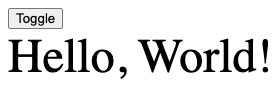
The following code renders a button that toggles whether a div is visible.
Note the readability of the _hyperscript code on the button element.
<html>
  <head>
    <script src="https://unpkg.com/hyperscript.org@0.9.12"></script>
    <style>
      .message {
        font-size: 3rem;
        opacity: 0;
        transition: opacity 1s;
      }
    </style>
  </head>
  <body>
    <div>
      <button _="on click toggle the *opacity of the next <div/>">
        Toggle
      </button>
      <div class="message">Hello, World!</div>
    </div>
  </body>
</html>
Counter
The following code implements a basic counter component.
Note that the if command doesn’t require the end keyword
if it is the last command.

<html>
  <head>
    <script src="https://unpkg.com/hyperscript.org@0.9.12"></script>
  </head>
  <body>
    <div style="display: flex; gap: 1rem">
      <button
        disabled
        _="on click
          remove @disabled from the next <button/>
          decrement the textContent of #count
          if it is 0 then add @disabled to me
        "
      >
        -
      </button>
      <span id="count">0</span>
      <button
        _="on click
          remove @disabled from the previous <button/>
          increment the textContent of #count
          if it is 10 then add @disabled to me
        "
      >
        +
      </button>
    </div>
  </body>
</html>
Using x-for and x-if Directives
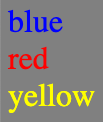
The following example demonstrates using the for and if commands.
It also demonstrates using the make, set, and put commands
to make a DOM element, set its properties, and put it into the DOM.
<html>
  <head>
    <script src="https://unpkg.com/hyperscript.org@0.9.12"></script>
    <script>
      // _hyperscript cannot access variables declared with const or let.
      var colors = [
        {name: 'blue', primary: true},
        {name: 'green', primary: false},
        {name: 'orange', primary: false},
        {name: 'purple', primary: false},
        {name: 'red', primary: true},
        {name: 'yellow', primary: true}
      ];
    </script>
  </head>
  <body style="background-color: gray">
    <h1>Primary Colors</h1>
    <div
      _="init
      for color in colors
        if color.primary
          make a <div/>
          -- The * indicates that we are setting a CSS property.
          set its *color to color.name
          set its *fontSize to 2rem
          set its textContent to color.name
          put it at the end of me
        end
      end
    "
    ></div>
  </body>
</html>
Score Keeper
This example demonstrates several more _hyperscript features.
- defining functions in a
<script type="text/hyperscript">element - calling _hyperscript functions
- setting variables to a literal object
- updating variables based on
inputchange events
The CSS is the same as in the Alpine version.
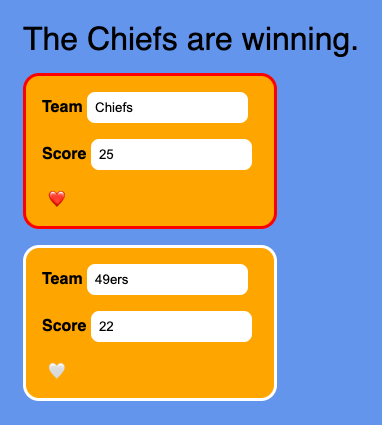
Here is the HTML.
<html>
  <head>
    <title>_hyperscript Score Keeper</title>
    <link rel="stylesheet" href="score-keeper.css" />
    <script src="https://unpkg.com/hyperscript.org@0.9.12"></script>
    <script type="text/hyperscript">
      def color(team)
        if team.like return 'red' end
        return 'white'
      end

      def heart(team)
        if team.like return '{red-heart}️' end
        return '{white-heart}'
        -- Replace `{red-heart}` and `{white-heart}` above
        -- with the corresponding emojis.
      end

      def report()
        if the score of $team1 is greater than the score of $team2
          set text to `The ${$team1.name} are winning.`
        else if the score of $team2 is greater than the score of $team1
          set text to `The ${$team2.name} are winning.`
        else
          set text to 'The score is tied.'
        end
        set the textContent of #report to text
      end
    </script>
  </head>
  <body
    _="init
      set $team1 to {name: 'Chiefs', like: false, score: 25}
      set $team2 to {name: '49ers', like: false, score: 22}
    "
  >
    <main class="column">
      <div id="report" _="init report()"></div>
      <section class="column team">
        <label>
          Team
          <input
            type="text"
            _="
              init set my value to $team1.name
              on change set $team1.name to my value then report()
            "
          />
        </label>
        <label>
          Score
          <input
            type="number"
            _="
              init set my value to $team1.score
              on change set $team1.score to my value then report()
            "
          />
        </label>
        <button
          _="
            init set my textContent to heart($team1)
            on click
              set $team1.like to not $team1.like
              set *border-color of closest <section/> to color($team1)
              set my textContent to heart($team1)
          "
        ></button>
      </section>
      <section class="column team">
        <label>
          Team
          <input
            type="text"
            _="
              init set my value to $team2.name
              on change set $team2.name to my value then report()
            "
          />
        </label>
        <label>
          Score
          <input
            type="number"
            _="
              init set my value to $team2.score
              on change set $team2.score to my value then report()
            "
          />
        </label>
        <button
          _="
            init set my textContent to heart($team2)
            on click
              set $team2.like to not $team2.like
              set *border-color of closest <section/> to color($team2)
              set my textContent to heart($team2)
          "
        ></button>
      </section>
    </main>
  </body>
</html>
DOM Literals
_hyperscript supports syntax for referring to parts of the DOM. The following table describes this syntax.
| DOM Target | Syntax |
|---|---|
| element by id | #someID |
| elements by CSS class | .someClassName |
| elements by CSS selector | <someCSSSelector/> |
| attribute value | @someAttributeName |
| CSS property value | *someCSSProperty |
The following code demonstrates using each kind of DOM literal.
<html>
  <head>
    <script src="https://unpkg.com/hyperscript.org@0.9.12"></script>
    <style>
      .styled {
        border: 1px solid gray;
        border-radius: 0.5rem;
        padding: 0.5rem;
      }
    </style>
  </head>
  <body
    _="init
     set el to #my-id -- finds an element by its id
     log el

     set id to @id of el -- gets an element attribute value
     log '@id =', id

     for el in .my-class -- finds elements by a CSS class
       log el
     end

     for btn in <button/> -- finds elements by tag name
       remove @disabled from btn -- removes an attribute
       add .styled to btn -- adds a CSS class to the element
     end

     set the *color of #d4 to 'blue' -- sets a CSS property
     -- Alternative using 's.
     -- set #d4's *color to 'blue'
    "
  >
    <div id="my-id">One</div>
    <div class="my-class">Two</div>
    <div class="my-class">Three</div>
    <button disabled _="on click remove me">Click Me</button>
    <div id="d4" style="color: red">Four</div>
  </body>
</html>
Errors
When syntax errors are encountered, error messages are written to the DevTools Console. They are quite descriptive.
Comments
Single-line comments begin with --
followed by at least one whitespace character.
For now, // for single-line comments and /* ... */ for multi-line comments
are also supported, but those may not be supported in the future.
Attributes
To get the value of an attribute on the current element,
use @attr-name. The value will always be a string.
To set the value of an attribute on the current element,
use set @attr-name to {value}.
If the value is not a string, it will be converted to a string.
Strings
Literal strings are delimited with single or double quotes.
Strings can be concatenated with the + operator.
Interpolation is performed in the same way as in JavaScript.
For example:
set fullName to `${firstName} ${lastName}`
Arrays
The following code demonstrates operating on arrays.
set scores to [7, 19, 12]
log the first of scores -- 7
log the last of scores -- 12
log random in scores -- one of the values
Objects
Objects are created with the same literal syntax as in JavaScript. For example:
set dog to {name: "Comet", breed: "Whippet"}
log `${dog.name} is a ${dog.breed}`
There are multiple ways to access a property of an object.
dog.namedog['name']dog's namethe name of dog
DOM Access
Possessive expressions can be used to get and set DOM content. For example:
get the first <li/> then
set my innerHTML to its innerHTML
Operators
Comparison Operators
_hyperscript supports all the comparison operators in JavaScript. It also supports many comparison keywords.
x is yis the same asx == yx is not yis the same asx != yno xandx existsare the same asx == null,x == undefined, and[[x.length]] == 0?x is less then yis the same asx < yx is greater then yis the same asx > y
Other operators with no direct comparison to JavaScript include the following:
{collection} is empty{element} matches {selector}
Math Operators
_hyperscript supports most JavaScript math operators.
It does not support the % operator for modulo,
but the mod keyword can be used instead.
_hyperscript evaluates all operators from left to right and doesn’t apply operator precedence. Parentheses must be used when an expression uses multiple operators.
The increment and decrement keywords modify the value of a number
as their name implies.
Conversions
To convert a string to a number, follow it with as an Int.
Conditional Logic
if {condition}
  ...
end
Iteration
_hyperscript supports many kinds of loops.
The break and continue keywords can be used in all of them.
for {var} in {collection}
  ...
end

for {var} in {collection} index {i}
  ...
end

repeat forever
  ...
end

repeat in {collection} -- sets the "it" variable
  ...
end

repeat while {condition}
  ...
end

repeat until {condition}
  ...
end

repeat {n} times
  ...
end
Some commands automatically operate on all items in a collection.
For example, add .some-class to <li/>
adds the CSS class some-class to all li elements.
Resources
TODO
Organize this content:
can combine with tailwind in order to use provided classes like hidden. how good are the error messages if there is something wrong in the syntax? Do error messages appear in the Dev tools console? Do error messages appear on page load or only when hyperscript is triggered? see the control flow section in the docs for conditional logic and iteration. maybe Alpine is better for this because it allows using JavaScript syntax. The then keyword allows specifying a sequence of hyperscript statements. what is the difference between if else and if otherwise?
on click toggle .some-class on selector click is an event. toggle is an action
List all the supported events. click, load, … List all the supported keywords and describe each one. toggle, transition, on, my, over to, seconds, then, … is there a keyword that runs two things at once unlike the then keyword that runs them serially? selectors can use the keyword me.
make sure you understand what the defer attribute does on a script tag. resetting a form can be done in a single attribute with hyper script, but requires three things with Alpine, x-data, x-on, and an id on the form.