It is helpful to have a way to configure an image with.
- specific preferences set settings
- tool windows open at specified locations with specified sizes
- desired packages loaded
There is more than one way to accomplish this. One way is to write and use a startup script. Another way is to create and load a package.
When To Use
The ability to easily configure a new image is useful when new versions of Cuis Smalltalk are released or just to create an image for a specific project. A new base image can be opened and configured. Once this is done, open the World menu and select “Save Image as…” to save the image under a new name.
Starting future sessions using the saved image will be much faster than starting the base image using a startup script. The reason is that the saved image will already contain all the packages installed by the startup script. Loading packages during startup is relative time consuming.
Startup Script Example
The following is an example script in a file named cuis.
#!/usr/bin/env zsh
CUIS_DIR=$SMALLTALK_DIR/Cuis-Smalltalk-Dev
VM=$CUIS_DIR/CuisVM.app/Contents/MacOS/Squeak
IMAGE=$CUIS_DIR/CuisImage/base-copy.image
$VM $IMAGE -s setup.st
To run headless, change the last line to the following:
$VM -headless $IMAGE -s setup.st
The following is an example of what can appear in the file setup.st
which contains Smalltalk code:
| world |
Utilities setAuthorName: 'R. Mark Volkmann' initials: 'rmv'.
world := UISupervisor ui.
[
    Display fullScreenMode: true.
    (Delay forSeconds: 1) wait.
    UISupervisor whenUIinSafeState: [
        | area browser children extent taskbarHeight workspace |

        "Delete all submorphs of the WorldMorph except the taskbar."
        children := world submorphs reject: [:aMorph | aMorph is: #TaskbarMorph].
        children do: [:child | child delete].

        "Set some preferences."
        "Preferences at: #defaultFontSize put: 14."
        Preferences at: #defaultFontSize put: 24.

        "Get the usable area not including the taskbar."
        taskbarHeight := UISupervisor ui taskbar morphHeight.
        area := RealEstateAgent maximumUsableArea
            extendBy: 0 @ taskbarHeight negated.
        extent := area extent // 2. "quarter of world"

        "Open a System Browser in the upper-left."
        browser := Browser open.
        browser
            "morphPosition: 0 @ 0;
            morphExtent: extent."
            morphPosition: extent x / 2 @ 0;
            morphExtent: extent x @ area extent y.

        "Open an Installed Packages window lower-left."
        cplw := CodePackageListWindow open: CodePackageList new.
        cplw morphPosition: 0 @ extent y; morphExtent: extent.

        "Open a Workspace in the upper-right."
        workspace := Workspace open.
        workspace
            morphPosition: extent x @ 0;
            morphExtent: extent.
        workspace model actualContents: '1 + 2.
''testing'' print.'.

        "Open a Transcript in the lower-right."
        TranscriptWindow openTranscript
            morphPosition: extent;
            morphExtent: extent.

        Feature require: 'JSON'.
        Feature require: 'UI-MetaProperties'.
        Feature require: 'WebClient'.
        "Load my package which defines the Object method logAs: and much more."
        Feature require: 'Volkmann'.

        "browser activateWindow." "brings to front"

        "Add buttons in upper-left to toggle full screen mode."
        "WHY DOES THIS FAIL IN SCRIPT, BUT NOT FROM WORKSPACE"
        "(Delay forSeconds: 1) wait.
        VFullScreenButtons new."
    ]
] fork
To use this script:
- Set the environment variable
SMALLTALK_DIRto the directory path where Cuis Smalltalk was installed. - Make a copy of the base image file that has a name like
Cuis7.1-6541.imageand name the copybase-copy.image. - Make a copy of the base changes file that has a name like
Cuis7.1-6541.changesand name the copybase-copy.changes. - Create the file
setup.st(described later) in the same directory as this script. - Open a terminal window.
cdto the directory containing this script.- Enter
./cuisto launch the VM in your preferred starting state.
Package Example
I created the package
Cuis-Smalltalk-RMVSetup
which defines the class RMVSetup in the class category RMVSetup.
which configures an image according to my preferences.
To install this package, clone the repository, open a Workspace,
enter Feature require: #RMVSetup, and “Do it”.
This results in the following window:
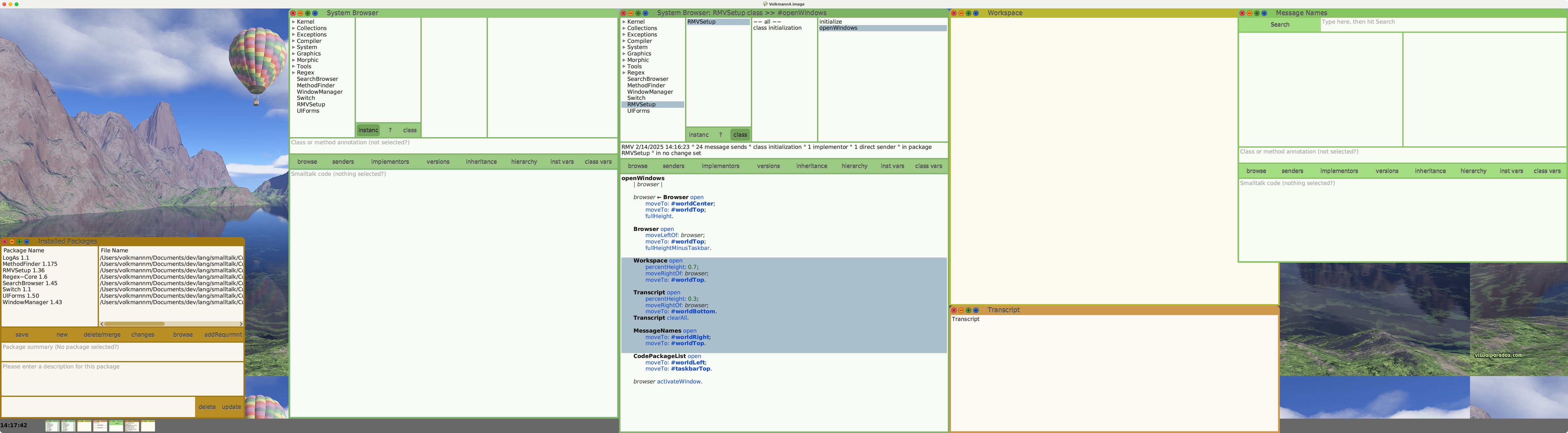
Installing the package runs the class method initialize
which calls the class method openWindows.
The code for each of these methods is shown below.
You may wish to create a similar package containing this code
and customize it according to your preferences.
initialize
    | filePath stream |

    "Set preferences."
    Utilities setAuthorName: 'R. Mark Volkmann' initials: 'rmv'.
    Preferences name: #showAssignmentAsLeftArrow category: #programming value: true.
    Preferences saveToDisk: #showAssignmentAsLeftArrow.
    WindowManager openAtCursor.

    "Add World background image."
    Preferences at: #backgroundEffect put: #tile.
    filePath := '../Cuis-Smalltalk-RMVSetup/altitude1600.jpg'.
    stream := filePath asFileEntry readStream.
    self runningWorld backgroundImageData: stream binary contentsOfEntireFile.

    self openWindows.
openWindows
    | browser |

    browser := Browser open
        moveTo: #worldCenter;
        moveTo: #worldTop;
        fullHeight.

    Browser open
        moveLeftOf: browser;
        moveTo: #worldTop;
        fullHeightMinusTaskbar.

    Workspace open
        percentHeight: 0.7;
        moveRightOf: browser;
        moveTo: #worldTop.

    Transcript open
        percentHeight: 0.3;
        moveRightOf: browser;
        moveTo: #worldBottom.
    Transcript clearAll.

    MessageNames open
        moveTo: #worldRight;
        moveTo: #worldTop.

    CodePackageList open
        moveTo: #worldLeft;
        moveTo: #taskbarTop.

    browser activateWindow.
The following instance methods moveTo:, moveLeftOf:, moveRightOf:,
fullHeight, fullHeightMinusTaskbar, and percentHeight were
added to the SystemWindow class by the Cuis-Smalltalk-RMVSetup package.
fullHeight
    | world |

    world := UISupervisor ui.
    self morphExtent: (self morphExtent x) @ (world morphExtent y).

fullHeightMinusTaskbar
    | taskbarHeight world |

    world := UISupervisor ui.
    taskbarHeight := world taskbar morphExtent y.
    self morphExtent: (self morphExtent x) @ (world morphExtent y - taskbarHeight).

moveLeftOf: aWindow
    "Move this window to the left of aWindow and guarantee
    that it will not extend past the left edge of the World."
    | newX newY position |

    position := aWindow morphPosition.
    newX := position x - extent x max: 0.
    newY := position y.
    self morphPosition: newX @ newY.

moveRightOf: aWindow
    "Move this window to the right of aWindow and guarantee
    that it will not extend past the right edge of the World."
    | newX newY position world worldWidth |

    world := UISupervisor ui.
    worldWidth := world morphExtent x.
    position := aWindow morphPosition.
    newX := position x + aWindow morphExtent x min: (worldWidth - extent x).
    newY := position y.
    self morphPosition: newX @ newY.

moveRightOf: aWindow
    "Move this window to the right of aWindow and guarantee
    that it will not extend past the right edge of the World."
    | newX newY position world worldWidth |

    world := UISupervisor ui.
    worldWidth := world morphExtent x.
    position := aWindow morphPosition.
    newX := position x + aWindow morphExtent x min: (worldWidth - extent x).
    newY := position y.
    self morphPosition: newX @ newY.

percentHeight: aNumber
    | world |

    aNumber <= 0 ifTrue: [ Error signal: 'aNumber cannot be zero or less.' ].
    aNumber > 1 ifTrue: [ Error signal: 'aNumber cannot be greater than one.' ].

    world := UISupervisor ui.
    self morphExtent: (self morphExtent x) @ (world morphExtent y * aNumber).