The Pen package supports turtle-like graphics.
To install the Pen package, clone the
Morphic GitHub repository,
enter Feature require: #Pen in a Workspace, and “Do it”.
The Pen class is a subclass of the BitBlt class.
It provides several examples in class methods.
Try entering them in a Workspace and “Do it”.
Display restoreAfter: [Pen example]
Pen exampleSketch. "drag around window to draw a thin, green trail"
Pen makeStar display.
The following code draws a house.
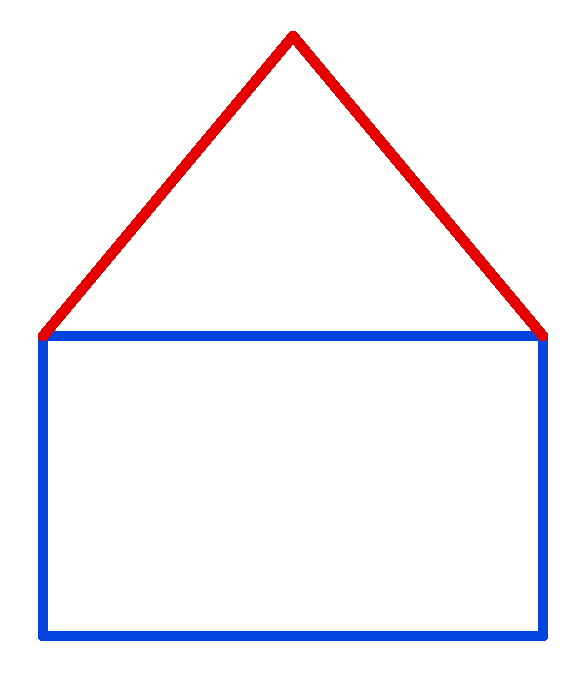
height := 300.
width := 500.
Display restoreAfter: [
    Display fillWhite.
    pen := Pen new.
    pen roundNib: 10.

    pen color: (Color blue).
    loc := pen location.
    x := loc x - (width / 2).
    y := loc y - (height / 2).
    pen place: x @ y.
    pen turn: 180.
    pen go: height.
    pen turn: -90.
    pen go: width.
    pen turn: -90.
    pen go: height.
    pen turn: -90.
    pen go: width.

    pen color: (Color red).
    pen place: x @ y.
    pen goto: loc x @ (y - height).
    pen goto: x + width @ y.
].
Pen instance methods
Pen instances have three instance variables,
location, direction, and penDown.
The location value is a Point instance that specifies an x-y coordinate.
It defaults to the center of the window.
It can be changed by sending #go:, #goto,
location:direction:penDown:, or place:.
It can be retrieved by sending #location.
The direction value is an angle in degrees where
zero is right, 90 is down, 180 is left, and 270 is up.
It defaults to 270 and can be reset to that by sending #north to the Pen.
It can be changed by sending #turn: or #location:direction:penDown:.
It can be retrieved by sending #direction.
Highlights include:
| Method | Description |
|---|---|
color: | sets pen color to argument |
defaultNib: | sets pen color to black and shape to square with argument width |
direction | answers current direction |
down | places pen down so it can draw |
fill:color: | TODO: Need an example of using this. |
go: | moves argument distance and draws if pen is down |
goto: | moves to argument Point and draws if pen is down |
home | sets location to center of window (default) |
location | answers current pen location |
location:direction:penDown: | sets location, direction, and penDown |
north | sets direction to 270; why no south, west, or east? |
place: | moves to Point without drawing even if pen is down |
print:withFont: | prints a given String at current location with given font |
roundNib: | changes pen nib to be a circle with argument diameter |
squareNib: | changes pend nib to be a square with argument size |
turn: | adds argument in degrees to direction |
up | raise pen up so it cannot draw |
The color: method sends the message #fillColor:
which is defined in the superclass BitBlt.
That stores the color in the instance variable halfToneForm.
The following code results in the error “MessageNotUnderstood: TrueTypeFont>>glyphAt:”:
pen print: 'Hello, World!' withFont: FontFamily defaultFamilyAndPointSize