Overview
Prolog is a logic-based programming language. The name is a contraction of “programming in logic”.
Prolog first appeared in 1972. It was designed by three computer scientists, Alain Colmerauer (France), Phillipe Roussel (France), and Robert Kowalski (USA/Britain).
Prolog uses a declarative syntax rather than a procedural one. Instead of writing code that describes “what” to do, the code describes relationships between data values.
Nearly all Prolog code has one of these four purposes:
-
Describe a relationship that is always true (aka holds) … a fact.
For example:
father(richard, mark).
father(mark, amanda).
father(mark, jeremy).
-
Describe a relationship that is conditionally true … a rule.
For example, the following rule states that
Gis a grandfather ofCifGis the father ofPANDPis either the father or mother ofC:grandfather(G, C) := father(G, P), (father(P, C); mother(P, C)). -
Ask whether a specific relationship is true using a query with no variables.
For example,
?- grandfather(richard, amanda).outputstrue. -
Ask for values for which a relationship is true using a query with variables.
For example,
?- grandfather(G, amanda).setsGtorichardSometimes there are multiple values for which a query holds. For example, the query?- grandfather(richard, G).setsGtoamandaand thenjeremy. Note how a rule can be used to find values for any of its arguments, searching in multiple directions.
Queries (aka questions) perform “unification” which basically means finding values for variables that cause a relationship to hold. This requires pattern matching search and backtracking. Unification relies on the properties of Horn clauses. A related term is “ground” which refers to an expression that contains no uninstantiated variables.
The set of facts and rules supplied to the Prolog engine is called the knowledge base (or database). Prolog is highly optimized to handle searching large knowledge bases.
Prolog is a homoiconic language, which means its code can be treated as data. Everything in Prolog is some kind of “term”. A program is a list of clauses. A list and a clause can both be represented as terms.
Prolog has many uses including artificial intelligence, abstract problem solving, symbolic equation solving, and more.
“IBM Watson is a question-answering computer system capable of answering questions posed in natural language.” It is partially implemented in Prolog.
Use Cases
Prolog is used in many kinds of applications including:
-
explainable AI (as opposed to approaches like neural networks)
-
problem solving
-
parsing
This includes parsing programming language source code.
-
natural language processing (NLP)
This includes automatic translation from one human language to another. It also includes translating human language to direct a computer and possibly generating a human language response (ex. Alexa and Siri).
-
specification language
For example, the Java Virtual Machine (JVM) specification uses Prolog.
-
rule-based systems (ex. Eliza)
-
automation systems
-
robot planning
-
natural language understanding
-
intelligent database retrieval
Learning Curve
The primary concepts in Prolog such as facts, rules, and queries are easy to understand after seeing a few examples.
However, writing programs that are entirely based on relationships rather than imperative code makes Prolog very different from other programming languages. This makes learning Prolog somewhat challenging initially. For example, to write a program that compiles some source code into its target representation, define the relationship that describes when source code is related to the target representation.
Prolog supports a large number of operators and built-in predicates. These take considerable time to learn and master.
Resources
-
The Art of Prolog Second Edition book by Sterling and Shapiro
-
A Brief Introduction to Prolog YouTube video by Erik Schierboom
-
Clause and Effect book by Clocksin
-
The Power of Prolog free, online book with accompanying videos by Dr. Markus Triska from the University of Technology in Austria
-
Programming in Prolog Fifth edition book by Clocksin and Mellish
Implementations
There are many implementations of the Prolog programming language. The first Prolog implementation was Marseilles Prolog (also referred to as Prolog 0 to Prolog IV) developed at Marseilles University. The second Prolog implementation was DEC-10 Prolog developed at Edinburgh University, and commonly referred to as Edinburgh Prolog.
Many current Prolog implementations conform to the ISO Standard for Prolog. This defines the minimum requirements for conforming implementations. Most implementations also add features beyond the ISO standard.
The ISO standard does not require implementations to provide a “top level” or REPL, but most do. A top level supports interactive entry and evaluation of Prolog queries. Some top level implementations also support tab completion, interactive debugging.
Several Prolog implementations compile source code to abstract machine code for the Warren Abstract Machine (WAM). David Warren pioneered efficient Prolog implementation in 1977. Searches in WAM use an efficient hash-based approach.
The table at Conforming Testing describes the degree to which each implementation conforms to the ISO standard. One reason to select a conforming implementation is that it increases the likelihood that your code will run in other implementations. Switch may be necessary in order to gain performance or specific features.
The Prolog implementations that are currently popular are described below.
Scryer Prolog

Scryer Prolog “is a free software ISO Prolog system intended to be an industrial strength production environment and a testbed for bleeding edge research in logic and constraint programming.”
Scryer Prolog is implemented in Rust (64%) and Prolog (36%).
A “scryer” is somehow who sees, hears or otherwise interprets spirit communications, usually on behalf of a magician who isn’t so gifted.
From the Scryer website, it’s main features include:
- ISO standard compliant
- integrated Constraint Logic Programming (CLP) libraries
- supports Definite Clause Grammars (DCGs)
- coroutine support
- tabling and SLG resolution
- compact string representation
- network libraries (TCP sockets, HTTP server, HTTP client, …)
- cryptography predicates
- WAM-based engine
- cross-platform
- implemented in Rust
To install, enter the following commands:
git clone https://github.com/mthom/scryer-prolog
cd scryer-prolog
curl https://sh.rustup.rs -sSf | sh # if cargo is not yet installed
cargo build --release
This creates the executable file target/release/scryer-prolog.
Define an alias like scryerp or just scry to make this easier to run.
To update your version of Scryer Prolog:
- cd to the directory containing the cloned GitHub repository.
- Enter
git pull - Enter
cargo build --release
To start a Scryer Prolog top level from a terminal, enter scry.
By default, Scryer Prolog only provides built-in predicates
that are defined in the ISO standard.
But it bundles many libraries that define non-ISO predicates that can
easily be made available with :- use_module(library(library-name)).
To specify configuration for all top level sessions,
create the file $HOME/.scryerrc.
This file often imports commonly used libraries. For example:
:- use_module(library(clpz)).
:- use_module(library(dcgs)).
:- use_module(library(format)).
:- use_module(library(lists)).
There is currently an issue
where operators defined in modules that are loaded in .scryerrc
are not available in source files passed to the Scryer interpreter.
A workaround is to explicitly load the module in the source file
with :- use_module(library(library-name)).
Scryer Help
After entering a query, press “h” to get the following help:
SPACE, "n" or ";": next solution, if any
RETURN or ".": stop enumeration
"a": enumerate all solutions
"f": enumerate the next 5 solutions
"h": display this help message
"w": write terms without depth limit
"p": print terms with depth limit
Scryer Common Errors
The following list describes some of the most commonly seen error messages that are output by Scryer Prolog.
-
Warning: singleton variable Name at line N of file-name.pl.
This means that the variable
Nameeither:- is an argument of a rule, but is not used by any rule body goal
- appears in a rule body goal, but is not an argument and is not set in a previous goal
-
error(existence_error(source_sink,"file-name.pl"),open/4).
This error occurs when Scryer Prolog is started with a file path and the file is not found.
-
error(syntax_error(inconsistent_entry),load/1).
This error can occur when there is a typo in a compiler directive.
-
error(permission_error(access,private_procedure,module_does_not_contain_claimed_export),load/1).
This error means that a module is being defined and the list of exports contains a functor that is not defined in the file. Sadly, the error does not indicate which function is undefined.
-
error(permission_error(modify,static_procedure,(',')/2),load/1).This error means that the source file contains a term with invalid syntax. Often the cause is a rule body that contains a goal which is not the last goal and is terminated by a period instead of a comma.
-
error(syntax_error(incomplete_reduction),read_term/3:line-number).
This error means that the source file contains a term with invalid syntax. Often the cause is a rule body whose last goal is terminated by a comma instead of a period or a rule body goal that is not the last one and is not followed by a comma.
This error can also occur when a goal uses a non-built-in operator that has not been loaded. For example, using the
#=requires loading theclpzlibrary. -
error(type_error(list,6),must_be/2).
This error can occur when a predicate argument is expected to be a list, but is some other type. For example, this happens when the second argument to
formatis not a list.
SICStus Prolog
SICStus Prolog is a commercial, high-performance implementation that began in 1986. A 30-day evaluation version is free of charge.
SICS is an acronym for the Swedish Institute of Computer Science where SICStus was created. The “tus” suffix is a play on Quintus Prolog (released in 1985) which was a fifth generation Prolog implementation. Think of “SICS” as having an alternative meaning of “sixth”.
It is one of the most conforming and sophisticated Prolog systems. No other system is even remotely comparable in terms of robustness.
GNU Prolog

GNU Prolog. is implemented in C (84%) and Prolog (15%).
To install the terminal command gprolog in macOS,
enter brew install gnu-prolog.
To start a GNU Prolog top level from a terminal, enter gprolog.
SWI-Prolog

SWI-Prolog offers a comprehensive free Prolog environment. Since its start in 1987, SWI-Prolog development has been driven by the needs of real world applications. SWI-Prolog is widely used in research and education as well as commercial applications.”
Its main author is Jan Wielemaker. The name SWI is derived from Sociaal-Wetenschappelijke Informatica (“Social Science Informatics”), the former name of the group at the University of Amsterdam, where Wielemaker is employed.
SWI-Prolog is implemented in C (48%) and Prolog (39%).
To install the terminal command swipl in macOS,
enter brew install swi-prolog
To start a SWI-Prolog top level from a terminal, enter swipl.
To specify configuration for all top level sessions,
create the file $HOME/.config/swi-prolog/init.pl.
For example, this file might set prolog flags.
SWI-Prolog Conformance
SWI-Prolog adds features beyond the ISO standard, some of which contradict the standard, making it non-conforming. One example is the addition of a string type. Many dedicated predicates are needed to operate on these strings rather than using list predicates. Another example is the addition of a custom dict type.
It is very easy to write code that runs in SWI-Prolog, but does not run in other Prolog implementations. In addition, some code that is valid according to the ISO standard does not run in SWI-Prolog.
For a detailed take on this issue, see Preparing Prolog.
Also see SWI7 and ISO Prolog.
SWI-Prolog Packs
Packs are add-on libraries.
To see a list of known packages, browse Packs (add-ons) for SWI-Prolog.
Alternatively, enter pack_list(substring) where
substring is part of one or more pack names.
To install a pack, enter pack_install(name).
This will download the code and install it.
The “reif” pack (reified if) implements the if_ predicate
which is similar to the -> operator, but has some advantages.
See the section “Higher-order Predicates” for examples.
The gvterm pack generates a graphviz file from a Prolog term. This is useful for visualizing the tree structure of a term.
SWI-Prolog Debugging
For information on using the debugger in SWI-Prolog, see Overview of the Debugger.
The trace predicate enables tracing of the search to find a query solution.
The following code defines fact about my family and a rule about grandfathers.
female(amanda).
female(judi).
female(tami).

male(jeremy).
male(mark).
male(richard).

father(richard, mark).
father(mark, amanda).
father(mark, jeremy).

mother(judi, mark).
mother(tami, amanda).
mother(tami, jeremy).

grandfather_of(X, Y) :-
  father(X, P),
  (father(P, Y); mother(P, Y)).
To trace the execution of the query grandfather_of(richard, X).,
enter trace. and then the query.
The screenshot below shows the output.
After each line in the trace, press the spacebar
to advance to the next term to be evaluated.
After a solution is found, press the semicolon key or the spacebar
to begin searching for the next solution.
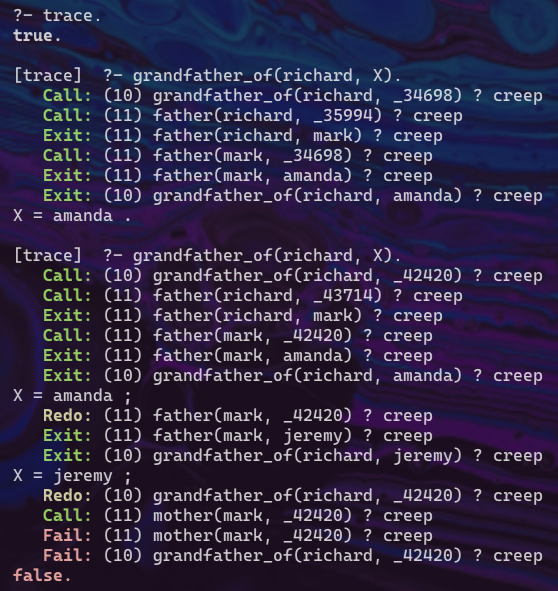
The trace predicate enables both the trace and debug modes.
To disable these, enter notrace. and nodebug.
SWI-Prolog Executables
To compile a Prolog source file to an executable,
enter swipl -o {exe-name} -c {source-name}.pl.
For example, swipl -o sukuko -c suduko.pl.
Running this executable with ./suduko starts a top level session
and loads the compiled facts and rules.
Ciao Prolog
Ciao “is a modern Prolog implementation that builds up from a logic-based simple kernel designed to be portable, extensible, and modular.”
Ciao is implemented in Prolog (72%) and C (23%).
To install:
-
Install emacs. In macOS, this can be done by entering
brew install emacs -
Enter
curl https://ciao-lang.org/boot -sSfL | sh -
Create an alias to the executable. For example:
alias ciao="$HOME/.ciaoroot/v1.22.0-m5/build/bin/ciao"
To start a Ciao top level from a terminal, enter ciao.
Other Implementations
- Tau is implemented in JavaScript (95%) and Prolog (5%).
- Trealla is implemented in C (82%) and Prolog (18%).
Online Top Level
To enter and run Prolog code in a web browser using SWI-Prolog, browse SWISH.
Enter facts and rules in the left pane. Enter a query in the lower-right pane. Press the “Run!” button or ctrl-return to execute the query.
Exiting
To exit from any Prolog interpreter, enter halt. or press ctrl-d.
Terminology
| Term | Meaning |
|---|---|
| term | the only datatype; has four subtypes listed below |
| - number | integer or floating point |
| - atom | identifier that represents a specific thing |
| - variable | represents a value to be determined |
| - compound term | specific combination of terms; more detail below |
| structure | another name for a compound term |
| fact | description of something that is true |
| rule | relationship involving one or more unknown things (variables) |
| clause | a single fact or rule |
| predicate | collection of clauses with the same principal functor |
| principal functor | name of a predicate |
| query | asks if a term is true or asks for satisfying variable values |
| knowledge base | collection of predicate clauses (aka database) |
| arity | number of predicate arguments |
| functor | predicate name and its arity; written with a slash between |
| goal | compound term in a rule body or query |
| list notation | comma-separated terms inside square brackets; ex. [a, B, 7] |
| operator notation | terms separated by operators; ex. Y = m*X + b |
| function notation | operators are written as function calls; ex. *(3, +(1, 2)) |
| unification | process of searching for variable values that satisfy a goal |
| choice point | represents a choice in the search for a solution |
| conjunction | and’ing terms with comma operator |
| disjunction | or’ing terms with semicolon operator |
| monotonic | described below |
| homoiconic | described below |
A string is treated as a list of atoms where each atom represents a character. This makes it a compound term.
Every compound term can be written as a functor name followed by an argument list. Each argument can be an atom, a variable, or another compound term. All compound terms, including nested ones, can be represented by a tree structure.
A rule can be thought of as a special kind of fact that depends on a set of other facts
Numbers can include underscores for readability.
For example, 1_234_567 makes it more clear
that this number is greater than one million.
The functor for foo(bar, baz) is written as foo/2.
The term “monotonic”, when used in the context of Prolog, is the property that:
- Adding constraints or conjunctions to a rule can only decrease the number of possible solutions.
- Adding clauses or disjunctions can only increase the number of possible solutions.
Prolog is a “homoiconic” language in that everything, including query results and complete Prolog programs, can be described by a term.
For more, see Glossary of Terms.
Syntax
Prolog programs are composed of facts, rules, and queries. All of these are terminated by a period.
Facts
A fact states that some relationship holds (always true). A fact cannot state relationships that do not hold.
A fact is written as a functor (atom) followed by an argument list that is surrounded by parentheses. The argument list contains only atoms, not variables.
For example:
runner(mark). % says mark is a runner
% We cannot use a rule to state that tami is not a runner.
likes(mark, prolog) % says mark likes prolog
These are facts that say comet is a whippet and spots is a cheetah:
whippet(comet).
cheetah(spots).
Facts provide a convenient way to define constants that are used in several places within a program. For example, a “size” constant can be defined and used as follows:
size(6).

some_rule(Arg1, Arg2) :-
  size(Size),
  format('The size is ~w.~n', [Size]).
Rules
Rules are written as a head and a body separated by
the “if” operator :- and terminated by a period.
They states that the head holds if all the goals in the body hold.
Rules do not return a value like functions in other programming languages,
but they can set the values of variables provided as arguments.
The head is a functor name followed by an argument list that is surrounded by parentheses. The head syntax is similar to that of a fact, but its argument list can contain variables.
The body is a comma (means “and”) or semicolon (means “or”) separated list of goals. Typically each goal is written on a separated line and indented, but this is not required.
The following rules state that something is fast if it is a cheetah or a whippet.
fast(X) :- cheetah(X).
fast(X) :- whippet(X).

% The previous two lines can be replaced with the following
% where the `;` operator or's its left and right values.
% fast(X) :- cheetah(X); whippet(X).
A fact is a degenerate case of a rule whose body only contains true.
For example, the following are equivalent:
likes(mark, ice-cream).
likes(mark, ice-cream) :- true.
The following rules define what it means for two people to be siblings or sisters.
:- use_module(library(dif)).

% This rule states that siblings must have the same father and the same mother.
% It has four goals.
sibling(X, Y) :-
  dif(X, Y), % can't be sibling of self
  father(F, X),
  father(F, Y),
  mother(M, X),
  mother(M, Y).

sister_of(X, Y) :-
  dif(X, Y), % can't be sister of self
  female(X),
  sibling(X, Y).
Often functor names describe the arguments
whose relationship is being described, separated by underscores.
For example, the rule head parent_child(P, C) makes it clear that
the first argument represents a parent
and the second argument represents a child.
Good rules can be used in multiple directions,
supporting multiple usage modes.
For example, it should be possible to use the parent_child rule
to find the children of a given parent, find the parents of a given child,
and find all known combinations of parent and child.
Using a name such as parent_of and parent makes this less clear.
Good functor names are general and describe a relationship rather than an action. Functor names containing words like “count”, “drop”, “find”, or “sort” imply that it performs an action rather than describing a relationship. For example, a rule that describes a relationship between a list and a sorted version of the list might be named “list_sorted” or “list_ascending”. These indicate that the rule has two arguments which are an unsorted list and a sorted list.
The is operator evaluates its right-hand side as an arithmetic expression
and assign the result to its left-hand side.
It should only be used when the right-hand side is an arithmetic expression.
For example:
area(circle, Radius, X) :- X is pi * Radius^2.
area(square, Side, X) :- X is Side^2.
area(rectangle, Width, Height, X) :- X is Width * Height.

?- area(circle, 2, X).
X = 12.566370614359172.
Rules only set the values variables that are arguments or used in body goals one time. Once set, they cannot be modified except through backtracking.
The last goal in a rule can be the built-in predicate true to always succeed.
It can also be false or fail to always fail.
None of these approaches are commonly used.
Rules can be recursive. The following rules compute the factorial of an integer:
factorial(0, 1) :- !.

factorial(N, F) :-
  N1 is N - 1,
  factorial(N1, F1),
  F is N * F1.

?- factorial(5, F).
% output is F = 120.
Also see the sum example in the “Lists” section.
When a rule is not working as expected, it may be too general (true for invalid values) or too specific (false for valid values). A common way to fix a rule that is too general is to add more goals. A common way to fix a rule that is too specific is to add more versions of the rule.
Queries
To ask a question in a top level, enter a query.
after the ?- operator.
Top levels typical provide this operator as a prompt.
This is also referred to as “posting” a query.
The main point of Prolog is to find solutions to queries or determine that there are no solutions.
A query ask whether or how a goal can be satisfied, aka hold.
When a query has no uninstantiated variables,
the result is true or false.
When uninstantiated variables are present, the result is a set of solutions. Each solution is expressed as a conjunction of variable values or constraints and the set of solutions is expressed as a disjunction. Conjunction (and’ed expressions) and disjunction (or’ed expressions) are described below. This makes the result a valid Prolog term.
The output from a query is a new, equivalent query that describes the possible known solutions. Solutions assign values to all variables in the query, which is referred to as making them “ground”. We say that only “known” solutions are found because it is possible that other solutions exist but cannot be found because they are not described by the provided facts and rules.
In summary, a query always has one of these four kinds of results:
trueorfalse- answer substitution expressed as sets of variable values for which the query holds
- a conditional solution (aka residual goal) expressed as constraints on variable values
- an exception describing why the query failed
For example:
% This is a query that asks whether comet is fast.
?- fast(comet). % true

% This is a query that asks for something that is fast.
?- fast(X). % comet
Suppose the following facts are loaded:
likes(mark, tacos).
likes(mark, books).
likes(mark, running).
The query likes(X, running) will find “mark”.
The query likes(mark, X) will find
“tacos”, “books”, and “running” that in that order.
When a query has multiple matches, as in this example,
the interpreter will wait for further input.
The query likes(X, Y) will find all known combinations
of people and things that they like.
When all arguments in a query are uninstantiated variables,
it is referred to as a “most general query”.
It is recommended to write nearly all rules
in a way that supports the most general query.
To search for the next match, press the semicolon key or the spacebar. SWI-Prolog also supports pressing the n, r, space, or tab keys to do this. Scryer Prolog supports pressing a to output all remaining solutions.
To stop searching for matches before the last one is found, press the return key. SWI-Prolog also supports pressing the c or a keys to do this.
After the last match is found, a prompt for the next query will appear.
Variables can be used for any argument of a predicate. The unification process will find each set of variable values that cause the predicate to succeed, one set at a time.
The once predicate wraps another predicate and gives only the first solution.
This is useful for predicates that never terminate
or predicates where only the first solution is needed.
Conjunctions
The comma operator, read as “and”, is used in rules or queries where multiple goals must be met. For example:
% This rule says that mark likes females that like cycling.
likes(mark, x) := female(X), likes(X, cycling).

% This query asks if mark loves tami AND tami loves mark.
?- loves(mark, tami), loves(tami, mark)`

% This query searches for things that both mark and tami love.
% X stands for the same value in both goals.
?- loves(mark, X), loves(tami, X)
Variables retain their values across query conjunctions, but their values are lost when a query ends. This is a feature of static single-assignment (SSA) that is used by Prolog. In SSA, “each variable to be assigned exactly once and defined before it is used.” and “every definition (Prolog fact, rule, or query) gets its own version.”
For example:
X is 6, Y is X * 2, Z is Y / 3.
% output is X = 6, Y = 12, Z = 4.
% Subsequent queries cannot access these values.
Disjunctions
The semicolon operator, read as “or”, is used in rules or queries where one of a set of goals must be met.
Earlier we saw a rule that stated something is fast if it is a cheetah or whippet. The following way of writing the rule uses disjunction:
% fast(X) :- cheetah(X); whippet(X).
Typical Flow
To start a Prolog top level, enter an implementation-specific command
such as swipl or gprolog.
To evaluate a query in the top level, enter the query terminated with a period.
If the query does not contain any variables
then true or false will be output.
If the query does contain variables, a lazy search will be performed to find the first set of values that satisfy the query will be output. To see the next possible solution, press the semicolon key. A period will be output after the last set is found. To stop outputting solutions before the last one has been output, press the period key.
In some top level implementations such as SWI-Prolog,
pressing ? outputs help on supported key commands.
To evaluate arithmetic operators that result in a numeric value,
assign the expression to a variable using the is operator.
For example, entering X is 1 + 2. will output X = 3.
The typical steps to run a Prolog program are:
- Add facts and rules to a Prolog source file that has an extension of
.pl - Load Prolog source files into the Prolog app.
- Enter queries in the Prolog app.
Unfortunately Prolog and Perl use the same file extension for their source files.
To load a .pl file in the top level, enter [f]. or consult(f).
where f is a file name without quotes or a file path in quotes.
For example, to load the file demo.pl in the current directory,
enter [demo].
Alternatively, pass a source file to the top level when starting it.
For example, swipl demo.pl
In SWI-Prolog, after modifying source files that have already been loaded,
enter make. to reload all of them.
To enter new facts and rules in a running session:
- Enter
[user].to open stdin as a pseudo file. - Enter facts and rules, pressing the return key after each.
- Press ctrl-d to close and load the pseudo file.
This replaces all existing clauses that match rather than adding to them.
Naming Conventions
Atoms are sequences of letters, numbers, and underscores
that begin with a lowercase letter.
They can also be any text enclosed in single quotes (allows spaces).
There are also the following special atoms:
;, !, [], and {}.
Variables are also sequences of letters, numbers, and underscores, but they begin with an uppercase letter or an underscore. An underscore by itself represents an anonymous variable. These can be used as arguments to predicates when the value of an argument does not matter.
Predicate names should describe a relationship rather than an imperative action.
It is also recommended that they indicate the kinds of arguments they take
and the order of the arguments.
For example, using the name sort for a predicate that can
generate a sorted list from an unsorted one
is imperative and does not describe its arguments.
A better name is list_ascending because:
- It indicates that there are two arguments.
- It indicates the order of the arguments which is the unsorted list followed by the sorted list.
- It does not favor a specific direction and can be used to generate a sorted list or determine whether a list is already sorted.
The following built-in predicates are examples of good names:
atom_chars, atom_codes, atom_length, atom_prefix,
number_chars, and number_codes.
Only predicates with side effects such as producing output
should have imperative names.
The following built-in predicates are examples of this:
asserta, assertz, retract, retractall,
write, write_canonical, and write_term.
Common Errors
When an attempt to run a Prolog program fails, it is often for one of these reasons.
- A token intended to be a variable starts with a lowercase letter instead of uppercase.
- A rule has
:=between its head and body instead of:-. - A goal in an intended conjunction ends with a period instead of a comma. Look for the error message “Full stop in clause-body”.
- The last argument to the
formatpredicate is a single value instead of a list of values to be inserted in the format string. - An attempt assign an arithmetic expression to a variable
uses the
=operator instead of theisoperator resulting in the expression not being evaluated. - The
->operator is used in one goal of a multiple goal conjunction and so must be wrapped in parentheses.
Compiler Directives
Compiler directives in source files begin with :-.
They have several purposed including:
- setting compiler flags
- including other source files
- including a module or library
- evaluate goals when the source file is loaded
Compiler Flags
Prolog flags configure the operation of a Prolog compiler.
To get the value of a prolog flag, use the current_prolog_flag predicate.
For example, current_prolog_flag(double_quotes, F)
sets F to the current value.
To set the value of the prolog flag, use the directive set_prolog_flag.
For example:
:- set_prolog_flag(double_quotes, chars).
For details on the double_quotes flag, see the Strings section.
Scryer prolog supports the following flags: bounded, double_quotes,
integer_rounding_function, max_arity, max_integer, min_integer,
occurs_check, and unknown.
These are documented in the source file src/lib/built-ins.pl.
before the clauses for current_prolog_flag.`
SWI-Prolog supports many more flags. These are documented at Environment Control (Prolog flags).
To suppress warnings about singleton variables, use the following directive:
:- style_check(-singleton).
Including Source Files
One Prolog source file can textually include another
using the include/1 directive.
For example:
:- include(util). % includes the source file util.pl
This is not currently supported in Scryer Prolog. A workaround is it to use the following:
:- initialization(consult(file-name)).
Another way to include another source file is to define it as a module
and use the use_module compiler directive.
For example, we could create the file strings.pl containing the following:
:- module(strings, []).
% This is intended to be run in Scryer Prolog which
% defines the seq predicate in its dcgs library.

% The first argument to the module predicate is the name of the module being defined.
% The second argument is a list of functors being exported.
% Note that DCG rules are passed two more arguments than appear.
:- module(strings, [filename_extension/4, split/5]).

:- use_module(library(dcgs)).

% To test this, enter phrase(split(",", P, S), "foo,bar").
split(Delimiter, Prefix, Suffix) --> seq(Prefix), Delimiter, seq(Suffix).

% To test this, enter phrase(filename_extension(F, E), "foo.bar").
filename_extension(Filename, Extension) --> split(".", Filename, Extension).
To use this module from another source file
% The strings module defined in strings.pl is specific to Scryer Prolog.
:- use_module(strings).
:- use_module(library(format)).

:- initialization((
  phrase(filename_extension(F, E), "foo.bar"),
  format("F = ~s, E = ~s~n", [F, E])
  % outputs "F = foo, E = bar"
)).
Including a Module/Library
To include a library (ex. clpfd), include a line like the following:
:- use_module(library(clpfd)).
Evaluating Goals on Load
To evaluate goals when a source file is loaded, precede them with :-.
For example:
:- write('Hello, World!'), nl.
A source file can contain any number of these.
Alternatively, to specify a conjunction of several goals to be evaluated,
use initialization. For example:
:- initialization(goal).
% or for multiple goals ...
:- initialization((goal1, goal2, goal3)).
Another way to run a goal on load is to use the -g option.
For example, scry -g run,halt my_file.pl
loads a Prolog source file, executes its run goal,
and executes halt to exit from top level.
Omit the halt goal to remain in the top level
so other goals can be interactively explored.
Command-line Arguments
To get command-line arguments in SWI-Prolog:
current_prolog_flag(argv, Argv)
To get command-line arguments in Scryer Prolog:
argv(Args)
Tree Representation
Every Prolog term can be represented as a tree
where parent nodes are functors and arguments are children.
For example, a(b, c(d, e), f) can be represented as the following tree:
- a/3
- b
- c/2
- d
- e
- f
Primitive Types
Booleans
Prolog represents Boolean values with the built-in predicates
true (always succeeds) and false (same as fail and always fails).
Rather than writing a rule that sets an argument to true or false,
it is preferable to write a rule that either succeeds or fails.
Numbers
Prolog supports three kinds of numbers, integer, floating point, and rational.
The following code demonstrates each of these:
IntegerSum is 2 + 3,
write(IntegerSum), nl. % 5

FloatSum is 2.1 + 3.2,
write(FloatSum), nl. % 5.300000000000001

RationalSum is 1 rdiv 3 + 1 rdiv 6,
write(RationalSum), nl. % 0.5
The following rules determine whether a given number is even or odd:
even(N) :- N mod 2 =:= 0.
odd(N) :- N mod 2 =:= 1.
Strings
Prolog can represent strings in three ways: a list of character atoms, a list of ASCII code integers, or an atom.
Literal strings can be delimited with double quotes or single quotes. SWI-Prolog adds the use of backticks which are non-standard.
To escape a quote inside a literal string, precede it with a backslash.
When single quotes are used, the value becomes an atom.
A single quoted string containing no special characters such as spaces
is equivalent to an atom with the same characters.
For example, 'demo' == demo is true.
In SWI-Prolog, when backticks are used, the value becomes a list of ASCII code integers.
When double quotes are used, the setting of
the double_quotes flag determines what the value becomes.
double_quotes | `“abc”“ becomes |
|---|---|
atom | atom abc |
chars | list of character atoms [a, b, c] |
codes | list of ASCII code integers [97, 98, 99] |
SWI-Prolog also supports the double_quotes value string
which causes double-quoted strings to become
a string type that is specific to SWI-Prolog.
The benefits of representing strings as lists of characters are that they can be output in a human-readable way, list predicates can be used to operate on them, and they can be partially instantiated with variable characters.
The default setting of double_quotes is
string in SWI-Prolog and chars in Scryer Prolog.
It is recommended to change this setting to chars in all implementations.
For example:
?- set_prolog_flag(double_quotes, chars).
L = "abc".  % becomes a list of character atoms
% L = [a, b, c].
When the double_quotes flag is set to chars, the following are equivalent:
""and[]"a"and[a]"abc"and[a, b, c]
The string type and its double quoted syntax section 5.2.3 discusses the pros and cons of the string options.
Since a double-quoted string becomes a list of character atoms,
its length can be obtained using the length predicate.
For example:
?- length("Mark", L).
L = 4.
Since a single-quoted string becomes an atom,
its length can be obtained using the atom_length predicate.
For example:
?- atom_length('Mark', X).
X = 4.
To test whether a string contains a given substring,
which could be a single character, use the sub_string predicate.
For example:
% 1st argument is the string to search.
% 2nd argument is the number of characters before the substring.
% 3rd argument is the number of characters in the substring.
% 4th argument is the number of characters after the substring.
% 5th argument is the substring to find.
% It is not necessary to capture arguments 2-4.
once(sub_string(S, _, _, _, C)) ->
  writeln('found');
  writeln('not found').
To concatenate two strings, use the string_concat predicate.
For example:
string_concat('foo', 'bar', S).
% sets S to "foobar"
To create a list of ASCII values from a literal string,
use the name predicate.
For example:
?- name('ABC', X).
X = [65, 66, 67].
To create a string from a list of ASCII values,
also use the name predicate.
For example:
?- name(X, [65, 66, 67]).
X = 'ABC'.
To append two strings, convert them to lists of ASCII codes, append those lists, and convert the result back to a string. For example:
appendStrings(S1, S2, SR) :-
  name(S1, L1),
  name(S2, L2),
  append(L1, L2, LR),
  name(SR, LR).

appendStrings('first ', 'second', X).
X = 'first second'
To append multiple atomic values, including strings,
use the atomics_to_string predicate. For example:
atomics_to_string(["foo", 3, 'bar'], S).
% output is "foo3bar"
The above approach will not work with double-quoted strings
if the double_quotes flag is set to chars because in that case
double-quotes strings will be treated as lists of atoms
and lists are not atomic.
To join multiple atomic values with a delimiter between each,
use the 3-argument version of atomics_to_string. For example:
atomics_to_string(["foo", 3, 'bar'], '|', S).
% output is "foo|3|bar"
To get a single character from a string, convert it to a list of ASCII codes,
and use the nth0 predicate.
For example:
?- name('Mark', L), nth0(2, L, C), put(C). % 114 (ASCII code for 'r')
To get the tail of a string when the double_quotes flag is set to chars,
use the append predicate. For example:
append("foo", T, "foobarbaz")
% sets T to "barbaz"
To split a string on a delimiter such as a space:
split(S, Delimiter, Prefix, Suffix) :-
  once(append(Prefix, [Delimiter|Suffix], S)).

% Example: filename_extension("foo.bar", F, E).
% gives F = "foo", E = "bar"
filename_extension(S, Filename, Extension) :-
  split(S, ., Filename, Extension).

% In SWI-Prolog the split_string predicate can be used.
split_string('foo,bar,baz', ',', '', L).
% sets L to ["foo", "bar", "baz"]
Data Structures
ISO Prolog supports three data structures, structures, lists, and pairs. Some Prolog implementations, such as SWI-Prolog, also support dicts.
SWI-Prolog also supports dicts (a.k.a dictionaries). See Dicts: structures with named arguments.
Structures
Structures (a.k.a. compound terms) are a bit like structs in some other programming languages. They group related values.
For example, dog(whippet, comet) is a structure
that describes a dog whose breed is “whippet” and whose name is “comet”.
In this example, one could think of dog as the type,
and whippet and comet are the components of the structure.
Developers determine the meaning and order of the components.
The syntax for a structure is the same as the syntax for a fact.
Structures can be used in facts and rules. Components of structures can be atoms or variables. For example:
owns(tami, pet(dog, comet)).
owns(amanda, pet(dog, maisey)).
owns(amanda, pet(dog, oscar)).
owns(jeremy, pet(dog, ramsay)).

% This takes a pet structure and destructures its kind and name.
print_pet(pet(Kind, Name)) :-
  format('~w is a ~w.~n', [Name, Kind]).

main :-
  owns(tami, A),
  format('pet = ~w~n', A), % pet(dog,comet)

  print_pet(A), % comet is a dog.

  owns(tami, pet(dog, B)),
  format('name = ~w~n', B), % comet

  owns(tami, pet(C, D)),
  format('kind = ~w, name = ~w~n', [C, D]). % dog and comet

:- main.
Structures can be nested. For example:
person(mark, address('123 Some Street', 'Somewhere', 'MO', 12345)).

main :-
  person(mark, address(S, _, _, _)),
  format('street = ~w~n', S). % 123 Some Street

:- main.
The parts of a structure can be obtained in multiple ways. For example:
:- use_module(library(format)).

report(Structure) :-
  functor(Structure, Name, Arity),
  format("Name = ~w~n", [Name]),
  format("Arity = ~w~n", [Arity]),
  arg(1, Structure, Arg),
  format("First Arg = ~w~n", [Arg]),
  Structure =.. List, % uses the "univ" operator
  format("List = ~w~n", [List]).

report(a(b, c)).
% The output is
% Name = a
% Arity = 2
% First Arg = b
% List = [a,b,c]
%   true.
Lists
Lists are commonly used to hold collections of elements when there can be any number of elements (even zero), their order matters, and all the elements have the same type (ex. all numbers).
A list can be written as a comma-separated set of terms
surrounded by square brackets.
For example, [red, green, blue] is a list of atoms
and [R, G, B] is a list of variables that can be
unified with any list containing exactly three elements.
An empty list is written as the atom [] which is called “nil”.
There are other ways to construct a list.
The dot functor (./2) is the list constructor.
It is passed the head and the tail of the list to be constructed.
For example, .(H, T) creates a list
where H is a single element that is the head
and T is a list of elements that is the tail.
Often the names of variables that hold lists end in “s” (ex. .(E, Es)).
SWI-Prolog uses a different functor name for the list constructor. For example:
L = '[|]'(a, [b, c]).
% output is L = [a, b, c].
The head-tail separator | in [H|T] creates a list
where H is a single element that is the head
and T is a list of elements that is the tail.
For example, [a] and [a | []] are both lists that only contain a
and [a | [b, c]] is equivalent to [a, b, c].
Use of the | operator can be nested.
For example, [a | [b | [c]]] is also equivalent to [a, b, c].
The following are all equivalent ways to write the same list:
[red, green, blue] % list notation

.(red, .(green, .(blue, []))) % function notation
% In SWI-Prolog, the dots must be replaced by `'[|]'`.

[red | [green | [blue]]] % head-tail separator notation
% Specifying a tail of [] for [blue] is optional.
Lists can be nested. For example:
[a, [b, c], d, [e, [f, g, h]]]
A “partial list” is a term that could become a list. For example:
[a | T] % will be a list if T is a list
[a | b] % not a list because b is not a list
[A, B, C | T] % will be a list of at least three elements if T is a list
Destructuring
The ISO | operator can be used to get the head and tail of a list.
Anonymous variables (_) can be used as placeholders for
elements whose values we don’t care about.
To get the head and tail of a list:
L = [foo, bar, baz], [H|T] = L. % H = foo, T = [bar, baz].
The following code gets the first and third values from a list.
The | _ syntax at the end of the list on the left side
indicates that we do not care about values in the tail of the list
which includes all values after the third.
[V1, _, V3 | _] = [9, 8, 7, 6, 5].
% output is
% V1 = 9,
% V3 = 7.
To create a new list that results from adding a value to the beginning of an existing list:
L1 = [b, c, d], L2 = [a | L1].
% output is L2 = [a, b, c, d].
The follow recursive rule iterates over all the elements in a list. Note how destructuring a list into its head and tail can be done in the argument list.
print_elements([]). % When the list is empty, do nothing.

print_elements([H|T]) :=
  write(H), nl,
  print_elements(T).

?- print_elements([red, green, blue]).
% output is
% red
% green
% blue
append Predicate
The built-in, ISO predicate append relates two lists to a list
that is the result of appending the first two lists.
If append were not built-in, it could be implemented as follows:
% Appending an empty list to any list gives the second list.
append([], L, L).

% Appending two lists is the same as appending
% the head of the first list (H) to the result of appending
% the tail of the first list (L1) to the second list (L2).
append([H|L1], L2, [H|L3]) :- append(L1, L2, L3).
Here are several examples of how append can be used:
% Is the result of appending two lists a given result list?
?- append([1, 2], [3, 4], [1, 2, 3, 4]).
true.

% What is the result of appending two lists?
?- append([1, 2], [3, 4], X).
X = [1, 2, 3, 4].

% What list must be appended to a given list to obtain a given result?
?- append([1, 2], X, [1, 2, 3, 4]).
X = [3, 4].

% What list must be prepended to a given list to obtain a given result?
?- append(X, [3, 4], [1, 2, 3, 4]).
X = [1, 2]

% What lists can be appended to obtain a given result?
?- append(X, Y, [1, 2, 3, 4]).
X = [],
Y = [1, 2, 3, 4] ;
X = [1],
Y = [2, 3, 4] ;
X = [1, 2],
Y = [3, 4] ;
X = [1, 2, 3],
Y = [4] ;
X = [1, 2, 3, 4],
Y = [] ;
false.
To create a new list that is the result of appending multiple lists:
L1 = [a, b], L2 = [c, d, e], L3 = [f], append([L1, L2, L3], L4).
% output is L4 = [a, b, c, d, e, f].
To create a new list that is the result of adding a value to the end of an existing list:
L1 = [a, b, c], append(L1, [d], L2).
% output is L2 = [a, b, c, d].
copy_term Predicate
The built-in, ISO copy_term predicate creates a copy of any term which can be
a list or structure, possibly containing uninstantiated variables.
copy_term(ListIn, ListOut)
every and some Predicates
There are no built-in predicates that determine if every or some element in a list satisfies a given predicate. These can be implemented as follows:
% This succeeds if every element in List satisfies Predicate
% and fails otherwise.
every(Predicate, List) :- maplist(Predicate, List).

% This succeeds if at least one element in a list satisfies Predicate.
some(_, []) :- fail.
some(Predicate, [H|T]) :-
  (call(Predicate, H) ->
    true
  ; some(Predicate, T)
  ).
The every and some predicates defined above can be used as follows:
every(clpfd:even, [2, 6, 8]) % succeeds
every(clpfd:even, [2, 5, 8]) % fails
some(clpfd:even, [1, 6, 9]) % succeeds
some(clpfd:even, [1, 5, 9]) % fails
filtering
The tfilter predicate in the reif library
can be used to implement the predicate list_matching
that relates a list to another list which only contains
elements from the first list that satisfy a given predicate.
The following code takes a list of strings and generates a list of those whose length is greater than or equal to 6.
:- use_module(library(clpz)). % for zcompare
:- use_module(library(reif)). % for tfilter

% Greater or equal
ge(=, true).
ge(>, true).
ge(<, false).

length_at_least(Length, List, Bool) :-
  length(List, Len),
  zcompare(Compare, Len, Length), % sets Compare to =, >, or <
  ge(Compare, Bool). % sets Bool to true or false

demo :-
  L0 = ["apple", "banana", "cherry", "date"],
  tfilter(length_at_least(6), L0, L),
  write(L), nl. % ["banana", "cherry"]
foldl Predicate
The foldl predicate is similar to what is called “reduce”
in other programming languages.
It is used to related a list of values to a single value
that is computed from the list values.
For example:
add(A, B, C) :- C #= A + B.

Numbers = [1, 2, 3], foldl(add, Numbers, 0, Sum). # Sum = 6
forall Predicate
The forall predicate tests whether all possible bindings
in a given term, result in another expression holding.
In this sense it is somewhat like the every predicate implemented above.
The forall predicate can also be used to execute a goal all possible bindings.
In this sense it is somewhat like a loop in other programming languages.
The forall predicate is not defined in the ISO standard.
It is present in the Scryer Prolog ios_ext library.
It is a built-in predicate in SWI-Prolog.
The following code determines if all numbers in a list are even:
:- use_module(library(iso_ext)).

all_even(L) :- forall(member(N, L), N mod 2 =:= 0).

demo :-
  L = [2, 4, 8],
  ( all_even(L) -> write(yes); write(no) ).
The following code executes a goal for all matching facts. The goal outputs information about unified variables.
:- use_module(library(format)).
:- use_module(library(iso_ext)).

dog(comet, whippet).
dog(maisey, treeing_walker_coonhound).
dog(oscar, german_shorthaired_pointer).
dog(ramsay, native_american_indian_dog).

demo :-
  forall(
    dog(Name, Breed),
    format("~w is a ~w.~n", [Name, Breed])
  ).
Last Element
There is no provided predicate that relates a list to its last element.
The following predicate, list_last, implements this.
% This relates a list to its last element.
list_last([], []).
list_last(List, Last) :-
  length(List, Length),
  nth1(Length, List, Last).
For example:
list_last([], Last). % Last = []

list_last([foo, bar, baz], Last). % Last = baz
length Predicate
The built-in, ISO length predicate relates a list to its length.
For example:
L = [a, b, c], length(L, Len). % Len = 3
list_min and list_max Predicates
The list_min and list_max predicates
find the smallest and largest numbers in a list.
The list_min and list_max predicates are not defined in the ISO standard.
They are present in the Scryer Prolog lists library.
In SWI-Prolog, the min_list and max_list predicates
provide the same functionality and are present in the lists library.
For example:
L = [3, 9, 2, 4], list_min(L, Min).
% output is Min = 2.

L = [3, 9, 2, 4], list_max(L, Max).
% output is Max = 9.
maplist Predicate
The maplist predicate can be used to create a list
that is derived by applying a given predicate to each element of another list.
This is similar to what is called “map” in other programming languages.
Predicates like this that take another predicate as an argument
are called “higher-order predicates”.
The maplist predicate is not defined in the ISO standard.
It is present in the Scryer Prolog lists library.
It is also present in the SWI-Prolog apply library.
For example:
double(A, B) :-
  var(A) -> A is B / 2; B is A * 2.

:- maplist(double, [1, 2, 3], L), write(L), nl.
% output is [2, 4, 6]
member Predicate
The member predicate can be used determine if a value is a member of a list.
The member predicate is not defined in the ISO standard.
It is present in the Scryer Prolog and SWI-Prolog lists libraries.
For example:
L = [3, 7, 9], member(7, L).
% doesn't output true, but also doesn't fail

L = [3, 7, 9], member(4, L).
% output is false
The `member` predicate can be used to implement
the equivalent of the `list_max` predicate.

```prolog
max_member(List, Max) :-
  member(Max, List), % Max is a member of List.
  % It is not true that there is any member of List
  % whose value is greater than Max.
  \+ (member(E, List), E > Max).
Compare the max_member rule to the following recursive rule
which provides the same results.
% The second argument to max_ is the maximum value found so far.
max([H|T], Max) :- max_(T, H, Max).
max_([], Max, Max).
max_([H|T], Max0, Max) :- H > Max0, max_(T, H, Max).
max_([H|T], Max0, Max) :- H =< Max0, max_(T, Max0, Max).
nth0 and nth1 Predicates
The nth0 and nth1 predicates get a list element at a given index.
The nth0 and nth1 predicates are not defined in the ISO standard.
They are present in the Scryer Prolog and SWI-Prolog lists libraries.
To get the list element at a given index:
L = [a, b, c], nth0(1, L, E). % zero-based index
% output is E = b.

L = [a, b, c], nth1(2, L, E). % one-based index
% output is E = b.
To get the index of a given element in a list:
L = [a, b, c], nth0(Index, L, b). % zero-based index
% output is Index = 1.

L = [a, b, c], nth1(Index, L, b). % one-based index
% output is Index = 2.
To create a new list that results from inserting a value at a given zero-based index in an existing list:
% Inserts x after 2nd element.
L1 = [a, b, c], nth0(2, L2, x, L1).
% output is L2 = [a, b, x, c].
permutation Predicate
The permutation predicate gets all permutations
of the elements in a given list.
The permutation predicate is not defined in the ISO standard.
It is present in the Scryer Prolog and SWI-Prolog lists libraries.
For example:
L = [a, b, c], permutation(L, Ps).
% output is
% Ps = [1, 2, 3] ;
% Ps = [1, 3, 2] ;
% Ps = [2, 1, 3] ;
% Ps = [2, 3, 1] ;
% Ps = [3, 1, 2] ;
% Ps = [3, 2, 1] ;
false.
reverse Predicate
The reverse predicate relates a list to another list
containing the same elements in reverse order.
The reverse predicate is not defined in the ISO standard.
It is present in the Scryer Prolog and SWI-Prolog lists libraries.
For example:
?- reverse([1, 2, 3], X).
% output is X = [3, 2, 1].
same_length Predicate
The same_length predicate succeeds if two given lists have the same length.
The same_length predicate is not defined in the ISO standard.
It is present in the Scryer Prolog and SWI-Prolog lists libraries.
For example:
L1 = [a, b, c], L2 = [9, 8, 7], same_length(L1, L2).
% doesn't output true, but also doesn't fail
select Predicate
The select predicate relates a list to another list
where the first instance of a given element is removed.
The select predicate is not defined in the ISO standard.
It is present in the Scryer Prolog and SWI-Prolog lists libraries.
To create a new list that results from removing the first occurrence of a given value:
select(b, [a, b, c, b], L).
% output is L = [a, c, b].
sort Predicate
The built-in, ISO predicate sort relates
a list to a sorted version of the list.
For example:
sort([banana, cherry, apple], S). % S = [apple, banana, cherry]
There is a defined sort order when the elements have different types. The order from lowest to highest is:
- variables sorted by their names
- floating point numbers from lowest to highest
- integers from lowest to highest
- atoms sorted by their names
- compound terms (structures) sorted by their arity and then by their functor name
The following code demonstrates sorting a list containing all these kinds of elements.
L0 = [b(a1, a2), b(a1), a(a1, a2), a(a1), foo, bar, 2, 1, 2.2, 1.1, B, A],
sort(L0, L)
% L = [_580800,_580802,1.1,2.2,1,2,bar,foo,a(a1),b(a1),a(a1,a2),b(a1,a2)]
% The variables A and B were assigned the names _580800 and _580802.
sum_list Predicate
The sum_list predicate relates a list of numbers to its sum.
The sum_list predicate is not defined in the ISO standard.
It is present in the Scryer Prolog and SWI-Prolog lists libraries.
For example:
L = [1, 2, 3], sum_list(L, Sum).
% output is Sum = 6.
Pairs
A Prolog “pair” is a key and a value.
There are two ways to write a pair, k-v or -(k, v).
Searches for specific pairs in a list of pairs are sequential. For a more efficient key lookup see the “Dicts” section.
For details on predicates that operate on pairs, see library(pairs): Operations on key-value lists.
To sort a list of pairs on their keys:
?- keysort([c-cow, b-bear, a-apple], Ps).
% output is Ps = [a-apple, b-bear, c-cow].
To get the keys from a list of pairs:
?- pairs_keys([c-cow, b-bear, a-apple], Ks).
% output is Ks = [c, b, a].
To get the values from a list of pairs:
?- pairs_values([c-cow, b-bear, a-apple], Vs).
% output is Vs = [cow, bear, apple].
To get both the keys and the values from a list of pairs:
?- pairs_keys_values([c-cow, b-bear, a-apple], Ks, Vs).
% output is Ks = [c, b, a], Vs = [cow, bear, apple].
When a list contains pairs with duplicate keys is sorted on those keys, we can get a new list where the keys are unique values and their values are lists of values. For example:
%- group_pairs_by_key([a-apple, a-apricot, b-banana, b-blueberry, c-cherry], G).
% output is G = [a-[apple, apricot], b-[banana, blueberry], c-[cherry]].
To swap keys and values in a list of pairs AND sort the pairs on their key:
?- transpose_pairs([c-cow, b-bear, a-apple], Ts).
% output is Ts = [apple-a, bear-b, cow-c].
The map_list_to_pairs predicate takes a predicate and a list of list.
It creates a list of pairs where the key of each pair is
the result of passing one of the sub-lists to a predicate
and the associated value is the sub-list.
For example, the following uses the length predicate.
?- map_list_to_pairs(
     length,
     [[apple, apricot], [banana, blueberry], [cherry]],
     Ps).
% output is Ps = [2-[apple, apricot], 2-[banana, blueberry], 1-[cherry]].
The following code implements rules to determine if a queen on a chess board can attach another piece. Note that:
- Each board position is represented by a row-column pair.
- The arguments destructure the keys and values of pairs that are passed in.
- Anonymous variables (underscore) are used for values that do not matter.
- The cut operator
!stops searching after the first solution is found.
queen_can_attack(R-_, R-_) :- !. % same row
queen_can_attack(_-C, _-C) :- !. % same column
queen_can_attack(R1-C1, R2-C2) :- % same diagonal
  abs(R1 - R2) =:= abs(C1 - C2).
Key/Value Pairs
assoc library
Several Prolog implementations including Scryer Prolog, SICStus Prolog, and SWI-Prolog support collections of key/value pairs using the assoc library.
The following code demonstrates the most commonly used predicates from this library, but there are more.
:- use_module(library(assoc)).
:- use_module(library(format)).

demo :-
  % Create an empty assoc.
  empty_assoc(A0),

  % Add a key/value pair, resulting in a new assoc.
  put_assoc(name, A0, 'Mark', A1),

  % Retrieve the value corresponding to a given key.
  get_assoc(name, A1, Name),
  format("Name = ~w~n", [Name]),

  % Delete the key/value pair for a given key.
  % The third argument can be a non-anonymous variable
  % that will be set to the value that was deleted.
  del_assoc(name, A1, _, A2).
dict type
SWI-Prolog supports another way to represent collections of key/value pairs using its custom dict type. Like the custom string type added in SWI-Prolog, the dict implementation violates the ISO standard in ways that allow writing code for SWI-Prolog that does not run in other implementations.
A dictionary, or dict for short, is a hash map.
To create a dict, specify a tag followed by an open curly brace,
key/value pairs where there is a colon between each key and value,
and the pairs are separated by commas, and a closing curly brace.
The tag can optionally begin with a module name and a colon.
Then it must specify an atom or variable, which can be _.
Keys must be atoms or integers that are no larger than max_tagged_integer.
Values in dicts can be other dicts.
For example:
report(P) :-
  format('Hello, ~w ~w!~n', [P.first, P.last]),
  format('I see you are ~w years old~n.', P.age),
  format('Your zip is ~w.~n', P.address.zip).

?- P = person{
  first: 'Mark',
  last: 'Volkmann',
  age: 62,
  address: _{
    street: '123 Some Street',
    city: 'Somewhere',
    state: 'MO',
    zip: 12345
  }
},
report(P).
% The output is:
% Hello, Mark Volkmann!
% I see you are 62 years old.
% Your zip is 12345.
To get the value of a key in dict:
Value = MyDict.get(key) % returns false if key is missing?
Value = MyDict.get(key, defaultValue) % uses default value if key is missing
To use a default value when a keys is missing:
MyDict = demo{a: 1, b: 2},
Key = b,
Value = MyDict.get(Key, 0),
format('key ~w = ~w~n', [Key, Value]).
To test whether a key exists in a dict:
MyDict = demo{a: 1, b: 2},
Key = b,
(Value = MyDict.get(Key) ->
    format('key ~w = ~w~n', [Key, Value]);
    format('key ~w not found', Key)
).
To create a new dict where a key/value part has been added or modified:
MyDict = demo{a: 1, b: 2},
NewDict = MyDict.put(b, 3)
Linked Lists
Dictionary (dict) instances can have properties that refer to other instances.
This can be used to implement a linked list.
The following code demonstrates how to iterate over such instances:
% This prints all the values found in a linked list.
print_list(nil) :- !.
print_list(Node) :-
  write(Node.value), nl,
  print_list(Node.next).

% This relates a node in a linked list to
% a list of values found in all reachable nodes.
linked_list(nil, []).
linked_list(Node, L) :-
  linked_list(Node.next, L2),
  % This appends in the order encounter.
  % append([Node.value], L2, L).
  % This appends in reverse order.
  append(L2, [Node.value], L).

:- initialization((
  N1 = node{value: 'alpha', next: nil},
  N2 = node{value: 'beta', next: N1},
  N3 = node{value: 'gamma', next: N2},

  print_list(N3), % prints gamma then beta then alpha

  linked_list(N3, L), % [alpha, beta, gamma]

  % This creates a string containing joined values from a list.
  atomics_to_string(L, ',', S),

  write(S), nl, % alpha,beta,gamma
  halt
)).
Type Checking
ISO Prolog provides many built-in predicates that can be used to assert the type of arguments. These are not supported in Scryer Prolog. Instead see the “sufficiently instantiated” (si) family of predicates in Module si.
| Predicate | Meaning |
|---|---|
var(V) | V is a variable |
nonvar(V) | V is not a variable |
number(V) | V is any kind of number |
integer(V) | V is an integer |
float(V) | V is a floating point number |
rational(V) | V is a rational number (ex. 2r3) |
rational(V, Numerator, Denominator) | V is a rational number with given a numerator and denominator |
atom(V) | V is an atom |
blob(V) | V is a blob |
string(V) | V is a string |
atomic(V) | V is not a variable or compound term |
compound(V) | V is a compound term |
functor(Term, Name, Arity) | gets the name and arity of any term |
current_predicate(functor) | tests whether functor (ex. op/3) is a known predicate |
callable(V) | V is an atom or a compound term |
ground(V) | V is not a variable or a compound term that holds variables |
cyclic_term(V) | V contains cycles (circular references) |
acyclic_term(V) | V does not contain cycles (circular references) |
The following rule uses many of the predicates described above to output the type of a given value:
writeln(X) :- write(X), nl. % predefined in SWI-Prolog

write_type(Thing) :-
  atom(Thing) -> writeln("atom"); % ex. a
  is_list(Thing) -> writeln("list"); % ex. [a]
  compound(Thing) -> writeln("compound"); % ex. a(b)
  float(Thing) -> writeln("float"); % ex. 3.1
  integer(Thing) -> writeln("integer"); % ex. 3
  string(Thing) -> writeln("string"); % ex. "a"
  var(Thing) -> writeln("variable"); % ex. A
  writeln("unknown").
Entering functor(2 + 3, F, A). sets F to (+) and A to 2.
Higher-order Predicates
Higher-order predicates, aka meta-predicates, are predicates
that take another predicate as an argument and call it.
Examples from the lists library include
call, findall, foldl, and maplist.
Examples from the reif library include
if_, tfilter, and tpartition.
Also, the custom predicates every and some
defined in the “Lists” section above also do this.
The following code demonstrates using
the foldl predicate in the lists library.
:- use_module(library(clpz)). % for #=
:- use_module(library(format)). % for format
:- use_module(library(lists)). % for foldl

add(A, B, C) :- C #= A + B.

run :-
  Numbers = [1, 2, 3],
  foldl(add, Numbers, 0, Sum),
  format("Sum = ~d~n", [Sum]).
The following code demonstrates using the reif library
if_, tfilter, and tpartition predicates.
:- use_module(library(format)).
:- use_module(library(reif)).

dog(comet).
dog(maisey).
dog(oscar).
dog(ramsay).

is_dog(X, true) :- dog(X).
is_dog(X, false) :- \+ dog(X).

report_reif(Name) :-
  % The first argument must be a predicate that accepts
  % an extra variable argument to receive true or false.
  if_(
    is_dog(Name),
    writeln(dog),
    writeln('not a dog')
  ).

writeln(X) :- write(X), nl.

run :-
  report_reif(comet), % dog
  report_reif(mark), % not a dog

  Beings = [mark, comet, tami, maisey, ramsay, oscar],

  tfilter(is_dog, Beings, JustDogs),
  format("JustDogs = ~w~n", [JustDogs]), % [comet,maisey,ramsay,oscar]

  tpartition(is_dog, Beings, Dogs, NonDogs),
  format("dogs include ~w~n", [Dogs]), % [comet,maisey,ramsay,oscar]
  format("non-dogs include ~w~n", [NonDogs]). % [mark,tami]
Dynamic Predicates
By default clauses cannot be added to or deleted from the knowledge base.
To enable this, run a dynamic query on a specific functor.
For example, to enable adding and removing “likes” predicates
that take two arguments:
:- dynamic(likes/2).
Once this is done, a clause matching that head (likes/2) can be
added to the beginning with asserta or added to the end with assertz.
In addition, clauses matching that head can be removed with the following predicates:
-
retractremoves a specific clause identified by a term (head and body). Other clauses that match the head can still be used. -
retractallremoves all clauses that match a given head. The predicate is still known to the runtime, but attempts to use the predicate after this will fail. -
abolishalso removes all clauses that match a given head, but attempts to use the predicate after this result in a predicate existence error.
For example, suppose we have the file likes.pl containing the following:
likes(mark, books).
likes(mark, running).
likes(tami, bikes).
A session can do the following:
[likes].
dynamic(likes/2).
assertz(likes(mark, reeces)). % adds after existing predicates
retract(likes(mark, books)). % removes
likes(mark, X). % outputs running and reeces

retractall(likes(mark, _)). % removes everything that mark likes
likes(X, Y). % outputs X = tami, Y = bikes.
retractall(likes(_, _)). % removes everything that anybody likes
likes(X, Y). % outputs false.
Another way to add predicates from the top level is to use [user].
as described in the “Typical Flow” section.
Input
Input can be read from a stream.
There are two stream aliases, user_input (defaults to stdin)
and current_input (defaults to stdin).
The stream associated with user_input
can be changed by the set_prolog_IO predicate.
The stream associated with current_input
can be changed by the set_input and see predicates.
Additional streams can be opened with the open predicate
and closed with the close predicate.
The following predicates read from the current_output stream
or a specified stream: read, get_byte, get_char, and get_code.
For example:
greet :-
  write('Enter your name: '),
  read(Name),
  format('Hello, ~w!', [Name]).

greet().
Enter a name in single or double quotes followed by a period.
This is an odd requirement for users!
Entering ‘Mark’. results in the following output: Hello, Mark!.
To remove the requirement for the user to surround the value being entered
in quotes and end with a period, SWI-Prolog provides the
read_line_to_string predicate.
This allows the user to enter any text and press the return key.
Note that this predicate name violates Prolog naming convention for I/O
that “read” is reserved for predicates that read entire Prolog terms.
For example:
read_line_to_string(user_input, Name),
format("Hello, ~w!~n", [Name]).
The Scryer Prolog charsio library provides a similar predicate
get_line_to_chars/3.
For example:
% :- use_module(library(charsio)).
:- use_module(library(format)).

% The get_line_to_chars predicate in charsio includes the newline character.
% The following reimplements it to avoid that.
get_line_to_chars(Stream, Cs0) :-
  get_line_to_chars_(Stream, Cs0, []).

get_line_to_chars_(Stream, Cs0, Cs) :-
  '$get_n_chars'(Stream, 1, Char),
  ( Char == [] ->
    Cs0 = Cs
  ; Char = [C],
    ( C == '\n' ->
      Rest = Cs
    ; Cs0 = [C|Rest],
      get_line_to_chars_(Stream, Rest, Cs)
    )
  ).

demo :-
  repeat,
    write('Enter name: '),
    % read_line_to_string(user_input, Name), % user must press return key
    get_line_to_chars(user_input, Name),

    format("Hello, ~s!~n", [Name]),
  !.
The get predicate reads a single character
and sets a variable to its integer ASCII value.
To read from a file and write the contents to stdout,
use the open, get_char, get_code, and close predicates.
For example:
processStream(end_of_file, _) :- !. % a "cut" that stops execution

processStream(Char, Stream) :-
  write(Char),
  get_char(Stream, NextChar),
  processStream(NextChar, Stream).

readFile(File) :-
  open(File, read, Stream),
  get_char(Stream, Char),
  processStream(Char, Stream),
  close(Stream).

readFile('demo.txt').
To read from a text file in Scryer Prolog:
:- use_module(library(dcgs)). % for seq
:- use_module(library(pio)). % for phrase_from_file and phrase_to_stream
phrase_from_file(seq(Cs), "input.txt"),
phrase_to_stream(Cs, user_output). % writes to stdout
Output
There are three output stream aliases,
user_output (defaults to stdout),
user_error (defaults to stderr),
and current_output (defaults to stdout).
The streams associated with user_output and user_error
can be changed by the set_prolog_IO predicate.
The stream associated with current_output
can be changed by the set_output and tell predicates.
Additional streams can be opened with the open predicate
and closed with the close predicate.
The following predicates write to the current_output stream
or a specified stream: write, format,
put_byte, put_char, put_code, and nl (writes a newline character).
The first argument to the write predicate should be an atom,
which can be produced by a single-quoted string.
For example:
writeln(X) :- write(X), nl. % predefined in SWI-Prolog

% The following four lines all produce the same output.
write('Hello World!'), nl.
write(current_output, 'Hello World!\n').
writeln('Hello World!'). % SWI-Prolog only
writeln(current_output, 'Hello World!'). % SWI-Prolog only
The format predicate can also write to the current output stream.
Often it is better to use the format_ DCG non-terminal (described later)
instead so the result can be captured and tested.
The format predicate takes a format string and a list of values
to be substituted into the format string.
The format string should be a list of character atoms,
which can be produced by a double-quoted string
when the double_quotes compiler flag is set to chars.
In Scryer Prolog, include the format library which defines
the format predicate and the format_ DCG non-terminal.
The format string can contain the following control sequences that all begin with a tilde:
~d: decimal~D: decimal with commas every three digits~e: floating point in exponential notation~E: same as~ebut with a capital E~f: floating point without exponential notation~i: ignores corresponding value; no output~Nf: float value with only N decimal places~n: single newline character~Nn: N newline characters~Nr: integer converted to radix N For example,~2routputs a number in binary,~16routputs a number in lowercase hexadecimal, and~16Routputs an integer in uppercase hexadecimal.~s: literal string~t: inserts multiple spaces up to the next tab stop; used to left, center, or right align what follows~w: writes value of a variable or atom~N|: sets a tab stop at column N~N+: sets a tab stop at N columns past last tab stop (A tab stop is assumed at column zero.)
For more control sequences, see the “format” link above.
A list of character atoms (which can be produced by a double-quoted string)
should be passed as the first argument to the format predicate.
For example:
% This is the equivalent of JavaScript console.log.
format("MyVariable = ~w~n", [MyVariable]).

format("~w likes ~s.", [mark, "Prolog"]).
% outputs "mark likes Prolog."
Rules can write to the current output stream. For example:
greet(Name) :- format("Hello, ~w!", [Name]).

greet("Mark")
% outputs "Hello, Mark!"
```

Tab stops can be used to output aligned columns.
For example:

```prolog
print_row(Row) :-
  % The 1st list element is left-aligned.
  % The 2nd list element is center-aligned.
  % The 3rd list element is right-aligned.
  format('~w~t~10+~t~w~t~10+~t~w~10+~n', Row).

:- Rows = [
     ["foo", "bar", "baz"],
     ["foolish", "barking", "bazooka"]
   ],
   maplist(print_row, Rows).
The output is:
foo          bar           baz
foolish     barking     bazooka
The 3-argument version of format can write to any stream, including a string.
For example, the following code sets S to a formatted string.
Language = 'Prolog',
Assessment = fun,
format(string(S), "~w is ~w.~n", [Language, Assessment]).
The format_ DCG non-terminal is similar to format.
Rather than writing to a stream it can be used
with phrase to capture the output as a list of character atoms.
This is typically preferred over using format
so the result can be tested.
For example:
S = 'World',
phrase(format_("Hello, ~w!~n", [S]), Result),

% Result is a list of character atoms.
% This writes each one to stdout.
maplist(write, Result).
The format_ DCG non-terminal can also be used with the
phrase_to_stream predicate to write the result to a given stream.
The put predicate writes a single ASCII value to the current output stream.
It is the counterpart to the get predicate.
To write to a file, use the open, write, and close predicates.
For example:
writeFile(File, Text) :-
  open(File, write, Stream),
  write(Stream, Text), nl,
  close(Stream).

writeFile("demo.txt", "first line\nsecond line").
To write to a text file in Scryer Prolog:
:- use_module(library(pio)). % for phrase_to_file
phrase_to_file("This is\na test.", "output.txt").
To write to a stream in Scryer Prolog (in this case stdout):
:- use_module(library(pio)). % for phrase_to_stream
phrase_to_stream("Hello, World!", user_output). % writes to stdout
To create a stream associated with a file, use the open predicate,
passing it a file path string, a mode (read, write, append, or update),
and a variable to capture the stream. For example:
open('demo.txt', write, Stream)
It is also possible to capture everything a goal writes to stdout in a string. For example:
my_goal :-
  writeln('line #1'),
  writeln('line #2').

:- initialization((
  with_output_to(string(S), my_goal),
  write(S)
)).
Another way to write to a string is to use a memory file which may be specific to SWI-Prolog. This has the advantage that rules can be written to accept any stream, allowing them to write to a file or a string. For example:
% Create a handle for a memory file.
new_memory_file(Handle),
% Open a stream to a memory file.
open_memory_file(Handle, write, Stream, [free_on_close(true)]),
% Write to the stream.
writeln(Stream, 'line #1'),
writeln(Stream, 'line #2'),
close(Stream),
% Copy the contents of the stream into a string.
memory_file_to_string(Handle, S),
write(S).
Special Characters
| Characters | Meaning |
|---|---|
:- | if; used to define rules |
, | logical and |
; | logical or |
not | logical not |
?- | begins a query |
. | terminates all commands |
% | begins single-line comment |
/* and */ | delimits multi-line comment |
Operators
Prolog operators can be prefix, infix, or postfix. Of the built-in operators, most are infix, a few are prefix, and none are postfix. Prefix operators are noted below.
Each operator has left, right, or no associativity.
Operators can be used in function form.
For example, infix operators like + whose usage s typically
written like a + b can instead be written as +(a, b).
As another example, X is 3 * (1 + 2). gives the same result (9)
as X is *(3, +(1, 2)).
The write_canonical predicate takes any term
and outputs it in its equivalent function notation.
For example, entering write_canonical(3 * 1 + 2).
outputs *(3,+(1,2)).
Arithmetic Operators
Prolog supports the following arithmetic operators:
| Operator | Meaning |
|---|---|
+ | addition (infix and prefix) |
- | subtraction (infix and prefix) |
* | multiplication |
/ | floating point division |
// | integer division |
div | integer division |
rem | remainder of integer division |
rdiv | rational number division |
mod | modulo |
** | exponentiation |
^ | exponentiation |
Number Operators
Prolog supports the following relational operators
for numbers and arithmetic expressions.
When the left and/or right side is an expression (ex. X * 2)
it is evaluated before the comparison is performed.
| Operator | Meaning |
|---|---|
=:= | equal value |
=\= | not equal value |
< | less than |
> | greater than |
=< | less than or equal |
>= | greater than or equal |
Atom and String Operators
Prolog supports the following relational operators for atoms and strings (also works with numbers):
| Operator | Meaning |
|---|---|
@< | alphabetically less than |
@=< | alphabetically less than or equal |
@> | alphabetically greater than |
@>= | alphabetically greater than or equal |
Term Operators
Prolog supports the following relational operators for single and compound terms:
| Operator | Meaning |
|---|---|
== | identical terms |
\== | not identical terms |
=@= | structurally equivalent terms |
\=@= | not structurally equivalent terms |
The dif/2 predicate is an alternative to the \== operator.
For example, dif(A, B) is similar to A \== B,
but the difference is somewhat complicated.
The dif/2 predicate expresses that its arguments can never become identical
and handles cases where this is not immediately known.
For more detail, see About dif/2.
The odd syntax for “equal” and “not equal”
was chosen because = is used for unification.
The odd syntax for “less than or equal” was chosen so it doesn’t look like an arrow.
The following tests demonstrate many of the relational operators:
test(equal) :-
  X is 1,
  Y is 1,
  X =:= Y.

test(not_equal) :-
  X is 1,
  Y is 2,
  X =\= Y.

test(alphabetically) :-
  'dog' @< 'fox',
  'fox' @> 'dog',
  'dog' == 'dog',
  'dog' @=< 'dog',
  'dog' @>= 'dog'.

test(identical) :-
  x(A, B) == x(A, B). % same functor name and argument variables

test(not_identical) :-
  x(A, B) \== x(C, D). % different argument variables

test(structurally_equivalent) :-
  [a, [b, c], d] =@= [a, [b, c], d],
  x(A, B) =@= x(C, D).

test(not_structurally_equivalent) :-
  x(A, B) \=@= x(C, D, E), % different arity
  x(A, B) \=@= y(C, D). % different functor name
Bitwise Operators
Prolog supports the following bitwise operators:
| Operator | Meaning |
|---|---|
/\ | bitwise and |
\/ | bitwise or |
xor | bitwise exclusive or |
\ | bitwise not (prefix) |
<< | bitwise shift left |
>> | bitwise shift right |
Constraint Logic Programming (CLP)
The CLP libraries implements Constraint Logic Programming through a series of new operators. These supports two primary use cases:
- declarative integer arithmetic
- combinatorial problems
CLP provides a different way of expression Prolog constraints for values in specific domains. There are four supported domains:
- CLP(FD) for integers
- CLP(B) for Booleans
- CLP(Q) for rational numbers
- CLP(R) for floating point numbers
When using Scryer or SICStus Prolog, consider using CLP(Z) as an alternative to CLP(FD).
The atoms inf and sup represent extreme values in a given domain.
For example, when the clpfd (or clpz) library is loaded,
they represent extreme values of integers.
They can only be used as range bounds specified with the .. operator.
In the case of the integer domain:
infrepresents the greatest value that is less than or equal to all integers. This can be thought of as negative infinity.suprepresents the least value that is greater than or equal to all integers. This can be thought of as positive infinity.
Each of these libraries define new operators. Highlights include the following:
-
arithmetic constraints:
#=equal#\=not equal#>greater#>=greater or equal#<less#=<less or equal
-
combinatorial constraints:
-
all_distinctholds when all elements in a list have distinct valuesFor example, this does not hold:
Values = [2, 5, 2], all_distinct(Values). -
global_cardinalitychecks number of occurrences of each value in a listThe first argument is a list of values to check. The second argument is a list of pairs where the key in each pair is a vale from the first list and the value in each pair is the number of times it occurs in the first list.
For example, this holds:
Vs = [2, 4, 2, 3, 2, 4], global_cardinality(Vs, [2-3, 3-1, 4-2]).
-
-
integer range:
..For example,
2..7is the range of integers from 2 to 7 inclusive on both ends and100..supis the range of integers from 100 to positive infinity. -
membership constraints:
-
in: single value is in an inclusive rangeFor example, this holds:
Value = 3, Range = 2..7, Value in Range. -
ins: list of values all all in a rangeFor example, the following holds:
Values = [3, 4, 7], Range = 2..7, Values ins Range.The rule
demodefined below code relates three integers >= 0 whose sum is 3.:- use_module(library(clpz)). % for ins, #=, and label demo(A + B + C = 3) :- % Relate three integers >= 0 whose sum is 3. Vs = [A, B, C], Vs ins 0..sup, A + B + C #= 3, label(Vs).To test this, enter queries like the following:
-
demo(1 + 0 + 2 = 3).- result istrue. -
demo(1 + 2 + 3 = 3).- result isfalse. -
demo(1 + 0 + X = 3).- result isX = 2. -
demo(T).- result is the following:T = (0+0+3=3) ; T = (0+1+2=3) ; T = (0+2+1=3) ; T = (0+3+0=3) ; T = (1+0+2=3) ; T = (1+1+1=3) ; T = (1+2+0=3) ; T = (2+0+1=3) ; T = (2+1+0=3) ; T = (3+0+0=3).
-
-
-
enumeration:
-
indomain? -
labelingfinds specific solutions to constraints. It takes a list of options and a list of constrained variables to which specific values should be assigned. -
labelis a shorthand forlabelingthat uses an empty option listFor example:
findall(
  [X, Y],
  (X in 5..10, Y in 7..14, X #> Y, label([X, Y])),
  Results
),
writeln(Results)
% output is [[8,7],[9,7],[9,8],[10,7],[10,8],[10,9]]
-
For example:
:- use_module(library(clpfd)).

% Find sub-ranges of the given ranges for X and Y
% where the X value is larger than the Y value.
X in 5..10, Y in 7..14, X #> Y, label([X, Y]).
% output is:
% X in 8..10, % determined that X cannot be less than 8
% Y#=<X+ -1, % means Y is less than or equal to X - 1
% Y in 7..9. % determined that Y cannot be greater than 9

% Find values for X and Y in their respective ranges
% where the X value is larger than the Y value.
% The label predicate finds specific values for which this holds.
X in 5..10, Y in 7..14, X #> Y, label([X, Y]).
% output is:
% X = 8, Y = 7 ;
% X = 9, Y = 7 ;
% X = 9, Y = 8 ;
% X = 10, Y = 7 ;
% X = 10, Y = 8 ;
% X = 10, Y = 9.
The following operators are provided by the clpfd library:
| Operator | Meaning |
|---|---|
#= | evaluates arithmetic expression on right and assigns to variable on left |
#\= | |
#< | |
#=< | |
#>= | |
#> | |
in | |
ins | |
indomain | |
label | |
labelling | |
all_distinct | |
global_cardinality | |
#<===> | |
fd_dom |
When using CLP, compare values with #= instead of =:=.
The following rules describe the relationship between a geometry shape and its area using operators defined by the “clpr” library:
:- use_module(library(clpr)).

area(circle, Radius, X) :- Pi is pi, {X = Pi * Radius^2}.
area(square, Side, X) :- {X = Side^2}.
area(rectangle, Width, Height, X) :- {X = Width * Height}.
The following is another way to describe the relationship between a circle and its area without using CLP:
radius_area(R, A) :-
    ground(R), % tests whether R is not a free variable
    A is pi * R^2.

radius_area(R, A) :-
    ground(A), % tests whether A is not a free variable
    R is sqrt(A / pi).
Other Operators
Prolog supports the following additional operators:
| Operator | Meaning |
|---|---|
:- | prefix; appears before a compiler directive |
:- | infix; appears between the head and body of every rule; read as “if” |
?- | prefix operator that appears before every query |
| | separates the head and tail of a list in [H| T] |
, | separates terms to be and’ed |
; | separates terms to be or’ed |
-> | similar to ternary operator ?: in other languages; called “if-then” |
--> | used in DCG grammar rules for implementing parsers |
\+ | prefix operator that succeeds when the goal that follows does not hold |
= | attempts to unify by finding satisfying variable values on LHS and RHS |
\= | tests whether two terms cannot be unified |
=.. | creates a goal from a list containing a functor name and arguments; called “univ” |
is | attempts to unify LHS with RHS arithmetic expression result |
>:< | partial unification between to dictionaries |
! | cut; prevents further backtracking |
*-> | soft cut; rarely used |
:= | evaluates RHS as JavaScript (odd!) |
:< | succeeds when LHS is a sub-dict of RHS dict |
: | separates a namespace qualifier from a predicate name |
$ | similar to ! TODO How does it differ? |
? | TODO: Does this compose two predicates? |
\_ | TODO: I can’t find any information on this. |
. | TODO: I can’t find any information on this. |
as | TODO: I can’t find any information on this. |
=> | TODO: I can’t find any information on this. |
Directives provide information to the Prolog compiler.
They are preceded by the :- prefix operator.
Highlights include:
dynamic(functors): allows adding and removing clauses for given functorsif,elif,else, andendif: support conditional compilationinclude(file): includes a given source fileinitialization(goal): executes a given goal at startup; multiple initializations are executed in the order they appearmodule: declares a module definitionmultifile(functors): allows clauses for given functors to reside in multiple source filesop(priority, kind, name): defines a custom operatorpublic(functors): allows inspecting clauses of given functorsset_prolog_flag(flag, value): sets a flag to change compiler operationuse_module(library): declares usage of a module; for example,:- use_module(library(clpfd)).
Some Prolog implementations allow placing :- before any goals
to execute it when the file is loaded.
But the ISO standard requires using the initialization directive.
For example:
:- initialization((
  writeln('Hello'),
  writeln('Goodbye')
)).
The ?- operator precedes queries.
The top level of most Prolog implementations displays that operator as a prompt.
I have not found a reason to actually used the ?- operator in code.
There are two primary differences between = and is.
The first is that the RHS of is must be an arithmetic expression.
The second is that is evaluates the RHS whereas = does not.
One way to evaluate a mathematical expression is to assign it to a variable.
For example, we can compute the angle in degrees
whose sin is 0.5 as follows:
% The asin function returns an angle in radians.
?- Angle is asin(0.5) * 180 / pi.
Angle = 29.999999999999996.
After evaluating this, the variable Angle is no longer defined.
The -> operator provides the equivalent of an “if” statement
or ternary operator in other programming languages.
The expression on the left can be a goal or conditional expression.
There can be two parts on the right separated by a semicolon.
The first part is used if the left side holds and
the second part is used if it does not.
Note that Prolog does not support the concept of Booleans,
so this is not decided based on whether the left side evaluates to “true”.
See the “Conditional Logic” section for details on the -> operator.
The =.. operator is typically used in conjunction with the call predicate
to dynamically create a goal and execute it. For example:
Format = 'X=~w and Y=~w~n',
Args = [1, 2],
Goal =.. [format, Format, Args],
call(Goal). % outputs "X=1 and Y=2"
% This is equivalent to the non-dynamic
% format('X=~w and Y=~w~n', [1, 2])
Custom Operators
Custom operators can be defined.
There are two required parts, declaration and implementation.
The op predicate declares the precedence, type, and name of an operator.
The precedence is a number between 0 and 1200 where 0 removes the declaration and 1 is the highest precedence. This is used to determine the order in which operators are evaluated in expressions that include multiple operators.
The type defines whether the operator is:
- prefix:
fxorfy - infix:
xfx,xfy, oryfx - postfix:
xforyf
The name can be any symbol.
The following code defines an operator named dbl that doubles a number:
:- arithmetic_function(dbl/1).
:- op(10, fx, dbl).
dbl(X, Y) :- Y is X * 2.

?- X is dbl 5. % gives 10
The expression dbl 5 generates the arithmetic expression 5 * 2
and the is operator evaluates that to get 10.
Existing operators, except the comma operator, can be redefined.
The | operator can only be redefined as an infix operator
whose precedence is at least 1001.
The current_op predicate asks queries operators.
For example:
% Get the priority and type of the "is" operator.
current_op(P, T, 'is').
% output is P = 700, T = xfx.

% Get all prefix operators.
current_op(P, fx, N).
% output is P = 1, N = ($); and many more
% All the names are output inside parentheses. Why?

% Get all operators.
current_op(P, F, N).
Arithmetic Functions
Prolog supports a large number of functions that return a number. See Arithmetic Functions. These include
abs: absolute value- bitwise operations such as shift and
xor ceiling: smallest integer that is greater than or equal to a valuee: value of e (2.71828…)floor: largest integer that is less than or equal to a valueexp: e to a given powergcd: greatest common denominatorinf: positive infinitylcm: least common multiplelog: logarithm base e (natural logarithm)log10: logarithm base 10max: maximum of two valuesmin: minimum of two valuesnan: not a number valuepi: value of pi (3.14159…)random: random integer between zero and an upper boundrandom_float: random float between zero and one (exclusive on both ends)succ: successive value;succ(2, X)gives3;succ(X, 3)gives2truncate: similar tofloor, but rounds toward zero for negative numbers- trigonometry functions
Conditional Logic
Prolog does not have the equivalent of an if or select statement
found in many other programming languages.
But it does have the -> operator which is somewhat like
the ternary operator in other programming languages.
An “else” part is often chained onto this using the ; operator.
For example:
sign_word(N, Word) :-
  ( N =:= 0 ->
    Word = zero
  ; N > 0 ->
    Word = positive
  ; Word = negative
  ).
When expressions using the -> operator appear in a conjunction
(comma-separated list of goals), it must be wrapped in parentheses
in order to be treated as a single goal in the conjunction.
When the ; operator is not used,
it is treated as if it were specified with the fail predicate.
This means that condition -> true-part is
the same as condition -> true-part; fail.
For example:
N = -3,
writeln(before), % will print
(N > 0 -> writeln(positive)), % will not print due to failing
writeln(after), % will not print due to failing
To fix the scenario above, replace the arrow line with the following:
(N > 0 -> writeln(positive); true),
Replacing the arrow operator with the comma operator produces a very similar result. The only difference is that without the arrow operator, if the “true goal” backtracks then the “false goal” will execute.
For example, the sign_word predicate above could be written as follows.
The first solution will be correct, but a second, incorrect solution
of negative will be provided when N is zero or positive.
sign_word(N, Word) :-
  ( N =:= 0
  , Word = zero
  ; N > 0
  , Word = positive
  ; Word = negative
  ).
The if_ predicate defined in the library reif takes three arguments.
The first is a predicate that sets its last argument to true or false.
The second is a goal to evaluate
if the first argument sets its argument to true.
The third is a goal to evaluate
if the first argument sets its argument to false.
For example:
is_zero(N, true) :- N =:= 0.
is_zero(N, false) :- N =\= 0.

is_positive(N, true) :- N > 0.
is_positive(N, false) :- N =< 0.

sign_word(N, Word) :-
  if_(
    is_zero(N),
    Word = zero,
    if_(
      is_positive(N),
      Word = positive,
      Word = negative
    )
  ).
Iteration
Iteration in Prolog is done with recursion or the repeat predicate.
The following code demonstrates several approaches to sum the numbers in a list, likely from least to most desirable.
:- use_module(library(clpz)). % for #=
:- use_module(library(format)). % for format
:- use_module(library(lists)). % for foldl and sum_list

sum1([], 0).
sum1([H|T], Sum) :- sum1(T, Sum0), Sum is H + Sum0.

add(A, B, C) :- C #= A + B.
sum2(Numbers, Sum) :- foldl(add, Numbers, 0, Sum).

demo :-
  Numbers = [1, 2, 3],

  sum1(Numbers, Sum1),
  format("Sum1 = ~d~n", [Sum1]),

  sum2(Numbers, Sum2),
  format("Sum2 = ~d~n", [Sum2]),

  sum_list(Numbers, Sum3),
  format("Sum3 = ~d~n", [Sum3]).
The following code demonstrates using the repeat predicate:
repeat,
  read(Term), % include a period at end of each entry
  ( Term = stop, ! % stops backtracking
  ; write(Term),
    fail % triggers backtracking
  ).
To get all the integers starting from one integer and ending at another,
use the between predicate.
For example:
% This sets V to 3, 4, 5, 6, and 7.
?- between(3, 7, V).
The between predicate can also be used to test
whether a value is between two numbers inclusively.
For example, the following are equivalent:
Row >= 0, Row =< 7.
between(0, 7, Row).
Lists of Solutions
The combination of the findall and label predicates are useful for
creating a list of solutions that satisfy given constraints
when there is a finite set of solutions.
For example:
:- use_module(library(clpfd)).

add(A, B, C) :- C #= A + B.

:- initialization((
  findall(
    [A, B], % transform each solution into the list [A, B]
    % Find all pairs of integers that satisfy these constraints.
    (add(A, B, 5), A in 1..5, A #> B, label([A, B])),
    Results % set this
  ),
  format('Results = ~w~n', [Results]), % [[3,2],[4,1],[5,0]]
  halt
)).
The bagof predicate is similar to the findall predicate,
but bagof fails when their a no solutions
whereas findall unifies with the empty list.
The setof predicate is similar to the bagof predicate,
but it sorts the solutions and removes duplicates.
Unfair Enumerations
When a query has an infinite number of solutions, there are situations where some solutions will never be generated. This is referred to as an “unfair enumeration”.
For example, the following code defines DCG rules that describe:
- a sequence of one or more “a” atoms named
as - a sequence of one or more “b” atoms named
bs - a sequence that combines these named
as_and_bs
:- use_module(library(dcgs)). % needed in Scryer Prolog
:- use_module(library(lists)). % needed in Scryer Prolog

as --> "a", as_.
as_ --> [] | as.

bs --> "b", bs_.
bs_ --> [] | bs.

as_and_bs --> as, bs.
If we ask for all possible solutions for as_and_bs, we get the following:
?- phrase(as_and_bs, Cs).
   Cs = "ab"
;  Cs = "abb"
;  Cs = "abbb"
% and more!
This will continue forever, giving solutions that contain more of the letter “b”. But we will never see a solution with more than one “a”.
This can be changed using “iterative deepening” which will iteratively increase the length of the solutions that are output. It will begin with the shortest solution which is “ab”. Then it will generate all solutions of length 3 which only include “abb” and “aab”. Then it will generate all solutions of length 4, and so on.
To add iterative deepening, we must add the length predicate
with an unspecified length before the phrase predicate as follows:
?- length(Cs, _), phrase(as_and_bs, Cs).
   Cs = "ab"
;  Cs = "abb"
;  Cs = "aab"
;  Cs = "abbb"
;  Cs = "aabb"
;  Cs = "aaab"
;  Cs = "abbbb"
; ... .
Partial Goals
Prolog supports adding arguments to goals before they are called.
This creates a “partial goal” and is similar to
function currying in other programming languages.
The resulting predicate can be passed to the call predicate
in order to evaluate it. For example:
:- use_module(library(clpfd)).

sum2(X, Y, Z) :-
  Z #= X + Y.

sum3(A1, A2, A3, A4) :-
  A4 #= A1 + A2 + A3.

writeln(X) :- write(X), nl.

:- initialization((
  sum3(1, 2, 3, R1),
  writeln(R1), % 6

  sum3(1, R2, 3, 6),
  writeln(R2), % 2

  % Currying one argument.
  call(sum3(10), 20, 30, R3),
  writeln(R3), % 60

  % Currying two arguments.
  call(sum3(10, 20), 30, R4),
  writeln(R4), % 60

  % Currying goal passed to maplist.
  Numbers = [1, 2, 3],
  maplist(sum2(10), Numbers, R5),
  writeln(R5), % [11,12,13]

  P = <, % could be set to a different relational operator
  Term =.. [P, 3, 5], % builds term from list containing functor and arguments
  % call(Term), % evaluates term
  ( call(Term) -> writeln(yes); writeln(no) ), % yes

  halt
)).
A predicate can be placed in a variable at runtime
and later used to create a term with the :.. operator
which is evaluated using the call predicate.
For example:
P = <, % could be set to a different relational operator
Term =.. [P, 3, 5], % builds term from list containing functor and arguments
call(Term). % evaluates term
Error Handling
Prolog provides throw and catch predicates for error handling.
The following built-in error types are provided (copied from SICStus Error and Exception Handling):
-
instantiation_errororinstantiation_error(Goal, ArgNo)This indicates that a goal was called with insufficiently instantiated variables.
-
type_error(TypeName,Culprit)ortype_error(Goal,ArgNo,TypeName,Culprit)This indicates that a goal was called with the wrong type of arguments.
TypeNameis the expected type andCulpritwhat was actually found. -
domain_error(Domain,Culprit)anddomain_error(Goal,ArgNo,Domain,Culprit)This indicates that a goal was called with arguments of the right type, but with illegal values.
Domainis the expected domain andCulpritwhat was actually found. -
existence_error(ObjectType,Culprit)orexistence_error(Goal,ArgNo,ObjectType,Culprit,Reserved)This indicates that something does not exist. If the
unknowncompiler flag is set toerror, this error is raised with ArgNo set to 0 when an undefined predicate is called. -
consistency_error(Culprit1,Culprit2,Message)orconsistency_error(Goal,Culprit1,Culprit2,Message)This indicates that a consistency error occurs when two otherwise valid values or operations have been specified that are inconsistent with each other.
-
context_error(ContextType,CommandType)orcontext_error(Goal,ContextType,CommandType)This indicates that the
CommandTypeis not permitted inContextType. -
evaluation_error(ErrorType,Culprit)orevaluation_error(Goal,ArgNo,ErrorType,Culprit)This indicates that an incorrect arithmetic expression was evaluated. This only occurs in
isoexecution mode. -
permission_error(Operation,ObjectType,Culprit)orpermission_error(Goal,Operation,ObjectType,Culprit,Reserved)This indicates that the
Operationis not permitted onCulpritof the typeObjectType. -
representation_error(ErrorType)orrepresentation_error(Goal,ArgNo,ErrorType)This indicates that a representation error occurs when the program tries to compute some well-defined value that cannot be represented, such as a compound term with arity > 255.
-
resource_error(ResourceType)orresource_error(Goal,ResourceType)This indicates that a resource error occurs when there are insufficient resources (ex. memory) to complete execution.
-
syntax_error(Message)orsyntax_error(Goal,Position,Message,Tokens,AfterError)This indicates that a syntax error was found when reading a term with
read/[1,2]or assembling a number from its characters withnumber_chars/2. In the former case this error is raised only if thesyntax_errorscompiler flag is set toerror. -
system_errororsystem_error(Message)This indicates that an error occurred while dealing with the operating system.
The following code demonstrates writing a rule that can throw and writing another rule uses the first rule and catches errors from it.
:- use_module(library(clpz)).

% This throws if N is less than zero.
double(N, D) :-
  ( N #>= 0 ->
    D #= N * 2
  ; throw(error(
      domain_error(non_negative_integer, N),
      double/2
    ))
  ).

demo :-
  catch(
    % The first argument specifies the goal to try.
    % Change -3 to 3 to see what happens when no error is thrown.
    double(-3, D),

    % The second argument specifies the kinds of errors to handle.
    error(domain_error(Domain, Value), Context),

    % The second argument can also be a variable to catch any kind of error.
    % Error,

    % The third argument specifies what to do after an error is caught.
    (
      format(
        "~w was passed ~w which is not in the domain ~w.~n",
        [Context, Value, Domain]
      ),

      % Use this instead of the previous line
      % when the second argument is a variable.
      % format("Error = ~w~n", [Error]),

      % optionally fail this rule when an error is caught.
      % fail

      % This provides a value for D when an error is caught.
      D = 0
    )
  ),
  format("D = ~d~n", [D]).
Pure Monotonic Core
The following is from Dr. Markus Triska:
To benefit most from Prolog, you must keep to its pure monotonic core. Side-effects and extra-logical predicates are well outside this core. Try to think in terms of relations and state what you want to describe, using only the predicates from the pure core. A small number of predicates suffices to express a great number of programs in this way.
As a guidance, the enumeration of libraries at Scryer Prolog Modules is ordered roughly in proportion of their expected need when keeping to the pure monotonic core, with
lists,dcgs,dif,reifandclpzat the start. These 5 libraries broadly suffice for a good 1-year course about Prolog.The library
formatis down further in this list, and the documentation makes it clear thatformat_//2should be used to declaratively describe the output instead of only emitting it via side-effects. The predicates from theiso_extlibrary such asbb_get/2, etc. are even further down in this list and may be interesting for internal use by authors of constraint solvers.
In the context of Prolog, “pure” means that the relations described in a program have certain properties such as not mutating data and not causing side effects (like producing output).
In the context of Prolog, “monotonic” means that adding a clause for a predicate or removing a goal from a clause only makes the predicate more general. This allows more solutions rather than removing any.
The following is a list of built-in predicates that are considered to ber part of the pure monotonic core:
true/0,false/0,fail/0(=)/2,unify_with_occurs_check/2(sound alternative to=/2)- conjunction
(A, B)and disjunction(A; B)ifAandBare pure repeat/0is/2?call(Goal)ifGoalis pure- predicates in library(clpfd/clpz) such as
(#=)/2and(#\=)/2 dif/2in library(dif)dif_si/2in library(si)number_chars/2,number_codes/2- if-then-else with
(;)/2 maplist(Goal, Ls)ifGoalis pure- user-defined predicates that only use predicates listed above
Help
Documentation of predicates uses argument mode indicators
that are described at
Notation of Predicate Descriptions.
These include ++ (ground), + (instantiated),
- (output), -- (unbound), ? (partially bound),
: (meta-argument such as a goal), @ (will not be instantiated),
and ! (mutable).
SWI-Prolog provides predicates that output information about predicates.
These include apropos, help, and listing.
To find information about built-ins related to a specific word in SWI-Prolog,
enter apropos(word).. For example, apropos(pair). outputs the following:
% LIB pairs_keys/2                        Remove the values from a list of Key-Value pairs.
% LIB pairs_values/2                      Remove the keys from a list of Key-Value pairs.
% LIB pairs_keys_values/3                 True if Keys holds the keys of Pairs and Values the values.
% SWI dict_pairs/3                        Bi-directional mapping between a dict and an ordered list of pairs (see secti ...
%   C 'PL_is_pair'()                      Returns non-zero if term is a compound term using the list constructor.
% SWI stream_pair/3                       This predicate can be used in mode (-,+,+) to create a stream-pair from an in ...
% SEC 'summary-lib-pairs'                 library(pairs)
% LIB protobuf_map_pairs/3                Convert between a list of protobuf map entries (in the form DictTag{key:Key,  ...
% LIB transpose_pairs/2                   Swap Key-Value to Value-Key.
% LIB json_dict_pairs/2                   This hook may be used to order the keys of an object.
% LIB map_list_to_pairs/3                 Create a Key-Value list by mapping each element of List.
% LIB group_pairs_by_key/2                Group values with equivalent (==/2) consecutive keys.
% ISO keysort/2                           Sort a list of pairs.
% LIB all_distinct/1                      True iff Vars are pairwise distinct.
%   C 'PL_clear_hash_table'()             Delete all key-value pairs from the table.
%   C 'PL_advance_hash_table_enum'()      Get the next key-value pair from a cursor.
%   C 'PL_new_hash_table'()               Create a new table for size key-value pairs.
% SEC pairs                               library(pairs): Operations on key-value lists
% LIB assoc_to_list/2                     Translate Assoc to a list Pairs of Key-Value pairs.
%   C 'PL_STRINGS_MARK'()                 These macros must be paired and create a C block ({...}).
% Showing 20 of 52 matches
%
% Use ?- apropos(Type:Query) or multiple words in Query
% to restrict your search.  For example:
%
%   ?- apropos(iso:open).
%   ?- apropos('open file').
For more detailed help on a specific predicate, enter help(functor/arity).
For example, help(between/3).
To list all the clauses (facts and rules) known in the current session,
enter listing..
The output will contain many built-in clauses in addition to those you loaded.
To list only the clauses for a given functor name,
enter listing(functor-name).
This will list all matching clauses regardless of arity.
For example, listing(append). shows the implementation of this functor name.
Debugging
trace Predicate
To see all the steps used to evaluate a predicate,
turn on trace mode by entering trace.
Enter a query and press the return key after viewing the result of each step in the evaluation.
When finished debugging, enter notrace. to turn this mode off.
debug Library
The debug library defines three prefix operators
that can be useful for debugging.
The * operator generalizes away a goal,
which essentially acts as though the goal is not present.
This can be placed before any goal,
even the last one which is followed by a period.
This is an advantage over commenting out a goal.
The $ operator adds tracing output to a goal.
It will write call:{namespace}:{goal-name}.
to stdout before evaluating the goal and write
exit:{namespace}:{goal-name}. to stdout after evaluating it.
For user defined goals, the namespace is user.
The $- operator will catch and portray any errors thrown
when the goal is evaluated.
If no errors are thrown, it has no effect.
The output will be
exception:{normal-error-message}:{namespace}:{goal-name}({arguments}).
The main benefit of using this is that it outputs the name of the goal
that triggered the error and the arguments that were provided.
The following code demonstrates using each of the debug library operators:
:- use_module(library(debug)).

writeln(X) :- write(X), nl.

anger(Level) :-
  ( Level < 10 ->
    writeln(red)
  ; throw(error(
      domain_error(too_angry, Level),
      anger/1
    ))
  ).

envy :- writeln(green).

demo :-
  $- anger(9),
  $ envy,
  * writeln(blue).
The output of the demo rule is:
red
call:user:envy.
green
exit:user:envy.
   true.
time Predicate
To determine how long it takes to evaluate a query,
use the time predicate from the time library.
For example:
:- use_module(library(time)).
?- time(append("abc", "def", L)).
Efficiency
For information about the performance of Prolog, see Efficiency of Prolog.
Unit Tests
SCI-Prolog includes a unit testing framework called “Test Box”. See Prolog Unit Tests.
Code for unit tests can be placed in the same source file
as the rules they test.
Alternatively, test code can be placed in a separate file
with an extension of .plt.
The following code demonstrates implementing unit tests
for the built-in append rule.
% This line is only needed to load predicates from another file.
% :- consult({file-name}).

:- begin_tests(append).

test(append_assertions) :-
  append([], [], []),
  append([a], [], [a]),
  append([], [a], [a]),
  append([a, b], [c, d], [a, b, c, d]).

test(append_make_first) :-
  append(X, [c, d], [a, b, c, d]),
  assertion(X == [a, b]),
  !.

test(append_make_second) :-
  append([a, b], X, [a, b, c, d]),
  assertion(X == [c, d]).

test(append_make_third) :-
  append([a, b], [c, d], X),
  assertion(X == [a, b, c, d]).

:- end_tests(append).
:- run_tests.
:- halt.
If the code above is in a file named append.plt
then the tests can be run by entering swipl append.plt.
If the last two lines in the code above are omitted,
use the following instead:
swipl -g run_tests -t halt your/file.pl
The test rule takes a test name (atom or string)
and an optional list of options.
Supported options include:
setup: takes a goal to execute before the test is runcleanup: takes a goal to execute after the test is runforall: takes a generator and runs the test for each generated valuethrows: takes an error and verifies that the test throws the errorerror: takes an error and verifies that the test throwserror(Error, _Context)- several other options that seem less valuable
The assertion rule prints assertions that fail.
When this is not used, the output will only provide
the name of the test that failed.
If a test ends with a choice point, a warning message will be output.
To prevent this, end the test with the cut operator (, !.)
or include the option nondet.
Puzzles
Jug Problem
TODO: Add this!
Sudoku
Prolog can be used to solve puzzles such as Sudoku.
The following code is based on code from Markus Triska in the SWI-Prolog manual.
:- use_module(library(clpfd)).

sudoku(Rows) :-
  % Verify that Rows is a list with 9 elements.
  length(Rows, 9),

  % Verify that all elements are lists
  % with the same length as Rows which is 9.
  maplist(same_length(Rows), Rows),

  % Create a flattened list of all the values (Vs), and verify
  % that all elements in Vs are a number in the range 1 to 9.
  append(Rows, Vs), Vs ins 1..9,

  % Verify that all element values in all rows
  % are unique within their row.
  maplist(all_distinct, Rows),

  % Create a list of lists that represent the columns.
  transpose(Rows, Columns),

  % Verify that all element values in all columns
  % are unique within their column.
  maplist(all_distinct, Columns),

  % Assign a variable name to each of the 9 rows.
  [R1, R2, R3, R4, R5, R6, R7, R8, R9] = Rows,

  % Verify that the element values in every 3x3 block
  % are unique within their block.
  blocks(R1, R2, R3),
  blocks(R4, R5, R6),
  blocks(R7, R8, R9).

% When a block is empty, its element values (which are none)
% can be considered unique.
blocks([], [], []).

% When a block is not empty, get its 9 values
% and verify that they are unique.
blocks([R1C1,R1C2,R1C3|T1], [R2C1,R2C2,R2C3|T2], [R3C1,R3C2,R3C3|T3]) :-
  all_distinct([R1C1, R1C2, R1C3, R2C1, R2C2, R2C3, R3C1, R3C2, R3C3]),
  blocks(T1, T2, T3).

% When there a no more rows, stop printing.
print_rows([]).

% When there are more rows, print the first row.
print_rows([H|T]) :- print_row(H), print_rows(T).

% When the last element of a row has been printed, print a newline.
print_row([]) :- nl.

% When there are more row elements,
% print the first one followed by a space.
print_row([H|T]) :- format('~w ', H), print_row(T).

% Each puzzle must contain at least 17 clues.

problem(1, % can solve
  [[_,_,_, _,_,_, _,_,_],
   [_,_,_, _,_,3, _,8,5],
   [_,_,1, _,2,_, _,_,_],

   [_,_,_, 5,_,7, _,_,_],
   [_,_,4, _,_,_, 1,_,_],
   [_,9,_, _,_,_, _,_,_],

   [5,_,_, _,_,_, _,7,3],
   [_,_,2, _,1,_, _,_,_],
   [_,_,_, _,4,_, _,_,9]]).

:- problem(1, Rows), sudoku(Rows), print_rows(Rows).
This outputs the following solution:
9 8 7 6 5 4 3 2 1
2 4 6 1 7 3 9 8 5
3 5 1 9 2 8 7 4 6
1 2 8 5 3 7 6 9 4
6 3 4 8 9 2 1 5 7
7 9 5 4 6 1 8 3 2
5 1 9 2 8 6 4 7 3
4 7 2 3 1 9 5 6 8
8 6 3 7 4 5 2 1 9
Einstein’s Riddle
Einstein’s riddle, aka Zebra Puzzle, describes a set of known facts and relationships and asks you to find some set of unknown values.
There are several examples of this type of puzzle.
One begins with “Three kids went to a superheroes dress birthday party.” The following code solves this puzzle.
% The names of the three kids are Ethan, Ali and Anya.
kid(ethan).
kid(ali).
kid(anya).

% They dressed up as Spiderman, Captain America and Iron Man.
hero(spiderman).
hero(captain_america).
hero(iron_man).

% The kids are 6, 8 and 10 years old.
age(6).
age(8).
age(10).

% Anya was dressed up as Spiderman.
kid_hero_age(anya, spiderman, A) :- age(A).

% Ethan was not dressed up as Captain America.
kid_hero_age(ethan, H, A) :- hero(H), age(A), H\=captain_america.

% The youngest kid dressed up as Spiderman.
kid_hero_age(K, spiderman, 6):- kid(K).

% The kid who is 8 years old dressed up as Captain America.
kid_hero_age(K, captain_america, 8) :- kid(K).

% Three values are distinct if this holds.
different(A, B, C) :-
  A \= B, A \= C, B \= C. % use distinct list?

% Determine the missing information.
solve(K1, H1, A1, K2, H2, A2, K3, H3, A3) :-
  kid_hero_age(K1, H1, A1),
  kid_hero_age(K2, H2, A2),
  kid_hero_age(K3, H3, A3),
  different(K1, K2, K3),
  different(H1, H2, H3),
  different(A1, A2, A3),
  !.

:- solve(K1, H1, A1, K2, H2, A2, K3, H3, A3),
   S = '~w is ~w and dressed as ~w.~n',
   format(S, [K1, A1, H1]),
   format(S, [K2, A2, H2]),
   format(S, [K3, A3, H3]),
   halt.
The output is:
anya is 6 and dressed as spiderman.
ethan is 10 and dressed as iron_man.
ali is 8 and dressed as captain_america.
The classic Zebra puzzle is a bit more difficult. It asks you to determine who owns a zebra.
There are five nationalities: englishman, japanese, norwegian, spaniard, and ukrainian.
There are five houses colors: blue, green, ivory, red, and yellow.
There are five drinks: coffee, milk, orange_juice, tea, and water.
There are five smokes: chesterfields, kools, lucky_strike, old_gold, and parliaments.
There are five pets: dog, fox, horse, snails, and zebra.
The following code solves this puzzle.
% The relation arguments are Nationality, Color, Drinks, Smokes, and Pet.

% List element A is on the left of list element B
% if appending $ something onto a list
% beginning with A,B results in a given list.
on_left(A, B, Ls) :- append(_, [A,B|_], Ls).

% List element A is on the right of list element B
% if B is on the left of A.
on_right(A, B, Ls) :- on_left(B, A, Ls).

% List elements A and B are adjacent
% if A is on the left or right side of B.
adjacent(A, B, Ls) :- on_left(A, B, Ls); on_right(A, B, Ls).

% This gets a list of all the houses contain all their details.
houses(Hs) :-
  % There are five houses.
  length(Hs, 5),

  % The Englishman lives in the red house.
  member(relation(englishman, red, _, _, _), Hs),

  % The Spaniard owns the dog.
  member(relation(spaniard, _, _, _, dog), Hs),

  % Coffee is drunk in the green house.
  member(relation(_, green, coffee, _, _), Hs),

  % The Ukrainian drinks tea.
  member(relation(ukrainian, _, tea, _, _), Hs),

  % The green house is immediately to the right of the ivory house.
  on_left(
    relation(_, ivory, _, _, _),
    relation(_, green, _, _, _),
    Hs),

  % The Old Gold smoker owns snails.
  member(relation(_, _, _, old_gold, snails), Hs),

  % Kools are smoked in the yellow house.
  member(relation(_, yellow, _, kools, _), Hs),

  % Milk is drunk in the middle house.
  Hs = [_, _, relation(_, _, milk, _, _), _, _],

  % The Norwegian lives in the first house.
  Hs = [relation(norwegian, _, _, _, _) | _],

  % The man who smokes Chesterfields lives in
  % the house next to the man with the fox.
  adjacent(
    relation(_, _, _, chesterfields, _),
    relation(_, _, _, _, fox),
    Hs),

  % Kools are smoked in the house next to the house where the horse is kept.
  adjacent(
    relation(_, _, _, kools, _),
    relation(_, _, _, _, horse),
    Hs),

  % The Lucky Strike smoker drinks orange juice.
  member(relation(_, _, orange_juice, lucky_strike, _), Hs),

  % The Japanese smokes Parliaments.
  member(relation(japanese, _, _, parliaments, _), Hs),

  % The Norwegian lives next to the blue house.
  adjacent(
    relation(norwegian, _, _, _, _),
    relation(_, blue, _, _, _),
    Hs),

  % Someone drinks water.
  member(relation(_, _, water, _, _), Hs),

  % Someone owns a zebra.
  member(relation(_, _, _, _, zebra), Hs).

zebra_owner(N) :-
	houses(Hs),
	member(relation(N, _, _, _, zebra), Hs),
	!.

water_drinker(N) :-
	houses(Hs),
	member(relation(N, _, water, _, _), Hs),
	!.

print_houses([]).

print_houses([H|T]) :-
  relation(N, C, D, S, P) = H,
  %S = 'The ~w lives in the ~w house, drinks ~w, smokes ~w, and owns a ~w.~n',
  %format(S, [N, C, D, S, P]),
  format(
    'The ~w lives in the ~w house, drinks ~w, smokes ~w, and owns a ~w.~n',
    [N, C, D, S, P]),
  print_houses(T).

:- houses(Hs), print_houses(Hs).
The output is:
The norwegian lives in the yellow house, drinks water, smokes kools, and owns a fox.
The ukrainian lives in the blue house, drinks tea, smokes chesterfields, and owns a horse.
The englishman lives in the red house, drinks milk, smokes old_gold, and owns a snails.
The spaniard lives in the ivory house, drinks orange_juice, smokes lucky_strike, and owns a dog.
The japanese lives in the green house, drinks coffee, smokes parliaments, and owns a zebra.
Search Strategies
Prolog implementations can employ many search strategies.
A forward chaining search strategy starts from a starting state and derives new states that can follow using rules describing valid changes until a goal state is reached.
A backward chaining search strategy starts from a goal state and derives new states that can precede it using rules describing valid changes until the starting state is reached.
TODO: Add information about other search strategies TODO: that Prolog implementations typically use.
Reading from URLs
The following code prints all the tag names found in an HTML document. They are indented to represent their position in the DOM hierarchy. This was only tested in SWI-Prolog.
:- use_module(library(http/http_open)). % for http_open

indent_write(Indent, V) :-
  format('~*|~t~w~n', [Indent, V]).

% This is used if 2nd argument is an element structure.
% element structure components are Tag, Attributes, and Children.
print_tag(Level, element(Tag, _, Children)) :-
  Indent is Level * 2,
  indent_write(Indent, Tag),
  NextLevel is Level + 1,
  maplist(print_tag(NextLevel), Children).

% This is used if 2nd argument is not an element structure.
print_tag(_, _). % ignore

% This provides a starting level of 0.
print_tag(E) :- print_tag(0, E).

process(In) :-
  % copy_stream_data(In, user_output). % for debugging
  load_html(In, DOM, []),
  maplist(print_tag, DOM).

% This ensures that close is called regardless of whether
% the first argument goal succeeds, fails, or raises an exception.
:- setup_call_cleanup(
     % Must use single, not double quotes around URL!
     http_open('https://mvolkmann.github.io', In, []),
     process(In),
     close(In)).
Definite Clause Grammars (DCGs)
A DCG defines a set of grammar rules (GR) that are used for
testing, completing, generating, and parsing text.
Each grammar rule has the syntax GRHead --> GRBody and describes
sequences of characters or tokens (often represented as atoms).
Be careful to include two dashes in the arrow and not just one.
DCGs are not yet part of the ISO Prolog standard, but they are being considered. Most Prolog implementations already support DCGs.
DCGs are enabled by default in SWI-Prolog,
but not in all Prolog implementations.
To enable DCGs, it may be necessary to include the dcgs library
with :- use_module(library(dcgs)).
This can be added to the configuration file for a Prolog implementation
so the dcg library is always available.
The name at the beginning of GRHead is used to refer to the rule.
Grammar rule names typically describe the kinds of sequences they allow
rather than describe their arguments as is common in Prolog predicates.
Each GRBody consists of terminals, non-terminals, and grammar goals. Terminals are fixed, allowed values contained lists. There are multiple ways to construct such lists including strings in double quotes and atoms in square brackets. A non-terminal refers to another DCG rule and typical includes a variable argument to capture matching text.
A grammar goal is a single Prolog goal or conjunction of them, written inside curly braces. Typically the purpose of a grammar goal is to set the values of variables that appear in the GRHead argument or a GRBody non-terminal. Grammar goals that set variables used in GRBody non-terminals should appear before all such non-terminals.
The following basic example demonstrates using a DCG
to describe a string that can contain a name.
It uses the seq DCG predicate to capture text.
:- use_module(library(dcg)).

% To use this, enter something like the following:
% phrase(hello(Name), "Hello, World!").
% The cut at the end allows the rule to terminate after matching once.
hello(Name) --> "Hello, ", seq(Name), "!", !.
To test whether a specific string matches this grammar rule for a specific name,
enter something like phrase(hello("World"), "Hello, World!").
which outputs true.
To extract a name from a matching string,
enter something like phrase(hello(Name), "Hello, World!").
which outputs Name = "World".
To generate the matching string for a given name,
enter something like phrase(hello("World"), X).
which outputs X = "Hello, World!".
To generate all possible matching strings,
enter something like phrase(hello(Name), S).
which outputs many possible solutions such as:
   Name = [], S = "Hello, !"
;  Name = [_A], S = ['H',e,l,l,o,',',' ',_A|"!"]
;  Name = [_A,_B], S = ['H',e,l,l,o,',',' ',_A,_B|"!"]
; ... .
The notation F//N refers to the DCG non-terminal F with N arguments.
Using two slashes instead of one distinguishes it
from a normal Prolog predicate.
Predefined non-terminals include:
(,)//2: concatenation; read as “and then” or “followed by”(|)//2: alternatives; read as “or”
The predicate phrase(GRBody, L) holds if
L is a list of character atoms that match GRBody.
This can be used to test, complete, and generate solutions for a DCG rule.
Since grammar rules can be used in all of these usage modes,
it is preferable to say that a grammar rule “describes” conforming sequences
rather than using words like “generates” and “consumes”.
When using SWI-Prolog, within DCG rules double-quoted strings
are treated as lists of ASCII code integers
regardless of the double_quotes compiler flag setting.
For example, the following grammar rules describe sequences
that contain any number of x characters.
The SWI-Prolog libraries dcg/basics and dcg/higher_order
provide additional predicates that are useful in writing DCG rules.
These must be included to use them.
All DCG rules can be translated to a standard Prolog rules which typically require longer code. Most DCG implementations do this behind the scenes and then consider those rules at runtime instead of the DCG rules.
DCG Predicates
The predicate seq(L) describes a sequence of values.
For example, the following finds all combinations of Xs and Ys values
that can be concatenated to form "abc":
?- phrase((seq(Xs), seq(Ys)), `abc`).
% output is:
% Xs = [], Ys = "abc"
% ;  Xs = "a", Ys = "bc"
% ;  Xs = "ab", Ys = "c"
% ;  Xs = "abc", Ys = []
The following code implements predicates that are often useful when using DCGs:
% seq represents a sequence of elements.
% Scryer Prolog provides this in its dcgs library.
seq([]) --> [].
seq([H|T]) --> [H], seq(T).

% Alternate way to implement append using DCGs.
append(Xs, Ys, Zs) :- phrase((seq(Xs), seq(Ys)), Zs).
% append('abc', "xyz", L), writeln(L). % output is [a,b,c,x,y,z]

% seqq represents a sequence of sequences.
% Scryer Prolog provides this in its dcgs library.
seqq([]) --> [].
seqq([H|T]) --> seq(H), seqq(T).
% phrase(seqq(["ab", "cd", "ef"]), L), writeln(L). % output is [a,b,c,d,e,f].

% qes is the reverse of seq.
qes([]) --> [].
qes([H|T]) --> qes(T), [H].

palindrome(L) :- phrase(qes(L), L).
% palindrome('mother'). % false
% palindrome('mom'). % true

% ... represents any sequence without capturing it.
% Scryer Prolog provides this in its dcgs library.
... --> [] | [_], ... .

% ... can be used to get the last element in a list.
% phrase((..., [Last]), "xyz"). % output is Last = z

% ... can be used to determine if a given sublist
% occurs anywhere in a list.
% phrase((..., "y", ...), "xyz"). % output is true
% phrase((..., "ar", ...), "Mark"). % output is true

% ... can be used to determine if
% any element occurs twice in succession in a list.
% phrase((..., [X, X], ...), "Mississippi"). % finds s, s, and p
Representing Trees
A DCG can be used to describe a tree structure and capture it as a nested structure. DCG rule heads can contain an optional structure for capturing parsed data. The functor names of these structures identify the kind of data captured.
For example, the following grammar rules describe a binary tree:
:- use_module(library(dcgs)).

nodes(nil) --> [].
nodes(node(Node, L, R)) --> [Node], nodes(L), nodes(R).

:- initialization((
  phrase(
    nodes(
      node(
        a,
        nil,
        node(
          b,
          node(c, nil, nil),
          nil
        )
      )
    ),
    L
  ),
  write(L),
  nl
  % output is list of leaf node values [a,b,c].
)).
DCGs can be used for parsing text by describing a relationship between lists of characters and syntax trees. This makes them ideal for parsing programming language syntax and producing an abstract syntax tree (AST).
DCG Rule Termination
Some grammar rules do not naturally terminate. One way to cause them to terminate is to use a different execution strategy such as “SLG resolution”. To enable this, execute the following:
:- use_module(library(tabling)).
:- table expr//0.
The following DCG that describes sequences like 1+1+1
doesn’t naturally terminate due to its use of left recursion.
However, it does terminate when SLG resolution is enabled.
expr --> "1".
expr --> expr, "+", expr. % uses left recursion
This can be rewritten as follows so it terminates without SLG resolution.
expr --> "1", expr_rest.
expr_rest --> [].
expr_rest --> "+", expr.
Using SLG resolution with DCGs is called “Packrat Parsing”.
Lexical Analysis
Lexical analysis defines relationships between strings and sequences of tokens. For example:
% This was only tested in Scryer Prolog.
:- use_module(library(charsio)). % for char_type

assignment(V, I) --> ws, word(V), ws, ":=", ws, integer(I), ws.
% once(phrase(assignment(V, I), "  gretzky := 99 ")).
% V = "gretzky", I = 99.

% This matches any single digit.
% The char_type predicate is defined in the charsio library.
digit(D) --> [D], { char_type(D, decimal_digit) }.

% This matches any non-empty list of digits.
digits([D|Ds]) --> digit(D), digits_(Ds).

% This is an "auxiliary rule" that is not intended to be used directly.
% Typically the names of such rules match that of the rule that uses it
% with an underscore added at the end.
% This matches any list of digits including an empty list.
digits_([D|Ds]) --> digit(D), digits_(Ds).
digits_([]) --> [].

% This matches any non-empty list of digits and converts it to an integer.
% For example, once(phrase(integer(I), "123")) gives the integer 123.
% For example, once(phrase((ws, integer(I), ws), "  1961 ")).
% I = 1961.
integer(I) --> digits(Ds), { number_chars(I, Ds) }.

% See https://github.com/mthom/scryer-prolog/discussions/1921
% There may be a bug related to ascii_punctuation.
punctuation(P) --> [P], { char_type(P, ascii_punctuation) }.

% This is an "eager consumer rule" which
% causes tokens to extend to their maximum length.
% Eager consumer rules check for the nil case ([]) last.
word([H|T]) --> [H], { char_type(H, alphabetic) }, word(T).
word([]) --> [].

% For example, once(phrase(words(Ws), "This is a test")).
% gives ["This","is","a","test"].
% This will not terminate if it encounters
% an unexpected character such as punctuation.
% TODO: Try to fix this with the punctuation grammar rule above.
words([]) --> [].
words([H|T]) --> ws, word(H), ws, words(T).

% ws matches one or more whitespace characters which include
% space, tab (\t), newline (\n), formfeed (\f), carriage return (\r),
% and many higher Unicode characters that are considered whitespace.
% To see a full list, enter
% length(_, N), char_code(C, N), char_type(C, whitespace).
% length(_, N) is a tricky way to generate decimal numbers from 0 to infinity.
% char_code(C, N) then gets the character code
% that corresponds to each decimal number.
% char_type(C, whitespace) then filters the output
% to only the character codes that are whitespace characters.
% After the last character is output, the following error message will appear,
% because there are no Unicode code points above some integer.
% error(representation_error(character_code),char_code/2).
ws --> [W], { char_type(W, whitespace) }, ws.
ws --> [].
For simple text matching and extraction, using a regular expression in other programming languages is an easier alternative. However, DCGs can be used for this purpose.
The following code provides two examples that are specific to Scryer Prolog:
:- use_module(library(dcg)). % for -->, seq, and phrase
:- use_module(library(charsio)). % for char_type

% To use this, enter something like the following:
% phrase(hello(Name), "Hello, World!").
hello(Name) -->
  "Hello, ", seq(Name), "!", !.

% To use this, enter something like the following:
% phrase(player(Name, Number), "Player Gretzky wears number 99.").
player(Name, Number) -->
  "Player ",
  seq(Name),
  " wears number ",
  % seq(Number),
  integer(Number),
  ".".

% This matches any single digit.
% The char_type predicate is defined in the charsio library.
digit(D) --> [D], { char_type(D, decimal_digit) }.

% This matches any non-empty list of digits.
digits([D|Ds]) --> digit(D), digits_(Ds).

% This matches any list of digits including an empty list.
digits_([D|Ds]) --> digit(D), digits_(Ds).
digits_([]) --> [].

% This matches any non-empty list of digits and converts it to an integer.
integer(I) --> digits(Ds), { number_chars(I, Ds) }.
The following code provides two examples that are specific to SWI-Prolog:
:- use_module(library(dcg/basics)). % for string_without and digits

% To test this, enter something like
% phrase(hello(Name), "Hello, World!").
hello(Name) -->
  "Hello, ", string(S), "!", !,
  { string_codes(Name, S) }.

% To test this, enter something like
% phrase(player(Name, Number), "Player Gretzky wears number 99.").
player(Name, Number) -->
  "Player ",
  string_without(" ", Cs),
  " wears number ",
  digits(Ds),
  ".",
  {
    string_codes(Name, Cs),
    number_codes(Number, Ds)
  }.
Parsing Sentences
The following code provides a basic example of using a DCG to perform Natural Language Processing (NLP). It is based on code in the video “Build Syntax Trees in Prolog with DCGs” at https://youtu.be/QGXypIkV-GU.
:- include(sentences). % This file is shown below.

% From Wikipedia, "English determiners are words such as
% the, a, each, some, which, this, and six
% that are most commonly used with nouns to specify their referents."
determiner --> [the] | [a].

noun --> [cat] | [dog].
noun_phrase --> determiner, noun.
verb --> [chased].
verb_phrase --> verb, noun_phrase.
sentence --> noun_phrase, verb_phrase.

% Enter `test.`
test :-
  phrase(sentence, [the,cat,chased,a,dog]), % matches
  \+ phrase(sentence, [the,cat,chased,a,mouse]), % does not match
  !.

% Enter `complete1.`
complete1 :-
  findall(X, phrase(sentence, [the,X,chased,the,dog]), Solutions),
  format('Solutions = ~w~n', [Solutions]).

% Enter `complete2.`
complete2 :-
  findall(Rest, phrase(sentence, [the,cat,chased | Rest]), Solutions),
  format('Solutions = ~w~n', [Solutions]).

% Enter `generate.`
generate :-
  findall(X, phrase(sentence, X), Solutions),
  maplist(atoms_sentence, Solutions, Sentences),
  maplist(writeln, Sentences).

/*
This is a basic example of using a DCG to perform
Natural Language Processing (NLP) in Prolog.
It is based on code in the video "Build Syntax Trees in Prolog with DCGs"
at https://youtu.be/QGXypIkV-GU.
*/

:- include(sentences).

% From Wikipedia, "English determiners are words such as
% the, a, each, some, which, this, and six
% that are most commonly used with nouns to specify their referents."
determiner --> [the] | [a].

noun --> [cat] | [dog].
noun_phrase --> determiner, noun.
verb --> [chased].
verb_phrase --> verb, noun_phrase.
sentence --> noun_phrase, verb_phrase.

% Enter `test.`
test :-
  phrase(sentence, [the,cat,chased,a,dog]), % matches
  \+ phrase(sentence, [the,cat,chased,a,mouse]), % does not match
  !.

% Enter `complete1.`
complete1 :-
  findall(X, phrase(sentence, [the,X,chased,the,dog]), Solutions),
  format('Solutions = ~w~n', [Solutions]).

% Enter `complete2.`
complete2 :-
  findall(Rest, phrase(sentence, [the,cat,chased | Rest]), Solutions),
  format('Solutions = ~w~n', [Solutions]).

% Enter `generate.`
generate :-
  findall(X, phrase(sentence, X), Solutions),
  maplist(atoms_sentence, Solutions, Sentences),
  maplist(writeln, Sentences).
The following code is from the file sentences.pl
which is included in the code above:
% This relates a string to the same string,
% but with the first letter capitalized.
capitalize(S0, S1) :-
  string_chars(S0, [H|T]),
  string_upper(H, U),
  atomics_to_string([U|T], S1).

% This relates a list of atoms to a sentence.
atoms_sentence(Atoms, Sentence) :-
  % Convert the list atoms into a list of strings.
  maplist(atom_string, Atoms, Strings),
  % Get the first word and a list of the remaining words.
  [W | Ws] = Strings,
  % Capitalize the first word.
  capitalize(W, C),
  % Join the words back into a single string
  % with a space between each word.
  atomics_to_string([C | Ws], ' ', S),
  % Add period at end.
  string_concat(S, ".", Sentence).

% This converts a list of atoms to a sentence
% and writes it to the current output stream.
write_sentence(Atoms) :-
  atoms_sentence(Atoms, Sentence),
  writeln(Sentence).
Generating Syntax Trees
The following code is an alternate version of the code in the previous section. It uses grammar goal arguments to capture nested structures that describe a syntax tree for a parsed sentence.
To capture the atoms that match each grammar rule, we specify a structure as the argument of each rule. These structures can contain arguments that are fixed atoms or variables that are set in the grammar rule body. The grammar rule arguments are “accumulators” in that they accumulate the result of parsing in a syntax tree.
This enables each grammar rule to generate a tree of structures that describe what was matched.
:- include(sentences).

determiner(d(a)) --> [a].
determiner(d(the)) --> [the].

noun(n(cat)) --> [cat].
noun(n(dog)) --> [dog].
noun_phrase(np(D, N)) --> determiner(D), noun(N).
verb(v(chased)) --> [chased].
verb_phrase(vp(V, Np)) --> verb(V), noun_phrase(Np).
sentence(s(Np, Vp)) --> noun_phrase(Np), verb_phrase(Vp).

% To see a sample tree, enter
% `phrase(sentence(Tree), [a,cat,chased,the,dog]).`

% Enter `test.`
test :-
  phrase(sentence(Tree), [the,cat,chased,a,dog]), % matches
  % Tree = s(np(d(the), n(cat)), vp(v(chased), np(d(a), n(dog)))).
  \+ phrase(sentence(Tree), [the,cat,chased,a,mouse]), % does not match
  !.

% Enter `complete1.`
complete1 :-
  findall(X, phrase(sentence(Tree), [the,X,chased,the,dog]), Solutions),
  format('Solutions = ~w~n', [Solutions]).

% Enter `complete2.`
complete2 :-
  findall(Rest, phrase(sentence(Tree), [the,cat,chased | Rest]), Solutions),
  format('Solutions = ~w~n', [Solutions]).

% Enter `generate.`
generate :-
  findall(X, phrase(sentence(Tree), X), Solutions),
  maplist(atoms_sentence, Solutions, Sentences),
  maplist(writeln, Sentences).
Meta-interprers
The topic of meta-interpreters is covered well at A Couple of Meta-interpreters in Prolog. Some key quotes from this post are:
- “An interpreter is a program that evaluates programs.”
- “Many programs are interpreters for domain-specific languages. For example, a program reading settings from a configuration file.”
- “An interpreter for a language similar or identical to its own implementation language is called meta-interpreter (MI).”
- “Prolog is exceptionally well-suited for writing MIs.”
Calling From Other Languages
Prolog implementations differ in their support for calling from other languages/environments.
For Scryer Prolog, work is underway to allow it to be called from Rust. Currently it only supports calling from an HTTP server.
SWI-Prolog can be called from C, JavaScript, and an HTTP server.
Calling SWI-Prolog From C
For calling SWI-Prolog from C, see Calling Prolog from C.
Calling SWI-Prolog From JavaScript
The npm package swipl makes it easy to run Prolog queries from a Node.js application which can be an Express server. This requires installing Node.js and SWI-Prolog.
To create a Node.js application that does this:
- Create a directory for the application and cd to it.
- Enter
npm initto create apackage.jsonfile. - Enter
npm install swiplto install the package. - Edit
package.jsonand add the script"start": "node index.js". - Create the file
index.jscontaining code similar to the following:
const swipl = require('swipl');

function loadFile(directory, fileName) {
  swipl.call(`working_directory(_, '${directory}')`);
  swipl.call(`consult(${fileName})`);
}

function printSolution(goal, solution) {
  console.log('Solution for', goal);
  if (solution) {
    console.log(' ', solution.X);
  } else {
    console.error('No solution returned');
  }
}

function printSolutions(goal, query) {
  console.log('Solutions for', goal);
  while (query && (solution = query.next())) {
    console.log(' ', solution.X);
  }
  // Only one query can be open at a time.
  query.close();
}

// This only gets the first solution.
let goal = 'member(X, [1,2,3,4])';
printSolution(goal, swipl.call('member(X, [1,2,3,4])'));

// This gets all solutions.
let query = new swipl.Query(goal);
printSolutions(goal, query);

// This loads a Prolog source file and runs a query against it.
loadFile('..', 'exercise1_3');
goal = 'grandfather_of(richard, X)';
query = new swipl.Query(goal);
printSolutions(goal, query);
The Prolog code is not prevented from performing “unsafe” operations.
For example if it invokes the halt predicate
then no further queries will be processed. I
Calling SWI-Prolog from an HTTP Server
SWI-Prolog has built-in predicates that:
- start an HTTP server
- load predicates from Prolog source files
- register routes
- respond to HTTP GET requests with HTML generated from query results
For example:
:- use_module(library(http/http_server)).

:- initialization((
  consult(family),
  http_server([port(8081)])
)).

:- http_handler(
  root(.),
  http_redirect(moved, location_by_id(home_page)),
  []).

:- http_handler(
  root(home),
  home_page,
  []).

home_page(_Request) :-
  % findall gathers all the solutions from the 2nd argument query,
  % transforms them with the first argument,
  % and places the resulting list in the 3rd argument.
  findall(h2(P), grandfather_of(richard, P), L),

  Title = 'Grandchildren of Richard',
  reply_html_page(
    title(Title),
    [h1(Title) | L] % page body
  ).
To start the server, enter swipl {filename}.pl.
Then browse localhost:{port-number}.
For more detail, see The HTTP server libraries.
Another way to run Prolog code in an HTTP server is to use Pengines. However, the getting started page says “We cannot at this time guarantee the safety of the Pengines platform. We think it is safe, but only if you know what you are doing. You run it at your own risk!” This coupled with the fact that the code has not been modified since November, 2020 leads me to think this may not be a good option.
Calling Scryer Prolog from an HTTP Server
Scryer Prolog supports creating an HTTP server that that can run Prolog queries and serves HTML pages containing the results. For example:
:- use_module(library(charsio)).
:- use_module(library(dcgs)).
:- use_module(library(format)).
:- use_module(library(http/http_server)).

:- use_module('lib/html_gen.pl').
:- use_module('lib/json.pl').
:- use_module('lib/list_util.pl').
:- use_module('lib/strings.pl').

:- initialization(consult(family)).

grandchildren_handler(Request, Response) :-
  % Get and print all request headers.
  http_headers(Request, Headers),
  maplist(print_pair, Headers),

  % Get and print the request body.
  http_body(Request, text(Body)),
  format("Body = ~w~n", [Body]),

  % Get the "name" query parameter.
  ( http_query(Request, "name", NameChars) ->
    have_name(Response, NameChars)
  ; missing_query_parameter(Response, "name")
  ).

grandchildren_json_handler(Request, Response) :-
  ( http_query(Request, "name", NameChars) ->
    % Get the grandchildren for the given name.
    atom_chars(NameAtom, NameChars),
    setof(P, grandfather(NameAtom, P), Ps),
    phrase(json(Ps), Json),
    http_headers(Response, ["Content-Type"-"application/json"]),
    http_body(Response, text(Json))
  ; missing_query_parameter(Response, "name")
  ).

have_grandchildren(Response, NameChars, Grandchildren) :-
  chars_capitalized(NameChars, Name),
  phrase(format_("Grandchildren of ~s!", [Name]), Title),
  maplist(person_li, Grandchildren, Lis),

  phrase(html(
    head([
      title(Title),
      style([
        "body { background-color: linen; }",
        "h1 { color: red; }",
        "h2 { color: blue; }",
        "li { color: purple; }"
      ])
    ]),
    body([
      h1(Title),
      ul(Lis),

      h2("Colors"),
      ul([
        li("red"),
        li("green"),
        li("blue")
      ])
    ])
  ), Content),
  http_body(Response, text(Content)). % not providing an icon

have_name(Response, NameChars) :-
  atom_chars(NameAtom, NameChars),
  % Get the grandchildren for the given name.
  setof(P, grandfather(NameAtom, P), Ps),
  length(Ps, Length),
  ( Length > 0 ->
    have_grandchildren(Response, NameChars, Ps)
  ; have_no_grandchildren(Response, NameChars)
  ).

have_no_grandchildren(Response, NameChars) :-
  chars_capitalized(NameChars, Name),
  phrase(format_("~w has no grandchildren.", [Name]), Content),
  http_body(Response, text(Content)). % not providing an icon

have_query(Response, QueryChars) :-
  string_list(QueryChars, ',', Words),
  maplist(string_term, Words, Terms),
  Goal =.. Terms,

  tfilter(is_var, Terms, Variables),
  length(Variables, Count),
  % When a query does not contain any variables, we want a Boolean result.
  ( Count == 0 ->
    ( call(Goal) -> Results = true; Results = false )
  ; Count == 1 ->
    [Variable|_] = Variables,
    setof(Variable, call(Goal), Results)
  ; setof(Variables, call(Goal), Results)
  ),

  phrase(json(Results), Json),
  http_headers(Response, ["Content-Type"-"application/json"]),
  http_body(Response, text(Json)).

home_handler(_, Response) :-
  % http_status_code(Response, 200), % default status
  phrase(html(
    head([]),
    body([
      h1("Welcome to Scryer Prolog!"),
      a("/grandchildren", "Grandchildren") % hyperlink
    ])
  ), Content),
  http_body(Response, text(Content)).

is_var(Term, false) :- \+ var(Term).
is_var(Term, true) :- var(Term).

listen :-
  % This cannot be stopped with ctrl-c.
  % See https://github.com/mthom/scryer-prolog/issues/485.
  % As a workaround, run the command `killall scryer-prolog`.
  http_listen(8081, [
    get('/', home_handler),
    get('favicon.ico', not_found_handler),
    get(grandchildren, grandchildren_handler),
    get('grandchildren.json', grandchildren_json_handler),
    get('query', query_handler)
  ]).

missing_query_parameter(Response, Name) :-
  phrase(format_("query parameter \"~s\" is missing", [Name]), Content),
  http_status_code(Response, 400),
  http_body(Response, text(Content)). % not providing an icon

not_found_handler(_, Response) :-
  http_status_code(Response, 404). % not providing an icon

person_li(Person, Li) :-
  atom_chars(Person, Cs),
  Li = li(Cs).

% For debugging
print_pair(Name-Value) :-
  format("~s = ~s~n", [Name, Value]).

query_handler(Request, Response) :-
  ( http_query(Request, "q", Query) ->
    have_query(Response, Query)
  ; missing_query_parameter(Response, "q")
  ).

string_term(String, Term) :-
  append(String, [.], S), % append period to terminate
  read_from_chars(S, Term).
The code above is in a file named http_server_scryer.pl.
To run this server, enter scry -g listen http_server_scryer.pl.
Then browse “http://localhost:8081”.
Pressing ctrl-c will not stop the server.
To stop it, enter killall scryer-prolog.
Language Server
TODO: How can you install a Prolog language server in Neovim? TODO: See https://github.com/jamesnvc/lsp_server.
TODO: Can you run Prolog code inside Neovim?
Miscellaneous Topics
For multithreading, see the spawn library.
TODO: Can you create an HTTP server that returns results of a Prolog program?