
PHP is an interpreted scripting language. It is typically used to implement web applications, but can also be used to implement command line scripts.
PHP was created by Ramus Lerdorf in 1994. Version 8 was released in November, 2020. A large number of PHP sites continue to use PHP version 5 or older. The most popular implementation is the Zend Engine, which is the default PHP interpreter in the Apache server.
The name PHP was an acronym for “Personal Home Page”, but now is an acronym for “PHP Hypertext Preprocessor”.
PHP source files typically contain HTML and CSS with embedded PHP code. This files are typically processed in an HTTP server and produce HTML that is returned to a web browser for rendering. Unlike JavaScript, PHP code does not execute in web browsers.
Typically data is passed from browsers to the server
using HTTP requests that contain data in HTML forms.
HTML forms can contain input elements with type="hidden"
to send data that is not rendered.
A great source of PHP documentation is the PHP Manual.
Pros
- What does Laravel add?
Cons
- Code only runs on page loads, so many page refreshes are required.
- No types?
Installing a command-line interpreter
TODO: To install PHP in Windows, …
macOS comes with PHP preinstalled. Do not use Homebrew to install it! This failed and made the preinstalled version unusable.
TODO: To install PHP in Linux, …
Running a command-line script
To run a PHP script from the command-line,
enter php {filename}.php.
For example, create the file hello.php containing the following:
<?php
echo "Hello, World!\n";
>
To run this, enter php hello.php.
Installing a server
A recommended way to obtain a local HTTP server is to use XAMPP. I tried this, but failed to get it to work in macOS.
Another option in macOS is to use the built-in support for Apache and PHP. See Installing Apache, PHP, and MySQL on macOS Catalina.
-
Start the Apache HTTP server.
sudo apachectl start
-
Browse http://localhost to verify that it is running.
-
Make a backup of the Apache configuration file.
cd /etc/apache2/cp httpd.conf httpd.conf-backup
-
Enable use of PHP in Apache.
- Edit httpd.conf.
- Uncomment the line
LoadModule php7_module libexec/apache2/libphp7.so.
-
Restart Apache.
apachectl restart
-
Enable creating new documents as a non-root user.
sudo chmod a+w /Library/WebServer/Documents
-
Create the file
/Library/WebServer/Documents/phpinfo.phpcontaining<?php phpinfo(); -
Browse http://localhost/phpinfo.php.
-
Create your first PHP page.
-
Create the file
hello.phpin the/Library/WebServer/Documentsdirectory. -
Add the following content:
<!DOCTYPE html> <html> <head> <title>PHP Hello World</title> </head> <body> <h1>Verifying PHP</h1> <?php echo "Hello, World!"; > <p>Did you see it?</p> </body> </html> -
Browse
localhost/hello.
-
-
See the “Installing” link above for steps to install MySQL.
Linting
PHP has a built-in code linter.
To run it, enter php -l {filename}.php or php -l *.php.
Code Formatting
To format PHP files using Prettier:
npm install -g prettier @prettier/plugin-phpprettier {filename}.php --writeorprettier *.php --write
For details on the Prettier plugin for PHP, see here.
To configure Prettier for PHP,
create a .prettierrc file similar to the following:
{
  "braceStyle": "1tbs",
  "phpVersion": "7.3",
  "singleQuote": true,
  "tabWidth": 2,
  "trailingCommaPHP": false
}
Setting phpVersion allows the Prettier plugin for PHP to use
modern language features that were added in the specified version and earlier.
Syntax
To embed PHP code in HTML and CSS, use the following syntax:
<?php
  // code
>
This code can add to the response using the echo command.
For example, echo "<h1>" . $title . "</h1>";.
Note that HTML tags can be output.
To embed the value of a PHP variable, use the following syntax:
<?= $variableName >
PHP statements are separated from each other by semicolons, which can also appear as statement terminators with the last statement having an optional terminator.
Much of the syntax of PHP matches that of JavaScript.
Comments
Single-line comments begin with // or #.
Multi-line comments are delimited by /* and */.
Variables
PHP variable names must begin with $
and typical follow that with a lowercase letter.
When the name consists of multiple works, camel-case is preferred.
Variable names are case-sensitive, but class and function names are not.
Names of constants are typically all uppercase.
The built-in function isset function returns a boolean
that indicates whether a variable has be set.
For example, isset($someName).
Builtin Data Types
The PHP built-in data types are
Boolean, Integer, Float, String,
Array, Object, NULL, and Resource.
NULL represents having no value.
It is the default value of variables that have not be assigned a value.
The boolean values true and false and the NULL value are case insensitive
and are commonly written in all lowercase.
The Resource type is used to store references to functions and other resources that are defined outside of PHP.
Strings
Strings can be delimited with single or double quotes. PHP also supports “heredocs”. TODO: Show this syntax!
Strings can be concatenated using the . (period) operator.
Double-quoted strings support interpolation of PHP variables. For example, these lines are equivalent:
echo "color = " . $color . "<br>";
echo "color = $color<br>";
Variable names in strings can optionally be surrounded by curly braces to prevent ambiguity. However, only variable names can be interpreted. Expressions, including function calls, in curly braces are not interpolated.
Another way to create a string is a “heredoc” which can create a multi-line string that supports interpolation like double quoted strings. For example:
$address = <<<EOT
123 Some Street
Somewhere, MO
12345
EOT;
Any delimiter word can follow <<< as long as the same word is used at the end.
The final way to create a string is a “nowdoc”. This is similar to a heredoc, but like single-quoted strings does not support interpolation. For example:
$address = <<<'EOT'
123 Some Street
Somewhere, MO
12345
EOT;
Note that the first occurrence of the delimiter word is in single quotes.
Arrays
PHP supports three types of arrays: indexed, associative, and multidimensional.
The array function is used to created an array.
For example:
$colors = array("red", "green", "blue");
This is called an “indexed array”.
To access an array element, specify an index in square brackets.
For example, $colors[1] gives green.
The count function takes an array and returns its length.
The array_filter function creates a new array that
contains a subset of the elements in an existing array.
It takes an array and a callback.
The callback can be the string name of a function or function definition.
For example:
$r_colors = array_filter($colors, function ($color) {
  return strpos($color, 'r') !== false;
})
The array_map function creates a new array that
contains the same number of elements as an existing array
that are computed from those element values.
It takes a callback, and any number of arrays.
Note that this is the opposite order of the array_filter arguments.
When multiple arrays are passed, the resulting array contains
an element corresponding to each element in each of the arrays.
The callback can be the string name of a function or function definition.
For example:
$upper_colors = array_map("strtoupper", $colors);
The array_reduce function creates a single value from an array.
It takes an array and a callback.
The callback can be the string name of a function or function definition.
For example:
$numbers = [1, 2, 3, 4];
$sum = array_reduce($numbers, function ($carry, $number) {
  return $carry + $number;
});
Associative Arrays
Associative arrays hold key/value pairs. For example, to create an association between months and their numbers:
$monthToNumber = array('January'=>1, 'February'=>2, ..., 'December'=>12);
To get the value for a given key, use the syntax $assocArray[key].
JavaScript-like syntax of $assocArray.property is not supported.
To add a key/value pair or modify the value of an existing key,
use the syntax $assocArray[key] = value;.
To iterate over the keys and values in an associative array:
foreach ($assocArray as $key=>$value) {
  // Use $key and $value.
}
Multidimensional Arrays
PHP arrays can contain arrays. This enables creating multidimensional arrays. For example:
$points = array(
  array(0, 0),
  array(1, 5),
  array(2, 3),
  array(3, 9)
);
To access elements in this array:
$point2 = points[2]; // array(2, 3)
$value2 = points[2][1]; // 3
Classes
A PHP class can define properties and methods. For example:
class Car {
  public $color;
  public $make;
  public $model;
  public $year;

  public function __construct($year, $make, $model, $color) {
    $this->color = $color;
    $this->make = $make;
    $this->model = $model;
    $this->year = $year;
  }

  public function toString() {
    return "$this->year $this->make $this->model in $this->color";
  }
}
TODO: What access specifiers besides public are supported?
Method parameter names must begin with $ just like variable names.
Methods refer to the current object using $this
and refer to properties of that object using ->.
Magic Methods
See here.
They include:
__construct()__destruct()__call()__callStatic()__get()__set()__isset()__unset()__sleep()__wakeup()__serialize()__unserialize()__toString()__invoke()__set_state()__clone()__debugInfo()
Objects
The new keyword is used to create an instance of a class.
For example:
$myCar = new Car(2015, "MINI", "Cooper", "orange");
To access a public property of an object, use the -> operator.
For example:
echo 'color is ' . $myCar->color . '<br>';
To call a public method of an object, use the -> operator.
For example:
echo $myCar->toString();
Conditional Logic
PHP supports the same syntax for if and switch statements as JavaScript.
Iteration
PHP supports the same syntax for
for, while, and do while loops as JavaScript.
for (initializations; condition; updates) {
  ...
}

while (condition) { // top tested
  ...
}

do {

} while (condition); // bottom tested
The foreach loop iterates over the elements of an array.
For example:
$colors = array("red", "green", "blue");
foreach ($colors as $color) {
  // use $color
}
To also get the index in each iteration:
foreach ($colors as $index=>$color) {
  $number = $index + 1;
  echo "$number) $color<br>";
}
If elements will be modified inside the body of foreach,
precede the variable with & to get a reference.
For example:
foreach ($colors as &$color) {
  $color = strtoupper($color);
}
Functions
To define a named function:
function name(parameters) {
  ...
}
To define an anonymous function, sometimes passed as an argument to another function, use the same syntax, but omit the name. They can also be assigned to a variable.
Variables defined in a function are local to that function.
Functions can only access variables defined outside them if they are listed after the global keyword. For example:
$a = 1;
$b = 2;

function demo($c) {
  global $a, $b; // cannot access $w and $x without this
  $d = 4;
  echo "a=$a, b=$b, c=$c, d=$d<br>"; // a=1, b=2, c=3, d=4
}

demo(3);
Including Other PHP Files
A PHP source file can include others. This is typically done at the top of the file. For example:
<?php
  include 'file-name.php';
  include 'subdirectory/file-name.php';
>

It is an error to define a function or class multiple times.
If a file being included defines functions or classes,
include it with `include_once` instead of `include`
to avoid this error.

For example, here is the file `math.php` that defines math functions:

```php
<?php
function sum($n1, $n2) {
  return $n1 + $n2;
}
// Could define more math functions here.
>
Note that the above file doesn’t indicate what it exports. All the functions and classes it defines are automatically exported.
Here is a PHP file that uses this:
<!DOCTYPE html>
<html>
  <body>
    <?php
    include 'math.php';

    echo 'sum = ' . sum(2, 3) . '<br>'; // 5
    >
  </body>
</html>
Superglobals
Superglobals are predefined PHP variables. PHP currently defines these:
-
$GLOBALSis an associative array that holds all global variables. -
$_SERVERis an associative array that holds server information.
For example:$_SERVER['REQUEST_METHOD']holds the method used to access the page such asGET,POST, orPUT.$_SERVER['SERVER_ADDR']holds the server IP address.$_SERVER['SERVER_HOST']holds the server host name.
For a complete list, see here.
-
$_GETis an associative array that holds URL query parameters that are typically specified in the URL of an HTTP GET request. -
$_POSTis an associative array that holds form data key/value pairs that are typically passed in the body of an HTTP POST or PUT request. -
$_FILESis an associative array that holds file uploads that are typically specified in the body of a multipart POST request. -
$_COOKIEis an associative array of HTTP cookies that are stored in the browser and passed to the server in every request. -
$_SESSIONis an associative array of session variables that are stored on the server only for the duration of the session. -
$_REQUESTis an associated array that combines the contents of$_GET,$_POST, and$_COOKIE. -
$_ENVis an associative array that holds environment variables that are passed in using theenvironmentmethod. TODO: It’s unclear what does this.
To get the value of a query parameter, use $_GET['name'].
To get the value of a form parameter, use $_POST['name'].
To get the value of a session variable, use $_SESSION['name'].
To determine if any of these have been set,
pass the syntax above to the built-in isset function.
To set a cookie, call setcookie('name', value).
To set a cookie with a time to live (TTL), add a third argument
that the number of seconds since the epoch at which it should expire.
For example, to live for one day, setcookie('name', value, time() + 86400).
To delete a cookie, set it with a negative expiration value.
Session values are only saved if a session has been started. To start a session, add the following on every page that accesses it, or in a file that all such pages include:
<?php session_start(); >
To set a session variable, use the syntax $_SESSION['name'] = value;
Query Parameters
Query parameters appear at the end of URLs after the ? character.
They are name/value pairs where each pair is separated by a & character
and each name and value are separated by an = character.
For example, ?make=MINI&model=Cooper&year=2015.
To get the value of a query parameter, use $_GET['someName'].
The built-in function isset can be used to
determine if a query parameter is set.
For example, isset($_GET['someName']).
Calculator Example
This is a ridiculous use of PHP because every button push triggers a page refresh. But it does work and it illustrates many PHP concepts.
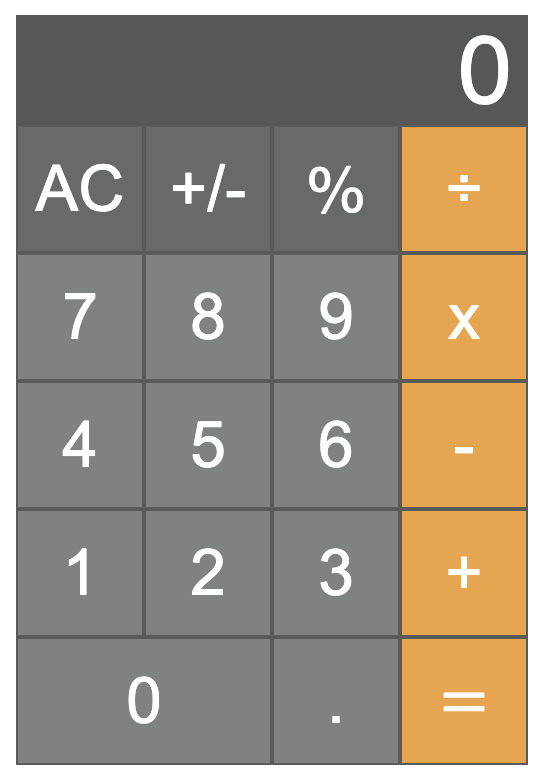
<!DOCTYPE html>
<html>
  <head>
    <title>PHP Hello World</title>
    <style>
      button {
        border: 1px solid #575B5A;
        color: white;
        cursor: pointer;
        font-size: 2rem;
        height: var(--size);
        outline: none;
        text-align: center;
        width: var(--size);
      }

      button:active {
        background-color: darkgray !important;
      }

      button[name='digit'] {
        background-color: #808282;
      }

      button[name='operator'] {
        background-color: #F0A33B;
      }

      button[name='special'] {
        background-color: #676A6A;
      }

      .double {
        width: calc(var(--size) * 2);
      }

      form {
        --size: 4rem;
        font-family: sans-serif;
      }

      .result {
        background-color: #545857;
        box-sizing: border-box;
        color: white;
        font-size: 3rem;
        padding: 0 0.5rem;
        text-align: right;
        width: calc(var(--size) * 4);
      }

      .row {
        display: flex;
        align-items: center;
      }
    </style>
  </head>
  <body>
    <?php
    $digit = $_GET['digit'];
    $lastOperator = $_GET['lastOperator'];
    $operator = $_GET['operator'];
    $special = $_GET['special'];
    $n1 = $_GET['n1'];
    $n2 = $_GET['n2'];

    $display = 0;

    $operateOnFirst = !$lastOperator || $lastOperator === '=';

    if (isset($digit)) {
      if ($operateOnFirst) {
        if ($lastOperator === '=') {
          $n1 = $digit;
          $lastOperator = '';
        } else {
          $n1 = $n1 . $digit;
        }
        $display = $n1;
      } else {
        $n2 = $n2 . $digit;
        $display = $n2;
      }
    } elseif (isset($special)) {
      if ($special === 'clear') {
        $n1 = '';
        $n2 = '';
        $lastOperator = '';
      } elseif ($special === '%') {
        if ($operateOnFirst) {
          $n1 /= 100;
          $display = $n1;
        } else {
          $n2 /= 100;
          $display = $n2;
        }
      } elseif ($special === 'sign') {
        if ($operateOnFirst) {
          $n1 = -$n1;
          $display = $n1;
        } else {
          $n2 = -$n2;
          $display = $n2;
        }
      }
    } elseif (isset($operator)) {
      if ($operator === '=') {
        if ($lastOperator === '+') {
          $display = $n1 + $n2;
        } elseif ($lastOperator === '-') {
          $display = $n1 - $n2;
        } elseif ($lastOperator === '*') {
          $display = $n1 * $n2;
        } elseif ($lastOperator === '/') {
          $display = $n1 / $n2;
        }
        $n1 = $display;
        $n2 = '';
        $display = is_int($display) ? $display : number_format($display, 4);
      } else {
        $display = $n1;
      }
      $lastOperator = $operator;
    }
    >
    <form>
      <div class="result">
        <?= $display >
      </div>
      <div class="row">
        <button name="special" value="clear">AC</button>
        <button name="special" value="sign">+/-</button>
        <button name="special" value="%">%</button>
        <button name="operator" value="/">÷</button>
      </div>
      <div class="row">
        <button name="digit" value="7">7</button>
        <button name="digit" value="8">8</button>
        <button name="digit" value="9">9</button>
        <button name="operator" value="*">x</button>
      </div>
      <div class="row">
        <button name="digit" value="4">4</button>
        <button name="digit" value="5">5</button>
        <button name="digit" value="6">6</button>
        <button name="operator" value="-">-</button>
      </div>
      <div class="row">
        <button name="digit" value="1">1</button>
        <button name="digit" value="2">2</button>
        <button name="digit" value="3">3</button>
        <button name="operator" value="+">+</button>
      </div>
      <div class="row">
        <button class="double" name="digit" value="0">0</button>
        <button name="digit" value=".">.</button>
        <button name="operator" value="=">=</button>
      </div>
      <input type="hidden" name="n1" value="<?= $n1 >">
      <input type="hidden" name="n2" value="<?= $n2 >">
      <input type="hidden" name="lastOperator" value="<?= $lastOperator >">
    <form>
  </body>
</html>
MySQL
MySQL is the most commonly used relational database in PHP applications.
To install MySQL on macOS,
install Homebrew
and enter brew install mysql.
Edit /usr/local/etc/my.cnf
and add the following at the end:
default-authentication-plugin=mysql_native_password
To start the MySQL server, enter mysql.server start.
To stop it, enter mysql.server stop.
Initially the only user is “root” and it has no password. To set a password for the “root” user:
- enter
mysql -uroot - enter
alter user 'root'@'localhost' identified by mysql_native_password 'new-password'; - enter
exit
phpMyAdmin
phpMyAdmin is a free tool implemented in PHP that provides a web UI for managing MySQL databases.
Download phpMyAdmin from here. Unzip the downloaded file and copy the directory created to your server documents directory. For example, in Apache running in macOS this directory defaults to /Library/WebServer/Documents.
Create an empty tmp directory in the phpMyAdmin directory.
Copy the file config.sample.inc.php to config.inc.php.
Edit this file and change the following line:
$cfg['Servers'][$i]['host'] = 'localhost';
to
$cfg['Servers'][$i]['host'] = '127.0.0.1';
If the Apache server is not running,
start it by entering sudo apachectl start.
If the MySQL server is not running,
start it by entering mysql.server start.
To run phpMyAdmin, browse localhost/phpMyAdmin.
Enter a username and password such as for the “root” user.
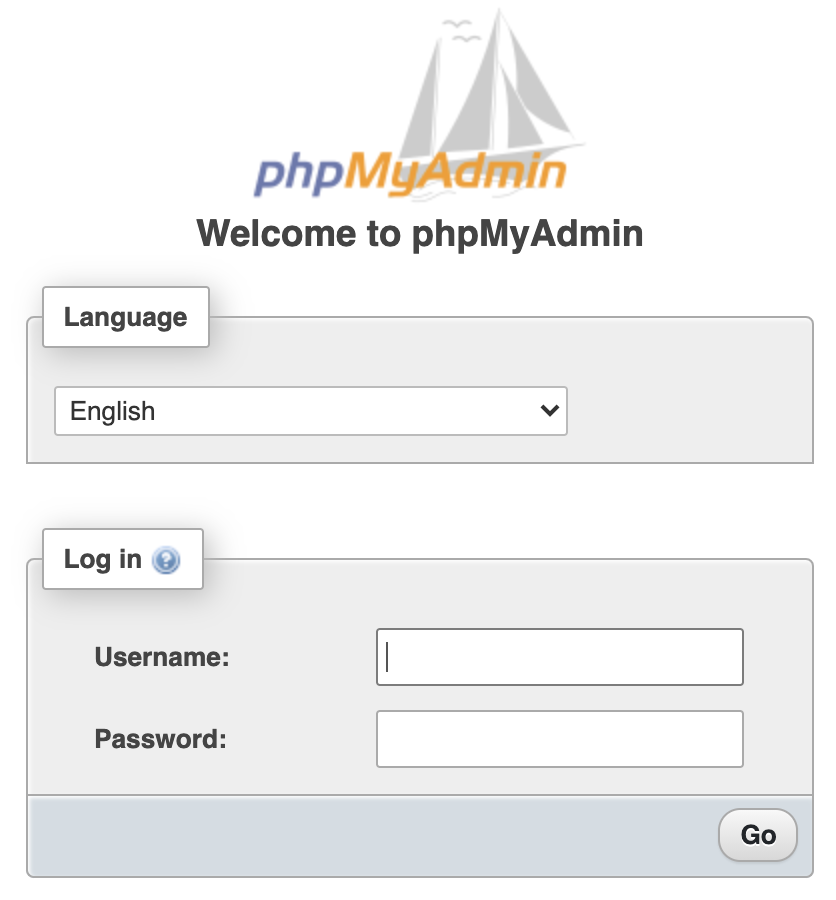
After logging in, the settings page is displayed.

Click the “Databases” tab to see a list of existing databases and create new ones.
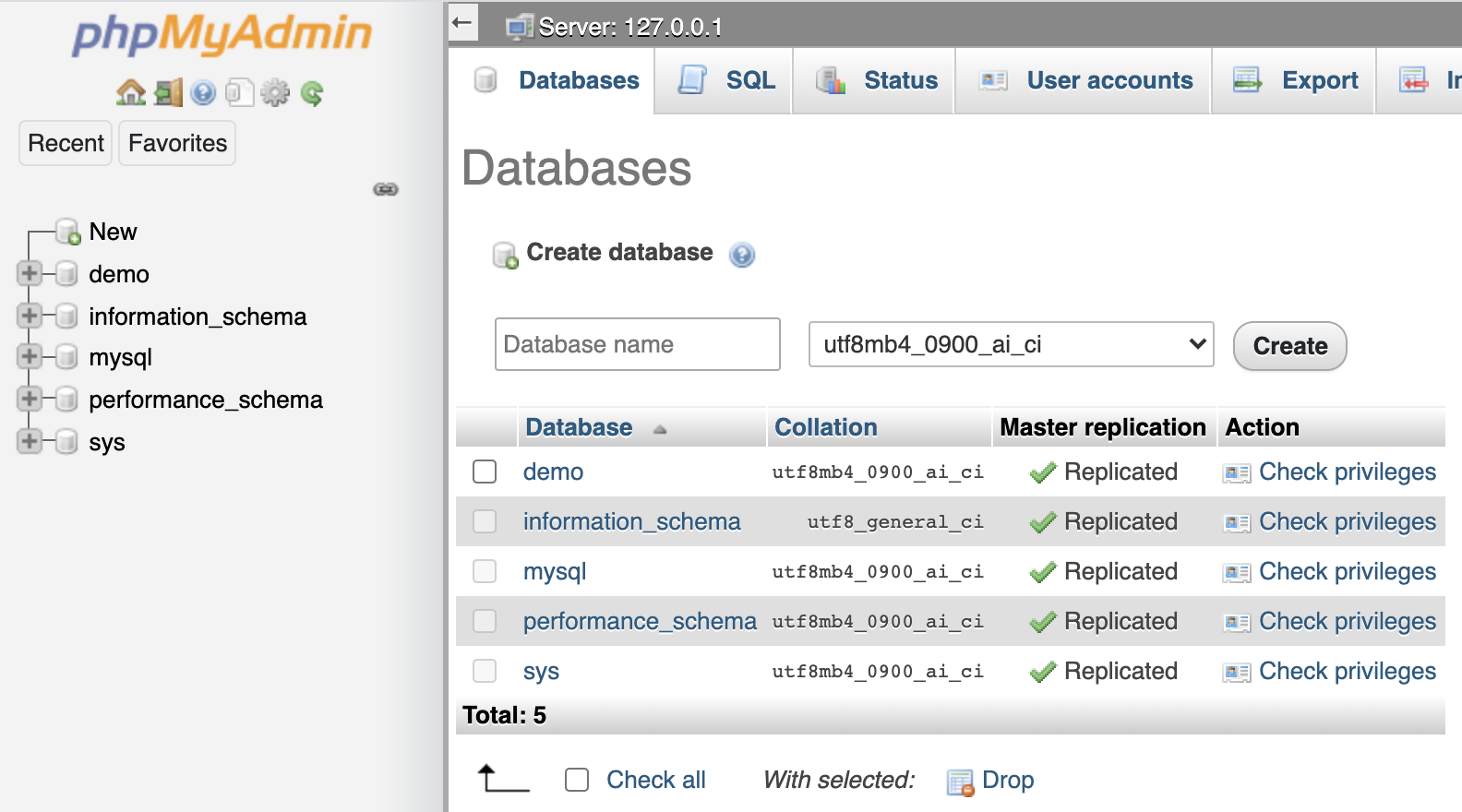
Click the link for an existing database to see its tables.
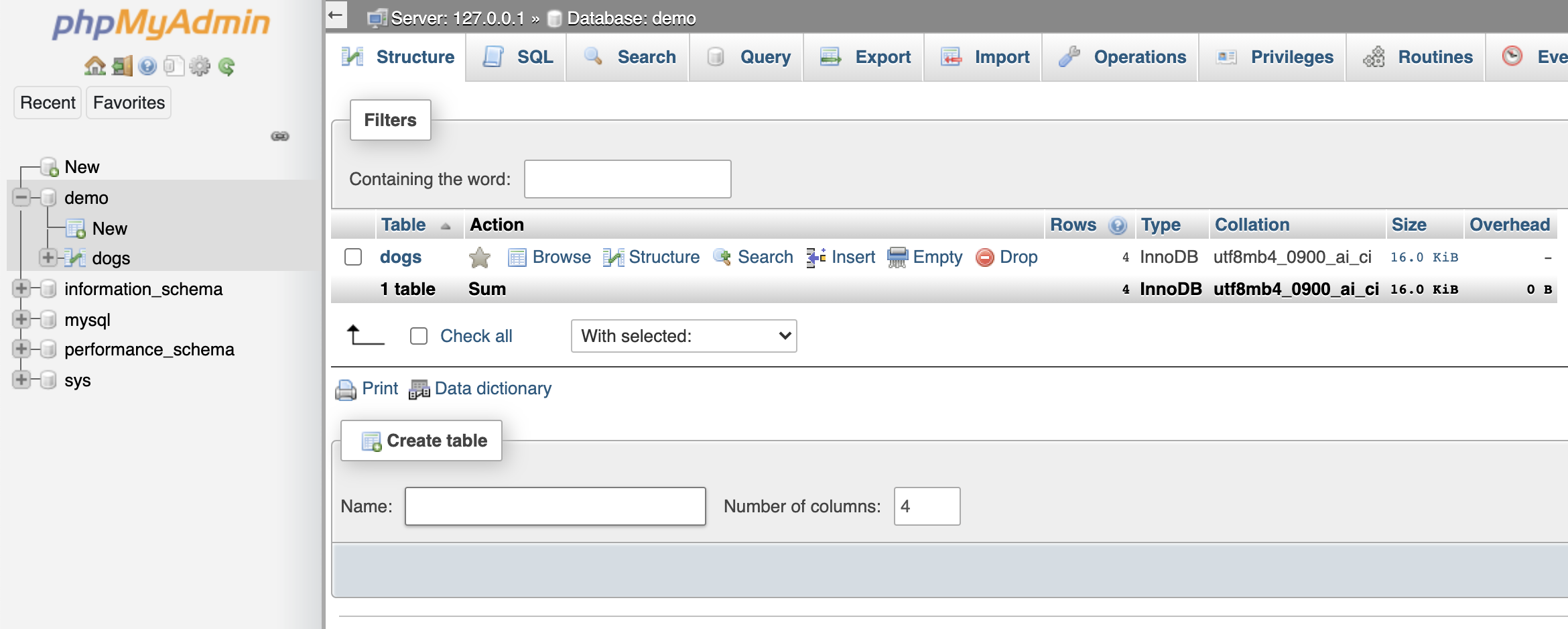
Click the link for an existing table to see its rows.

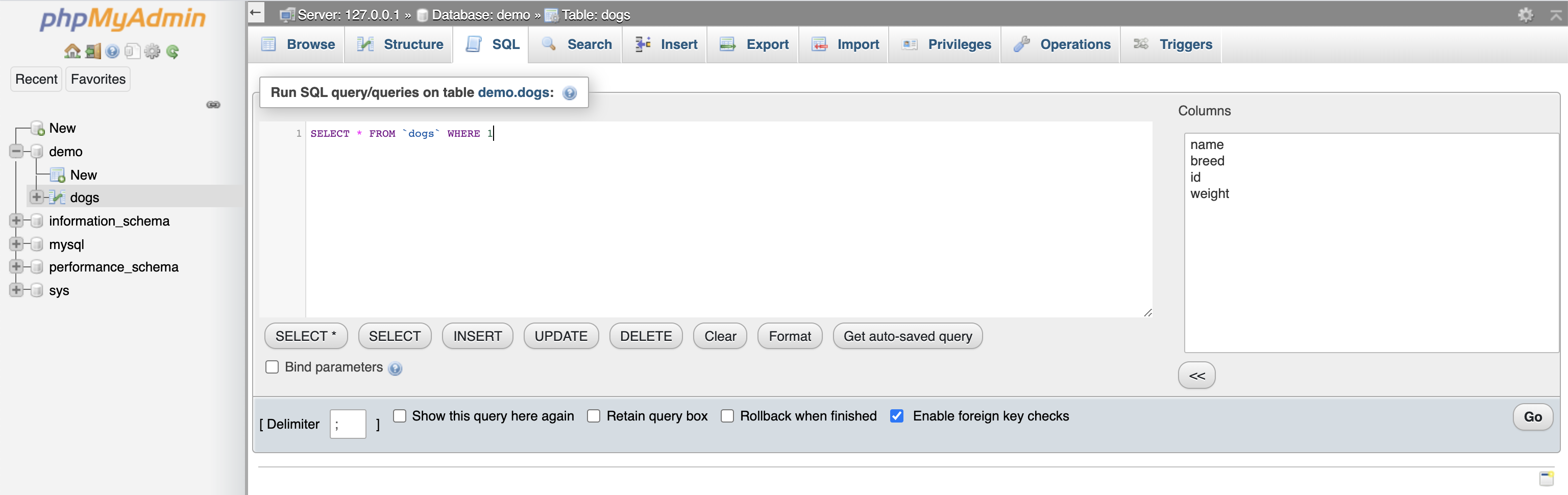
Click the “SQL” tab to enter SQL for any kind of operation including creating tables, querying, inserting, updating, and deleting. The UI also provides ways of doing all of these things without writing SQL.
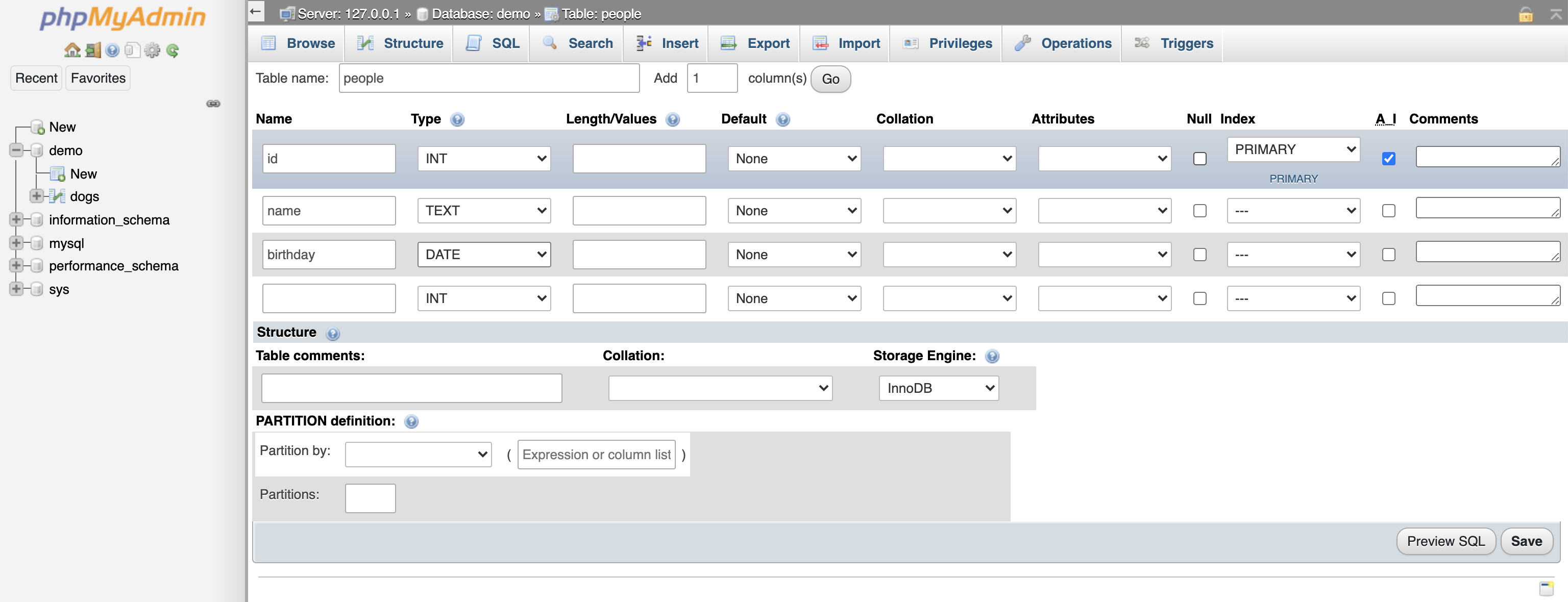
To create a new table without writing SQL, click a database in the left nav, enter a table name and number of columns under “Create table”, and press the “Go” button. Enter the column details in the UI below. Note that the “A_I” checkboxes are for auto-increment which is often used with primary keys.
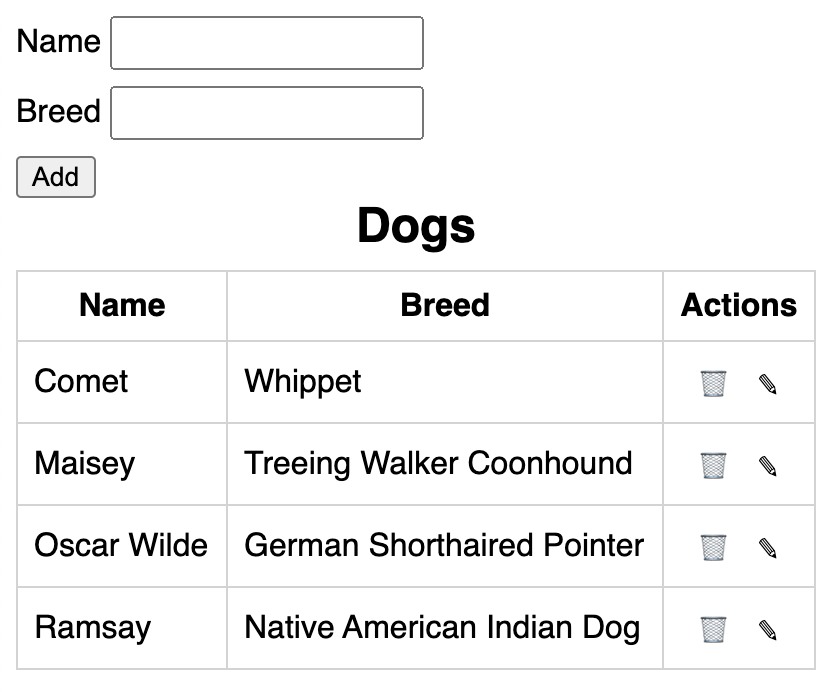
Database with CRUD
Here is an example web app that performs Create/Retrieve/Update/Delete operations on a database table.
Let’s start with the file includes/db.php
which creates a connection to the database.
<?php
$dbServername = '127.0.0.1'; // 'localhost' doesn't work
$dbUsername = 'root';
$dbPassword = 'root';
$dbName = 'demo';
$dbConn = mysqli_connect($dbServername, $dbUsername, $dbPassword, $dbName);
Next is the file includes/dog-crud.php that
inserts, updates, and deletes records in the “dogs” database table.
<?php
include_once 'db.php';

$fullAction = $_POST['action'];
$pieces = explode('-', $fullAction);
$action = $pieces[0];
$id = $pieces[1];

$name = $_POST['name'];
$breed = $_POST['breed'];

$sql = '';

switch ($action) {
  case 'delete':
    $sql = "delete from dogs where id = $id;";
    mysqli_query($dbConn, $sql);
    break;
  case 'insert':
    $sql = "insert into dogs (name, breed) values ('$name', '$breed');";
    mysqli_query($dbConn, $sql);
    break;
  case 'edit':
    // Do nothing.
    break;
  case 'update':
    $sql = "update dogs set name='$name', breed='$breed' where id = $id;";
    mysqli_query($dbConn, $sql);
    break;
  default:
    $action = "error-${action}";
}

// If any output is produced before this,
// such as by echo statements, you'll get
// "Warning: Cannot modify header information - headers already sent by".
header("Location: ../dogs.php?action=$action&id=$id");
Finally, the file dogs.php generates the HTML for the app.
<!DOCTYPE html>
<html>
  <head>
    <title>PHP Dogs</title>
    <style>
      .actions {
        text-align: center;
      }

      body {
        font-family: sans-serif;
      }

      caption {
        font-size: 1.5rem;
        font-weight: bold;
        margin-bottom: 0.5rem;
      }

      .error {
        color: red;
        margin-top: 1rem;
      }

      input {
        padding: 4px;
      }

      .row {
        margin-bottom: 0.5rem;
      }

      table {
        border-collapse: collapse;
      }

      table button {
        background-color: transparent;
        border: none;
      }

      td, th {
        border: 1px solid lightgray;
        padding: 0.5rem;
      }
    </style>
  </head>
  <body>
    <?php
    include_once 'includes/db.php';

    function startsWith($text, $prefix) {
      $len = strlen($prefix);
      return substr($text, 0, $len) === $prefix;
    }

    $action = $_GET['action'];
    $id = $_GET['id'];

    $btnAction = $action === 'edit' ? "update-$id" : 'insert';
    $btnText = $action === 'edit' ? 'Update' : 'Add';


    $sql = 'select * from dogs order by name;';
    $results = mysqli_query($dbConn, $sql);
    //$count = mysqli_num_rows($results);

    $name = '';
    $breed = '';

    // Fetch each result set row as an associative array.
    $dogs = [];
    while ($dog = mysqli_fetch_assoc($results)) {
      if ($action === 'edit' && $id === $dog['id']) {
        $name = $dog['name'];
        $breed = $dog['breed'];
      }
      array_push($dogs, $dog);
    }
    >

    <form method="POST" action="includes/dog-crud.php">
      <div class="row">
        <label for="name">Name</label>
        <input id="name" name="name" value="<?= $name >">
      </div>
      <div class="row">
        <label for="breed">Breed</label>
        <input id="breed" name="breed" value="<?= $breed >">
      </div>
      <button name="action" value="<?= $btnAction >">
        <?= $btnText >
      </button>

      <table>
        <caption>Dogs</caption>
        <thead>
          <tr>
            <th>Name</th>
            <th>Breed</th>
            <th>Actions</th>
          </tr>
        </thead>
        <tbody>
          <?php
            foreach ($dogs as $dog) {
              $id = $dog['id'];
              echo '<tr>';
              echo "<td>{$dog['name']}</td>";
              echo "<td>{$dog['breed']}</td>";
              echo '<td class="actions">';
              //TODO: How can you ask the user to confirm the delete without JS?
              echo "<button name='action' value='delete-$id'>🗑</button>";
              echo "<button name='action' value='edit-$id'>✎</button>";
              echo '</td>';
              echo '</tr>';
            }
          >
        </tbody>
      </table>
    </form>

    <?php
      if (startsWith($action, 'error')) {
        $pieces = explode('-', $action);
        echo '<div class="error">';
        echo "An invalid action \"$pieces[1]\" was submitted.";
        echo '</div>';
      }
    >
  </body>
</html>